Table of Contents >> Show >> Hide
- Quick cheat sheet: pick your “less” level
- Method 1: Unfollow them (the “peacekeeping” option)
- Method 2: Snooze them for 30 days (the “temporary timeout”)
- Method 3: Unfriend them (the “clean break” option)
- Bonus tips: make “seeing less” actually stick
- Common questions (so you don’t accidentally start a social wildfire)
- Real-world experiences: what it’s like to “see less” (without torching relationships)
- Conclusion
Facebook is a lot like a neighborhood potluck: some people bring delicious updates, some bring five hundred photos of their lunch, and one person always brings unsolicited “wellness” advice. If one specific person is taking over your Feed, you don’t need to start a digital feudor dramatically announce your departure like it’s an airport gate. You can simply see less of them.
This guide walks you through three easy, practical ways to reduce someone’s presence on Facebook, while keeping your social life intact. You’ll learn when to use each option, how to do it on mobile and desktop, and how to avoid common “oops” moments (like unfriending your boss at 2:00 a.m.).
Quick cheat sheet: pick your “less” level
- Unfollow: You stay connected, but their posts stop appearing in your Feed (until you choose to follow again).
- Snooze (30 days): A temporary breakgreat for “vacation photo season,” elections, or any time their content becomes a little too… present.
- Unfriend (or Block if needed): The “hard reset.” Use when you truly want distance, not just fewer posts.
Note: Facebook menus change names and layouts from time to time. The good news is the patterns stay consistent: look for the three dots (…), a Following/Friends button, or Feed/Content preferences in Settings.
Method 1: Unfollow them (the “peacekeeping” option)
If you want to see less without making things awkward, unfollowing is usually the best first move. It removes their posts from your Feed, but you’re still connected. You can still visit their profile, react to posts when you choose, and message normallyyour Feed just stops being their personal channel.
When unfollowing makes the most sense
- You like the person… in small doses.
- Their posts are repetitive (daily rants, endless chain posts, or “Like if you agree!”).
- You want long-term relief, not a 30-day timeout.
- You don’t want the social ripple effects of unfriending.
How to unfollow from a post in your Feed (fastest)
- Find a post from the person in your Feed.
- Click or tap the three dots (…) in the corner of the post.
- Select Unfollow (wording may appear as “Unfollow [Name]”).
How to unfollow from their profile (mobile + desktop)
- Go to their profile page.
- Look for a button like Friends or Following.
- Choose Unfollow.
What changes after you unfollow?
- You see fewer posts: Their updates stop appearing in your main Feed.
- They aren’t alerted: It’s quiet and drama-resistant.
- You still have access: You can still see their content by visiting their profile.
Example: the “everyday oversharer”
Let’s say your cousin posts 12 times a day: breakfast, commute, gym mirror selfie, lunch, vague status (“Some people are just fake…”), dinner, dessert, and then a late-night meme dump. You don’t hate them. You just want your Feed to include… literally anyone else. Unfollow gives you your Feed back without starting a family group chat incident.
Pro tip: If you later miss their updates (it happens!), you can go back to their profile and follow again. Facebook calls this “reconnect” in some settings areas, but the idea is the same: you can restore what you hid.
Method 2: Snooze them for 30 days (the “temporary timeout”)
Snooze is Facebook’s way of saying: “You don’t need to unfriend your friendjust take a breath.” When you snooze someone, you temporarily stop seeing their posts in your Feed for 30 days. It’s perfect for short-term overload: a nonstop vacation, a hyper-fixation hobby arc, or the annual “I’m running for HOA president” campaign.
When snoozing is the best choice
- You only need a break, not a permanent change.
- The person is going through a phase (and you’re going through patience).
- You want to cool down during a tense situation without cutting ties.
- You’re not sure whether unfollowing is “too much.”
How to snooze someone (mobile + desktop)
- Find a post from the person in your Feed.
- Tap/click the three dots (…) in the top corner of that post.
- Select something like I don’t want to see this or Feed preferences (wording varies).
- Choose Snooze [Name] for 30 days.
What happens during the snooze period?
- Their posts disappear from your Feed for 30 days.
- No notification is sent to the person you snoozed.
- You can end it early if you change your mind.
How to end a snooze early
There are a couple common ways to undo a snooze, depending on your device and the current menu layout:
- From their profile: Visit their profile and look for a label like Snoozed, then select End Snooze.
- From settings: Go to Settings → Feed/Content preferences (names vary), then find your Snoozed list and end it there.
Example: “vacation photo season”
Your friend goes to Hawaii and posts a sunrise every morning, a beach selfie every afternoon, and a “Grateful 💙” caption every night. You’re happy for them. Truly. But after day six, your thumb is tired. Snoozing them for 30 days lets you enjoy your own life again, while they continue living in a travel brochure.
Pro tip: Snooze is fantastic for good people + overwhelming content. If the content is harmful, harassing, or dangerous, skip “Snooze” and consider stronger safety tools like reporting or blocking.
Method 3: Unfriend them (the “clean break” option)
If you want to see less because you actually want distance, unfriending may be the right move. Unfriending removes the connection entirely. That means their posts won’t show up in your Feed because they’re no longer in your friends list.
When unfriending is the right call
- You don’t have a real relationship anymore (old acquaintance, ex-coworker, random add from 2014).
- The person consistently crosses boundaries.
- You’re cleaning up your friend list for privacy reasons.
- You’re done negotiating your peace.
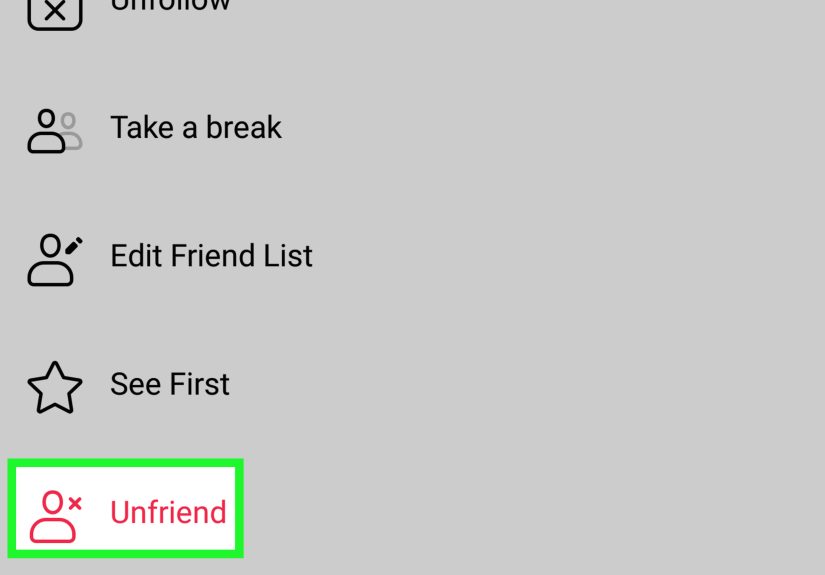
How to unfriend someone
- Go to the person’s profile.
- Click/tap the Friends button (or a similar connection button).
- Select Unfriend.
What unfriending changes (and what it doesn’t)
- They’re removed from your friends list.
- You don’t automatically block them. Depending on privacy settings, they may still see public content.
- It can be noticed. Facebook doesn’t typically “announce” it, but people can figure it out if they look.
If you need more than “unfriend”: consider blocking
Sometimes you don’t just want to see lessyou want zero contact. That’s where blocking comes in. Blocking is more serious than unfriending or unfollowing: it prevents profile viewing and interaction in many cases, and it’s designed for safety, harassment prevention, or firm boundaries.
Rule of thumb:
- Unfollow = “I want my Feed back.”
- Snooze = “I want a temporary break.”
- Unfriend = “We’re not connected anymore.”
- Block = “Do not pass go.”
Example: the “argument magnet”
Maybe there’s a person who turns every comment section into a courtroom dramacomplete with unrelated screenshots, five-paragraph replies, and a suspiciously confident tone. You’ve tried hiding posts. You’ve tried snoozing. Somehow they still find a way into your day. In cases like that, unfriending (or blocking, if needed) is less about being “mean” and more about protecting your attention.
Bonus tips: make “seeing less” actually stick
The three methods above are the main event. But if Facebook still feels cluttered, these extra tools help you fine-tune your Feed without turning your account into a ghost town.
Hide a single post (for one-off annoyances)
If you don’t want to punish the whole relationship for one annoying post, hide just that post:
- Tap/click … on the post.
- Select Hide post or I don’t want to see this.
This is great for one-time spammy content, spoilers, or the occasional chain post that reads like it was forwarded from 2009.
Use Feed/Content preferences (for broader control)
Facebook includes settings that let you manage what appears in your Feedlike reviewing who you’ve snoozed, who you’ve unfollowed, and adjusting what types of posts you want to see more or less. If you’ve done a few snoozes and unfollows over time, checking your preferences can be like cleaning out a closet: slightly annoying, but deeply satisfying afterward.
Balance the “less” with a little “more”
One underrated trick: don’t just remove noiseadd signal. If there are friends or Pages you genuinely want to see, consider adding them to Favorites (where available). It’s easier to feel good about what you removed when you’re also intentionally building a Feed you enjoy.
Common questions (so you don’t accidentally start a social wildfire)
Will the person know I unfollowed or snoozed them?
Generally, these actions are designed to be discreet. People typically aren’t notified when you unfollow or snooze them. (That’s kind of the whole point: fewer posts, fewer awkward conversations.)
Can I still message someone I unfollowed or snoozed?
Yes. Unfollow and snooze are primarily about what appears in your Feed. Messaging is separate.
What if I only want to see less of someone’s shared content?
Sometimes the person isn’t the main sourcethey’re the “friend who shares everything.” In those cases, hiding individual posts or snoozing can be more precise than unfriending. Start small, then escalate only if you need to.
What if the options don’t look exactly like this on my phone?
That’s normal. Facebook changes labels and menu flow. Look for the same core controls: … menus on posts, Friends/Following buttons on profiles, and Feed/Content preferences under Settings.
Real-world experiences: what it’s like to “see less” (without torching relationships)
Most people don’t wake up and think, “Today I will curate my Facebook Feed like a museum exhibit.” It usually starts with a slow realization: you open the app to check one thing, and suddenly you’re knee-deep in someone else’s entire personality arccomplete with 47 updates, 12 memes, and a comment section that feels like a family reunion hosted inside a blender.
A common experience is the guilt-to-relief pipeline. At first, you hesitate: “If I unfollow them, is that rude?” Then you do it and realize nothing explodes. Your phone doesn’t burst into flames. You still have friends. In many cases, the other person never noticesbecause most people aren’t auditing who sees their posts. The relief is immediate: your Feed becomes quieter, your scrolling slows down, and you stop feeling like Facebook is assigning you homework every time you log in.
Another relatable moment is using Snooze for the first time and thinking, “Where has this been all my life?” People often treat Snooze like a pressure valve. It’s especially useful during predictable “seasons” of overload: election cycles, major sports events, celebrity trials, MLM launches, or the month someone discovers a new hobby and posts about it like they’ve been appointed the global spokesperson. Snoozing can feel surprisingly kind: you’re not cutting the person off, you’re just stepping away until the intensity drops back to normal-human levels.
Then there’s the situation where you realize you’re not actually annoyed at the personyou’re annoyed at your lack of control. That’s why small actions like hiding a single post can be so satisfying. It’s a tiny boundary that says, “This is not for me,” without turning it into a referendum on the entire relationship. Some people even develop a simple personal rule: hide the post once, snooze if it keeps happening, unfollow if it becomes a pattern. That kind of ladder keeps the decision calm and practical instead of emotional.
Unfriending is different. The “experience” most people report isn’t a burst of triumphit’s more like finally cleaning out a drawer you’ve avoided for years. You unfriend the random high school acquaintance who comments “WOW” on everything, the stranger you added during a community event, or the person who keeps picking fights in your comments. Afterward, your friend list feels more intentional, and your privacy can improve because your content isn’t automatically shared with people you barely know anymore.
And yes, sometimes people worry about the social consequences. The reality is that your mental bandwidth matters. Curating your Feed isn’t pettyit’s attention hygiene. You wouldn’t invite every single person you’ve ever met into your living room 24/7, so it makes sense not to invite them into your brain 24/7 either. If you approach it as a way to reduce noisenot punish peopleyou’ll usually feel better about your choices and stick with them.
Conclusion
Seeing less of someone on Facebook doesn’t have to be a dramatic, friendship-ending event. Start with Unfollow for long-term quiet. Use Snooze when you need a temporary break. And if your boundary needs to be firm, Unfriend (or block, when safety requires it) gives you a clean reset. The goal isn’t to win social mediait’s to make your Feed feel like a place you actually want to be.