Table of Contents >> Show >> Hide
- Quick Supplies Checklist (So You’re Not Hunting for Scissors Mid-Craft)
- Before You Start: Measure the Locket Like a Calm, Responsible Person
- Method 1: The Classic Trace-and-Cut (Best for Most Lockets)
- Method 2: Digital Resize + Wallet Prints (Best for Sharp, Clean Results)
- Method 3: Home Printing + Protective Finish (Best for DIY Control)
- Pro Tips for a Locket Photo That Looks “Wow” Instead of “Welp”
- FAQ: Small Questions That Turn Into Big Annoyances
- Real-Life Experiences (About ) That Make This Whole Thing Feel Less Fiddly
- Conclusion: Pick Your Method, Then Go Slow on the Final Cut
A locket is basically a tiny, wearable time machineexcept instead of sending you back to 2007, it holds a photo of
someone (or something) you never want far from your heart. The catch: lockets are famously picky about photo size,
shape, and thickness. One millimeter too big and the locket won’t close. One millimeter too small and your photo
slides around like it’s trying to escape.
The good news? Putting a picture in a locket isn’t hard. It’s just small. Like, “why am I doing precision arts and
crafts without a tiny helmet?” small. Below are three reliable methodsranging from classic trace-and-cut to modern
digital resizingplus practical tips that keep your photo looking crisp instead of crumpled.
Quick Supplies Checklist (So You’re Not Hunting for Scissors Mid-Craft)
- Your locket (open and emptyobvious, but we’re covering all bases)
- Photo you want to use (digital file or printed copy)
- Small sharp scissors or a craft knife
- Clear tape or removable adhesive (photo-safe if possible)
- Tweezers (optional, but your fingers will appreciate the backup)
- Printer + photo paper (if printing at home) OR access to a photo lab
- The locket’s paper insert or inner frame (if it came with one)
Before You Start: Measure the Locket Like a Calm, Responsible Person
There’s no single “standard” locket photo size. Some are tiny ovals. Some are hearts. Some are circles. Some are
suspicious shapes that look like a heart had a stressful week. The fastest way to win is to measure the inside photo
area (not the outside of the pendant).
Two easy ways to get the size
- Use the insert: If your locket came with a paper template or plastic cover, that’s the “correct”
shape. Treasure it like a tiny map to hidden gold. - Measure the inner window: Use a ruler (millimeters help). Measure the width and height of the
photo space inside the locket, then note the shape (oval/heart/round/rectangle).
Pro tip: If your locket holds two photos (one on each side), measure both sides. Some lockets pretend
they’re symmetrical and then surprise you.
Method 1: The Classic Trace-and-Cut (Best for Most Lockets)
This is the traditional “locket ritual,” and it works whether your photo is printed at home or from a photo lab.
The idea is simple: use a template (insert, inner frame, or a paper tracing) and cut precisely.
Best for
- Lockets that came with a paper insert or plastic cover
- Heart and oval lockets (where freehand cutting gets… emotionally complicated)
- Anyone who wants the most accurate fit with the least tech
Step-by-step
- Print your photo on photo paper if possible. Photo paper is sturdier and looks sharper than regular
copy paper. If you only have copy paper, it can still workjust handle it gently and consider adding a protective
layer (more on that later). - Place the insert on your photo. If your locket came with a paper shape, lay it on top of your
printed photo and move it around until the face (or pet nose) is centered the way you want. - Trace the outline. Use a pencil or fine pen to trace the shape. Keep it lightnobody wants a bold
marker outline framing Grandma like a comic book panel. - Cut slightly outside the line first. This sounds backwards, but it’s smart. You can always trim
smaller. You cannot “uncut” a corner you accidentally snipped off. - Test fit, then micro-trim. Place the photo inside the locket. If it catches or buckles, remove it
and shave off tiny slivers until it sits flat and the locket closes comfortably. - Replace the plastic cover (if included). Many lockets have a thin plastic shield that goes on top
of the photo to keep it from shifting and to protect it from friction.
Common mistakes (and how to avoid them)
- Cutting exactly on the line immediately: Start slightly larger, then trim down.
- Using dull scissors: Dull blades tear paper fibers and create jagged edges that make the photo look
messy. - Forgetting the hinge side clearance: Some lockets have a lip or notch near the hinge. If your photo
catches there, notch that edge just a hair.
Method 2: Digital Resize + Wallet Prints (Best for Sharp, Clean Results)
If you want the photo to look professionally printed (crisp, glossy, and not like it came out of “printer panic
mode”), go digital. Resize your image on a phone or computer, then print it as a small print (like wallet prints) and
cut it to shape.
Best for
- Anyone who wants a sharper image than a home printer can manage
- People who want multiple copies (because “Plan B” is beautiful)
- Lockets that need a very small photo (tiny prints cut more cleanly)
Step-by-step
- Pick the right photo (composition matters more when it’s tiny).
Choose an image with a clear subject and decent lighting. Busy backgrounds turn into visual confetti when shrunk.
Zoom in so the face (or meaningful detail) fills the frame. - Crop to the locket’s shape.
If your locket is oval or heart-shaped, crop to a rectangle first with the subject centered. You’ll cut the exact
shape later.
If you’re using software that supports “crop to shape,” you can preview how it fits before printing (very helpful
for hearts and circles). - Resize with intention.
If your locket’s opening is, say, 18mm wide, you can size the print slightly larger (for trimming) and keep the face
centered.
Keep image quality high: if you can, start with a larger original photo so you’re not enlarging a tiny, blurry file. - Print as a small-size photo set.
Wallet prints are convenient because you get multiple copies on one sheet, and the paper is typically true photo
stock. That means clean edges, less curling, and better color. - Use Method 1 to cut to final shape.
Once your wallet prints arrive (or print out), use the locket insert or tracing outline to cut the final shape and
place it inside.
Fast example: turning a phone photo into a locket-ready print
Let’s say you have a heart locket. You pick a portrait where the subject is centered, crop it tighter so the face is
the focus, then print wallet-size photos. You cut out the heart using the paper insert. You now have three backup
copies because wallet sets usually give you multiplesaka the ultimate stress-reducer when you make one “oops cut.”
Method 3: Home Printing + Protective Finish (Best for DIY Control)
If you like being in control of everything (including your margins, gloss level, and the exact millimeter of your
cut), home printing is your method. The secret is to print small photos without losing qualityand then protect them
so they don’t curl, smudge, or get scuffed inside the locket.
Best for
- Last-minute gifts (because time is a concept, and you’re ignoring it)
- People who want to test different photos quickly
- Lockets where you need a custom size not offered as a standard print
Step-by-step
- Create a small-photo “print sheet.”
Place multiple copies of your photo on one page (so you can pick the best cut). If your software has “multiple
images per page” layouts, use it. If not, paste several copies into a document and size them consistently. - Use photo paper and the best quality setting.
In printer settings, choose photo paper and high quality. This reduces banding and gives better skin tones (and
better fur tones, if your locket contains a beloved dog who deserves the spotlight). - Trim carefully and test fit.
Cut the photo slightly larger than needed, then trim down in tiny steps until it fits perfectly. - Add a protective finish if your locket doesn’t include a plastic cover.
You have three easy options:- Clear tape lamination: Put a strip of clear tape over the photo (front only), then trim the edges.
- Thin self-adhesive laminate sheet: Great if you have itkeeps the photo flat and protected.
- Photo-safe adhesive + plastic cover: If your locket has a plastic insert, let that do the protecting.
- Secure the photo gently.
Most lockets hold the photo in place with the frame or plastic cover. If it needs help, use a tiny piece of
removable adhesive or a small dot of tacky puttyjust enough to stop sliding, not enough to turn your locket into a
permanent craft project.
Troubleshooting home printing (because printers love drama)
- White border won’t go away: Try borderless printing if your printer supports it, or print larger and
trim down. - Photo looks too dark: Brighten the image slightly before printing (screens are brighter than paper).
- Photo curls: Photo paper can curl if it’s thin or humid. Let prints dry fully, then press them under
a book for a few minutes.
Pro Tips for a Locket Photo That Looks “Wow” Instead of “Welp”
Choose simple, high-contrast photos
Tiny photos need clarity. A clean face shot, a pet portrait, or a strong silhouette works better than a wide group
photo where everyone becomes a friendly blur.
Keep the photo thin
Thick paper can prevent the locket from closing. If your print feels stiff, try trimming from a thinner photo print
or use one protective layer only (tape OR laminate, not both).
Use tweezers for placement
This is the easiest upgrade to your whole experience. Tweezers help you place the photo flat without fingerprinting
the surface or bending corners.
Make backups on purpose
Print or copy at least two versions. One for the locket, one for the inevitable “I cut it too small by a molecule”
moment.
FAQ: Small Questions That Turn Into Big Annoyances
Do I need special “locket photos”?
Nope. You just need a photo printed at a size that can be cut down accurately. Wallet prints and small-format prints
are often perfect because you get multiple copies on photo paper.
Can I use regular printer paper?
You can, especially for testing the size and shape. For the final version, photo paper usually looks better and holds
up longer inside the locket.
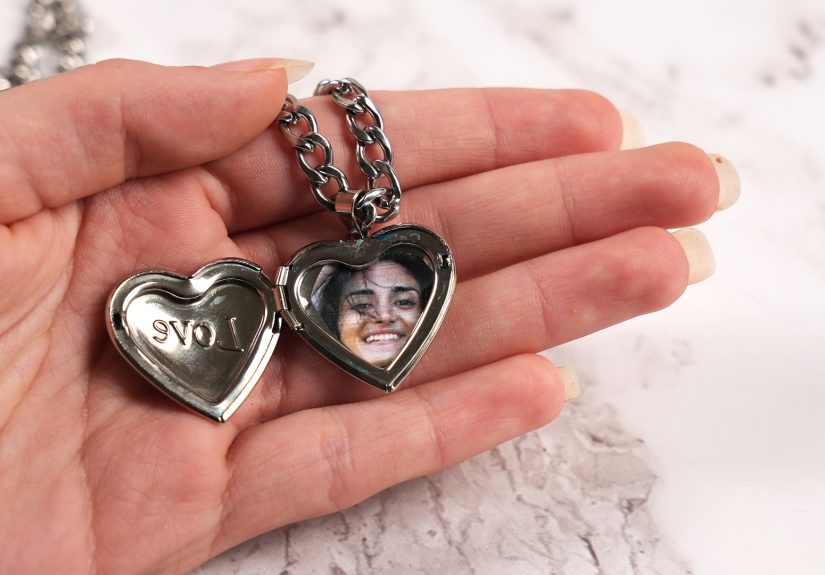
How do I handle a heart-shaped locket?
Heart lockets are the reason templates were invented. Use the insert if you have it, trace carefully, and cut slowly.
If the top “bumps” don’t match perfectly, trim in tiny steps until the heart sits flat.
Should I glue the photo in?
Usually, no. Most lockets are designed to hold the photo with an inner frame or plastic cover. If yours is loose, use
a tiny removable adhesive dot instead of permanent gluefuture-you will thank you.
Real-Life Experiences (About ) That Make This Whole Thing Feel Less Fiddly
People don’t usually buy a locket because they’re having an ordinary Tuesday. Lockets show up for birthdays, memorials,
graduations, and “I need to carry this moment with me” seasons of life. And almost every locket owner has the same
mini adventure: realizing the photo space is smaller than expected and suddenly developing the fine motor skills of a
watchmaker.
One common experience is the “first print is a practice print.” You choose the perfect photo, print it once, cut it,
and discover the head is slightly off-centerso now your loved one looks like they’re leaning out of frame to tell you
a secret. The second print is better. The third print is perfect. This is why wallet prints feel like a little gift:
they quietly assume you might need backups, because humanity is consistent like that.
Another familiar moment is the “heart-shaped locket reality check.” On-screen, cropping a photo into a heart seems
straightforward. In real life, that top curve can be dramatic. People often find that the locket’s heart shape is not
the heart shape they were picturingit’s its own heart. The win is using the paper insert as the boss of the process.
Once you trace the actual insert and cut to that, the photo finally lies flat and the locket closes without a
battle.
Then there’s the “printers are mood-based creatures” experience. You print at home, confident and optimistic, and the
photo comes out with a thin white border or slightly darker than expected. You adjust the brightness, try again, and
suddenly it looks great. The lesson most people learn: paper absorbs light differently than a phone screen, and tiny
photos exaggerate flaws. A small brightness bump and high-quality print settings can save the day.
A surprisingly sweet experience happens when people experiment with composition. A lot of folks start with a full-body
photo or a group shot, then realize that in locket-land, simple wins. A close-up smile, a pet face, or even a tiny
symbol (like a place you love) reads better at miniature size. It’s less about squeezing “everything” into the locket
and more about choosing one detail that feels like the whole story.
Finally, there’s the “I didn’t think I’d care this much” moment. You’re just trying to fit a photo. But once it’s in
placeand you snap the locket closedyou realize it’s not just a craft project. It’s a tiny private gallery you can
wear. And yes, you will probably open it a few extra times just to admire how neatly you cut the edges. That’s not
vanity. That’s craftsmanship.
Conclusion: Pick Your Method, Then Go Slow on the Final Cut
If you want the simplest, most accurate approach, use the trace-and-cut method with the locket’s insert. If you want
the sharpest prints and easy backups, resize digitally and order wallet prints. If you need full control (or you’re on
a deadline), home print a small-photo sheet and protect the photo so it stays clean and flat.
No matter which method you choose, the best locket photos share three traits: they’re centered, they’re printed clearly,
and they’re trimmed with patience. Tiny photos don’t forgive rushed scissors. But with a steady hand and a spare copy,
you’ll get a perfect fitand a locket that closes like it was made for that memory.