Table of Contents >> Show >> Hide
- What Makes a Faucet “Smart” (and Not Just Expensive)
- Quick Picks (If You Just Want the Answer)
- 1) Moen Smart Faucet (U by Moen / Arbor Smart Touchless)
- 2) Delta VoiceIQ with Touch2O (Trinsic / Essa / Leland Variants)
- 3) KOHLER Sensate with KOHLER Konnect (Luxury Smart Done Right)
- 4) Moen Arbor MotionSense Wave (The Best “Smart-ish” Faucet for Real Life)
- 5) BioBidet Flow Motion Activated (Best Value Touchless Faucet)
- 6) Pfister Stellen React Touchless (Strong Utility, Less Fuss)
- Smart Faucet Buying Guide (So You Don’t Buy the Wrong Kind of “Smart”)
- Installation Notes That Save Your Weekend
- FAQ
- Conclusion
- Real-Life Experiences (Extra of “Oh, So That’s Why People Buy These”)
A smart faucet is basically the kitchen’s way of saying, “I’ve seen what you do with raw chicken, and I’d like
to be touched less, please.” Whether you’re cooking, cleaning, bottle-filling, or conducting the nightly
“why is there glitter in my sink?” investigation, a smarter faucet can save time, water, and your last shred
of patience.
But “smart” can mean a few different things: voice control, touch activation, motion sensing, app presets,
measured dispensing, temperature indicators, andif you’re fancyusage tracking and leak-ish alerts. Below are
six smart (and smart-ish) faucets that are actually worth your money, plus a guide to picking the right one
without turning your cabinet into a tangle of hoses, batteries, and regrets.
What Makes a Faucet “Smart” (and Not Just Expensive)
In 2026, a faucet can be “smart” in three broad ways. The best ones combine at least two:
- Hands-free activation: motion sensor or “wave” sensors that turn water on/off without touching the handle.
- Touch activation: tap the spout/handle with your wrist or forearm to start/stopgreat when your hands are messy.
- Connected features: Wi-Fi + app presets (specific temperature + volume), voice commands, usage tracking, and notifications.
The trick is buying the kind of “smart” that fits your life. If your Wi-Fi is moody, you may want a faucet that’s
brilliant even when offline (touch or motion). If you meal-prep a lot, measured dispensing and presets can feel like
a tiny personal assistant who never complains about overtime.
Quick Picks (If You Just Want the Answer)
- Best overall connected faucet: Moen Smart Faucet (U by Moen / Arbor Smart)
- Best for touch control + voice: Delta VoiceIQ with Touch2O
- Best luxury smart faucet: KOHLER Sensate with KOHLER Konnect
- Best “no-Wi-Fi-needed” hands-free: Moen Arbor MotionSense Wave
- Best value touchless faucet: BioBidet Flow Motion Activated
- Best for strong everyday utility: Pfister Stellen React Touchless
1) Moen Smart Faucet (U by Moen / Arbor Smart Touchless)
If you want the full “smart faucet” experiencevoice, app presets, and hands-free motionMoen’s smart faucet line is
the name that comes up over and over. The big appeal isn’t just turning water on and off. It’s the ability to get
exactly what you asked for: a specific amount at a specific temperature, without hovering over the sink like a
anxious hummingbird.
Why it’s worth buying
- Measured dispensing: handy for rice, pasta water, pet bowls, humidifiers, and “I need exactly two cups” moments.
- App presets: set your common tasks (coffee pot, baby bottle, water pitcher) and run them quickly.
- Multiple control styles: voice/app + motion + the regular handle for when you’re in a hurry or the internet is… being itself.
- Kitchen-friendly quality-of-life features: a pull-down sprayer and strong rinse modes on many models.
Best for
Busy households, enthusiastic cooks, people who bake (precision matters), and anyone tired of “Did I leave the water running
while I hunted for the colander?” anxiety.
Watch-outs
- Power planning: smart features often want either batteries, an AC adapter, or a nearby outletcheck your model’s requirements before you buy.
- Setup time: you’ll spend a bit of time pairing the faucet, naming presets, and training your voice assistant not to misunderstand “fill my pot” as “fill my phone.”
Practical tip
Make one preset that’s purely functionallike “Hot rinse, 30 seconds”for sticky pans. It’s the adult version of a cheat code.
2) Delta VoiceIQ with Touch2O (Trinsic / Essa / Leland Variants)
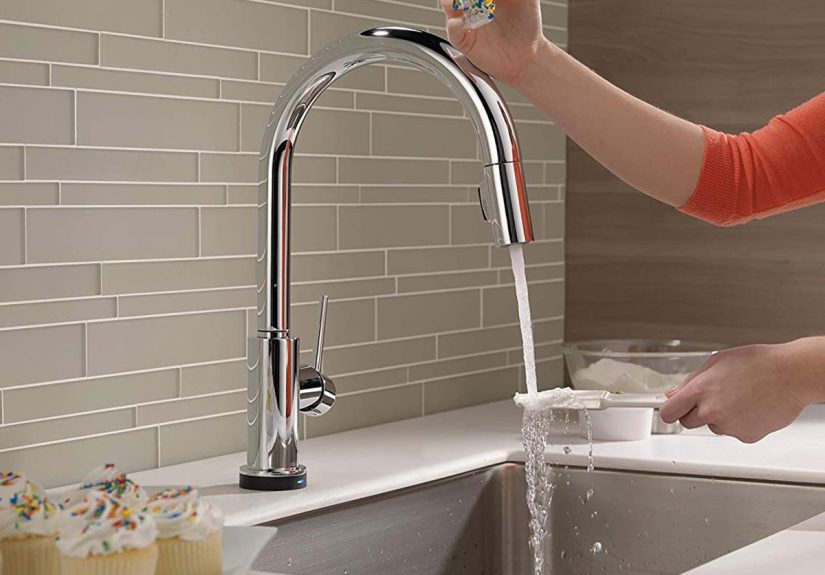
Delta’s superpower is making “smart” feel natural. Touch2O lets you tap the faucet on/off with your wrist or forearm,
while VoiceIQ adds the fun part: “Dispense one cup” or “Fill this container” without using your hands at all.
It’s a great blend of connected convenience and old-school reliability.
Why it’s worth buying
- Touch control that actually makes sense: a quick tap is faster than waving at a sensor when you’re rushing.
- Voice metering: measured amounts reduce overfilling and wasteespecially when you’re multitasking.
- Temperature awareness: many Touch2O models use a temperature indicator light so you’re less likely to surprise your hands with lava-water.
- Good “smart-to-normal” fallback: if your smart speaker is down, touch still works; if touch is messy, the handle still exists. Everyone wins.
Best for
People who want smart features but don’t want their faucet to feel like a science project. Also great for cooks who constantly
turn water on/off while rinsing, prepping, and washing.
Watch-outs
- Power needs: some VoiceIQ setups may prefer an outlet/adapter, depending on the exact model.
- Voice habits: you may need to learn Delta’s command style so it meters consistently (worth it once you do).
Practical tip
Put your most common measured command on repeat: “dispense one cup.” After a week, you’ll wonder why faucets ever made you eyeball water like a gambler.
3) KOHLER Sensate with KOHLER Konnect (Luxury Smart Done Right)
KOHLER Sensate is the “I want the premium experience” pick. It’s touchless by default and, with KOHLER Konnect,
it brings voice control, measured dispensing, and app-based monitoring into a sleek, high-end package. If you’ve ever
wished your faucet could behave like a calm, well-trained assistant, this is the vibe.
Why it’s worth buying
- Touchless Response tech: reliable hands-free on/off for messy prep and cleanup.
- Voice commands + presets: turn on/off, dispense specific amounts, and run routine fills without touching anything.
- Usage monitoring and notifications: the app can display water usage, and some configurations can notify you if something seems unusually “flow-y.”
- Polished design: it looks like a statement piece, not a gadget with plumbing attached.
Best for
Remodelers, design-focused kitchens, and anyone who wants a smart faucet that feels upscale (and stays that way).
Watch-outs
- Budget reality: it’s a splurge. You’re paying for design, fit-and-finish, and a deep feature set.
- Minimum dispense limits: measured fills typically have minimum amounts (so it may not do “exactly three tablespoons,” no matter how politely you ask).
- Power: many Sensate configurations are designed around AC power rather than frequent battery swapsplan accordingly.
Practical tip
Use measured fills for coffee makers, kettles, and pasta pots. It’s less about being fancy and more about never cleaning an overflow again.
4) Moen Arbor MotionSense Wave (The Best “Smart-ish” Faucet for Real Life)
Not everyone wants Wi-Fi in their sink. That’s fair. The Moen Arbor MotionSense Wave hits a sweet spot:
hands-free activation that works fast and feels intuitive, without requiring an app to do the basics.
It’s “smart” the way a sharp knife is smartuseful, daily, and not needy.
Why it’s worth buying
- Wave sensor activation: turn water on/off with a wave, ideal for messy hands or big pot situations.
- Power Clean on many models: a stronger spray mode can make dish duty less tragic.
- Simple learning curve: guests can use it without a tutorial (a surprisingly rare luxury).
- Solid track record: widely reviewed for build quality and day-to-day usability.
Best for
Families, rental properties, and anyone who wants hands-free convenience without adding another app to their phone.
Watch-outs
- Sensor placement quirks: if you store soap bottles or sponges in the sensor’s “line of sight,” you may trigger the faucet unintentionally.
- Batteries or adapter: many MotionSense setups run on batteries, with optional AC power depending on configuration.
Practical tip
Keep the sensor zone clear. Your faucet doesn’t need to know what your dish soap is doing at 2 a.m.
5) BioBidet Flow Motion Activated (Best Value Touchless Faucet)
BioBidet’s Flow is proof you don’t have to spend luxury money to get genuinely helpful touchless features.
It’s popular because it focuses on the stuff that matters: responsive motion activation, a useful pull-down sprayer,
and clever convenience touches that feel “premium” without acting like it.
Why it’s worth buying
- Motion activation: easy on/off without smearing marinara on the handle.
- Battery powered simplicity: typically runs on standard AA batteriesno outlet required for many installs.
- SmartLatch-style convenience (on select versions): some variants start/stop flow when you pull the sprayer down and retract it.
- Value-forward design: a strong option for upgrading a kitchen without turning it into a high-stakes renovation.
Best for
Budget-conscious upgrades, first-time homeowners, and anyone who wants touchless benefits without paying “designer faucet” prices.
Watch-outs
- Battery life: you’ll eventually be the person who keeps spare batteries “just in case.” Welcome to the club.
- No voice/app ecosystem: it’s smart in the hands-free sense, not in the connected-home sense.
Practical tip
If you hate replacing batteries, set a recurring reminder when you first install it. Future-you will be annoyingly grateful.
6) Pfister Stellen React Touchless (Strong Utility, Less Fuss)
Pfister’s React touchless approach is straightforward: keep your hands off the handle, keep water under control,
and keep the faucet easy to live with. The Stellen line adds a clean, modern profile and practical spray options.
It’s a great “workhorse” pick for a busy sink.
Why it’s worth buying
- Wave-to-activate sensor: designed for quick on/off when your hands are occupied or messy.
- Useful spray modes: stream/spray and pause-style controls help with rinsing and filling.
- Everyday-friendly specs: high-arc clearance and solid flow for typical kitchen tasks.
- Good balance of price and features: you get hands-free convenience without paying for a full connected ecosystem.
Best for
Households that want a reliable touchless kitchen faucet with a modern look, strong day-to-day performance,
and minimal setup.
Watch-outs
- Sensor sensitivity: like many touchless faucets, it can take a day or two to learn the “gesture sweet spot.”
- Power source: confirm whether your configuration is battery, AC, or boththen plan the under-sink space accordingly.
Practical tip
Use the pause function when you’re moving a pot from sink to stove. It’s a small feature that saves big cleanup.
Smart Faucet Buying Guide (So You Don’t Buy the Wrong Kind of “Smart”)
1) Pick your control style: voice, touch, or motion
Voice-activated faucets are amazing for measured dispensing and routines, but they’re only as good as your setup
(Wi-Fi, smart speaker, and your household’s ability to remember the command phrase).
Touch faucets are the quickest “messy hands” solution with almost no learning curve.
Motion sensor faucets are the best for hygiene and convenience, but placement and sensitivity matter.
2) Power: batteries vs AC adapter vs outlet
Touchless and smart faucets need power. Some run on AA batteries, some prefer an AC adapter, and some are designed for a standard outlet.
Before you fall in love with a faucet, look under your sink: do you have an outlet? Do you have room for an adapter and control box?
If not, battery-powered can be the simplest path.
3) Measured dispensing: the underrated hero feature
If you cook a lot, measured dispensing can be more useful than “turn on/off.” It reduces overflows, saves water, and keeps you from
hovering while your pot fills. It’s especially great for coffee machines, humidifiers, pet bowls, and meal-prep containers.
4) Temperature feedback and safety
Temperature indicator lights are genuinely helpfulparticularly in homes with kids. They also reduce the classic “oops, that’s molten”
surprise. If you choose a connected faucet, look for options that let you limit max temperature or customize warm/hot presets.
5) Finish, cleaning, and real-world durability
Matte black looks sharp but can show mineral spots; spot-resistant finishes can reduce fingerprints; polished chrome is forgiving and easy to match.
If you live with hard water, prioritize finishes that clean easily and consider a routine wipe-down schedule (yes, your faucet wants skincare).
6) Smart-home ecosystem and privacy
If you want voice control, confirm compatibility with your assistant (Alexa or Google Assistant are the most common).
For app-connected faucets, use strong Wi-Fi passwords and keep firmware updated. A faucet isn’t going to steal your identity,
but it can collect usage dataso treat it like any other smart home device and configure it thoughtfully.
Installation Notes That Save Your Weekend
- Measure cabinet space first: smart faucets may include a control box, battery pack, or adapter that needs room.
- Check hole count: many faucets work with one-hole sinks but include deck plates for three-hole setups. Confirm before ordering.
- Plan power early: if your faucet needs an outlet, decide whether you’re adding one (electrician) or choosing a battery model.
- Don’t kink the hose: pull-down sprayers need smooth movement; route lines carefully and avoid sharp bends.
- Calibrate the sensor zone: once installed, test normal movements around the sink and adjust placement of soap/sponges to prevent accidental activation.
FAQ
Are smart faucets actually worth it?
If you cook often, have kids, or hate touching handles with messy hands, yessmart features can improve daily life.
If you rarely use the sink beyond rinsing a mug, touchless might be overkill (but still kind of delightful).
Do touchless faucets waste water by turning on accidentally?
They canusually because of sensor placement or clutter near the sink. Most “accidental runs” are solved by keeping the sensor area clear
and learning the activation gesture. Some models also include auto-shutoff timers as a backstop.
What’s better: touchless or touch?
Touch is fast and predictable. Touchless is hygienic and great when your hands are truly messy. If you can, choose based on how your kitchen is used:
lots of cooking and food prep often favors touchless; lots of quick rinses and frequent on/off favors touch.
Will a smart faucet still work if the internet goes out?
The core faucet functions (handle, and often sensor/touch depending on the model) typically still work. Voice and app features may not.
If outages are common where you live, prioritize a model that’s excellent in “manual mode.”
Conclusion
The best smart faucets don’t exist to impress your guests (though they will). They exist to make everyday kitchen moments easier:
cleaner hands, fewer overflows, faster rinsing, and less fiddling with handles when your brain is already juggling dinner, laundry,
and the sudden realization that you’re out of paper towels again.
If you want the most features, go connected (Moen Smart, Delta VoiceIQ, KOHLER Sensate Konnect). If you want the most convenience with
the least setup, go touchless without Wi-Fi (Moen MotionSense Wave, BioBidet Flow, Pfister Stellen React). Either way, your sink becomes
a little more efficientand a lot less sticky.
Real-Life Experiences (Extra of “Oh, So That’s Why People Buy These”)
Let’s talk about what actually happens after you install a smart faucetbecause the brochure version is always “effortless elegance,”
and the real version is “why is my faucet responding to the reflection of a spoon?”
Experience #1: The raw chicken problem. You’re seasoning chicken, your hands are basically a biohazard, and the handle is
sitting there like a temptation. Touchless activation is the hero here. A quick wave, rinse, soap, rinse again, and your faucet handle remains
blissfully untouched. The first time you avoid cross-contaminating the handle, you’ll feel like you just unlocked a new adulthood level.
Experience #2: The pasta pot stare-down. Filling a big pot the old way is a strange ritual: you stand there, watching water rise,
knowing that if you look away, it will overflow the moment you blink. Measured dispensing changes that. You tell the faucet how much you want,
it does the math, and you walk away to do literally anything elselike finding the lid you swear you own.
Experience #3: Kids discover voice control. This is both magical and mildly terrifying. The first week, your child will try:
“Faucet, give me a river!” or “Faucet, make it hot!” This is why temperature limits and preset controls matter. Set guardrails early,
and consider naming your presets something boring like “Bottle Fill” instead of “Summon Water Dragon.”
Experience #4: Cleaning day chaos. When you wipe down the sink area, motion sensors can activate like they’re trying to help.
The fix is simple: learn your faucet’s pause/disable method (many have one), or turn it off at the handle for the 90 seconds you’re scrubbing.
Once you do, you’ll stop arguing with your faucet like it’s a roommate.
Experience #5: Battery reality vs battery panic. Battery-powered touchless faucets are convenientuntil the day they aren’t.
The trick is to treat batteries like a smoke detector: keep spares, and don’t ignore the early warning signs. When your faucet starts acting
sluggish, it’s not possessed; it’s just hungry.
Experience #6: Guests. Everyone becomes a scientist at your sink. Some people wave like they’re landing a plane. Others tap the spout
three times like it’s going to open a secret passage. The best faucets are intuitive enough that guests figure it out quickly, and flexible enough
that even if they don’t, the handle still saves the day.
Bottom line: the “smart” part isn’t about showing off. It’s about reducing friction in the moments you repeat every daywashing, rinsing, filling,
cleaningso your kitchen feels smoother, cleaner, and just a little more under control. And honestly, in this economy of attention, anything that
saves mental bandwidth is basically a wellness product.