Table of Contents >> Show >> Hide
- MicroWeb in Plain English: A Web Browser on an 8088 (Because Why Not?)
- The Reality Check: What a 1980s IBM PC Can (and Can’t) Do Online
- What You Need: Hardware and Software Checklist
- The Secret Sauce: DOS Networking (Packet Drivers + TCP/IP)
- Getting Online: Two Classic Paths
- Installing MicroWeb Without Turning Your Weekend Into a Troubleshooting Documentary
- The Modern Web Problem: HTTPS, Heavy Pages, and Other Obstacles Named “Progress”
- What Browsing Actually Looks Like (When It’s Working)
- Performance Tips: How to Make a 4.77 MHz PC Feel Like It’s Doing Great
- MicroWeb vs. Other DOS Browsers: A Quick Reality-Based Comparison
- Troubleshooting: The Greatest Hits
- Why This Matters (Beyond the Party Trick)
- of “What It Feels Like” to Browse with MicroWeb
- Conclusion
The modern web is a sprawling, JavaScript-powered theme park. A 1980s IBM PC is more like a sturdy bicycle with one gear and a bell. So naturally, someone asked the question no one needed answered (and everyone secretly wanted answered): Can this thing browse the World Wide Web?
With MicroWeba tiny, real-mode DOS web browser built to run on an 8088-class machinethe answer is a very enthusiastic “yes,” followed by a calmer “as long as you don’t expect it to load a site that weighs more than your entire hard drive.”
This guide walks through what MicroWeb is, how it pulls off the trick, how to actually get a vintage IBM PC (or XT-class compatible) online, and how to make the modern internet behave like it’s wearing a polite 1992 sweater.
MicroWeb in Plain English: A Web Browser on an 8088 (Because Why Not?)
MicroWeb is a DOS web browser designed for minimal hardware. In practical terms, that means it’s built to run in the harsh desert of conventional memory and slow CPUsexactly where an original IBM PC lives.
Why MicroWeb Is Different
Historically, DOS web browsing came with a catch: “Sure, it works… if you have more RAM, faster CPU, extra memory managers, and a willingness to troubleshoot until your hair becomes a config file.” MicroWeb is aimed at the opposite vibe. It’s lightweight, runs in 16-bit real mode, and focuses on letting old machines do one job well: fetch and display readable web pages.
It’s not trying to compete with Chrome. It’s trying to help a 4.77 MHz classic avoid fainting on contact with a cookie banner.
The Reality Check: What a 1980s IBM PC Can (and Can’t) Do Online
The Stuff Your PC Has in Short Supply
- CPU cycles: The 8088 is charming, but it is not fast. You will learn patience as a spiritual practice.
- Memory: Conventional memory is precious. Every TSR you load is a tiny tax on your browsing dreams.
- Modern web compatibility: HTTPS, heavy CSS, and JavaScript are basically “nope” territory.
The Stuff It Can Still Do Surprisingly Well
- Fetch plain HTTP pages and display simplified HTML.
- Read text-centric sites (news, documentation, retro-friendly pages, lightweight search tools).
- Navigate with keyboard-first efficiencylike the internet intended before autoplay video existed.
What You Need: Hardware and Software Checklist
Minimum Practical Setup
- An IBM PC/XT-class machine (8088 or compatible), or a faithful emulator.
- DOS (often FreeDOS for convenience, but MS-DOS works too).
- A video adapter compatible with common vintage standards (CGA/EGA/VGA/Hercules-class modes are typical targets).
- A network path: Ethernet via an ISA NIC, or serial via PPP through another machine/modem emulator.
- Packet driver support for the network interface.
- A DOS TCP/IP stack (MicroWeb commonly pairs with the mTCP ecosystem).
A mouse is optional. MicroWeb browsing without a mouse is absolutely doable, and honestly feels more historically accuratelike you’re commanding the web with pure keyboard authority.
The Secret Sauce: DOS Networking (Packet Drivers + TCP/IP)
DOS doesn’t come with “just connect to Wi-Fi” energy. Networking is more like assembling a sandwich where each ingredient is from a different decade. You typically need:
- A packet driver for your network card (or serial PPP interface).
- A TCP/IP stack that can talk to that packet driver.
- Client apps (like MicroWeb) that talk to the TCP/IP stack.
mTCP: The Friendly Bridge Between DOS and the Internet
For many retro setups, mTCP is the workhorse: a lightweight DOS TCP/IP stack and application suite built with vintage machines in mind. It often includes tools for DHCP, ping, FTP, telnet, and more. Even if you’re here for MicroWeb, mTCP is frequently the “foundation layer” that makes the whole thing feel less like a science experiment and more like… well, a slightly dramatic networked computer.
Getting Online: Two Classic Paths
Option A: Ethernet (The “Feels Like Cheating” Method)
The simplest setup, if your machine can accept it, is an ISA Ethernet card with a packet driver. Retro-friendly NICs (or retro-friendly emulated NICs) often mimic standards that packet drivers support well.
The trickiest part is usually matching the card’s I/O address, hardware IRQ, and the packet driver’s software interrupt. Once those line up, DOS networking becomes almost suspiciously normal.
Option B: Serial PPP (The “I Want the Full 1989 Experience” Method)
If Ethernet hardware is hard to source or you want authentic vibes, you can go the serial route: run PPP over a serial link, often using a modern machine (or dedicated device) as the gateway to your network. This is also how some enthusiasts connect machines using vintage modems or modem emulators.
It’s slower, it’s fiddlier, and it’s also wildly satisfying when it workslike you just taught a museum exhibit to speak TCP/IP.
Installing MicroWeb Without Turning Your Weekend Into a Troubleshooting Documentary
MicroWeb is often distributed in ways that acknowledge reality: most people don’t want to hand-craft a DOS networking stack from scratch while whispering motivational quotes to CONFIG.SYS.
Step 1: Boot to DOS and Load Your Packet Driver
Your packet driver usually loads from AUTOEXEC.BAT or manually from the command line. When it loads correctly, it typically reports its settings and the software interrupt it will use for communications. If it complains loudly, it’s usually about IRQ/I/O conflicts or unsupported hardware.
Step 2: Configure TCP/IP (Often via mTCP)
A common workflow is: run DHCP to grab an IP address, then launch your client app. If you’re going static, you’ll set IP, gateway, and DNS manually. Either way, once DOS has an IP, you’re in business.
Step 3: Run MicroWeb
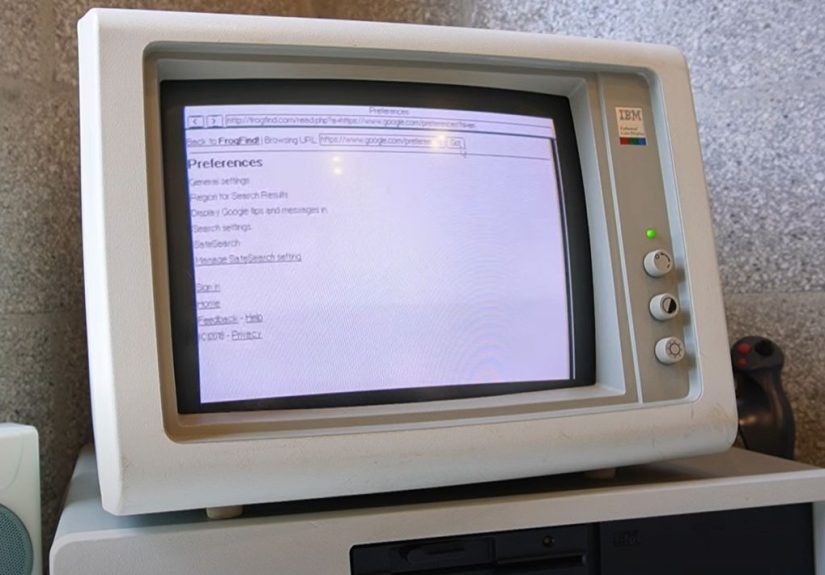
When MicroWeb starts successfully, it can fetch pages over HTTP and render simplified HTML. Expect speed to vary wildly: the same page can feel “snappy” one moment and “is it thinking or has it achieved enlightenment?” the next, depending on page size and complexity.
The Modern Web Problem: HTTPS, Heavy Pages, and Other Obstacles Named “Progress”
MicroWeb’s biggest enemy isn’t CPU speed. It’s that the modern web assumes a lot: TLS everywhere, megabytes of scripts, layout engines, tracking systems, and pop-ups that demand your email address before you’ve even decided if you like the font.
MicroWeb, by design, keeps things minimal. That means you’ll typically browse: HTTP pages, retro-friendly pages, and proxy-transformed pages.
FrogFind and Similar “Make the Web Small Again” Tools
Services like FrogFind exist specifically to help older browsers. They fetch modern pages server-side and return simplified, low-friction HTML that older systems can digest. Think of it as sending your IBM PC to the web through a translator who removes the “extra” (scripts, heavy styling, and other modern chaos) and hands back the readable part.
For the retro browsing workflow, FrogFind can be the difference between “the web is impossible” and “I’m reading the news on a machine older than my favorite video game console.”
Proxies: Your Browser’s Time Machine
Another power move is running a proxy on a modern machine in your network that: handles HTTPS, optionally transcodes content, and serves it back as plain HTTP in lightweight form. Tools in this category include dedicated retro proxies and general “old browser” proxy projects.
MicroWeb can be configured to use a proxy by setting an environment variable (commonly HTTP_PROXY) before launching it. This is a huge deal: it lets a vintage browser offload the hard parts (modern TLS and heavy transformations) to a machine that isn’t operating under 640 KB constraints.
What Browsing Actually Looks Like (When It’s Working)
MicroWeb browsing on an 8088 is less “scroll an infinite feed” and more “select a destination, travel deliberately, and enjoy the text.” The experiences that tend to feel best are:
- Retro-optimized news pages and text-first blogs
- Documentation (especially when proxied or simplified)
- Search + click workflows via services that output basic HTML
- Small communities and hobby pages that still keep things lightweight
You’re not going to stream video. You’re not going to run web apps. You are going to do something arguably rarer in 2026: read the internet without being chased by an algorithm.
Performance Tips: How to Make a 4.77 MHz PC Feel Like It’s Doing Great
1) Use a Proxy or Retro-Friendly Gateway
This is the single biggest quality-of-life improvement. Let something modern handle HTTPS and page simplification. Your PC gets the “clean” version. Everyone wins.
2) Prefer Small Pages and Simple Sites
Pages with long scripts and complex layouts don’t just load slowlythey may not load meaningfully at all. Choose pages that are text-forward, or use a search gateway that gives you simplified results.
3) Keep Your DOS Setup Lean
Every driver and TSR competes for conventional memory. If you’re tight on RAM, prioritize the essentials: packet driver, mouse (optional), and whatever your TCP/IP setup needs. The less clutter, the more room MicroWeb has to breathe.
MicroWeb vs. Other DOS Browsers: A Quick Reality-Based Comparison
If you explore DOS browsing, you’ll bump into other classics. The big difference is target hardware and design philosophy.
Arachne (Graphical, Heavier, Historically Popular)
Arachne is a well-known DOS browser with broader features and a more graphical approach, but it typically expects more memory headroom than an original IBM PC naturally provides. It’s a great option for later DOS machines with additional memory support.
Line Mode Browsers (Text-First, No-Nonsense)
Line-mode browsing has deep roots in early web history. It’s extremely efficient, often extremely compatible, and extremely allergic to modern design trends. If your goal is “get text from the web,” the line-mode worldview is still relevant.
MicroWeb sits in a sweet spot: modern enough to feel like “web browsing,” small enough to run where other browsers tap out, and flexible enough to work with proxies and retro web services.
Troubleshooting: The Greatest Hits
Problem: “It Loads the Browser, But Nothing Connects”
- Confirm the packet driver loaded and matches your NIC settings (I/O address, IRQ).
- Confirm your IP configuration (DHCP succeeded, or static settings are correct).
- Check DNS: many failures are “can’t resolve host,” not “can’t reach network.”
Problem: “Most Sites Redirect to HTTPS and Then It’s Over”
- Use a retro gateway like FrogFind for the simplified HTTP-friendly version.
- Set up a proxy on a modern machine and point MicroWeb at it using HTTP proxy settings.
Problem: “It’s Slow Enough to Measure With a Calendar”
- Use smaller pages and simplified sources.
- Consider EMS (if your setup supports it) for buffering larger content on some configurations.
- Be kind to your CPU. It’s doing its best.
Why This Matters (Beyond the Party Trick)
Browsing the web on a 1980s IBM PC isn’t just nostalgia. It’s a reminder that the web can be: lighter, more accessible, and less wasteful. MicroWeb and the ecosystem around it (TCP/IP stacks, proxies, simplifiers) demonstrate something surprisingly modern: you can improve user experience by removing complexity instead of adding it.
It’s also preservation in action. A vintage machine that can talk to the present feels less like a dead artifact and more like a living system one that still has a job to do.
of “What It Feels Like” to Browse with MicroWeb
Imagine you’ve got a beige box on your desk with a keyboard that clacks like it’s filing paperwork. You boot into DOS and everything feels immediate: no splash screens, no animations, just a blinking prompt that’s basically saying, “Tell me what you want.”
First you load the packet driver. It responds with a tiny status message that feels oddly reassuringlike a handshake across four decades. Then you run DHCP, and for a moment you’re watching a 1980s machine negotiate with a 2020s network like it’s the most normal thing in the world. When the IP address appears, you get that tiny thrill that only retrocomputing can deliver: the thrill of making incompatible eras cooperate.
You launch MicroWeb. The screen stays mostly text. No glossy UI. No “Welcome!” tour. Just purpose. You type a URL and press Enter, and the machine begins the slow, determined work of pulling something from the internet. It’s not a “scroll and forget” experience. It’s intentional. You wait, you watch, and you actually care what loads because every request has a cost.
The first time a page appearsreal content, real wordsyou feel like you cheated physics. You’re reading modern information on a system designed when “online” meant your phone was attached to the wall. The page is simple, stripped down, and honestly… pleasant. Without the clutter, the text is the point. Links stand out. Navigation feels clean. It’s not flashy, but it’s readable in a way the modern web sometimes forgets to be.
Then you hit a modern site and it immediately tries to redirect you to HTTPS like it’s escorting you to a velvet-rope VIP room you can’t enter. Instead of frustration, you pivot: you use a retro-friendly gateway or a proxy and suddenly the same content becomes accessible againlike you found a side door labeled “For Computers That Still Respect Simplicity.”
The experience also changes how you browse. You stop opening ten tabs. You stop half-reading. You choose destinations. You search with purpose, click carefully, and read more completely. And somewhere between the slow downloads and the clean text, you realize the whole thing is strangely relaxing. It’s the internet, but with the volume turned down.
When you’re done, you exit back to the DOS promptno lingering background tasks, no “are you sure?” pop-ups, no notifications begging for attention. Just silence, a blinking cursor, and the satisfying knowledge that you just took a machine from the early PC era and let it peek into the present day.
Conclusion
Browsing the WWW on a 1980s IBM PC using MicroWeb is equal parts technical puzzle and joyful time travel. With the right DOS networking setup, a compatible packet driver, and a little help from proxies or retro-friendly services, MicroWeb makes the modern web readable againat least the parts worth reading.
And maybe that’s the best lesson here: the web doesn’t have to be heavy to be useful. Sometimes, the most futuristic thing you can do is make it small.