Table of Contents >> Show >> Hide
- What “immersive” actually means in a learning context
- Start where good teaching starts: outcomes, not angles
- Design for attention: guided moments + exploration lanes
- Turn passive viewing into active learning
- Production basics that quietly make (or break) immersion
- Accessibility: make “immersive” inclusive, not exclusive
- Integrate the tour into your course so it doesn’t float away
- Use real-world tour models for inspiration (and legitimacy)
- Data, feedback, and iteration: the “version 2.0” mindset
- Ethics, privacy, and comfort: keep immersion from becoming “icky”
- A quick build checklist you can steal (please do)
- Conclusion: the tour is the “place,” but the design is the lesson
- Field Notes: of “What This Looks Like in the Wild”
A virtual tour can be a “walk-and-talk” slideshow… or it can feel like you handed students a backstage pass and a mission.
The difference isn’t the camera. It’s the design.
In higher education, virtual tours work best when they stop trying to replace an in-person visit and start trying to
teach: guiding attention, prompting observation, and turning “look around” into “figure this out.”
Do that, and students won’t just click through a panoramic hallwaythey’ll interact, analyze, argue (politely), and remember.
What “immersive” actually means in a learning context
“Immersive” doesn’t have to mean headsets and sci-fi vibes. In teaching, immersion is the feeling that students are
present enough to notice details and involved enough to make decisions.
An engaging virtual tour experience usually includes:
- Purpose: clear learning outcomes and a reason for every stop
- Agency: students can explore, choose, and test ideas
- Guidance: prompts that focus attention so learners don’t get lost in “ooh shiny” mode
- Interaction: hotspots, questions, short tasks, or collaborative challenges
- Reflection: a debrief that turns “I saw it” into “I understand it”
Start where good teaching starts: outcomes, not angles
Before you pick a platform, write 3–5 outcomes in plain English. Not “students will view the site,” but:
“students will identify three safety hazards,” “compare two systems,” or “justify a recommendation using evidence from the tour.”
Then storyboard the experience like a mini-lesson:
pre-brief (what to look for), tour (where to look), and debrief (what it means).
This is also where you decide whether students need a guided pathway, free exploration, or both.
Pick the right tour format for your learners
Virtual tours come in a few common formats. Each has strengths (and a couple of traps):
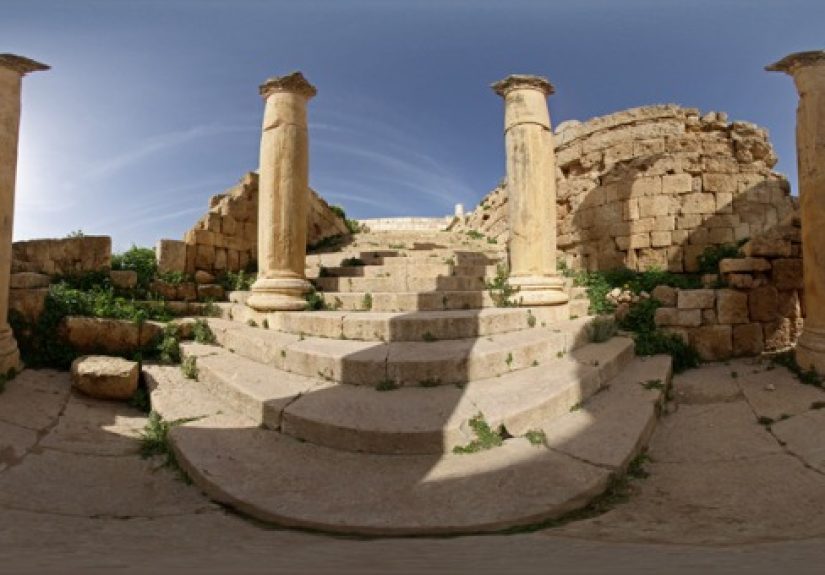
- 360° photospheres (still images): easiest to produce, beginner-friendly, great for “notice and label” tasks.
- 360° video: adds motion and context, but can increase cognitive load if students don’t know where to focus.
- Interactive panoramas with hotspots: best for inquiryclick for data, zoom for clues, open prompts on demand.
- 3D walkthroughs (e.g., spatial capture): useful when distance and scale matter (labs, exhibits, facilities).
- Headset-based VR: powerful for presence, but adds logistics and accessibility considerations.
A practical rule: if this is your first build, start with 360° still images and layered interactivity.
You’ll get 80% of the learning impact with 20% of the production stress.
Design for attention: guided moments + exploration lanes
The number-one problem with tours is that students wander like they’re in a virtual mall:
“I saw a door! Then a sign! Then… I forgot what class this was.”
Your job is to gently steer attention without turning the experience into a boring, linear video.
Use “guided stops” to sync the class
Guided steps ensure everyone notices key features in a similar sequenceespecially for safety training, lab orientation,
or any tour tied to assessment. A guided approach can show one focal point at a time, with a short prompt, then move on.
Think of it as a docent who doesn’t shush students, but does say, “Heylook up.”
Then add “exploration lanes” for curiosity
After guided stops, give students structured freedom:
- Choose-your-path: “Pick two of the three stations and compare them.”
- Optional deep dives: hotspots labeled “Want more?” for extra diagrams, short clips, or readings.
- Challenge mode: hidden “evidence” hotspots students must find to support a claim.
Turn passive viewing into active learning
Engagement is not a vibe. It’s a behavior. Build activities that require students to do something with what they see:
High-impact activity patterns
- Observe → label → justify: “Label two components and explain what problem each solves.”
- Spot-the-risk: “Find three hazards and propose mitigations.” (Works beautifully in facilities, labs, clinics.)
- Compare-and-contrast: “Compare two rooms/processes and argue which is more efficient and why.”
- Scavenger hunt with purpose: prompts that force reading signs, interpreting instruments, or connecting clues.
- Role-based exploration: assign roles (auditor, designer, historian, patient advocate) and have teams report out.
Example: a facilities/engineering tour that teaches, not just shows
Imagine a mechanical room tour. Instead of “Here is the chiller,” students get:
(1) a guided stop that highlights key equipment,
(2) hotspots that reveal basic specs or labels,
(3) a short scenario: “The campus needs to reduce peak loadwhat change would you recommend?”
Now students aren’t sightseeingthey’re practicing professional thinking.
Production basics that quietly make (or break) immersion
You don’t need a Hollywood budget, but you do need consistency. Here are the basics that reliably improve tour quality:
- Stabilize the camera: tripod/stand at approximate eye level so the view feels natural.
- Control lighting: avoid extreme contrast; overexposed windows kill detail.
- Keep scenes short and purposeful: too many scenes becomes a “Where am I?” simulator.
- Use clean audio: if you narrate, record in a quiet space; poor audio breaks presence fast.
- Write micro-scripts: 2–3 sentences per stop beats a 3-minute ramble (even if it’s a charming ramble).
Also plan for tool churn. Platforms change, features get deprecated, and what worked last year may vanish.
Keep your source media organized so you can migrate without rebuilding from scratch.
Accessibility: make “immersive” inclusive, not exclusive
Accessibility isn’t an add-on; it’s part of engagement. If a learner can’t navigate, perceive, or control the experience,
they’re not “less engaged”they’re locked out.
Key accessibility moves for virtual tours
- Keyboard navigation: hotspots and controls must be reachable without a mouse.
- Captions and transcripts: for prerecorded and live audio/video when used.
- Audio description (when needed): especially if critical information is only visual.
- Don’t force motion-based controls: offer a non-VR / non-motion alternative on mobile.
- Readable labels: clear hotspot names like “Boiler pressure gauge (close-up)” beat “Click here.”
Practical tip: test your tour once with only a keyboard and once with sound off. You’ll discover problems instantlyand
you’ll also discover which of your “obvious” directions were, in fact, a lie.
Integrate the tour into your course so it doesn’t float away
Tours are most effective when they’re embedded into a learning sequence, not posted as a lonely link with the caption,
“Enjoy!” (Students will enjoy it… for 38 seconds.)
A simple structure that works across disciplines
- Pre-brief (5–10 minutes): set outcomes, key vocabulary, and a checklist of what to find.
- Tour (15–30 minutes): guided stops + exploration lane, with a worksheet or form to capture evidence.
- Debrief (15–25 minutes): discussion, comparison of findings, and a short reflection or applied problem.
Assessment ideas that feel fair (and are harder to bluff)
- Evidence-based reflection: students must cite 2–3 specific tour observations to support a claim.
- Short quiz with screenshots: “Identify the component shown and explain its function.”
- Group brief: teams submit recommendations or a safety audit report.
- Discussion prompts: “What did you notice that surprised you?” + “What would you change and why?”
Use real-world tour models for inspiration (and legitimacy)
You don’t have to invent the idea of a “good virtual visit.” Museums and parks have already done a lot of the hard thinking.
For example:
- Map-based tours can pair exploration with context, helping learners understand place, sequence, and scale.
- Curated collections of virtual experiences show how to frame a tour with story, not just scenes.
- Guided 360 content models how narration can focus attention without overwhelming viewers.
Borrow the pattern, not the exact content: establish a route, label stops clearly, and make every stop answer a question.
Data, feedback, and iteration: the “version 2.0” mindset
Your first release is a prototype. Treat it like one.
Collect lightweight feedback: “Where did you get confused?” “Which hotspot was most useful?” “What felt slow?”
Then adjust:
- Cut or merge scenes that don’t earn their keep.
- Rewrite prompts that students misinterpret.
- Add 1–2 “orientation” signs (a map, compass, or “You are here” moment) if navigation is messy.
- Improve accessibility labels and controls as you discover friction points.
Ethics, privacy, and comfort: keep immersion from becoming “icky”
Virtual tours can capture people, data, and spaces. Set boundaries early:
- Privacy: get permissions; avoid recording identifiable students/clients/patients where inappropriate.
- Safety: don’t encourage risky imitationframe hazardous locations as observation-only.
- Comfort: offer non-VR viewing options and avoid forced motion controls that can trigger discomfort.
- Transparency: tell students what tech is required and provide alternatives.
A quick build checklist you can steal (please do)
Plan
- Write 3–5 learning outcomes.
- Storyboard 6–12 stops with 1 prompt each.
- Decide: guided path, exploration lane, or hybrid.
Capture
- Use stable, eye-level shots; keep lighting consistent.
- Record short narration (optional) and keep it tight.
- Take fewer, higher-quality scenes instead of dozens of mediocre ones.
Build
- Add hotspots with meaningful labels and short, actionable prompts.
- Include an orientation moment (map, “start here,” or a short “how to navigate” cue).
- Embed checks for understanding every few stops.
Make accessible
- Keyboard access for navigation and hotspots.
- Captions/transcripts for video/audio; audio description when needed.
- Offer a non-motion alternative for mobile/VR modes.
Teach with it
- Pre-brief → tour tasks → debrief discussion.
- Assess with evidence-based responses, not “did you click it?”
- Iterate after student feedback.
Conclusion: the tour is the “place,” but the design is the lesson
If you want an immersive and engaging virtual tour experience, don’t aim for “realistic.” Aim for meaningful.
A well-designed tour increases student involvement, guides attention, and turns observation into analysiswithout requiring
a headset, a studio, or a production crew the size of a superhero movie.
Build it like you build any strong learning experience: clear outcomes, thoughtful structure, inclusive access, and activities
that make students think. When those pieces are in place, the tech stops being the star of the show and becomes what it should
be: a bridge to real learning.
Field Notes: of “What This Looks Like in the Wild”
Here’s the part no one tells you until after you’ve launched your first virtual tour: students will treat it like a game,
a museum, and a speedrunsometimes all in the same five minutes.
One student will slowly inspect every label like a detective in a prestige TV drama.
Another will whip the viewpoint around like they’re trying to set a world record for “fastest tour completion,” then ask,
with full sincerity, “Wait… what were we supposed to learn?”
The fix usually isn’t more content. It’s better pacing and clearer tasks. Instructors often get the best results by adding
tiny “speed bumps” that force thinking without killing momentum: a required checkpoint question after Stop 2, a compare-and-contrast
prompt at Stop 5, and a quick “submit one screenshot as evidence” requirement at the end. Those small moves reliably convert
wandering eyes into accountable observation.
Another common surprise: what feels “obvious” in a room is not obvious in a sphere. In a physical space, you can point and say,
“Over there.” In a virtual space, “over there” is basically a philosophical concept. The best tours compensate by labeling hotspots
like you’re helping someone in a hurry: “Emergency shutoff (red lever),” “Pressure gauge (close-up),” “Exit signage (upper right).”
You’ll feel slightly silly writing those labelsright up until you see students successfully find the exact thing you meant.
Group work changes too. If you tell a class, “Explore and discuss,” you’ll get five separate conversations and one person who
somehow ended up staring at the ceiling for the entire session. A stronger pattern is role-based touring:
assign each group member a lens (safety inspector, process analyst, accessibility advocate, historian, designer) and ask each to
collect two pieces of evidence. When they reconvene, they teach each other. Students like the clarity, and you get richer discussion
because the group is comparing different types of observations instead of repeating the same ones.
Accessibility also becomes very real, very fast. The moment a student can’t open a hotspot with a keyboard, or a narrated clip
lacks captions, the tour stops being “immersive” and starts being “a locked door.” The instructors who build accessibility checks
into their workflowkeyboard testing, captions/transcripts, alternative viewing modestend to see a second benefit:
everyone navigates more smoothly, including students on phones, older laptops, or spotty Wi-Fi.
Finally, expect iteration. Your first version is rarely “done.” It’s “teachable.”
After the first run, you’ll learn which stop is confusing, which prompt is too vague, and where students want one more clue.
That’s not failure; that’s design feedback you didn’t have access to until real humans started clicking.
Treat the tour like a living lab, and it will keep getting betterwithout you needing to become a full-time virtual-tour filmmaker
(a career path that sounds glamorous until you’re labeling hotspot number 47 at midnight).