Table of Contents >> Show >> Hide
- The 30-Second Verdict
- Side-by-Side Specs (Quick Comparison)
- Design and Setup
- Voice Assistant Smarts: Alexa vs Google Assistant
- Smart Home Compatibility: The Ecosystem Question
- Audio Quality: “It’s a Mini Speaker” (But There Are Levels)
- Privacy: Mic Buttons, Voice Histories, and Real-World Controls
- Extra Features That Actually Affect Daily Life
- Buying Advice: Who Should Choose Which?
- Futureproofing: What Changes in 2025–2026 Could Matter?
- Conclusion: The “Right” Choice Is the One You’ll Actually Use
- Real-World Experiences (What Everyday Use Feels Like)
If you’ve ever wanted a tiny, puck-sized roommate who never sleeps, answers trivia on demand, and occasionally
mishears “play jazz” as “buy glass,” welcome to the smart speaker club. Two of the most famous mini speakers
to ever colonize nightstands are the Google Home Mini and the Amazon Echo Dot.
They’re both small, both affordable (or at least they were when new), and both can turn your home into a place
where you shout commands into the air like a futuristic wizard.
But they’re not the same. Under the cute fabric (or plastic) exteriors are two different “brains”:
Google Assistant on the Home Mini and Alexa on the Echo Dot. The real question isn’t
“Which one is better?” It’s “Which one fits your life, your apps, your smart home gadgets, and your tolerance
for a device that sometimes answers confidently… and incorrectly?”
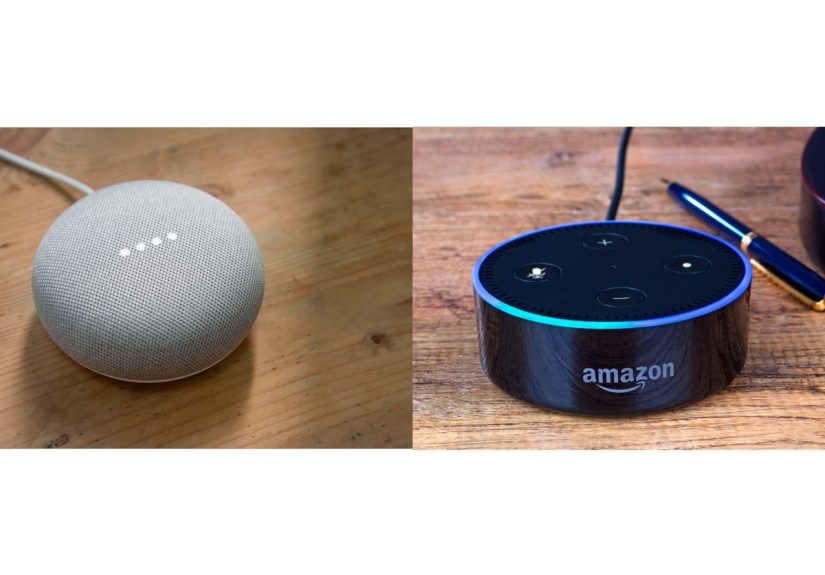
In this side-by-side comparison, we’ll focus on the Google Home Mini (1st gen) versus the
Echo Dot (commonly the 5th gen as the current mainstream Dot), while also calling out what’s changed in
the smart speaker worldbecause these devices don’t live in a museum, they live on your Wi-Fi.
The 30-Second Verdict
-
Pick Google Home Mini if you’re deep in Google’s ecosystem (Gmail/Calendar, Android, Google Home app),
prefer Google’s knowledge answers and natural-language handling, and you’re okay buying older/discontinued hardware. -
Pick Echo Dot if you want the most current “mini speaker” experience, strong smart-home routines,
Alexa’s huge skills ecosystem, and handy extras like a temperature sensor and motion-based routines.
Side-by-Side Specs (Quick Comparison)
Specs aren’t everything, but they’re a good way to spot what each device was built to do. Here’s a practical,
real-world comparison.
| Feature | Google Home Mini (1st gen) | Amazon Echo Dot (5th gen) |
|---|---|---|
| Voice assistant | Google Assistant | Alexa |
| Speaker driver | 40 mm driver (360-degree sound) | 1.73″ driver |
| Microphones | 2 far-field microphones | Multiple-mic array (varies by model; tuned for far-field pickup) |
| Power / port | Micro-USB, 5V/1.8A | Barrel-style power connector (typical Dot); no 3.5mm out on 5th gen |
| Smart home extras | Voice Match (multi-user), routines | Motion + temperature sensors; eero Built-in Wi-Fi extender capability |
| Matter support | Matter over Wi-Fi (hub role in Google Home ecosystem) | Matter support (Wi-Fi only on Dot) |
| Status today | Older/discontinued (Google sells Nest Mini now) | Current mainstream “Dot” line (plus newer variants in the Echo family) |
Design and Setup
Google Home Mini: Tiny, simple, and very “Google 2017”
The Home Mini is basically a compact fabric-covered hockey puck that tries to disappear into your decor.
Setup is straightforward in the Google Home app: connect to Wi-Fi, link your music services, and start asking
it questions like “What is the capital of… wait, never mind.”
One practical note: the Home Mini uses micro-USB power. That’s convenient if you’ve got old cables
lying around, but it also screams “I was released when fidget spinners were still a thing.”
Echo Dot: The modern mini speaker that’s built for routines
The Echo Dot line has evolved into a small sphere that looks more “intentional” on a shelf. Setup happens through
the Alexa app, and it’s typically fast: connect, update, and name the device something you won’t regret yelling across
the house. (“Alexa, turn off Bedroom Dot” is safer than “Alexa, turn off The Orb.”)
What makes the newer Dot feel more “2020s” is that it’s designed around automation triggersespecially its built-in
temperature and motion features that can power hands-free routines.
Voice Assistant Smarts: Alexa vs Google Assistant
Google Assistant strengths
Historically, Google Assistant has excelled at information queries: quick facts, follow-up questions, and “understand
what I meant” moments. If you ask messy, human questionslike “What’s the weather like this weekend and do I need an umbrella
Sunday evening?”Google Assistant often handles conversational phrasing gracefully.
The Home Mini also supports Voice Match, which helps it recognize different household members and deliver
personalized results like calendars, reminders, or commute timesuseful when your family shares one speaker but not one brain.
Alexa strengths
Alexa’s superpower is breadth: tons of integrations (“skills”), lots of device support, and strong routine logic.
For many people, Alexa becomes less of a trivia engine and more of an automation manager:
“When motion is detected, turn on the hallway light,” or “If the room temperature hits X, start the fan.”
The Echo Dot (5th gen) leans hard into this with built-in sensors. That means it can act like a tiny smart-home trigger
even when you’re not actively talking to ityour home can respond to you walking in or the room heating up, which feels like
the first step toward living in a sci-fi movie (but with more laundry).
Smart Home Compatibility: The Ecosystem Question
If your home is “Google-shaped”
If you use Android, Chromecast/Google TV, and the Google Home app, the Home Mini fits neatly. You can create Google Home
routines, control compatible devices, and manage everything under a Google account. It’s especially comfortable for people who
already live inside Google services (Calendar reminders, Google Assistant on your phone, etc.).
If your home is “Amazon-shaped” (or you want it to be)
If you have Ring devices, Fire TV, or you’re building a smart home with lots of third-party gadgets, Echo speakers are often
a natural hub. Alexa routines can get surprisingly detailed, and Amazon keeps pushing features that make Echo devices act like
infrastructurenot just speakers.
Matter: A rare moment when everyone plays nice
Matter is the smart home standard designed to reduce the “Will this work with my system?” headache. In practical terms:
both ecosystems support Matter, but the way they support it depends on which hub device you have.
-
Google Home Mini can serve as a hub for Matter over Wi-Fi devices in the Google Home ecosystem.
(It’s not a Thread border router, so Thread-based Matter devices usually need a different Google hub.) -
Echo Dot (5th gen) supports Matter (commonly over Wi-Fi on this class of device),
letting you onboard and control compatible Matter devices through Alexa.
Audio Quality: “It’s a Mini Speaker” (But There Are Levels)
Google Home Mini sound
The Home Mini is great for voice responses, timers, podcasts, and “play something while I cook” background audio.
But if you’re expecting room-filling music, it’s not going to perform miracles. Reviews have long noted that it’s not a
bassy, music-first speakermore like a voice assistant that can also play music when asked nicely.
Echo Dot sound
The Echo Dot (5th gen) is widely seen as a noticeable step up compared to older Dots, with clearer vocals and fuller sound
for its size. It’s still a compact speaker, but it’s the kind that can genuinely handle casual music listening in a bedroom,
office, or kitchen without sounding like it’s trapped in a soda can.
Pro tip: “Mini speaker” doesn’t mean “mini system”
If audio matters a lot, use a mini speaker for voice control and step up to a bigger speaker for music. Many households
run a “tiny assistant everywhere” approach and keep a better speaker in the main room. Think of the Mini/Dot as the
remote control that can talk back.
Privacy: Mic Buttons, Voice Histories, and Real-World Controls
What you can do on both platforms
Both Google and Amazon provide tools to review and delete voice interactions, and both devices include a physical mic mute
controlso you can stop active listening in a very literal way.
Google privacy controls
Google allows you to manage and delete saved activity, including audio recordings, through your Google Account settings.
You can also set auto-delete windows (for example, keeping activity for 3, 18, or 36 months). If you like the idea of
“I want this to clean up after itself,” that setting matters.
Amazon privacy controls
Amazon provides Alexa privacy controls where you can review and delete voice recordings, and it also offers settings for
auto-deleting recordings after a period (commonly 3 or 18 months, depending on the setting options available). Echo devices
also include a dedicated mic off button.
One important “modern Echo” context point: Amazon has also made changes around local processing options on certain Echo
devices as it shifts toward more cloud-based AI experiences. Translation: if your top priority is “as little cloud as possible,”
it’s worth reading current privacy settings before you commit.
Extra Features That Actually Affect Daily Life
Echo Dot’s temperature + motion: small sensors, big usefulness
These aren’t gimmicks. A temperature sensor can make a cheap fan smarter:
“If the room goes above 78°F, turn on the smart plug.” Motion detection can make lighting feel automatic without adding
another device: walk in, lights on. The best smart home upgrades are the ones you stop noticing because they “just happen.”
eero Built-in: turning a speaker into Wi-Fi support
If you already use an eero mesh router system, certain Echo devices can act as mesh extenders through eero Built-in,
adding coverage in tricky spots. It’s not a replacement for a full router upgrade, but it’s a clever “bonus feature” if your Wi-Fi
has one dead zone that ruins your streaming nights.
Home Mini’s multi-user help: underrated in shared households
Voice Match is particularly handy if multiple people rely on one speaker. It can reduce the “Why is it reading my brother’s calendar
again?” problem. For families or roommates, personalization can matter as much as audio.
Buying Advice: Who Should Choose Which?
Choose Google Home Mini if…
- You’re already using Google services daily and want a tiny Google Assistant station in the room.
- You value Voice Match and personalized reminders in a multi-person household.
- You’re okay with older/discontinued hardware (often found used) and want a budget entry point.
- You prefer Google’s style of web-backed answers and conversational queries.
Choose Echo Dot if…
- You want a more current mini speaker with stronger sound for casual music listening.
- You want built-in sensors for automations (temperature/motion) without buying extra gear.
- Your smart home leans Amazon (Ring/Fire TV) or you want maximum compatibility through Alexa’s ecosystem.
- You like the idea of eero Built-in Wi-Fi extension (if you already have eero).
Futureproofing: What Changes in 2025–2026 Could Matter?
Smart speakers aren’t just hardwarethey’re software platforms that evolve. Recently, both ecosystems have been shifting toward
more advanced AI experiences. Google has been signaling a transition toward Gemini-branded AI features across its home devices,
while Amazon has been rolling out Alexa’s next-generation AI direction (often discussed under Alexa+). These shifts won’t magically
upgrade the physical speaker inside a Home Mini, but they can influence how assistants respond, how features roll out, and which
devices get the “new shiny” first.
Practical takeaway: if you want the best chance at long-term feature updates, buying into the currently supported product line
(Echo Dot / Nest Mini class) is usually safer than picking up older devices just because they’re cheap.
Conclusion: The “Right” Choice Is the One You’ll Actually Use
The Google Home Mini vs Echo Dot debate is really a debate about what you want your smart speaker to be.
The Home Mini is a simple Google Assistant outpostgreat for voice help, reminders, and Google-flavored answers.
The Echo Dot is a more automation-forward devicestrong routines, broad compatibility, and smart-home extras that punch above
its size.
If your goal is “help me run my home with minimal friction,” the Echo Dot is usually the more flexible choice today.
If your goal is “give me Google Assistant in a tiny speaker and keep it simple,” the Home Mini still does the jobespecially
if you find one at a bargain price.
Real-World Experiences (What Everyday Use Feels Like)
Here’s the part most spec sheets won’t tell you: living with a mini smart speaker is less like owning a gadget and more like
adopting a very literal-minded household helper. Over time, the “best” speaker becomes the one that fits your habitsbecause you
stop thinking about it as a device and start treating it like a household utility, like a light switch that talks.
In many homes, the Google Home Mini ends up as the “question station.” It’s the one you ask when your hands are
messy and your brain is tired: “How many teaspoons are in a tablespoon?” “Set a 12-minute timer.” “What time does the game start?”
The biggest win is speed: you don’t reach for your phone, unlock it, get distracted by notifications, and forget what you were doing.
You just ask. In a kitchen, this is magic. In a bedroom at night, it’s a little less magical if you accidentally ask a question and
suddenly your room glows like a tiny UFO landing (smart speakers love LEDs).
The other day-to-day thing people notice with Google’s approach is personalization. In households where multiple people share one
speaker, Voice Match can feel like a quiet quality-of-life upgrade. Instead of one generic set of reminders, the speaker can respond
in ways that are more “for you.” That makes routines like “Good morning” more usefulcalendar reminders, commute time, weatherbecause
it’s not just reading the same info to everyone. The downside is that personalization requires being comfortable with account linking.
Some people love that convenience; others prefer a more anonymous household device.
With the Echo Dot, the lived experience often tilts toward “home control.” People might buy it for music or questions,
but the feature that sneaks into daily life is automation. The temperature sensor becomes a surprisingly useful background helper:
you don’t have to ask “Is it hot?”you can make the home react when it is hot. The motion routines can be similarly sneaky:
walk into a room and lights turn on, then shut off after you leave. Once that works reliably, it’s hard to go back, because your
home starts feeling responsive instead of manual.
Another common Echo Dot experience is discovering the “routine rabbit hole.” It starts innocent: “Turn on the lamp at sunset.”
Then it becomes: “If it’s after 10 PM and motion is detected, turn on the hallway light at 20% brightness.” Suddenly you’re building
smart home logic like you’re the CTO of your own living room. Alexa’s routines and integrations tend to encourage this kind of tinkering,
and that’s either delightful or exhausting depending on your personality (and how much free time you have).
The funniest shared experience across both devices is that your household learns to speak in “assistant language.” People naturally start
using shorter commands, specific phrasing, and a slightly exaggerated claritylike you’re leaving a voicemail for a robot. And yes, everyone
eventually tries to be polite (“please” and “thank you”), even though the assistant’s emotional range is basically “helpful” and “confused.”
Bottom line: the Home Mini experience is often about answers and convenience; the Echo Dot experience is often about
automation and smart home momentum. If you know which one you want more, you already know which speaker you’ll enjoy
living withbecause the best smart speaker is the one you forget is even there… until it saves you time.