Table of Contents >> Show >> Hide
- What Is a Cloffice (and Why It Works So Well)?
- Step 1: Pick the Right Closet (Not All Closets Want This Job)
- Step 2: Measure, Sketch, and Decide Your “Work Style”
- Step 3: Clear It Out and Prep the Space Like a Mini Renovation
- Step 4: Power, Internet, and Safety (Because Extension Cords Are Not a Lifestyle)
- Step 5: Choose (or Build) the Desk the Smart Way
- Step 6: Lighting That Makes You Look Alive on Video Calls
- Step 7: Ergonomics in a Tiny Space (Small Room, Big Neck Energy)
- Step 8: Storage and Organization (Vertical Space Is Your Best Friend)
- Step 9: Doors, Sound, and Privacy
- Step 10: Ventilation and Comfort (The “Closet Heat” Problem)
- Three Budget Paths (So You Don’t Accidentally Build a Spaceship)
- Quick Cloffice Checklist (Save This Before You Start)
- Experience Notes: Real-World Lessons From Cloffice Setups (About )
- Conclusion: Your Best Workday Might Be Hiding in a Closet
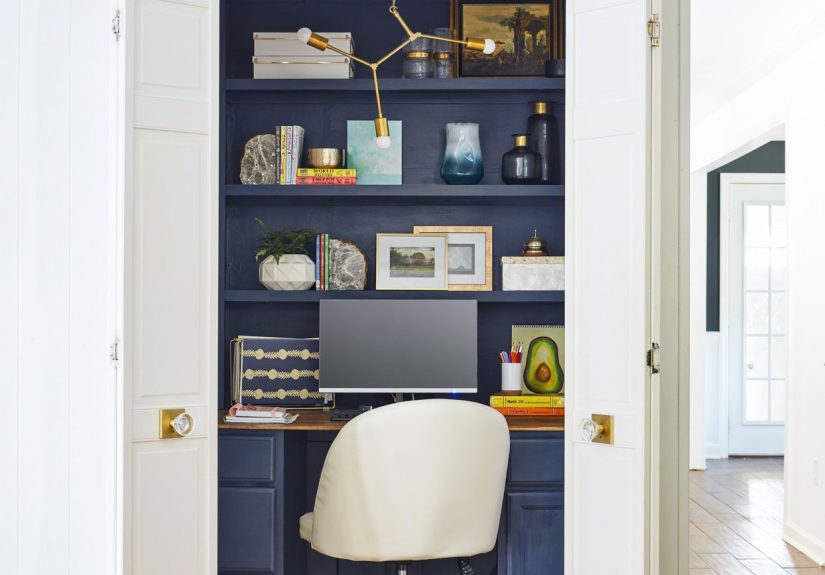
The cloffice is the work-from-home world’s best magic trick: you turn a closet into a legit office, then make it “disappear” at 5:01 p.m. by closing the doors. No more laptop living on the dining table. No more printer shame. Just you, your tools, and a tiny space that says, “I am here to focus,” even if the rest of the house is auditioning for a chaos documentary.
But here’s the secret: a great cloffice isn’t just a desk crammed into a dark box. It’s a planned micro-room with smart power, comfortable ergonomics, good lighting, and storage that works harder than a caffeine-fueled group project. Let’s build yours the right wayso it feels like an upgrade, not a punishment.
What Is a Cloffice (and Why It Works So Well)?
“Cloffice” is short for closet office: a small workstation carved out of a reach-in closet, linen closet, or even a shallow nook. It’s popular for one big reason: it creates a dedicated work zone without stealing square footage from your bedroom, living room, or kitchen.
A cloffice also sets a psychological boundary. When you sit inside it, your brain gets a clear cue: work mode. When you shut the doors, you get another cue: rest mode. That separation is a productivity (and sanity) booster, especially in homes where you can’t spare an entire room for an office.
Step 1: Pick the Right Closet (Not All Closets Want This Job)
Look for these “green flags”
- Power nearby: An outlet inside is ideal. An outlet just outside the closet can work with good cable management.
- Enough depth for your setup: You want space for a work surface plus a little breathing room for wrists, cords, and your sanity.
- Door options: Bifold, sliding, curtain, or even no doors at alleach changes how the space feels and functions.
- Ventilation potential: Closets can get warm and stuffy fast. If the closet is in a room with good airflow, you’re already ahead.
Closet types and what they’re best for
- Reach-in bedroom closet: Great for a “close it and forget it” office. You may need to rehome some clothing.
- Linen/hall closet: Surprisingly perfect for laptop work and paperworkoften near outlets and close to the action.
- Small walk-in closet: Luxury cloffice territory. You can fit deeper shelving, better lighting, and sometimes even a small chair.
Step 2: Measure, Sketch, and Decide Your “Work Style”
Before you buy anything, measure the closet’s width, depth, and height. Then decide what kind of work you do most. A cloffice for video calls and spreadsheets needs different priorities than one for crafting, writing, or studying.
Common cloffice “profiles”
- Laptop + calls: Prioritize a clean backdrop, flattering lighting, and a comfortable seat.
- Dual monitor / heavy computer work: Prioritize monitor height, desk depth, airflow, and power management.
- Paperwork / admin: Prioritize file storage, a large work surface, and quick-grab organizers.
- Creative work: Prioritize vertical storage, pegboards, supply bins, and bright task lighting.
Sketch a simple plan: where the desktop goes, where the monitor sits, where cords travel, and where you’ll store supplies. A two-minute sketch can save you two weekends of “Why did I do this to myself?”
Step 3: Clear It Out and Prep the Space Like a Mini Renovation
Declutter with intention
If the closet currently holds clothes or linens, decide what stays. Many people keep a slim clothing section on one side and dedicate the other side to the office. Others relocate everything and go full cloffice. Either approach worksjust avoid the “half office, half junk drawer, half Narnia” trap.
Make the shell feel finished
- Patch holes and scuffs: A smooth wall instantly makes the space feel intentional.
- Paint or wallpaper: Light colors can make the space feel bigger; bold wallpaper can make it feel like a design feature.
- Add a wipeable surface: If you’re painting, consider a durable finishclosets get bumped a lot.
- Floor upgrade (optional): A thin mat or low-pile rug can reduce echo and make it feel cozier.
If you’re working with a small budget, peel-and-stick wallpaper and simple paint are high-impact moves. They’re also the fastest way to make your cloffice feel like a “real” room rather than “the place where hangers used to live.”
Step 4: Power, Internet, and Safety (Because Extension Cords Are Not a Lifestyle)
Plan your power load
Make a list: laptop, monitor(s), lamp, phone charger, webcam, speaker, printer (maybe), and a small fan (likely). If you’re suddenly plugging in half a tech store, don’t rely on a pile of power strips. Use a quality surge protector, keep cords tidy, and avoid plugging power strips into power strips.
Wi-Fi and calls
- Check signal strength: Closets tucked deep into a hallway can be Wi-Fi dead zones.
- Upgrade strategically: A mesh node or router repositioning can solve most cloffice connectivity issues.
- Use a headset for clarity: Closets can echo. A headset is often the easiest fix.
Step 5: Choose (or Build) the Desk the Smart Way
The desk is the cloffice’s foundation. Pick one that fits your space and your work habits, not just your Pinterest dreams.
Option A: A floating desktop (best for most cloffices)
A floating desktop is a sturdy surface mounted to the walls with brackets or cleats. It looks built-in, saves floor space, and can be cut to your exact width. Popular materials include plywood with edge banding, butcher block, or a pre-made countertop cut to size.
Option B: A wall-mounted folding desk (best for ultra-tight closets)
If depth is limited, a folding desk lets you reclaim space when you’re done. Pair it with a slim stool or a chair that can slide out easily. The key is stability: you don’t want your desk wobbling every time you type an email that contains the word “urgent.”
Option C: A compact desk that fits inside (best for renters)
If you can’t drill or build, find a small desk with a shallow depth and minimal legs. A simple table-style desk can work beautifullyjust make sure you still have room for your chair and knees.
Step 6: Lighting That Makes You Look Alive on Video Calls
Closets are not famous for natural light. So your cloffice needs a lighting planideally layered:
- Ambient light: General brightness so the space doesn’t feel like a cave.
- Task light: Focused light on your keyboard/notes.
- Face-friendly light: Soft, forward-facing light for video calls.
Easy lighting upgrades
- LED puck lights or light strips: Great under shelves or at the top of the closet for even brightness.
- Sconce or small wall lamp: Saves desk space and looks intentional.
- Clamp lamp: Flexible and renter-friendly; clamp it to a shelf or desktop edge.
Aim for light that helps you focus without harsh glare. Neutral-to-cool task lighting often feels “work appropriate,” while a dimmer lets you soften things after hours. Bonus tip: place lighting so it doesn’t create a bright monitor and a dark face on callsyour coworkers deserve to see your expressions, not your silhouette.
Step 7: Ergonomics in a Tiny Space (Small Room, Big Neck Energy)
Cloffices are compact, which makes ergonomics even more important. A bad setup in a small space can lead to neck strain, wrist discomfort, and the classic “why do my shoulders live up by my ears now?” feeling.
Monitor placement basics
- Height: The top of the screen should be at or slightly below eye level, so you’re not craning your neck.
- Distance: About an arm’s length is a common guideline (roughly 20–28 inches for many people, depending on screen size and vision).
- Glare control: Keep the monitor angled away from strong light sources.
Keyboard, mouse, and posture basics
- Elbows: Keep them near your sides, bent roughly 90–120 degrees.
- Wrists: Neutral (not bent up/down). Keep keyboard and mouse on the same surface.
- Support: Feet on the floor (or a footrest), back supported, shoulders relaxed.
If your cloffice can’t fit a full ergonomic chair, don’t panic. You can still improve comfort with a supportive seat cushion, a compact chair with lumbar support, or a stool plus a footrest so you’re not dangling like a bored kid at a grown-up table.
Step 8: Storage and Organization (Vertical Space Is Your Best Friend)
Cloffices win when they use height. Think: shelves above the desk, organizers on the walls, and storage that makes it easy to reset the space at the end of the day.
High-impact storage ideas
- Floating shelves: Store supplies, baskets, and reference books without eating desk space.
- Pegboard or rail system: Hang frequently used tools, headphones, scissors, chargers, and small bins.
- Door-mounted hooks: Great for bags, a headset, a cable pouch, or a small clipboard.
- File box or slim drawer unit: Keeps paperwork tidy and out of sight.
Cable management that doesn’t look like a science experiment
- Use adhesive clips or channels to guide cords along edges.
- Mount a power strip under the desk to keep plugs off the floor.
- Label chargers (future you will be grateful).
- Bundle slack cable length with Velcro ties, not random knots.
Step 9: Doors, Sound, and Privacy
Doors are optional, but they’re a huge part of the cloffice vibe:
- Keep doors: Best for hiding work clutter and mentally “closing” the office.
- Remove doors: Makes the space feel bigger and improves airflow, but you lose the clean shut-it-away moment.
- Swap to a curtain: Softer look, easier clearance, and often better for tight spaces.
Make it sound better (and feel calmer)
Closets can echo. Soft surfaces help: a thin rug, a fabric pinboard, baskets, even a curtain. If you’re on frequent calls, consider a few acoustic panels or a felt wall board behind your monitor. You don’t need a recording studiojust a space where your voice doesn’t bounce around like it’s looking for a place to live.
Step 10: Ventilation and Comfort (The “Closet Heat” Problem)
A cloffice can get warm quickly, especially with a monitor, laptop, and a person who is trying very hard to concentrate. Comfort isn’t a luxuryit affects focus.
Keep the air moving
- Use a small fan: Even gentle airflow helps with heat and that “stale closet” feeling.
- Leave doors open during work hours: If you have doors, consider working with them open, then closing them after.
- Watch for odors or humidity: If things feel damp or musty, investigate the cause (humidity, leaks, poor airflow) and address it before you turn the closet into a daily workspace.
Three Budget Paths (So You Don’t Accidentally Build a Spaceship)
1) The “Use What You Have” Cloffice ($0–$150)
- Clear the closet, patch and paint.
- Add a simple tabletop or a cut board as a desktop.
- Use a lamp or puck lights, plus basic cable clips.
- Upgrade ergonomics with a laptop stand + external keyboard/mouse.
2) The “Weekend Upgrade” Cloffice ($150–$600)
- Install a floating desktop (better fit and stability).
- Add shelves, baskets, and a compact drawer unit.
- Layer lighting (ambient + task) and add a dimmer or smart bulb.
- Improve the backdrop with wallpaper or a neat pinboard.
3) The “Built-In Dream” Cloffice ($600+)
- Custom built-ins, integrated lighting, and intentional storage zones.
- Electrical upgrades (extra outlet, hardwired lighting) where appropriate.
- Higher-end chair or a slim ergonomic solution that fits perfectly.
- Acoustic treatment and a polished, video-call-ready design.
Quick Cloffice Checklist (Save This Before You Start)
- Space: Measure width/depth/height and plan chair clearance.
- Power: Outlet access, surge protection, tidy cords, no power-strip stacking.
- Lighting: Ambient + task + face-friendly for calls.
- Ergonomics: Screen height, keyboard/mouse position, foot support.
- Storage: Shelves + wall organization + a “reset” spot for daily clutter.
- Comfort: Airflow, heat control, and a setup you can actually sit in for hours.
- Style: Simple finishes that make it feel like a real space (paint, wallpaper, art).
Experience Notes: Real-World Lessons From Cloffice Setups (About )
People who build cloffices tend to learn the same lessonsusually right after they’ve already mounted something to a wall. So here’s the “what we wish we knew earlier” roundup, based on common before-and-after patterns you’ll see in real cloffice makeovers and small-space office setups.
1) Door clearance will humble you. A desk can fit perfectly on paper… until you realize the closet doors can’t open fully, or your chair can’t slide in without hitting the track. Many successful cloffices solve this by removing bifold doors, switching to a curtain, or installing a sliding solution. The big takeaway: measure not only the desk footprint, but also the movement footprinthow you enter, sit, and exit like a normal human.
2) The chair is the make-or-break item. In a compact closet, a bulky chair can eat half the usable space and turn your cloffice into a crab-walk zone. A lot of people end up swapping to a slimmer chair, a stool with a footrest, or a chair that lives just outside the closet and rolls in only when needed. If you’re on calls all day, comfort still mattersso think “small but supportive,” not “tiny and tragic.”
3) Heat and “closet air” are real. Laptops, monitors, and bodies produce warmth. Add closed doors and you’ve created a mini greenhouseminus the tomatoes. Many cloffice owners report their biggest quality-of-life improvement is simple airflow: working with doors open, adding a quiet desk fan, or rearranging so the heat isn’t trapped. If the closet ever had musty vibes, tackling humidity and airflow first makes the workspace feel clean and sustainable.
4) Lighting affects mood more than you expect. People often start with one desk lamp and wonder why they feel tired or why video calls look like a spooky campfire story. The most “wow” transformations usually add overhead-style brightness (pucks/LED strips) plus a task light. Once the space is evenly lit, the cloffice stops feeling like a storage area and starts feeling like a tiny studio.
5) Cables multiply when you aren’t looking. A cloffice can look neat for about five minutesuntil chargers, adapters, and random cords start crawling across the desk. The setups that stay tidy usually have two habits: (a) a mounted power strip under the desk, and (b) a dedicated cable route (clips or channels) that keeps cords off the work surface. Add labels and you’ll save yourself from the “Why do I have three identical black cords and none of them fit?” problem.
6) The best cloffices include an end-of-day reset ritual. This is the underrated superpower. People who love their cloffice tend to spend 60–90 seconds each day putting the mouse away, stacking papers into a tray, and clearing the desktop. Then they close the doors (or pull the curtain) and mentally clock out. That tiny routine helps your home feel like a home againwithout needing a separate office room.
Conclusion: Your Best Workday Might Be Hiding in a Closet
A cloffice is proof that you don’t need a sprawling home office to work comfortablyyou need a smart plan. Start with measurements, build a stable desk, light it like you mean it, and set your body up to feel good at hour six (not just minute six). Add storage that supports quick cleanup, keep power safe and tidy, and make airflow part of the design.
Do it right and your cloffice becomes the ultimate work-from-home upgrade: focused when it’s open, peaceful when it’s closed, and stylish enough that you’ll actually want to sit down and get things done.