Table of Contents >> Show >> Hide
- Can a PS5 Be Used Horizontally or Vertically?
- First, Figure Out Which PS5 Model You Own
- Before You Reposition Your PS5
- How to Put the Original PS5 into Vertical Orientation
- How to Put the Original PS5 into Horizontal Orientation
- How to Put a PS5 slim into Horizontal Orientation
- How to Put a PS5 slim into Vertical Orientation
- How to Put a PS5 Pro into Horizontal or Vertical Orientation
- Horizontal vs. Vertical PS5: Which Orientation Is Better?
- Common Mistakes to Avoid
- Best Placement Tips for Long-Term Use
- Final Thoughts
- Real-World Experience: What It’s Actually Like to Use a PS5 in Both Orientations
If the PlayStation 5 had a personality, it would absolutely be the dramatic friend who arrives late, looks fabulous, and takes up way more room on the couch than expected. The good news is that Sony designed the PS5 to work in either horizontal or vertical orientation. The only trick is doing it the right way for your specific model. And yes, that detail matters more than most people think.
Some PS5 owners still assume the console can just be plopped onto a shelf like a paperback novel. Not quite. Depending on whether you have the original PS5, the newer PS5 slim, or a PS5 Pro, the setup process is a little different. Use the wrong stand, skip the feet, or cram the console into a hot little cave of an entertainment center, and you are asking for wobble, heat, and regret.
This guide walks through exactly how to put a PS5 into horizontal or vertical orientation, how to identify which model you have, what accessories you need, and what setup mistakes to avoid. By the end, your console should be stable, properly ventilated, and no longer sitting there like it was balanced by pure optimism.
Can a PS5 Be Used Horizontally or Vertically?
Yes. A PS5 can be used in either orientation, but the correct setup depends on the model. That is the part many people miss. The original launch-model PS5 uses a round base for both horizontal and vertical placement. The newer PS5 slim and PS5 Pro use horizontal stand feet for side placement, while vertical placement requires an official vertical stand sold separately.
That means the answer to “Can I stand my PS5 up?” is yes, but not always with what came in the box. The answer to “Can I lay my PS5 on its side?” is also yes, but again, not by winging it and hoping the curves magically cooperate. Sony’s design is stylish, but it is not exactly a brick. It needs support.
First, Figure Out Which PS5 Model You Own
Before touching the stand, identify your console family. This saves time and prevents the classic internet problem of following the right tutorial for the wrong machine.
Original PS5 (CFI-1000 model group)
This is the launch-era “big boi” PS5. It uses a single round base that works in both horizontal and vertical positions. If you bought a PS5 near launch and it came with a chunky circular stand, this is probably your model.
PS5 slim (CFI-2000 model group)
This version is smaller and uses horizontal plastic feet for side placement. If you want to set it vertically, you need Sony’s separate vertical stand.
PS5 Pro (CFI-7000 model group)
The PS5 Pro follows the newer setup style too. It uses horizontal feet when placed on its side, and a separate vertical stand when placed upright.
If you are not sure, check the model number on the console itself or in the system documentation. This is one of those moments where reading the label is smarter than guessing from a YouTube thumbnail.
Before You Reposition Your PS5
Do a little prep first. It takes two minutes and saves you from scratching the console, fumbling a tiny screw onto the floor, or moving hot plastic around with the confidence of a raccoon in a kitchen.
What to do before switching orientation
- Turn the console off fully, not just into Rest Mode.
- Unplug the power cable and connected accessories.
- Wait a moment if the system is still warm.
- Place the console on a soft cloth over a flat surface.
- Keep the screw, cap, stand feet, or base pieces together so nothing vanishes into the furniture dimension.
Sony also recommends keeping the console in a well-ventilated spot with at least a little breathing room around it. Translation: do not trap it in a tight shelf cubby, do not block the vents, and do not sit it directly on a shag rug like it is a decorative sculpture.
How to Put the Original PS5 into Vertical Orientation
If you have the original PS5, vertical placement uses the included round base and a screw. The base is not optional decoration. It is part of the setup.
Step-by-step
- Turn off the PS5 completely and unplug it.
- Place the console on a soft cloth with the rear side facing up.
- Rotate the stand so the hook and groove align into the vertical setup position until you hear a click.
- Remove the screw cap from the bottom of the console.
- Store that cap in the underside compartment of the base.
- Take the screw from the base compartment.
- Attach the base to the bottom of the console.
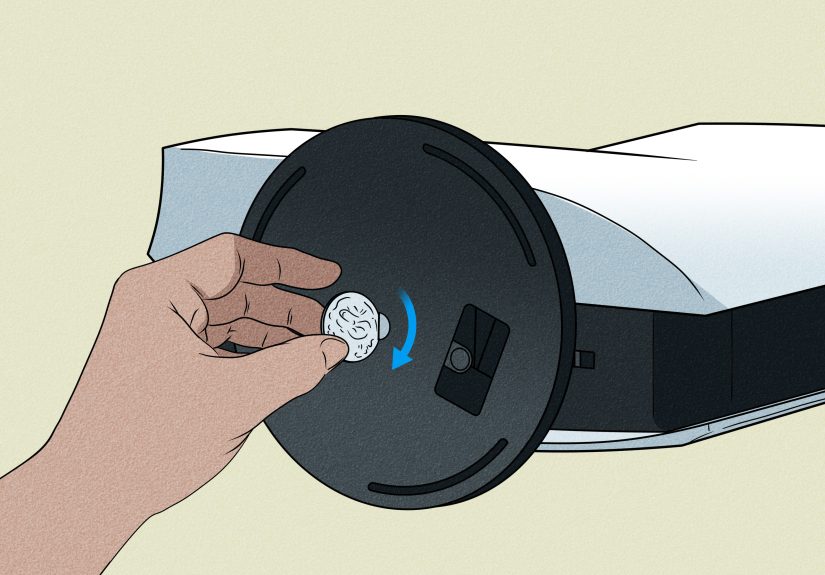
- Tighten the screw by hand or with a coin.
- Stand the console upright in its final location.
The original PS5 is tall and slightly theatrical in vertical mode. It looks great beside a TV stand, but make sure it is not somewhere pets, kids, or an enthusiastic vacuum cleaner can bump into it.
How to Put the Original PS5 into Horizontal Orientation
This is where some owners go wrong. The original PS5 still needs the base in horizontal mode. You do not simply remove the stand and lay the console down like a sleepy white whale.
Step-by-step
- Turn the console off and unplug it.
- If the stand is attached for vertical use, unscrew and remove it.
- Store the screw in the base compartment so you do not lose it.
- Rotate the base into its horizontal configuration until it clicks.
- Place the console with the rear side facing up.
- Align the base with the marked area on the console.
- Press the base firmly into place.
- Lay the console gently in its final horizontal position.
The nice part of horizontal placement is stability. The not-so-nice part is that the original PS5 still takes up a lot of shelf width. Think “small canoe” rather than “compact console.”
How to Put a PS5 slim into Horizontal Orientation
The PS5 slim simplifies horizontal placement, but only if you use the included feet correctly. Sony includes different feet depending on whether the console has the disc drive attached, so do not mix them up.
Step-by-step
- Turn off the console and unplug it.
- Place it on a soft cloth on a flat surface.
- Take the included horizontal stand feet.
- Attach the correct feet into the grooves on the console.
- Make sure they are fully seated and even.
- Lay the PS5 slim horizontally in your setup.
That is it. No dramatic screw ceremony. Just make sure the correct feet are attached. The slim model is lighter and easier to place, but it still should not be balanced naked on the shelf like a modern-art experiment.
How to Put a PS5 slim into Vertical Orientation
For vertical placement, the PS5 slim requires Sony’s vertical stand. It is sold separately, so if you opened the box and found only the horizontal feet, Sony was not pranking you. That is the intended setup.
Step-by-step
- Turn off the PS5 slim completely.
- Unplug all cables and let the console cool briefly if needed.
- Place the console on a soft cloth with the rear side facing up.
- Remove the screw cap from the console.
- Attach that screw cap into the marked spot on the stand.
- Align the stand with the console’s screw hole.
- Secure the stand using the mounting screw, tightening it by hand or with a coin.
- Stand the console upright and check that it feels stable.
If your setup is tight on width but generous in height, this is usually the cleaner-looking option. It also keeps the console footprint smaller on the media cabinet, which is handy if your shelf is already fighting for custody of a soundbar, router, and seven game boxes.
How to Put a PS5 Pro into Horizontal or Vertical Orientation
The PS5 Pro follows the same general logic as the slim model. Horizontal placement uses the included feet. Vertical placement uses the separate vertical stand. Sony also emphasizes good ventilation, which makes sense because the Pro is designed for higher-performance workloads and has large rear and bottom airflow paths.
Horizontal PS5 Pro setup
- Power the system off completely.
- Set it on a soft cloth.
- Insert the horizontal feet into the correct grooves.
- Place the console horizontally on a stable surface.
Vertical PS5 Pro setup
- Power the system off completely.
- Unplug the cables and let the console cool if it has been in use.
- Place it rear side up on a soft cloth.
- Remove the screw cap.
- Attach the cap to the stand where indicated.
- Align the stand and secure the screw.
- Set the console upright and verify it is steady.
If you are buying a PS5 Pro or recent PS5 hardware now, remember that vertical presentation often appears in product photos, but that does not always mean the vertical stand is in the box. Marketing photography loves drama. Packaging details love fine print.
Horizontal vs. Vertical PS5: Which Orientation Is Better?
There is no one-size-fits-all answer. Both orientations can work well when the console is set up properly and the vents are clear. The better choice depends on your space, your habits, and whether your home contains small children, curious cats, or one friend who gestures too much while telling a story.
Choose horizontal if:
- You want the most stable, low-profile setup.
- Your entertainment center has more width than height.
- You worry about the console getting bumped.
- You prefer a tucked-away look.
Choose vertical if:
- You want to save shelf width.
- You like the signature PS5 display look.
- Your setup has plenty of vertical clearance.
- You are using the correct stand and have a stable surface.
The most important thing is not which orientation wins some imaginary style contest. It is whether the console is stable, supported, and able to breathe.
Common Mistakes to Avoid
1. Skipping the stand or feet
This is the biggest mistake. The original PS5 needs its base in both modes. The slim and Pro models need their horizontal feet when lying down and the vertical stand when standing up.
2. Blocking the vents
Leave space around the console. Do not push it tight against a wall, wedge it into a narrow shelf, or drape anything over it. A PS5 is a console, not a heated decorative candle.
3. Putting it on carpet or thick fabric
Soft, fuzzy surfaces can interfere with airflow and collect dust. Use a hard, flat surface instead.
4. Repositioning while the system is hot
Let it cool for a moment. This is especially smart if you have just finished a long session and the system has been working hard.
5. Losing the screw or cap
Store them immediately. The original PS5 base has a compartment for this, which is one of the few times in modern tech that a tiny hidden storage space actually feels genius.
Best Placement Tips for Long-Term Use
If you want your PS5 setup to look good and function well, think beyond just the stand. Leave enough open space around the console. Make cable routing neat. Dust the area regularly. If the console is in a cabinet, make sure the cabinet is open enough for airflow. If it feels like the shelf belongs in a submarine, the PS5 probably should not live there.
Also consider your real-world setup habits. A dorm room, a shared family media center, and a minimalist gaming desk all create different challenges. The right orientation is usually the one that works with your space without compromising stability or ventilation.
Final Thoughts
Putting a PS5 into horizontal or vertical orientation is easy once you know which model you own and which support pieces it requires. The original PS5 uses its base for both positions. The PS5 slim and PS5 Pro use horizontal feet when laid down and a separate vertical stand when standing upright. Follow the correct method, leave room for airflow, and your setup will be cleaner, safer, and a lot less likely to wobble every time someone walks by.
In other words, the PS5 can absolutely be horizontal or vertical. It just does not want to be random about it.
Real-World Experience: What It’s Actually Like to Use a PS5 in Both Orientations
In real homes, choosing between horizontal and vertical orientation is rarely just about aesthetics. It usually starts with a practical problem. Maybe the console looks incredible standing up next to the TV, but then someone realizes the shelf above it is about half an inch too low. Maybe horizontal placement seems safer, but suddenly the PS5 takes over the entire media console like it pays rent. That is why the “best” orientation often comes down to daily experience rather than theory.
For a lot of people, horizontal placement feels more relaxed. It is easier to trust. Once the base or feet are attached correctly, the console sits lower, looks more secure, and feels less dramatic. Households with kids, pets, or a lot of foot traffic often prefer this setup because it reduces the fear factor. Nobody wants to watch an expensive console wobble because a dog sprinted past chasing a toy. Horizontal orientation also works well for players who keep the PS5 inside a wide entertainment center, especially when height is limited.
Vertical orientation, though, has a different kind of appeal. It looks intentional. It gives the PS5 that futuristic tower-like presence Sony clearly wanted. On a gaming desk or beside a modern TV setup, it can look sleek and surprisingly efficient because it uses less horizontal shelf space. People with narrow furniture often end up liking vertical placement more simply because it frees room for controllers, charging docks, discs, or a soundbar remote that always disappears at the worst possible time.
There is also a psychological side to it. A vertically oriented PS5 feels more like a centerpiece. A horizontal PS5 feels more integrated into the room. Neither is automatically better, but they create a different vibe. Some gamers love the bold “look at this next-gen machine” energy of vertical setup. Others want the console to blend in and quietly do its job without looking like a white spaceship landed under the television.
From a usability standpoint, the biggest difference often comes from surrounding space. A properly ventilated PS5 in either orientation tends to inspire confidence. A PS5 squeezed into a cramped shelf does not. Owners who leave breathing room around the console usually report fewer worries about heat, less dust buildup around the vents, and an overall tidier setup. In other words, the orientation matters, but the environment around it matters just as much.
Another common experience is that people switch their preference over time. Someone may start with the PS5 vertically because it looks cool on day one, then move it horizontally after reorganizing the room. Others go the opposite direction after getting a smaller TV stand and realizing shelf width is now precious real estate. The good news is that Sony’s setup system is designed for that kind of flexibility, as long as you keep the stand parts together and do not treat the mounting screw like a disposable bread tie.
The most consistent takeaway from real-world setups is simple: the best orientation is the one that fits your room, keeps the console stable, and preserves airflow. When those three boxes are checked, the PS5 tends to settle into everyday life nicely, whether it is standing tall like it wants applause or lying low like it is trying not to start any trouble.