Table of Contents >> Show >> Hide
- First: Identify What Kind of “Group Text” You’re In
- iPhone: How to Remove Someone from a Group Text (When It’s iMessage)
- Android: How to Remove Someone from a Group Text (It Depends)
- What Happens When You Remove Someone (or Start a New Thread)
- Polite Scripts for “Uninviting” Someone (Without Starting World War III)
- Troubleshooting: Common Problems and Fixes
- Quick Decision Guide (Because You’re Busy)
- Real-World “Experiences” That Happen All the Time (Extra )
- Conclusion
Group texts are like group projects: one person starts it, everyone ends up in it, and at least one person is thinking,
“How do I politely make this… smaller?”
The tricky part: whether you can remove someone depends less on your confidence and more on the kind of group message
you’re in (iMessage vs. SMS/MMS vs. RCS) and the app/carrier features available. Below is the real-world, no-magic-button guide
for both iPhone and Androidplus a few “save your sanity” workarounds when removing someone isn’t possible.
First: Identify What Kind of “Group Text” You’re In
Why this matters (a lot)
“Group text” can mean three different technologies, and they don’t all support member management:
- iMessage group (Apple-to-Apple): usually gives you the power to add/remove peopleif the group is big enough.
- SMS/MMS group (carrier texting): typically cannot remove a person once the thread exists; you’ll need a workaround.
- RCS group (modern “chat” for Android and now some iPhone-to-Android texting): features vary by carrier/app; some support add/remove, some don’t.
Quick ways to tell
- On iPhone: iMessage bubbles are usually blue. If you’re texting Android users, you’ll often see “Text Message • SMS” or “Text Message • RCS” in the message field depending on your carrier/settings.
- On Android (Google Messages): RCS chats behave more like chat apps (typing indicators, better media). If RCS is off, you’re usually in SMS/MMS land.
If you can’t find any member controls, don’t assume your phone is broken. It’s probably the message type saying,
“Nice try.”
iPhone: How to Remove Someone from a Group Text (When It’s iMessage)
The reality check (requirements Apple enforces)
You can remove someone from an iMessage group only if:
- The conversation is an iMessage group (everyone is using Apple devices with iMessage).
- The group has 4 or more people total (you + at least three others).
Steps: Remove someone from an iMessage group on iPhone
- Open the Messages app.
- Tap the group conversation.
- Tap the group icons or group name at the top of the thread.
- In the participant list, press and hold the person you want to remove.
- Tap Remove from Group, then confirm Remove.
If you don’t see “Remove from Group,” here’s why
- It’s not an iMessage group. If an Android phone is included (or the thread switched to SMS/MMS/RCS), iPhone usually won’t allow member removal.
- The group is too small. If it’s you + 2 others (3 total), removal typically won’t appear.
- Someone’s iMessage isn’t active. If a number becomes “non-iMessage,” the thread may behave like carrier texting and lose iMessage controls.
Workarounds on iPhone when removal isn’t possible
If the chat includes non-Apple users or is SMS/MMS/RCS, you usually can’t “kick” someone out. Your best options:
- Start a new group message without them
Create a new message, add the same people except the person you want to exclude, and send a “moving threads” message like:
“New thread for planningso it doesn’t get lost.” (Translation: “You’re not invited, but politely.”) - Mute the conversation
Great for noisy chats. You still remain in the group, but your phone stops acting like a fire alarm. - Leave the conversation (if available)
Some iMessage groups let you leave if there are enough participants. If “Leave this Conversation” isn’t there, that’s another clue you’re not in a fully-manageable iMessage group. - Block the contact
Blocking stops messages from that person on your devicebut it does not remove them from the group for everyone else. Think “noise-canceling headphones,” not “bouncer.”
Android: How to Remove Someone from a Group Text (It Depends)
Android isn’t one single messaging experiencedifferent phones and carriers use different apps (Google Messages, Samsung Messages, carrier-branded apps),
and group controls vary depending on whether the chat is RCS or SMS/MMS.
Scenario A: RCS group chat (best chance of removing someone)
Some RCS group chats support member management (like naming the group and adding/removing participants),
but it’s not guaranteed across every device, carrier, and app version.
Try this general path (Google Messages):
- Open Google Messages.
- Tap the group chat.
- Tap the group name or the three-dot menu (⋮) in the top right.
- Open Group details (or “Details / People & options”).
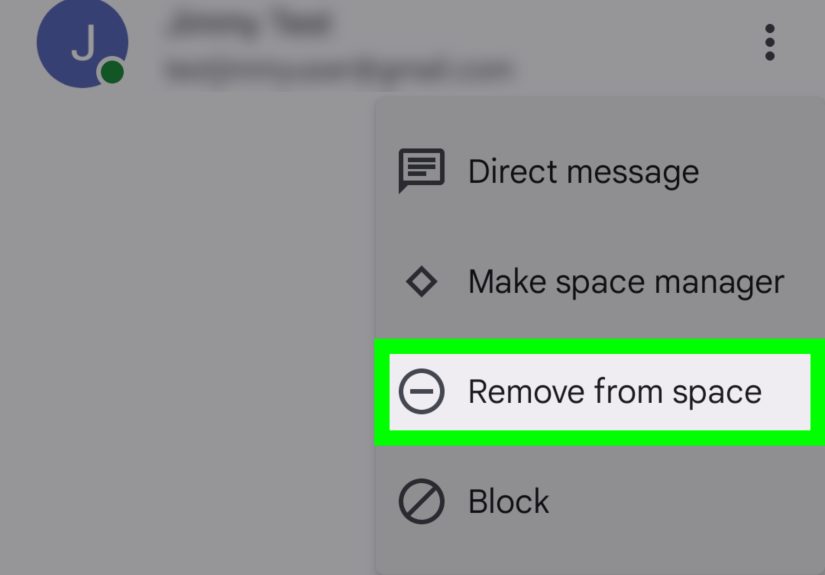
- Look for the participant list and a Remove option next to a member (or in a submenu).
If you don’t see a remove option: your RCS setup may not support it (or it’s an SMS/MMS group). In that case, jump to the workaround section below.
Scenario B: Traditional SMS/MMS group text (most common limitation)
With SMS/MMS group texting, you typically cannot remove a participant from the existing thread. The “group” is essentially your phone
sending messages to a set of numbers; there’s no universal server-side membership control.
Scenario C: Samsung Messages (common on Galaxy phones)
Samsung Messages makes it easy to create group messages, but removing people from an existing carrier-based group thread often isn’t supported
the way chat apps are. If you don’t see member controls in “Details” or “Participants,” treat it like SMS/MMS and use the workaround below.
The Android workaround that actually works: make a new group
- Tap New conversation in your messaging app.
- Select the same participants except the person you want removed.
- Send a first message that explains the new thread (without being weird about it).
Example opener: “Starting a fresh thread for the details so it’s easier to track.”
(This is the group-chat version of sliding a note under the door.)
What Happens When You Remove Someone (or Start a New Thread)
If you successfully remove them (iMessage/RCS where supported)
- They generally stop receiving new messages from that group.
- Past messages usually remain in their history (removal isn’t a time machine).
- Some platforms may show a small “X was removed” system note, depending on the app.
If you create a new group without them
- The old group still exists for everyone who was in it.
- The excluded person won’t see the new thread (unless someone adds them back).
- This is the most reliable “removal” method for SMS/MMS groups.
Polite Scripts for “Uninviting” Someone (Without Starting World War III)
Use one of these depending on the vibe:
Low-drama (work / school logistics)
- “Making a smaller thread for the people directly involvedso updates don’t get missed.”
- “Starting a planning-only chat to keep this organized.”
Friendly (family / friends)
- “New thread for the trip detailsless noise, more snacks.”
- “I’m splitting the chat so it’s easier to followjoining the new one!”
Direct (only if you must)
- “Heythis chat is just for the project team. I’m moving the group to a smaller thread.”
Troubleshooting: Common Problems and Fixes
“Remove from Group” is missing on iPhone
- Check the group size: if it’s under 4 total people, removal usually isn’t available.
- Check who’s in the chat: if anyone is non-Apple (or the chat is using SMS/MMS/RCS), you may not be able to remove people.
- Try updating iOS: messaging controls can vary slightly by iOS version and current settings.
Android group shows no member controls
- Confirm RCS is enabled in your messaging app settings (if your carrier supports it).
- Assume it’s SMS/MMS if you still don’t see “Group details” or removal tools.
- Use the new-group workaround (it’s boring, but it works).
“I removed them, but they got added back”
If someone else in the group has the ability to add participants (common in many group chats), they can re-add the person.
If this becomes a pattern, it’s not a tech problemit’s a boundaries problem wearing a trench coat.
Quick Decision Guide (Because You’re Busy)
- All iPhones + 4+ people? Remove is usually possible in iMessage.
- Any Android in the thread (or green bubbles on iPhone)? Removal is often not supported; start a new group.
- Android RCS group with Group Details & Remove option? Try removing there; if not available, start a new group.
Real-World “Experiences” That Happen All the Time (Extra )
Most people don’t wake up thinking, “I can’t wait to remove someone from a group text today.” It usually starts with a totally normal moment:
you’re trying to coordinate somethingdinner, a school event, a work deadlineand one accidental tap turns your tidy plan into a digital town hall meeting.
Suddenly your phone is lighting up like it’s auditioning for a holiday display.
One common scenario: the “Oops, wrong contact” moment. You’re adding “Alex” to a groupexcept there are three Alexes in your phone.
You pick the wrong one, send “Hey, we’re meeting at 6,” and immediately realize you’ve invited your dentist, your former coworker, or your cousin’s
softball coach into a chat about margaritas. On iPhone, you might get lucky if it’s a true iMessage group with enough peopleremove them, breathe again.
But if any Android users are involved, you learn the hard truth: you can’t always undo the invite. That’s when the “new thread” strategy becomes your hero.
Another classic: the work chat that won’t stop working. Someone starts a project group text with good intentions, but then it becomes
a 24/7 notification factory. A few weeks later, the project ends, yet the chat lives onpeople posting “any updates?” long after the updates stopped existing.
If you can’t remove people (or leave), muting is the underrated sanity move. It’s the digital equivalent of gently closing the office door without making it
a whole thing.
Then there’s the family logistics spiral: “What time is dinner?” turns into “Who’s bringing ice?” turns into 46 photos of someone’s dog
wearing a scarf. Nobody is actually mad… but everyone is overwhelmed. In these cases, removing someone is rarely the goal. The real goal is: keep the group,
keep the peace, reduce the chaos. That’s where splitting chats helps: create one thread for logistics (“Dinner at 6, bring salad”), and let the meme-chat
roam free elsewhere. You’re not kicking anyone outyou’re organizing the universe one notification at a time.
Finally, there’s the awkward but real situation: you need a smaller, need-to-know chat (think: surprise party planning, sensitive scheduling,
or a small committee). People sometimes worry this will look “mean,” but it’s usually about clarity. The most successful approach is simple and practical:
start the smaller group with a neutral message like, “Making a planning-only thread so details don’t get lost.” Almost everyone understandsbecause deep down,
everyone has been trapped in a noisy group chat at least once and wished for a trapdoor.
In other words: the technology may limit what you can do, but you still have options. If removal is available, use it. If it’s not, don’t fight your phone.
Make a clean new thread, name it clearly, and move forward like the organized legend you were born to be.
Conclusion
Removing someone from a group text is totally doable sometimesspecifically in iMessage groups on iPhone (with enough participants and all Apple devices),
and in certain Android RCS group setups that support member controls. But if you’re dealing with SMS/MMS (or mixed-device threads that behave like carrier texting),
the most reliable solution is still the simplest: start a new group without the person, then mute or exit the old chaos as needed.