Table of Contents >> Show >> Hide
- Why Anthropic Changed Its Data Policy
- Quick Start: How to Stop Anthropic From Training on Your Chats
- What the “Help Improve Claude” Toggle Really Does
- Delete Chats You Don’t Want Used
- What Anthropic Still Sees When You Opt Out
- How This Compares to Other AI Chatbots
- Best Practices to Protect Your Privacy With Claude
- FAQ: Anthropic Training and Your Conversations
- Real-World Experiences: What It’s Like to Lock Down Your Claude Data
Anthropic used to be the privacy-conscious kid on the AI block: your Claude chats were
off-limits for training, full stop. Then 2025 happened. Now Anthropic says it will use
your conversations to train its AI models unless you tell it not to. The good
news? You absolutely can say “nope” you just have to flip the right switches.
In this guide, we’ll walk you through exactly how to stop Anthropic from training its AI
models on your conversations, what that mysterious
“Help improve Claude” toggle really does, how long your data hangs
around, and how this compares to what other AI chatbots are doing. We’ll also talk
through some real-world experiences so you know what it’s actually like to lock your
Claude data down.
Why Anthropic Changed Its Data Policy
When Anthropic first launched Claude, its promise was simple: your chats weren’t used
for model training. That helped the company stand out in a field where “we may use your
data to improve our services” had quietly become the default for most AI tools.
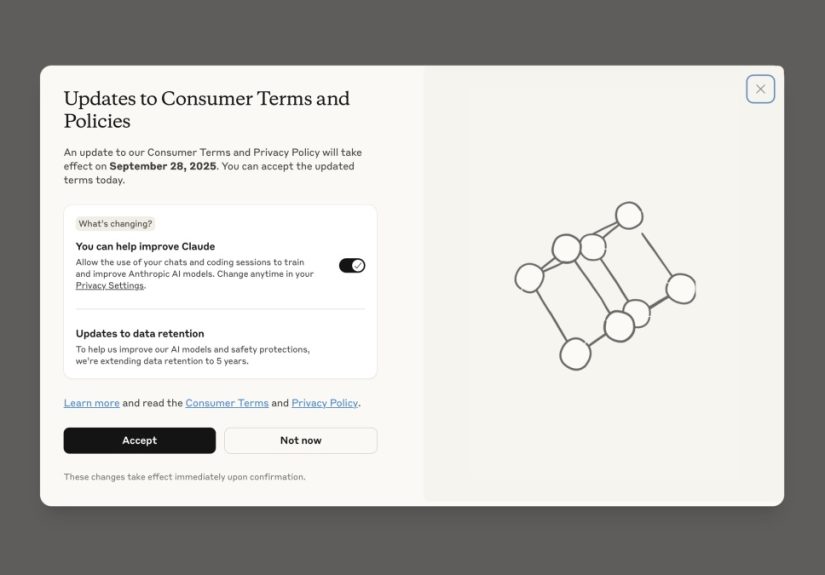
That stance shifted in 2025. Anthropic announced that, starting in the fall, it would
begin using personal Claude chats and coding sessions as training data unless users
opted out. At the same time, it expanded data retention:
- If you allow training, Anthropic can keep your chats for up to
five years to use for model improvement and safety research. - If you opt out, most chats are kept for around
30 days for safety and abuse monitoring, then deleted under the
general retention policy.
Anthropic frames this as a way to make Claude more helpful and secure by learning from
real-world use. Privacy advocates, meanwhile, hear: “Your late-night oversharing might
become training data unless you actively do something about it.”
The compromise is control. Anthropic now gives every personal user a clear choice:
help train Claude with your conversations, or flip the switch and keep your chats out
of the training pool.
Quick Start: How to Stop Anthropic From Training on Your Chats
If you don’t care about the backstory and just want to lock this down in under a
minute, here’s the fast version.
On the Claude website (desktop browser)
- Sign in to your Claude account.
- Click your name or profile icon in the sidebar or top corner.
- Select Settings.
- Go to the Privacy tab.
- Find the option labeled “Help improve Claude” or
“Use my data to improve models”. - Toggle this off. When it’s off, Anthropic should no longer use your
future chats and coding sessions for model training.
On the Claude mobile app
- Open the Claude app and log in, if you aren’t already.
- Tap your name or profile icon.
- Tap Settings, then choose Privacy.
- Locate “Help improve Claude” and switch it off.
If you’re a new user
New Anthropic users will typically see a prompt during signup asking whether they want
to help improve Claude by sharing chats for training. To keep your data out of the
training pool:
- When asked, choose No or leave the training option unchecked.
- You can always double-check or change this later in Settings > Privacy.
If you’re on a business or enterprise plan
Anthropic’s consumer training policy applies to personal accounts. Business, enterprise,
and certain institutional contracts are typically governed by separate terms that
restrict using customer data for training models. If you use Claude through your
employer:
- Check with your IT or legal team about how your chats are handled.
- Your admin may have organization-wide controls that override personal training
toggles.
What the “Help Improve Claude” Toggle Really Does
The wording “Help improve Claude” sounds friendly, but it hides a lot of complexity.
Turning this setting on generally means:
- Your chats and coding sessions can be included in datasets used to train or fine-tune future Claude models.
- Those conversations may be retained for up to five years for model improvement and
safety work, rather than the shorter, default retention window.
Turning it off means:
- Your future chats shouldn’t be used to train Claude’s general-purpose models (with
a few safety and abuse-review exceptions). - Your data is usually kept for a shorter period (about 30 days in typical consumer
scenarios) for fraud prevention, abuse detection, and legal obligations.
Importantly, the toggle affects future training use. If you had it on
for a while and then switch it off, Anthropic says new chats are excluded from future
training. But any training already done on past data can’t realistically be undone
the model can’t “unlearn” your conversations one by one.
Delete Chats You Don’t Want Used
In addition to the training toggle, Anthropic lets you delete individual conversations
or, if necessary, your whole account. This matters because:
- Deleted chats are not supposed to be used for future model training.
- They may still be retained briefly in backups or logs, but they are excluded from
new training runs.
How to delete a conversation in Claude
- Open Claude and go to your conversation list.
- Hover over or long-press the conversation you want to remove.
- Choose Delete or the trash-can icon.
- Confirm that you really want to delete it.
Think of this as a second line of defense: the training toggle tells Anthropic not to
use your future chats for model improvement, and deleting sensitive conversations adds
an extra layer of “no, seriously, please don’t keep this.”
What Anthropic Still Sees When You Opt Out
Here’s the part many people miss: opting out of training does not turn Claude into a
completely private, local-only notebook. Anthropic still processes your data on its
servers, and it may use some of it for safety, abuse detection, and diagnostics.
Even if you opt out of model training, Anthropic can still:
- Temporarily retain chats (typically around 30 days) to detect spam, fraud, or policy
violations. - Review individual conversations that are flagged for safety reasons for example,
content that looks dangerous or abusive. - Use aggregated, de-identified metrics to keep the system stable and secure.
That’s not unique to Anthropic; it’s how most major AI providers work today. The
opt-out option is about preventing your conversations from being folded into the giant
dataset used to train future versions of Claude not about erasing every trace of
your chats from existence the moment you hit send.
How This Compares to Other AI Chatbots
If you’re getting déjà vu, it’s because we’ve seen this movie before. Other major AI
platforms also default to using conversations for training unless you opt out, though
the settings live under different names (“Improve model quality,” “Use my content to
help train,” and so on).
Anthropic’s move essentially brings Claude in line with industry norms with two key
twists:
- It is relatively explicit about offering a toggle for personal users to control
training. - It has a “split” model where many business and enterprise contracts keep
customer data out of general training by default.
For everyday users, the practical takeaway is simple: if you’re using any major AI
chatbot, check its privacy or data settings. If there’s a training toggle, and you
care about keeping your conversations out of future models, turn it off.
Best Practices to Protect Your Privacy With Claude
The training toggle is important, but it’s not the only thing that matters. If you
really don’t want your personal life turning into machine-learning fuel, combine the
toggle with smarter habits:
1. Don’t paste what you can’t afford to leak
This is the boring but necessary rule of thumb: if sharing something with a cloud
service would be a disaster if it leaked think full medical history, unreleased
financial results, or your friend’s deeply personal secrets don’t paste it into
Claude, even with training turned off.
Use summaries instead: “a sensitive health report,” “confidential sales forecast,” or
“a private email from a family member” rather than the exact text. That way, Claude
can still help you think through problems without you broadcasting the raw data.
2. Strip identifiers where possible
Before pasting text into Claude, remove names, phone numbers, addresses, and other
personally identifiable information (PII). Replace them with placeholders like
“Client A” or “My Manager.” You still get useful AI help, but with much less risk if a
conversation is ever reviewed or accidentally exposed.
3. Review your settings periodically
Data policies change. Companies add new features, research projects, and
cross-product integrations. Make it a habit to:
- Open Settings > Privacy every few months.
- Confirm that “Help improve Claude” is still off.
- Skim any notices about changes to Terms or Privacy Policy.
It’s not thrilling reading, but a two-minute check can save you from unpleasant
surprises later.
4. Be smart about shared devices and accounts
If you’re logged into Claude on a shared computer, other people may see your chat
history even if Anthropic doesn’t use it for training. Log out when you’re done, and
avoid mixing personal and work conversations in the same account.
FAQ: Anthropic Training and Your Conversations
Does turning off “Help improve Claude” delete my old chats?
No. Flipping the toggle off doesn’t automatically erase your existing history. It
tells Anthropic not to use your future chats (and possibly newly resumed old threads)
for training. If you want specific conversations gone, you’ll need to delete them
individually or clear your history.
Can Anthropic “untrain” Claude on chats it already used?
Realistically, no. Once a model has been trained on a large dataset, you can’t cleanly
pull out the influence of one user’s conversations. Instead, Anthropic focuses on
excluding your data from future training runs and new models after
you change your settings or delete chats.
If I delete my account, what happens to my data?
Deleting your account should remove your personal profile and exclude your data from
future model training. Some records may linger for a time in backups, logs, or for
legal reasons, but the company’s goal is that your content is no longer actively used
to train or improve general models after account deletion. Always check the current
privacy policy for the latest details.
Are my work chats with Claude used for training?
If you use Claude through a company, school, or other organization, your data is often
governed by a separate agreement. Many enterprise contracts explicitly prohibit using
customer data for training public models. That said, only your organization (or its
admin) can give you a definitive answer, so don’t be shy about asking.
Real-World Experiences: What It’s Like to Lock Down Your Claude Data
So what actually changes once you’ve flipped the switch and told Anthropic to keep
your chats out of training? In day-to-day use, surprisingly little and that’s kind
of the point.
Most people who have turned off “Help improve Claude” report that the chatbot behaves
exactly the same: it still remembers context within a conversation, still drafts your
emails, still summarizes your PDFs, and still helps you debug stubborn code. The
difference is largely behind the scenes, in how long your data is stored and whether
it’s fed back into future model-training runs.
The biggest change is psychological. Once you’ve walked through the privacy settings,
you tend to become more intentional about what you share. You might still paste a
paragraph from a tricky contract, but you’re less likely to drop your full account
numbers or full names of third parties into the chat window. You start to develop a
mental filter: “Is this something I’m okay sending to any online service at all?”
For teams, the experience is more structured. Privacy-conscious managers often do a
quick internal training: they show everyone where the Claude privacy settings live,
explain what “Help improve Claude” means, and set expectations about what should and
shouldn’t be shared. Some companies choose to keep the training toggle off across the
board while still using Claude extensively for brainstorming, drafting, QA checks,
and code review on non-sensitive snippets.
Individuals juggling multiple AI tools also notice that Claude feels more transparent
than some alternatives. The toggle is labeled in straightforward language, and the
company’s privacy site explains, in plain terms, how training and retention work. That
doesn’t mean you should blindly trust it, but it does make it easier to make an
informed call on whether to opt in or out.
Another common experience: once you’ve locked down your settings, you may use Claude
more, not less. When you know your chats aren’t being used as training data, it’s
easier to relax and treat Claude like a serious productivity tool rather than a
novelty you poke at once a month. People often graduate from “write me a funny poem”
to “help me refactor this messy function” or “walk me through this confusing
insurance letter” because they feel a bit more confident in how their data is handled.
Of course, savvy users still layer protections. Some keep a dedicated “throwaway”
account for quick experiments and separate accounts for anything involving sensitive
info. Others combine Claude with local tools for example, using a local text editor
or password manager for raw data, and asking Claude for help only with redacted or
summarized versions. The training opt-out is a solid foundation, but it’s not a
substitute for basic digital hygiene.
In the end, stopping Anthropic from training on your conversations doesn’t mean you
have to stop using Claude. It just means you’re drawing a clearer boundary. You’re
saying, “You can help me, but my data doesn’t get to join the giant soup that feeds
future models.” For many people, that trade-off full functionality with tighter
control over where their words end up feels like exactly the right balance.