Table of Contents >> Show >> Hide
- What Is a Vibration Smartphone Attack?
- Why Vibration Matters: Your Phone Is a Tiny Seismograph
- Attack Type #1: Inferring Keystrokes and PINs from Motion Sensors
- Attack Type #2: Covert Channels Using Vibration (When Buzzing Becomes Morse Code)
- Attack Type #3: Web and App Tracking via Motion Signals
- Who’s Most at Risk?
- Signs Something Is Off
- How to Protect Yourself (Practical, Non-Paranoid Edition)
- What Platform Changes Have Helped (and What’s Still Tricky)
- So… Should You Worry?
- Experiences Related to Vibration Smartphone Attack (Realistic Scenarios and Lessons)
- Conclusion
Your phone has two jobs: keep you connected and occasionally buzz like a tiny, impatient bee. But in the security world,
that buzz (and the sensors that “feel” it) can be more than a notification. A vibration smartphone attack
is a broad category of tricks that abuse vibration, haptics, and motion sensors to infer what you’re doing, to
signal information in sneaky ways, or to quietly collect behavioral data.
The twist is that many of these attacks don’t look like a classic “hack.” No skull-and-crossbones pop-up. No dramatic
Hollywood typing montage. Instead, it’s more like your phone whispering secrets through tiny shakesbecause modern
smartphones are packed with sensors designed to notice movement, orientation, taps, and vibration patterns.
What Is a Vibration Smartphone Attack?
At a high level, a vibration smartphone attack uses one (or both) of these ideas:
- Side-channel inference: Your phone’s accelerometer and gyroscope can pick up micro-movements and
vibrations caused by tapping the screen. With enough data, an attacker may infer what you typedlike PIN digits,
unlock patterns, or keyboard taps. - Covert vibration channels: Malware can intentionally trigger vibration patterns to encode data.
Another processor even a nearby devicemay detect and decode those patterns using motion sensors, effectively turning
vibration into a secret communication path.
The key point: vibration isn’t just “feedback.” It’s measurable motion. And anything measurable can become a signal.
Why Vibration Matters: Your Phone Is a Tiny Seismograph
Smartphones include motion sensors for everyday features: screen rotation, step counting, gaming controls, fall detection,
navigation smoothing, and more. The two stars of the show are:
- Accelerometer: measures acceleration (including tiny jolts)
- Gyroscope: measures rotational movement (subtle twists and turns)
When you tap a touchscreen, the phone doesn’t just register a touch coordinate. The device also experiences a small,
real-world physical responseespecially if you’re holding it in your hand. Add haptic feedback (that “tick” sensation),
and you’re basically creating a repeatable pattern of motion. From a security perspective, that’s interesting… and
mildly terrifying in an “I didn’t know my phone had gossip sensors” sort of way.
Attack Type #1: Inferring Keystrokes and PINs from Motion Sensors
How it works (without the villain monologue)
Research over the last decade-plus has shown that motion sensor readings can sometimes be used to infer user input.
The concept is straightforward:
- You tap a key on a touchscreen keyboard or a numeric PIN pad.
- Your phone shifts slightlydirection, magnitude, and timing vary by tap location.
- A malicious app (or a compromised component) records sensor data and looks for patterns.
- With statistical models and training data, it estimates which keys you pressed.
Why this is plausible in real life
This threat is most relevant when motion sensors can be accessed quietly and frequently. Many apps have legitimate
reasons to read motion data (fitness, games, accessibility features), which can make suspicious activity harder to spot
with the naked eye. And unlike a camera or microphone prompt, motion sensor access has historically felt “invisible”
to everyday users.
What attackers can realistically learn
In the real world, the risk varies. Some scenarios are harder (full QWERTY text, different keyboards, predictive text,
changing grip). Others are easier (fixed PIN pads, repeated unlock behavior, consistent hand posture).
That’s why a lot of published work focuses on numeric entry points: lock screens, phone dialers, and authentication flows.
Limits that keep this from being magic
If you’re thinking, “Okay, but wouldn’t this be noisy?”yes. Accuracy depends on phone model, sampling rate, how you hold
the device, whether the phone is on a table, whether you’re walking, and more. Security risk doesn’t require perfection,
though; even partial inference can help narrow guesses, target specific digits, or reveal patterns over time.
Attack Type #2: Covert Channels Using Vibration (When Buzzing Becomes Morse Code)
A covert channel is an unintended pathway that can carry information outside normal controls.
In vibration smartphone attack research, one common theme is encoding data into vibration patterns.
Two apps, one phone: “colluding” behavior
Imagine a bad situation where one app has access to sensitive information (maybe a token, a contact list, or a snippet of data),
and another app can read motion sensors. If the OS doesn’t treat vibration as a sensitive output (or if the behavior is
hard to attribute), the first app can “transmit” bits via vibrations while the second app “receives” them via the accelerometer.
It’s sneaky, and it can bypass controls aimed at network traffic.
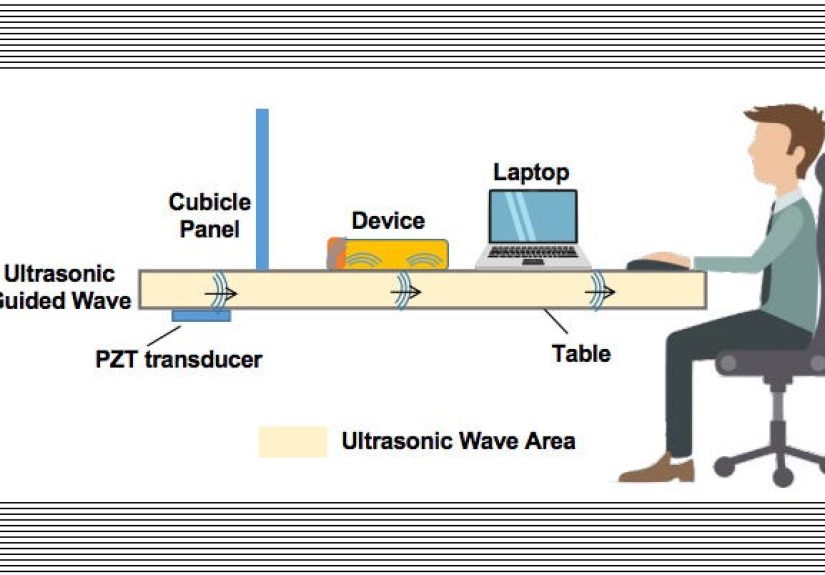
From “barely noticeable” to “detectable at a distance”
Some studies explore vibrations that are subtle enough to avoid human attentionespecially when the phone is sitting on a surface.
Others explore more exotic detection methods (like specialized sensing equipment). You don’t need the sci-fi version to take the
risk seriously, though. The practical takeaway is that vibration can become a signal, and signals can be exploited.
Why this matters beyond spy novels
Covert channels matter most in high-assurance environments (enterprise devices, regulated industries, defense contexts),
but the concepts influence consumer security too. The same mechanisms that make haptics feel nice can also create measurable
artifactsespecially when combined with sensor access that’s easy to request or hard to notice.
Attack Type #3: Web and App Tracking via Motion Signals
Vibration smartphone attack discussions often overlap with a broader privacy issue: motion sensors can contribute to
behavioral profiling and device fingerprinting. Even if an attacker can’t infer your exact PIN,
motion and vibration patterns can still reveal:
- How you hold your phone (one-handed vs. two-handed)
- When you’re walking vs. stationary
- Tap rhythm and interaction habits
- Potentially unique sensor “signatures” across devices
Modern platforms have added more controls over timeespecially for web motion accessbecause “silent sensor access” is a
privacy headache. But ecosystem behavior changes, and not all apps treat sensor data as sensitive by default.
Who’s Most at Risk?
Most people don’t need to panic and throw their phone into a lake (please don’t; the fish have enough problems).
But some situations raise the stakes:
- Frequent PIN entry in public: repeated patterns are easier to learn or infer.
- High-value accounts: banking, crypto wallets, corporate VPNs, admin panels.
- Lots of apps from unknown publishers: the bigger the app surface area, the bigger the risk.
- Older devices or delayed updates: fewer modern privacy protections and security patches.
- Enterprise/BYOD: sensitive data plus mixed personal apps can be a risky combo.
Also worth noting: some attacks become more plausible when attackers can collect data over time. That’s why “quiet” threats
are a concernlow drama, high patience.
Signs Something Is Off
Vibration smartphone attack activity is designed to be subtle, so there’s no guaranteed “tell.” Still, these are worth watching:
- Odd vibration patterns that don’t match your notification settings (especially when the phone is idle).
- Unexpected battery drain or heat when you’re not using the device much.
- Suspicious app behavior (apps that “need” motion access but don’t have a clear reason).
- Weird timing: vibrations that happen right after unlocking, entering a passcode, or opening a sensitive app.
None of these prove an attack by themselves. But they’re good reasons to do a quick security check and tighten settings.
How to Protect Yourself (Practical, Non-Paranoid Edition)
1) Use stronger authentication where it matters
If motion inference attacks ever reduce your PIN search space, longer passcodes and modern authentication help a lot.
Prefer a longer passcode over a short 4-digit PIN for high-value accounts, and use biometrics where appropriate
(with a strong fallback passcode).
2) Keep your OS and key apps updated
Updates aren’t just “new emojis.” They often include privacy controls and sensor-related restrictions. Staying current
reduces exposure to known weaknesses.
3) Audit apps like you’re the bouncer at a very picky club
Delete apps you don’t use. Be skeptical of apps that request broad access without a clear reason. Stick to reputable
developersespecially for keyboard apps, launchers, “battery savers,” and novelty utilities.
4) Reduce unnecessary haptics in sensitive moments
If your phone (or specific apps) let you reduce haptic feedback on lock screens or authentication prompts, consider it.
This doesn’t “solve” the problem, but it can reduce consistent vibration signals associated with sensitive inputs.
5) Use built-in privacy dashboards and permission tools
Modern mobile OSs increasingly show what apps access sensitive resources. While motion sensors may not always be presented
like camera/mic, privacy tooling is improving. Use it to spot apps that behave oddly and to limit what you can.
6) For organizations: treat sensors as data sources
If you manage devices (MDM/UEM), consider policies that limit high-risk apps, restrict sideloading, enforce updates,
and apply strong authentication requirements. The more sensitive the environment, the more “innocent sensors” should be
treated as part of your threat model.
What Platform Changes Have Helped (and What’s Still Tricky)
The mobile ecosystem has slowly moved toward tighter sensor governance. For example, some platforms and app stores have
pushed developers toward clearer disclosure and more constrained sensor access in certain contexts. Sampling-rate limits
and permission prompts in some scenarios can reduce the precision of motion-based inference.
But it’s tricky because motion sensors are legitimately useful. If every accelerometer reading required a scary pop-up,
your fitness tracker would become a fitness guess-er. So the real solution tends to be a mix of:
- better OS-level guardrails for background access and high-frequency sampling
- store review policies that flag suspicious sensor usage
- developer best practices and honest disclosure
- user control that’s understandable (not buried 14 menus deep)
So… Should You Worry?
Think of a vibration smartphone attack the way you think of lockpicking: it’s real, it’s been demonstrated,
and it’s more relevant in some situations than others. Most people face bigger risks from phishing, weak passwords,
and installing sketchy apps. But the vibration angle matters because it highlights a broader truth:
security isn’t only about what your phone showsit’s also about what your phone reveals.
If you keep your phone updated, avoid shady apps, use strong authentication, and take privacy settings seriously,
you’re already doing the best “everyday defense” against this entire class of sensor-based threats.
Experiences Related to Vibration Smartphone Attack (Realistic Scenarios and Lessons)
To make this topic feel less abstract, here are realistic “what it looks like” experiences people and teams often describe
when dealing with sensor-based risks. These aren’t horror storiesmore like teachable moments where the phone’s tiny wiggles
turn into big security conversations.
Experience #1: The “Why Is My Phone Buzzing?” moment
Someone notices a faint, repeating vibration pattern late at nighttoo gentle to feel in-hand, but obvious when the phone
is resting on a wooden nightstand that acts like a tiny amplifier. At first, they assume it’s a notification loop or a
misconfigured app alert. The surprising part is that the vibration isn’t tied to visible notifications at all. The “lesson”
here is simple: vibrations can be triggered by apps for reasons that aren’t obvious to the user, and a pattern that seems
harmless can still be a signal worth investigating.
Experience #2: The security review that starts with a game app
In a workplace device audit, a team finds an innocuous-looking game that reads motion sensors constantlybecause it uses tilt
controls. That’s not suspicious by itself. But during the review, the team realizes the same always-on motion stream could,
in theory, provide a side channel during authentication flows if combined with other risky behavior. Nothing “bad” is proven,
but the organization still changes its mobile policy: games can stay, but only on personal devices; corporate devices get a
tighter app allowlist. The takeaway: sometimes the right response isn’t panicit’s segmentation and sensible rules.
Experience #3: The “PIN on the go” habit
A person unlocks their phone while walkingevery time. The habit feels normal. But from a sensor perspective, walking adds
noise, which sounds like it would make inference harder. The twist is consistency: if someone always unlocks in the same
posture, with the same grip, and uses the same short PIN, the repeated patterns can still become useful to an attacker in a
long-term collection scenario. The practical improvement is boring but effective: switch to a longer passcode for sensitive
access, reduce repeated PIN entry where possible, and rely on stronger authentication methods.
Experience #4: The “two apps that shouldn’t be friends” scenario
A developer learns about colluding-app concepts and suddenly sees their phone differently. One app has legitimate access to
data (say, enterprise email). Another appinstalled casuallyhas no business reason to trigger vibration patterns or to keep
motion sensors active in the background. The experience becomes a personal reset: remove apps that don’t justify their access,
favor well-known publishers, and treat “free utility apps” with the skepticism usually reserved for “free candy” in a van.
Experience #5: The “privacy settings treasure hunt”
Many people only discover motion-related controls after reading about sensor privacy. They dig into settings and realize that
some motion access (especially in browsers or specific app contexts) may be governed by toggles they’ve never touched.
The experience is equal parts empowering and mildly annoyingbecause nobody wants to become a part-time settings archaeologist.
Still, the best outcome is common: after a few minutes of cleanup (uninstalling unused apps, updating the OS, adjusting haptics
for lock screens where available), they feel more in control, and the device becomes less “mysteriously busy” in the background.
Across all these experiences, one theme keeps showing up: sensor-based threats don’t require you to become a cybersecurity
wizard. They mostly reward the same habits that protect against everyday mobile risksupdates, app hygiene, strong authentication,
and a willingness to question “Does this app really need to do that?”