Table of Contents >> Show >> Hide
- What Is an ECM File?
- How ECM Works Without Getting Too Nerdy
- How to Open an ECM File
- What Happens After You Decode the ECM File?
- Can You Convert an ECM File to ISO?
- Common Problems When Opening ECM Files
- ECM vs. Other Disc Image Formats
- Best Practices for Handling ECM Files
- FAQ About ECM Files
- Real-World Experiences With ECM Files
- Final Thoughts
Every so often, a mysterious file lands on your desktop with the extension .ECM, and suddenly your normal bag of tricks stops working. Double-click it? Nothing useful. Mount it? Nope. Open it in your favorite media tool? Also nope. It feels like your computer is staring back at you and saying, “Nice try.”
The good news is that an ECM file is not broken, cursed, or secretly plotting against you. In most cases, it is a disc image that has been processed to remove redundant error-correction data so the file can compress more efficiently. In plain English: it is a space-saving wrapper often used for older CD-based disc images, especially in archiving and retro-gaming circles.
This guide explains exactly what an ECM file is, why it exists, how to open one, and what to do after you decode it. Along the way, we will also clear up the usual confusion around BIN, CUE, ISO, RAR, and the classic “Why won’t this thing open?” moment.
What Is an ECM File?
An ECM file is typically an Error Code Modeler disc image. It is designed to make certain kinds of CD image files smaller by stripping out ECC and EDC data, which stand for error correction and error detection codes. Those codes are useful on an actual disc, but in many raw disc-image sectors they are also predictable, which means software can remove them and later rebuild them without losing the original data.
That is the secret sauce. ECM is not a magic compression format in the same way ZIP or RAR is. It is more like a very clever pre-compression cleanup step. It removes information that can be regenerated later, then lets another compression tool do a better job. Think of it as packing for a trip and realizing you do not need to bring three identical black T-shirts. Same trip, less luggage.
Why ECM files exist
ECM was created to help raw CD image formats compress better. Files such as BIN, CDI, NRG, CCD, and similar raw-sector formats often include predictable sector data. By removing that redundant data first, the file usually becomes noticeably smaller when compressed with tools like RAR or 7-Zip.
That is why you may see filenames like these:
game.bin.ecmdisc_image.nrg.ecmbackup.cdi.ecm.rar
In many cases, the .ECM file is only one step in the chain. It may also be packed inside a .rar, .7z, or .zip archive. So if you try to “open the ECM file” and hit a wall, the real job may be two steps long: extract the archive first, then decode the ECM file.
What an ECM file is not
It is also worth clearing up one common mix-up: .ECM does not usually mean Enterprise Content Management when you are dealing with a file extension on a home computer. In this context, it almost always refers to the disc-image format. It is also not the same thing as .EMC, .EMM, or random similarly named file extensions that just happen to look like they are related. File extensions are sneaky like that.
How ECM Works Without Getting Too Nerdy
Here is the simple version: a raw CD image is made up of sectors, and some of those sectors contain data that can be mathematically reconstructed. ECM removes that reconstructable information. Later, when you decode the file with the proper tool, the missing ECC/EDC data is regenerated and the original image is restored.
This process is considered lossless, which means the recovered disc image matches the original structure when the file is decoded properly. That is why ECM has long been used by people who wanted smaller archives without throwing away actual content.
One important detail: not every disc image benefits equally. Raw images that store full 2352-byte sectors can see meaningful savings. A standard “cooked” ISO, however, already stores 2048-byte sectors and usually does not include the same extra ECC/EDC information. In those cases, ECM has little or nothing useful to remove. So if you try to ECM an ISO and expect a miracle, the file may shrug politely and stay almost the same size.
How to Open an ECM File
Here is the big truth most people need right away: you usually do not open an ECM file directly the way you open a PDF, MP3, or JPG. Instead, you decode it back into its original disc image format. Once that is done, you can mount it, burn it, convert it, or use it with compatible software.
Step 1: Check whether the ECM file is inside another archive
If the file ends in something like .ecm.rar, .ecm.7z, or .ecm.zip, start there. Use an archive tool such as 7-Zip or PeaZip to extract the contents. After extraction, you should be left with the actual .ECM file.
Step 2: Decode the ECM file
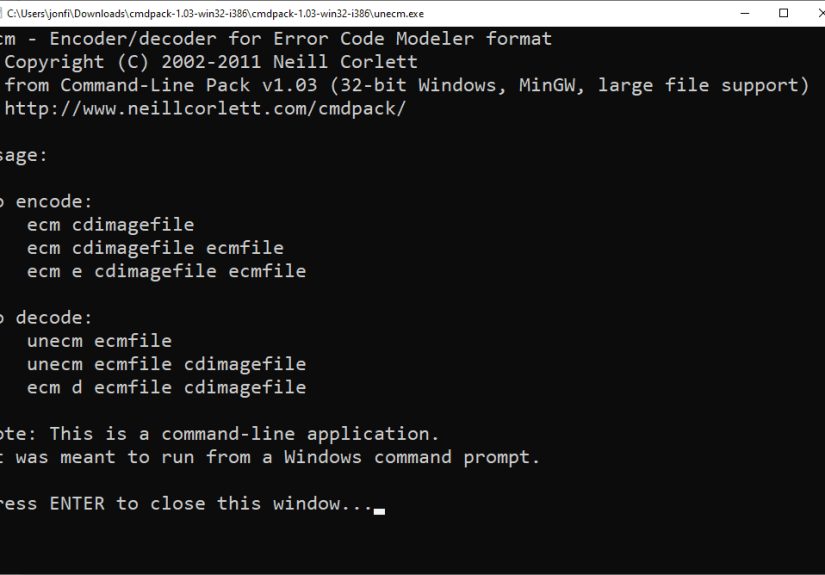
The classic tool for this job is unecm, which is part of the ECM utility family originally associated with Neill Corlett. There are also GUI front ends and related tools, but unecm remains the name you will see most often.
On Windows
Windows users often have two easy options:
- Use a graphical helper such as an ECM GUI tool.
- Use
unecm.exedirectly from the command line.
A very common quick method is to drag the ECM file onto unecm.exe. That tells the utility to decode the file and recreate the original disc image in the same folder.
You can also use Command Prompt:
If you want to specify the output name manually, use:
On macOS and Linux
On macOS and Linux, the workflow is similar, but you will usually run the tool in Terminal. Depending on how the tool is packaged on your system, the command may be called unecm or ecm-uncompress.
Or, on some Debian/Ubuntu-style systems:
That command typically recreates the original disc image automatically, based on the input filename.
What Happens After You Decode the ECM File?
Once the ECM file is decoded, you usually get back a more familiar image file such as BIN, IMG, NRG, CDI, or occasionally ISO. What you do next depends on what the original image format was.
If you get a BIN file
A .bin file often works together with a .cue file. The BIN contains the raw disc data, while the CUE file describes the disc layout, track structure, and sometimes audio track placement. If you are working with software that expects BIN/CUE, keep both files in the same folder and make sure the filenames match correctly.
This matters a lot for older CD-based software and games. If the CUE file points to the wrong BIN filename, or the files are separated, the image may fail to load even though nothing is technically wrong with the data. Classic file-format drama: the data is fine, but the naming is a mess.
If you get an ISO file
An .iso file is much easier to deal with. Modern operating systems can often mount ISO files directly, which means you can browse the contents or use the image without extra conversion. If your goal is simple access rather than preservation, this is the least dramatic outcome.
If you get CCD, CDI, NRG, or IMG
These are other disc image formats. Some programs can open or convert them directly, while others prefer you to convert them into BIN/CUE or ISO after decoding. The key point is that ECM is just the outer wrapper; once it is removed, the real file type determines your next step.
Can You Convert an ECM File to ISO?
Yes, but there is an important catch: the reliable first step is decoding, not converting. An ECM file should be decoded back into its original image format first. After that, you can decide whether conversion to ISO makes sense.
For example:
game.bin.ecmbecomesgame.bin- If needed,
game.binand its matchinggame.cuecan then be converted by a compatible disc-image utility
Some guides online casually say “convert ECM to ISO,” but that is a shortcut description. The technically accurate sequence is decode ECM, then convert the restored image if necessary.
Common Problems When Opening ECM Files
The file will not open at all
You may be trying to open the ECM file in the wrong kind of program. Remember, ECM files are typically decoded, not viewed. Use unecm or another ECM-capable tool first.
The decoded file still does not work
Check the output type. If you got a BIN file, you may also need the matching CUE file. If you got an NRG or CDI file, you may need software that supports those formats specifically.
The CUE file is present but the program still fails
Open the CUE file in a text editor and confirm that the referenced filename matches the decoded BIN exactly, including spaces and capitalization where relevant. A mismatched filename is one of the most common causes of loading failures.
The file is really an archive, not just ECM
If the original download was a RAR, 7Z, or ZIP package, extracting only part of it can leave you with missing pieces. Make sure the full archive is extracted before you try decoding the ECM file.
You expected a giant size reduction and did not get one
That is not necessarily a problem. Compression gains depend on the disc-image structure. Some files shrink nicely; others barely budge. ECM is smart, but it is not a wizard wearing a cape made of free storage.
ECM vs. Other Disc Image Formats
| Format | Main Purpose | Can You Usually Open It Directly? | Notes |
|---|---|---|---|
| ECM | Prepare raw disc images to compress better | No | Usually decode first with unecm or ecm-uncompress |
| ISO | Standard disc image | Usually yes | Often mountable directly in modern operating systems |
| BIN/CUE | Raw disc image plus track layout | Often yes, with the CUE file | Important for discs with multiple tracks or audio |
| NRG/CDI/CCD | Vendor- or tool-specific disc image formats | Sometimes | Support varies by app and platform |
Best Practices for Handling ECM Files
- Keep the original archive until you confirm the decoded image works.
- Store the BIN and CUE together if both are required.
- Do not rename files casually unless you also update the CUE file.
- Decode first, convert second.
- Do not assume every
.ECMfile will become an ISO.
FAQ About ECM Files
Is an ECM file safe?
The file format itself is not inherently dangerous. As with any downloaded file, the real safety issue is where it came from. Scan unknown downloads and be cautious with bundled archives or executables.
Can 7-Zip open ECM files directly?
7-Zip is excellent for extracting archives, but an ECM file usually needs a dedicated decoder such as unecm. In many cases, 7-Zip helps with the archive wrapped around the ECM file, not the ECM format itself.
Why is my ECM file associated with retro games so often?
Because raw CD-based game images were a natural fit for ECM. The format helped reduce download size while preserving the ability to reconstruct the original disc image later.
Can I burn an ECM file directly to disc?
Usually no. Decode it first into its original image format, then burn or mount the restored image.
Do I lose quality when decoding an ECM file?
Not when the file is valid and decoded properly. The format is meant to be lossless, rebuilding predictable sector data that was removed during ECM encoding.
Real-World Experiences With ECM Files
If you have never handled an ECM file before, the first encounter can be oddly memorable. Most people meet the format in the least glamorous way possible: they download what looks like a normal disc image, double-click it, and discover their computer has absolutely no interest in cooperating. The file sits there with the confidence of something that knows it is technically correct while still being deeply inconvenient.
A common experience goes like this: someone finds an old software backup or a vintage game image packed as .bin.ecm. They assume it is basically an ISO in a funny hat. Ten minutes later, they have tried mounting it, renaming it, opening it in three random programs, and maybe whispering “please” at the screen. Nothing happens. That is the moment ECM teaches its first lesson: this file is not broken; it just expects the right workflow.
Another very normal experience is discovering that the ECM file is not even the final obstacle. It might be tucked inside a RAR archive, which means step one is extraction, and step two is decoding. People often feel stuck because they skip the first half of the chain or stop after the first half. In practice, ECM problems are usually not “mystery corruption” problems. They are sequence problems. Do the steps in the right order, and the file often becomes perfectly ordinary.
There is also the classic CUE-file surprise. A user successfully decodes game.bin.ecm back into game.bin, feels victorious for about thirty seconds, and then discovers the image still will not load in the target application. Why? Because the software wanted the .cue file, not just the BIN. Or the CUE exists, but it references the wrong filename because someone renamed the BIN along the way. In other words, the ECM stage went fine, but the disc-layout stage still needed attention. This is where patience beats panic.
People who work with older disc-based formats for preservation or compatibility reasons often end up appreciating ECM after the initial annoyance wears off. Once you understand the format, it starts to make sense. It is not trying to be flashy. It is trying to be efficient. And efficiency is not always glamorous. Sometimes it looks like a command-line utility from another era quietly doing math in the background while modern software pretends not to notice.
The biggest practical takeaway from real-world use is simple: ECM files reward methodical handling. Keep your files together, check whether a CUE sheet is involved, extract outer archives first, decode with the proper tool, and only then decide whether you need to mount, burn, emulate, or convert the result. Once users understand that pattern, ECM stops feeling like a weird roadblock and starts feeling like what it really is: a smart, if slightly grumpy, way to package certain raw disc images.
Final Thoughts
An ECM file is not something you casually double-click and admire. It is a practical, technical format built to make certain raw disc images smaller and easier to compress by removing rebuildable ECC/EDC data. To open one, you normally decode it first with a tool such as unecm or ecm-uncompress, then work with the restored disc image like you would any other BIN, ISO, NRG, or similar file.
Once you know that, the mystery evaporates. The format stops looking like a problem and starts looking like a process. And that is really the whole story of ECM files: not broken, not magical, just misunderstood by one double-click too many.