Table of Contents >> Show >> Hide
- Why Hide Your Phone Number on Facebook in the First Place?
- What Hiding Your Phone Number Actually Means
- Way 1: Hide Your Phone Number on Facebook Without Deleting It
- Way 2: Remove Your Phone Number From Facebook Entirely
- A Smart Bonus Step: Limit Who Can Find You by Phone Number
- What If Meta Has Your Number Even If You Never Added It?
- Common Problems People Run Into
- Best Practices for Better Facebook Privacy
- Final Thoughts
- Experience-Based Insights: What People Usually Notice After Hiding Their Phone Number
- SEO Tags
Facebook has a funny relationship with personal information. On one hand, it wants to help friends find you. On the other, sometimes it feels a little too enthusiastic about helping literally everyone find you. If your phone number is attached to your account, that can be convenient for login, account recovery, two-factor authentication, and the occasional “Oh right, that’s how Facebook still knows I exist” moment. But convenience and privacy are not the same thing.
If you want more control, the good news is that you can usually hide your phone number on Facebook in two practical ways. First, you can make the number invisible on your profile so other people cannot see it. Second, you can remove the phone number from your account entirely if you no longer want Facebook to keep it there. Those are the two main fixes, and choosing the right one depends on whether you still want the number for security or recovery.
This guide walks through both methods in plain English, without the usual maze of confusing menu labels and tiny privacy toggles. It also covers what hiding your number actually does, what it does not do, and a few privacy checks that are worth doing while you are already poking around in Facebook’s settings like a responsible adult with trust issues.
Why Hide Your Phone Number on Facebook in the First Place?
Your phone number is more sensitive than most people think. An email address can be changed. A username can be swapped. A phone number, though, tends to follow you around like a loyal but nosy sidekick. It can connect your social accounts, messaging apps, business listings, and identity verification systems. That means when it shows up in the wrong place, it can create headaches fast.
Many people decide to hide their Facebook phone number for a few common reasons. Maybe they do not want casual acquaintances seeing it on their profile. Maybe they are selling something on Facebook Marketplace and do not want random callers. Maybe they are trying to avoid spam, unwanted texts, or awkward “Hey, I found your number on Facebook” messages from people they absolutely did not invite into their weekend. Some users also want tighter privacy after job changes, breakups, moves, or online harassment concerns.
There is also the bigger privacy picture. Even if you trust your friends, you may not want one piece of data doing too much work behind the scenes. A phone number can be used for account recovery, friend suggestions, and identity matching across systems. That is why so many privacy-conscious users revisit this setting sooner or later.
What Hiding Your Phone Number Actually Means
Before you start tapping through settings, it helps to know the difference between hiding and removing. These are not the same thing.
Option 1: Hide It From Your Profile
When you hide your phone number, the number usually stays attached to your account, but the audience for that field changes. In other words, Facebook still has it, but other people do not see it on your profile. This is useful if you still want the number for login verification or account recovery.
Option 2: Remove It From Your Account
When you remove the number, it is no longer listed as contact information on the account. This gives you more privacy, but it may also affect things like login, security alerts, or text-based account recovery. That can be perfectly fine, as long as you have another recovery option set up, such as a current email address or an authentication app.
Think of it like this: hiding is putting the phone number behind a curtain, while removing is kicking it out of the building.
Way 1: Hide Your Phone Number on Facebook Without Deleting It
This is the best choice if you still want your number connected to your Facebook account but do not want other people to see it. The exact layout may vary a little depending on whether you are using the mobile app, a mobile browser, or desktop, because Facebook enjoys rearranging furniture just often enough to keep everyone humble. Still, the general path is usually very similar.
How to hide your Facebook phone number on mobile
- Open the Facebook app and go to your profile.
- Look for See your About info, See More About Yourself, or a similar profile details option.
- Scroll to Contact info or Contact and Basic Info.
- Tap Edit next to your phone number.
- Open the audience selector next to the number.
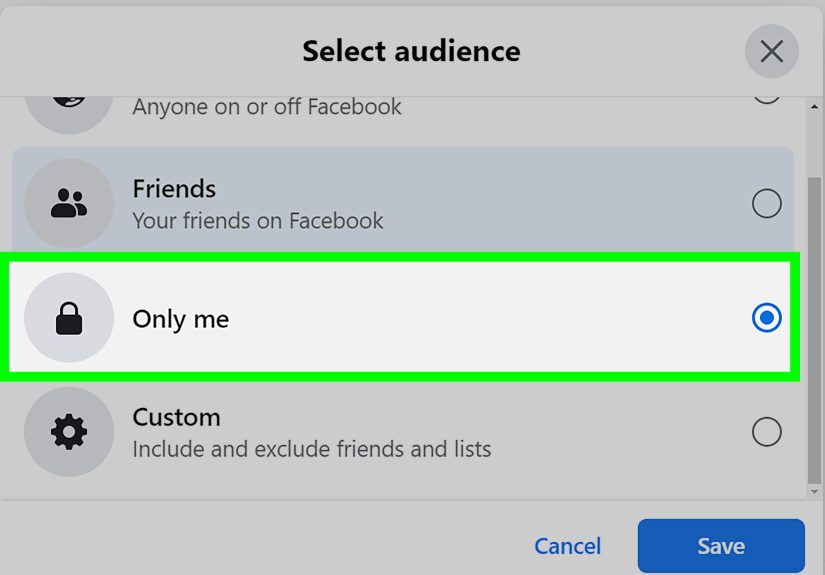
- Choose Only Me.
- Save the change.
How to hide your Facebook phone number on desktop
- Log in to Facebook on a browser and open your profile.
- Go to your About section.
- Open Contact and Basic Info.
- Find your phone number and click the privacy or audience setting beside it.
- Select Only Me.
- Confirm and save.
Once this setting is changed, your number should no longer be visible to the audience that could previously see it. If it had been set to Public or Friends, switching it to Only Me is the fastest privacy win in the whole process.
When this method makes the most sense
Use this method if you still rely on that number for Facebook login, password resets, security codes, or alerts. It is the middle path: better privacy without giving up the convenience of a linked number. For most users, this is the simplest fix and the one that causes the fewest side effects.
Way 2: Remove Your Phone Number From Facebook Entirely
If you no longer want your number attached to Facebook at all, removing it is the stronger option. This is often the better move for people who use an authentication app instead of text-based verification, or for anyone who simply does not want their number sitting in another account settings panel forever.
How to remove your phone number from Facebook
- Open Facebook and go to Settings & Privacy.
- Tap or click Settings.
- Go into Accounts Center.
- Open Personal details.
- Choose Contact info.
- Select your phone number.
- Choose Delete or Remove.
- Confirm the action if Facebook asks for your password or a verification step.
On some versions of Facebook, you may see the option to manage contact info directly from your profile, then move into account-level settings from there. The wording can vary, but the goal is the same: get to the saved contact information and remove the number from the account.
What to do before you delete it
Before removing your number, make sure you are not cutting off your own escape route. Check that your recovery email address is current. If you use two-factor authentication, consider switching to an authentication app or security key before you delete the number. That way, you keep your account secure without depending on SMS.
This is especially important if the phone number is old, inactive, or no longer fully under your control. An outdated recovery number is not just useless. It can be a liability.
A Smart Bonus Step: Limit Who Can Find You by Phone Number
Even after you hide your number on your profile, it is worth reviewing how people can find you on Facebook. This setting is separate from profile visibility, which is where many users get tripped up. They hide the number, feel victorious, and then assume the job is done. Facebook, naturally, has a sequel.
Go to your privacy settings and look for a section like How people find and contact you. If you see an option related to who can look you up using the phone number you provided, set it to the most restrictive option available. If your interface offers Friends or a similar limited audience, choose that over a broader setting.
This matters because hiding a number on the profile and controlling phone-based discoverability are related, but not always identical. If your goal is maximum privacy, do both.
What If Meta Has Your Number Even If You Never Added It?
Here is the part that makes people stare at the wall for a minute. Sometimes Meta may have contact information because someone uploaded their address book from Facebook, Messenger, or Instagram. In plain English, your number might have traveled there because somebody else handed over their contacts list like party favors.
If that concerns you, you can also look for Meta’s contact removal tool, which is designed for checking whether contact information exists in Meta’s address-book database and requesting deletion if it does. That is separate from hiding your number on your own Facebook profile, but it is useful for people who want a more complete privacy cleanup.
Common Problems People Run Into
The setting will not stay changed
If your privacy change does not seem to stick, update the app, refresh the page, and try again from a browser if you were using mobile. Facebook settings occasionally act like they are powered by pure mood. Logging out and back in can also help.
You cannot remove the number
If Facebook requires the number for a current security setup, change your recovery or two-factor authentication method first. Once another recovery method is in place, try deleting the number again.
Your number is hidden, but you still feel exposed
That feeling is not irrational. Hiding the number is helpful, but it is only one part of Facebook privacy. Also review your public profile details, friend list visibility, email visibility, search engine indexing, and audience settings for future posts.
Best Practices for Better Facebook Privacy
- Use Only Me for sensitive profile fields whenever possible.
- Keep your recovery email current before removing a phone number.
- Use an authentication app instead of SMS if you want stronger account security.
- Review the Privacy Checkup tool every few months.
- Check for old phone numbers on your account and delete the ones you no longer use.
- Turn off contact uploading if you do not want Facebook or related apps syncing your address book.
None of these changes make you invisible, but together they make your profile much less easy to map, match, and misuse. On social media, that counts as a very respectable victory.
Final Thoughts
If you are wondering how to hide your phone number on Facebook, the answer is refreshingly simple once you know where to look. You have two main choices: hide the number from your profile or remove it from your account entirely. The first option keeps convenience. The second option gives you a cleaner privacy slate.
The best move depends on how you use Facebook. If you still need the number for account access, set the audience to Only Me. If you would rather not keep the number on Facebook at all, remove it and switch to a different recovery or authentication method. Either way, do not stop at the phone number. Treat it as the beginning of a broader privacy tune-up, not the whole concert.
Because on Facebook, one tiny setting can make the difference between “my profile feels under control” and “why is my dentist from 2014 suddenly texting me.”
Experience-Based Insights: What People Usually Notice After Hiding Their Phone Number
One of the most common experiences people report after hiding their phone number on Facebook is simple relief. Not dramatic movie-scene relief. Just the quiet, satisfying kind that comes from knowing one more piece of personal information is not hanging out in public. For users who keep a fairly open profile, changing that one setting often feels like closing a window they forgot was open.
Job seekers often notice the difference first. When someone is applying for work, networking online, and cleaning up their digital presence, Facebook can suddenly feel less like a social platform and more like a messy closet full of old receipts. Hiding a phone number becomes part of a larger effort to look professional and reduce unnecessary exposure. The number might not have caused a visible problem yet, but many people decide not to wait for one.
People who sell items locally also tend to have strong opinions about this setting. A lot of them start with the best intentions. They want to be reachable, move a couch quickly, and answer buyer questions fast. Then the messages spill into texts, the texts spill into late-night calls, and suddenly a ten-dollar lamp is controlling the weekend. Once they hide their number on Facebook and keep communication inside Messenger, the whole experience usually feels cleaner and easier to manage.
Another common experience involves old connections. Not dangerous ones, just unexpected ones. Former classmates, distant relatives, ex-coworkers, and people from earlier life chapters have a magical ability to reappear online the minute your information is too easy to find. Users who hide their number often say the change is less about secrecy and more about boundaries. They still want to exist online. They just do not want every casual connection upgraded to direct phone access.
Some users also discover that hiding the number gives them a push to review everything else. Once they fix one privacy setting, they start checking email visibility, friend list settings, public profile details, and search discoverability. It becomes a kind of digital spring cleaning. One drawer gets organized, and suddenly the whole room is under inspection. That is usually a good thing.
There is also a practical lesson people learn the hard way: removing a number without checking recovery settings first can be annoying. Very annoying. The smart users are the ones who update their email, verify their authentication method, and then remove the number. The frustrated users are the ones who discover, at the worst possible time, that the deleted number was still their backup route into the account. Privacy is excellent. Getting locked out of your own profile is less charming.
Overall, the real-world experience is usually positive. People feel more in control, less exposed, and more intentional about what Facebook can show, store, or use. Hiding your phone number is not the entire privacy solution, but it is one of those small account changes that punches above its weight. It takes a few minutes, costs nothing, and can spare you a surprising amount of nonsense later.