Table of Contents >> Show >> Hide
- Before You Start: Do You Actually Need to Register?
- How to Register Drones: 10 Steps
- Step 1: Confirm your takeoff weight and your purpose
- Step 2: If you’re recreational, pass TRUST before you fly
- Step 3: Gather the info you’ll need (so you don’t rage-quit mid-form)
- Step 4: Create an account on the FAA’s official registration portal
- Step 5: Choose the correct registration type
- Step 6: Enter your operator details carefully
- Step 7: Add drone details (and Remote ID info if needed)
- Step 8: Pay the fee and submit your registration
- Step 9: Save proof of registration and mark your drone
- Step 10: Stay compliant: Remote ID, renewals, and updates
- Specific Examples (Because This Is Where People Get Tripped Up)
- Common Registration Mistakes (and How to Avoid Them)
- FAQ: Fast Answers to the Questions Everyone Asks
- of Real-World Experiences: What Registering a Drone Feels Like
- Conclusion
Registering a drone in the United States sounds like it should involve a DMV line, a paper ticket number, and at least one person loudly sighing.
Luckily, it’s mostly the opposite. FAA drone registration is online, relatively quick, and costs less than many people spend on coffee while watching
drone videos they swear are “research.”
In plain English, registration is the FAA’s way of connecting a real human to a flying robotso if something goes wrong, the drone doesn’t get to
“mysteriously disappear” into the sunset like a cartoon villain. If your drone meets the registration requirement, doing this right protects you from
fines, helps law enforcement identify drones when needed, and keeps you aligned with other big rules like Remote ID.
Before You Start: Do You Actually Need to Register?
The biggest trigger for FAA drone registration is weight at takeoff (including the battery and any accessories). In general, drones
that weigh more than 0.55 lb (250 g) and less than 55 lb must be registered. If you’re flying purely for fun with a
drone under 250 grams, you typically don’t need to registerbut you still must follow the recreational safety rules.
Two common operation types you’ll choose from
- Recreational flying (the FAA’s “Exception for Limited Recreational Operations”): you’re flying for fun/personal enjoyment.
-
Part 107: you’re flying for work, a side hustle, a school project that benefits an organization, content creation tied to a business,
or anything beyond “just for fun.”
Quick reality check (because the internet loves loopholes)
- If your “recreational” flight is helping your business (even indirectly), you’re likely in Part 107 territory.
- Adding accessories (lights, prop guards, bigger battery) can push a “sub-250g” drone over the limit at takeoff.
- Registration is not the same as permission to fly anywhere. Airspace rules and local restrictions still apply.
How to Register Drones: 10 Steps
Step 1: Confirm your takeoff weight and your purpose
Start with the simplest question: Does your drone weigh over 250 grams at takeoff? If yes, you’re likely registering. Next question:
Are you flying recreationally or under Part 107? This choice matters because the FAA handles these registration types differently (and you
don’t want to pay twice because you picked the wrong lane).
Step 2: If you’re recreational, pass TRUST before you fly
Recreational flyers are required to pass the TRUST (The Recreational UAS Safety Test) and keep proof of completion. It’s designed to
teach the basicsthink “driver’s ed,” but with fewer parallel parking nightmares. Save the certificate somewhere you can actually find later (your
future self will thank you).
Step 3: Gather the info you’ll need (so you don’t rage-quit mid-form)
Before you open the registration site, collect your basics: full legal name, physical mailing address, email, and a way to pay the fee. You’ll also
want your drone’s make/model, and if applicable, a Remote ID serial number (some setups ask for it). Having everything ready turns registration into a
quick errand instead of a multi-day saga.
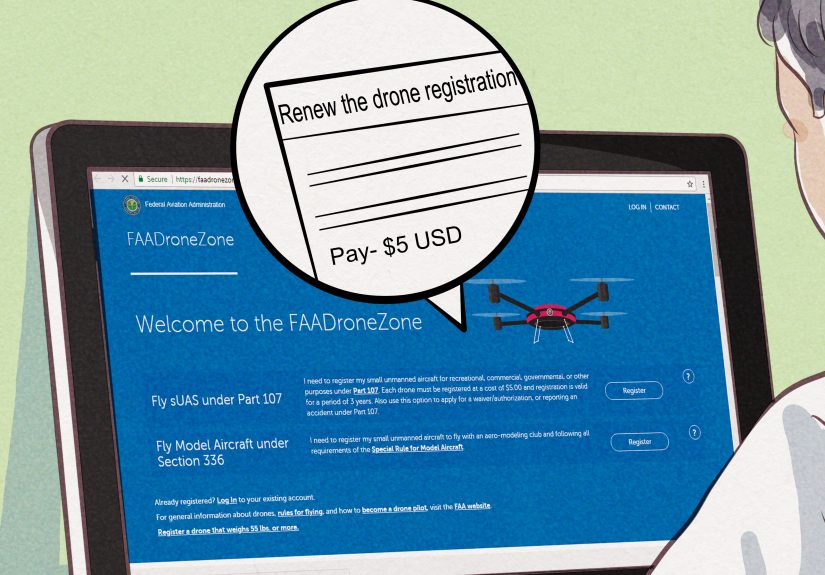
Step 4: Create an account on the FAA’s official registration portal
Use the FAA’s DroneZone portal to register. Create your account using a real email you check (not the one you made in middle school with “xX”
sprinkled everywhere). After verification, sign in and head to the registration section.
Step 5: Choose the correct registration type
Select Recreational if you are flying only for fun/personal enjoyment under the exception rules. Select Part 107 if
you hold (or are operating under) a Remote Pilot Certificate and your flights are not purely recreational. This choice affects whether one registration
covers your recreational inventory or whether each aircraft needs its own Part 107 registration entry.
Step 6: Enter your operator details carefully
This step is straightforward, but accuracy matters. Use your legal name and correct address. This is also where you’ll want to double-check spelling,
because nothing ruins “quick and easy” like a typo that forces you into support tickets and follow-ups later.
Step 7: Add drone details (and Remote ID info if needed)
Depending on your registration type, you’ll either register under a recreational inventory approach or register individual aircraft for Part 107.
You may also be prompted for Remote ID information. If your drone has Standard Remote ID, it typically broadcasts an ID; if it uses a broadcast module,
that module’s details matter. Don’t guessuse what the manufacturer provides.
Step 8: Pay the fee and submit your registration
The FAA registration fee is typically $5 and is valid for three years (fees and exact handling depend on operation
type). Pay through the portal, submit, and wait for confirmation. This is the moment you officially become the parent/guardian of a tiny aircraft.
Congratulationsyour drone now has paperwork.
Step 9: Save proof of registration and mark your drone
After approval, you’ll get a registration number and/or documents. Save a digital copy and keep it accessible when you fly. Then mark your
drone with the registration number in a way that’s readable. Many pilots use a small label on the body or an armclean, legible, and not
flapping in the prop wash like a little white flag.
Step 10: Stay compliant: Remote ID, renewals, and updates
Registration isn’t “set it and forget it.” If your drone requires registration, Remote ID rules may apply unless you fly within an FAA-Recognized
Identification Area (FRIA). Also, note your expiration date and renew on time. If your address or other info changes, update it so your registration
stays accurate. And always check airspace rules before flightsregistration is only one piece of the compliance puzzle.
Specific Examples (Because This Is Where People Get Tripped Up)
Example 1: A sub-250g drone that becomes “over 250g”
You buy a lightweight drone marketed as “under 250g.” Then you add prop guards, a strobe for night visibility, and a bigger battery. Now your takeoff
weight crosses 250 grams. Even if you’re just filming your dog doing zoomies, you may now need FAA registration (and Remote ID compliance, depending on
the setup). Moral of the story: the scale is the boss.
Example 2: Real estate photos for a friend
You’re not charging money, but the purpose is tied to selling a house. That’s generally not “just for fun.” This is the kind of scenario that often
pushes pilots into Part 107 operations, meaning you’d need the appropriate certificate and the correct registration type for that
operation.
Example 3: You register recreationally, then later earn Part 107
Many pilots start recreational, then go Part 107 after they realize drones are more addictive than streaming shows. Be aware that operation type matters.
Your registration must match how you’re flying. If you switch how you fly, plan your registration and documentation accordingly so you’re covered for the
missions you actually do.
Common Registration Mistakes (and How to Avoid Them)
- Picking the wrong operation type: Decide upfront: purely fun (recreational) or anything else (Part 107).
- Forgetting takeoff weight includes accessories: Your drone’s “listed weight” isn’t always your flight weight.
- Not marking the drone: A registration number in your email is not the same as a registration number on the aircraft.
- Letting registration expire: Put the renewal date on your calendar like it’s a birthday you can’t afford to forget.
- Assuming registration equals permission: You still need to follow airspace rules, local park rules, and safety guidelines.
FAQ: Fast Answers to the Questions Everyone Asks
Do I need to register if I only fly indoors?
FAA registration is tied to aircraft and operation rules, but many people treat indoor-only flights differently in practice. If your drone is otherwise
required to be registered and you might ever fly outdoors, it’s safer to be properly registered rather than trying to build a compliance plan around
“I swear it never leaves my living room.”
Can I register even if my drone is under 250 grams?
Some pilots choose to register anyway for simplicity or future flexibility. But the key point is whether registration is required for your
current use and takeoff weight.
Does registration cover local laws?
No. Registration is federal. States, cities, parks, and venues may have additional restrictions (including “no launch/no land” rules). Always verify
where you’re flying, not just whether you’re registered.
of Real-World Experiences: What Registering a Drone Feels Like
Most first-time drone owners have the same emotional arc: excitement, confidence, and then a brief moment of panic when they realize “aircraft” is a
real word that now applies to something sitting on their kitchen table. The good news is that registration is usually less dramatic than people expect.
The most common “hard part” isn’t the websiteit’s deciding which category you belong in and making sure your drone’s takeoff weight is what you think
it is.
A surprisingly typical experience goes like this: someone buys a small drone for travel, sees “249g” on the box, and assumes they’re done. Then they
add a prop guard kit (because crashing is a rite of passage), a strobe (because visibility is smart), and maybe a larger battery for longer flights.
Suddenly, the drone that was “totally under the limit” is now a little over at takeoff. That’s when pilots learn the important lesson that the FAA
cares about real-world takeoff weight, not marketing vibes. People often describe this moment as equal parts annoying and oddly satisfyinglike stepping
on a scale after the holidays and realizing the cookies were, in fact, “that serious.”
Another common story: recreational flyers breeze through TRUST, save the certificate… and then lose it in a folder labeled “Important Stuff” that has
400 screenshots and exactly zero important things. The practical takeaway pilots share is to store your registration proof and TRUST certificate in at
least two placeslike your phone and a cloud driveso you can pull them up quickly if asked. It’s not paranoia; it’s just modern life.
When pilots register under Part 107, the experience is often described as “more official.” Not because the form is scarier, but because it’s connected
to work, responsibility, and sometimes client expectations. People who do their first paid shoot (even a small one) frequently say that having their
registration and documentation in order makes them feel more confident on-site. It’s like showing up to a job with your tools organized instead of
pulling random items from a backpack like a magician with questionable planning.
Finally, the most consistent “real-world” feedback is that registration becomes part of a broader routine: check the weather, check airspace, confirm
batteries, confirm Remote ID setup, and make sure your drone is marked and your proof is handy. Once you build that habit, registration stops feeling
like bureaucracy and starts feeling like what it’s meant to be: a simple baseline for flying responsiblyso you can spend more time capturing smooth
footage and less time wondering if your drone is one park ranger conversation away from ruining your day.
Conclusion
Registering your drone is one of the easiest ways to stay on the right side of FAA rulesespecially once you factor in takeoff weight, operation type,
marking requirements, and Remote ID. Follow the 10 steps above, keep your proof accessible, label your drone clearly, and treat renewal like a normal
part of drone ownership. The payoff is simple: less stress, fewer “Wait, is this legal?” moments, and more time actually flying.