Table of Contents >> Show >> Hide
- Before You Reset: Take 2 Minutes to Save Yourself 20 Minutes
- How to Reset a Lost Hotmail Password on Desktop
- How to Reset a Lost Hotmail Password on Mobile
- What If You No Longer Have Access to Your Recovery Email or Phone?
- How Long Does Hotmail Password Recovery Take?
- What If Your Account Was Hacked?
- What to Do After You Reset Your Hotmail Password
- Common Hotmail Password Reset Problems
- Desktop vs. Mobile: Which Is Better for Recovery?
- Real-World Experiences People Have During a Hotmail Password Reset
- Final Thoughts
Losing your Hotmail password can feel like locking your keys in the car, then realizing the car is also your office, your bank branch, and the place where every password reset link on earth goes to hang out. The good news is that recovering a Hotmail account is usually very doable. The even better news is that Hotmail accounts now run through Microsoft’s account system, so the reset process is fairly organized on both desktop and mobile.
If you cannot sign in to your old @hotmail.com address, this guide walks you through the safest and fastest way to reset it. We’ll cover what to do on a computer, how to handle it on a phone, what to try if you no longer have access to your backup email or phone number, and what to do after you get back in so you do not have to perform this emotional dance again next month.
Quick note: Hotmail still exists as an email address, but password resets are handled through your Microsoft account. That means the steps may mention Outlook, Microsoft account, or account recovery even if your email address still proudly says Hotmail.
Before You Reset: Take 2 Minutes to Save Yourself 20 Minutes
Before you start clicking the reset button like it owes you money, slow down and do three quick checks. First, make sure you are entering the correct email address. Many people have multiple Microsoft addresses, aliases, or old regional domains and accidentally try the wrong one. Second, test whether the password is truly lost or whether AutoFill has been feeding you a stale password from a browser or phone. Third, try signing in from a browser instead of an app if the app keeps looping or showing vague error messages.
You should also ask yourself one important question: Did I forget my password, or do I think my account was compromised? If you simply forgot it, a normal reset is the way to go. If you suspect someone else changed it, added forwarding rules, or started sending strange emails from your account, you need to move a bit more carefully and check the account for security changes after recovery.
How to Reset a Lost Hotmail Password on Desktop
Step 1: Go to the Microsoft sign-in page
Open your browser and head to the Microsoft sign-in page. Enter your Hotmail address, then continue until you see the password screen. Look for the Forgot password? or Reset password option. Microsoft may change the button wording slightly over time, but the route is the same: tell Microsoft which account you are trying to recover, then confirm you are the real owner.
Step 2: Choose how to verify your identity
Microsoft will usually offer one or more verification methods tied to your account. This could be a backup email address, a phone number, or another security method already attached to your Microsoft account. Pick the option you still have access to. You may be asked to confirm part of the masked email address or the last few digits of a phone number before Microsoft sends a code.
This part is where people often pause and squint at the screen like it is a witness lineup. If you recognize the recovery option, choose it. If you do not recognize any of the masked email addresses or phone numbers, do not guess wildly. That can waste time and increase frustration. Move to the recovery tools described later in this guide.
Step 3: Enter the verification code
Check the backup email inbox or your text messages, then enter the code Microsoft sends. If the code does not arrive right away, double-check your spam folder, make sure your phone has service, and confirm you selected the correct recovery destination. Codes can expire, so use the newest one if multiple arrive.
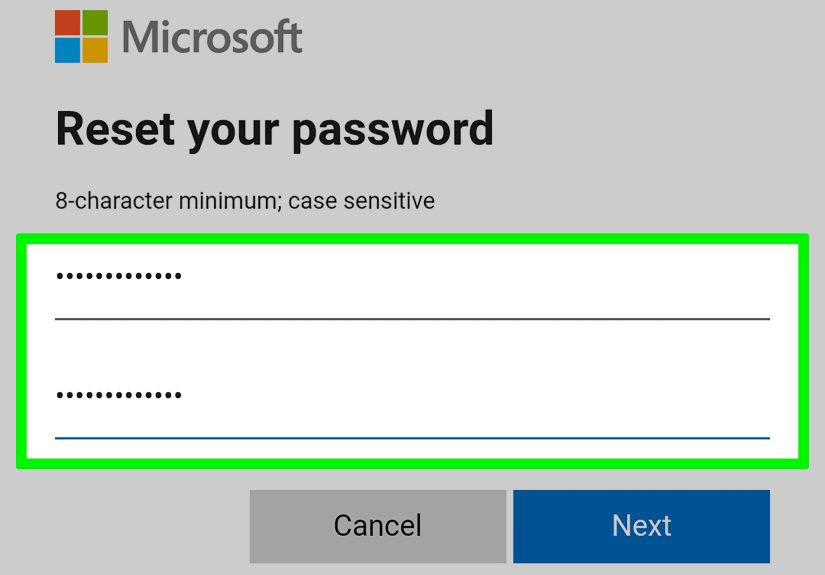
Step 4: Create a new password
Once the code is accepted, Microsoft will let you create a new password. This is not the moment for “Password123” or your dog’s name plus an exclamation point. Choose a strong, unique password that you have never used on another site. If your Hotmail password matches your old shopping login from 2018, that is a security horror movie waiting for a sequel.
A good password is long, unique, and hard to guess. A password manager can generate one for you and store it safely so your brain can return to important tasks, like remembering where you put your coffee.
How to Reset a Lost Hotmail Password on Mobile
The mobile process is almost identical, but the experience can differ depending on whether you are using a browser, the Outlook app, or another mail app. When in doubt, your mobile browser is usually the cleanest path.
Option 1: Use your mobile browser
On iPhone or Android, open Safari, Chrome, or your preferred browser and go to the Microsoft sign-in page. Enter your Hotmail address, tap Forgot password?, and follow the same verification steps used on desktop. This method is handy because it bypasses some app-specific glitches and lets you work directly inside Microsoft’s recovery flow.
Option 2: Start from the Outlook app
If your Hotmail account is already listed in the Outlook app but will not sign in, tap the account sign-in prompt and look for the password recovery option. The app often redirects you to a secure Microsoft sign-in page anyway, so do not be surprised if the app politely shows you the door and sends you to the browser.
Best mobile tip: keep the backup channel nearby
If Microsoft sends the reset code to another email address, make sure you can open that mailbox on the same device or on a second device. If the code is sent by text, keep enough battery on your phone and avoid switching networks mid-process. Mobile recovery is easy when everything works and weirdly dramatic when your battery hits 3 percent.
What If You No Longer Have Access to Your Recovery Email or Phone?
This is the part that causes the most panic, but it is not game over. If you do not see a recovery option you can use, or you no longer have access to the backup email or phone number attached to the account, Microsoft provides additional recovery tools.
Try the Sign-in Helper first
Microsoft’s Sign-in Helper is designed for situations where the normal code-based recovery path is not available. It helps determine the next best step, which may include guided recovery or escalation to the account recovery form. Think of it as the traffic officer of password recovery: not glamorous, but useful when the intersection gets messy.
Use the Microsoft account recovery form
If standard verification fails, the account recovery form is your main fallback. You will need a working email address that Microsoft can use to contact you about the request. It does not have to be another Microsoft account. It can be any email address you can access right now. If necessary, you can create a fresh Outlook account just to receive updates about the recovery request.
When completing the form, include as much accurate detail as possible. Microsoft may ask about old passwords you remember, services you used with the account, or other account details that help prove ownership. This is not a test of your worth as a human being. It is a test of whether you remember enough about your account to convince an automated system that you are, in fact, you.
The more accurate detail you provide, the better your chances. If your request is denied, you can try again, but do not rush and resubmit the same weak answers. Gather better information first, then try again with more complete details.
How Long Does Hotmail Password Recovery Take?
If you still have access to your recovery email or phone, the reset usually takes only a few minutes. If you need the account recovery form, it can take longer. In many cases, Microsoft responds within about 24 hours, though timing can vary depending on the situation.
If your recovery request is unsuccessful, you can try again, but quality matters more than speed. Repeating the same incomplete answers tends to produce the same disappointing result, just with extra emotional damage.
What If Your Account Was Hacked?
If you suspect someone else got into your Hotmail account, treat the situation as more than a forgotten password. Once you regain access, do not stop at changing the password. Do a full cleanup.
Start with your device security
If you clicked a suspicious link, downloaded a shady file, or used a sketchy public device, scan your computer or phone with reputable security tools and update the operating system. Resetting the password without cleaning the device first is like installing a new lock on a door while leaving the window open.
Then review your Microsoft account settings
After you get back into the account, check for signs of tampering. Look for unfamiliar forwarding rules, suspicious automatic replies, connected accounts you do not recognize, or recent security changes that were not made by you. Also review your sent, deleted, and junk folders. If a hacker had access, these folders often tell the story before the plot twist is fully understood.
Sign out of other sessions
If you believe someone else was signed in, sign out of all devices and sessions available through your account security settings. Then change your password again if needed and turn on two-step verification. Email accounts are especially sensitive because they are often the recovery hub for your other services.
What to Do After You Reset Your Hotmail Password
Getting back in is only halftime. The second half is how you prevent another lockout.
1. Update your recovery info
Add or confirm a backup email address and any other supported recovery methods you can actually access. Outdated recovery info is one of the biggest reasons people get stuck in the first place.
2. Turn on two-step verification
Multifactor authentication adds an extra layer of security, which makes it much harder for someone to get in even if they learn your password. For an email account, this is one of the smartest security upgrades you can make.
3. Use a password manager
A password manager helps generate strong passwords and saves them securely across devices. It also reduces the classic human habit of reusing one beloved password across fifteen unrelated accounts, which is a terrible strategy dressed as convenience.
4. Watch for phishing
Many “password problems” start with phishing. Be cautious with emails or texts claiming your account is locked, suspended, or urgently needs verification. Instead of clicking the link in the message, open a new tab and go directly to Microsoft. Real security starts with mild trust issues.
5. Consider passkeys where available
Across major platforms, passkeys are becoming a more phishing-resistant sign-in option. Even if you still rely on passwords for some services, learning how passkeys and secure password storage work on your phone and browser can make your overall account security much stronger.
Common Hotmail Password Reset Problems
The code never arrives
Check spam folders, weak signal, blocked texts, or mistyped recovery details. Request a fresh code if needed and use the newest message.
You recognize the masked recovery option, but cannot access it anymore
Move to the Sign-in Helper or recovery form. Do not keep requesting codes to an inbox or phone you cannot reach.
You changed security info recently
Microsoft may place security info changes into a pending state. In some cases, changes can take up to 30 days to fully take effect. If you did not make the change, treat that as a security issue.
The app keeps asking for the old password
After resetting the password, remove and re-add the Hotmail account in the mail app if it keeps clinging to old credentials like a stubborn ghost.
Desktop vs. Mobile: Which Is Better for Recovery?
If you are doing a simple code-based reset, both are fine. Mobile is convenient and fast. Desktop is often easier when you need to compare old account details, fill out a recovery form, or keep multiple windows open. If you are already stressed, choose the device that gives you the most visibility and the fewest distractions. In other words, maybe not the phone with 73 unread notifications and a dying battery.
Real-World Experiences People Have During a Hotmail Password Reset
One of the most common experiences is the “I haven’t used this account in forever, but now I desperately need it” moment. Maybe it was your first email address, maybe it is tied to an old Xbox profile, maybe a tax document or school login still points to it. You try the password you were absolutely certain was correct, and Microsoft looks back at you with the digital equivalent of a raised eyebrow. That moment is frustrating, but it is also normal. Old accounts tend to hold old habits, and old habits often include passwords we thought we would remember forever.
Another common scenario happens on mobile. Someone is standing in line, sitting in a rideshare, or waiting outside an appointment and decides this is the perfect time to fix their Hotmail login. Sometimes it works beautifully. Sometimes the recovery code goes to another inbox that is also signed out, the text message arrives late, and the battery starts making dramatic life choices. The lesson is simple: mobile recovery is convenient, but it works best when your backup methods are already up to date and your device is fully charged.
There is also the classic “I changed phone numbers years ago” problem. People often discover that the masked phone digits on the recovery screen belong to a number they no longer recognize or no longer own. This can be a surprisingly emotional moment, because it reminds you how many digital systems silently depend on contact details you set up ages ago. The recovery form becomes especially important here, and patience matters. The people who do best are usually the ones who slow down, gather old details carefully, and fill out the form with accurate information instead of treating it like a speed round.
Then there is the compromise scare. Someone notices strange emails in the Sent folder, a friend asks why they received a weird message, or a forwarding rule appears out of nowhere. In those cases, resetting the password feels less like routine maintenance and more like emergency plumbing. The account owner is not just trying to sign back in. They are trying to understand what happened, stop the damage, and make sure the same thing does not happen again. That is why the cleanup steps matter so much after recovery. A new password alone is good. A new password plus two-step verification, updated recovery methods, and a quick security review is much better.
Some people also realize during this process that email is the center of their digital life. Once you cannot access your email, everything else starts wobbling. Bank alerts, shopping receipts, password resets, school accounts, travel confirmations, work tools, and app sign-ins all seem to funnel back into that one inbox. It is an annoying revelation, but a useful one. Recovering your Hotmail account is not just about one password. It is about restoring the control point for many other accounts.
And finally, there is the post-recovery feeling: relief mixed with a promise to “never let this happen again.” That promise tends to stick better when you take action right away. Add a backup email you actually use. Turn on multifactor authentication. Save the new password in a trusted password manager. Check your security settings while the experience is still fresh in your mind. The best time to improve account security is right after a scare, when motivation is high and your memory of the chaos is still crystal clear.
Final Thoughts
If you lost your Hotmail password, do not panic. Start with the standard Microsoft reset flow, use your recovery email or phone if you still have access, and move to the Sign-in Helper or recovery form if you do not. On desktop, you get more screen space and easier form-filling. On mobile, you get speed and convenience. Both can work well when your recovery details are current.
The bigger lesson is not just how to reset a lost Hotmail password. It is how to make sure you are never stranded without a backup plan again. Update your recovery info, use a strong unique password, enable two-step verification, watch for phishing, and treat your email account like the digital front door it really is. Because it is.
Editor’s note: Screens and button labels can vary slightly over time, but the overall Microsoft recovery flow remains the same: identify the account, verify ownership, reset the password, and secure the account afterward.