Table of Contents >> Show >> Hide
- What “Luminary Geometry” Actually Is
- Why This Project Hit a Nerve (and Why It Still Does)
- The Two-Cycle Concept: One Grid, Two Kinds of Time
- Menstrual Cycle Tracking, Without Turning It Into Homework
- Moon Phases 101 (So Your LEDs Tell the Truth-ish)
- Design: Islamic Geometry Meets Modern LEDs
- Hardware Breakdown (No, You Don’t Need to Be a Wizard)
- How the Calendar Logic Works (Conceptually)
- Choosing Colors That Communicate (Not Just “Look Cool”)
- Practical Build Notes (Without Turning This Into a 40-Page Manual)
- Privacy-by-Design: The Hidden Feature
- Ways to Customize It (Because Makers Will, Obviously)
- Common Questions People Ask (Usually After Seeing It Glow)
- Experiences Related to Luminary Geometry (What Building and Living With It Feels Like)
Imagine your wall décor doing two jobs at once: looking like a tiny galaxy of glowing geometric stars
and quietly helping you track two famously cyclical forces of natureyour menstrual cycle and the Moon.
That’s the charm (and the tiny act of defiance) behind Luminary Geometry, a DIY LED calendar featured by
Make: that turns a month into light, color, and patternno cloud sync, no notifications, no “helpful” pop-up asking
if you might be pregnant because you sneezed weird.
Built around a tessellated Islamic-geometry-inspired design and a grid of addressable LEDs, this project is equal parts
electronics, craft, and cultural storytelling. It’s also practical: in a world where people have raised real concerns about
sensitive health data living inside apps, a physical tracker can feel refreshingly… analog. Except, you know, it’s 250 LEDs.
So: analog vibes, digital sparkle.
What “Luminary Geometry” Actually Is
Luminary Geometry is a weekend-scale maker build (moderate difficulty, roughly $40–$50 in parts, depending on sourcing)
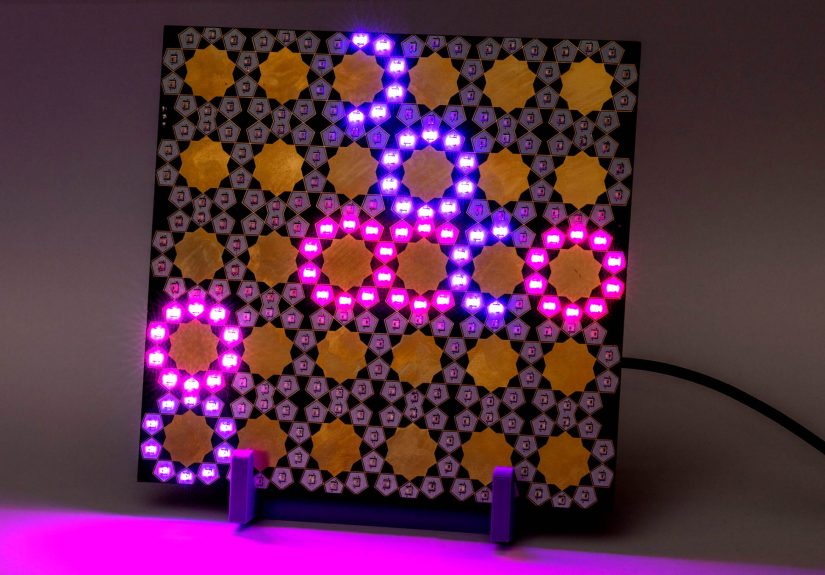
that displays a month using a 6×5 grid of repeating ten-pointed star units30 tiles total, one per day.
Each star unit contains multiple LEDs, and because the geometry overlaps, the board ends up with 250 addressable LEDs
arranged in a visually “woven” pattern rather than a simple rectangle of dots.
The creators’ core insight is delightfully simple: a lunar month is about 29–30 days long, and many people also think about
their menstrual cycle in monthly rhythms. So the calendar uses a 30-day visual languagelighting certain stars in certain colorsto
show moon phases and period days together, side-by-side, without storing your data anywhere online.
Why This Project Hit a Nerve (and Why It Still Does)
Period tracking is normal health tracking. But in recent years, people in the U.S. have become more vocal about privacy risks:
how apps collect data, how third parties may receive it, and how health-related information can be exposed through advertising tech
or weak policies. Public guidance from privacy advocates and health organizations has encouraged users to think critically about what’s
stored where, and whether a given tool keeps data locally, shares it, or can be compelled to disclose it.
Luminary Geometry sits squarely in that conversationwithout being preachy. It’s not saying “apps are evil.”
It’s saying “sometimes, the safest server is your own wall.” And it does it with glowing purple-and-gold geometry instead of a lecture.
The Two-Cycle Concept: One Grid, Two Kinds of Time
1) The month as a physical interface
The 30 star tiles represent a “good-enough” month for lunar cycles (which often alternate between 29 and 30 days).
That means you can use the board like a living calendar: one star per day, with specific colors indicating meaning.
2) Moon phases as a repeating pattern
A lunar cycle (new moon → first quarter → full moon → third quarter → back to new moon) repeats roughly every 29.5 days.
Instead of needing a screen, the board can represent the phase visuallyby lighting parts of each star in a way that “suggests” the Moon’s shape
or by using phase-based color coding.
3) Period tracking as a second overlay
Period days can be marked in a distinct color (often a deep rose or warm red). The result is a layered story:
a month of moonlight plus a month of personal biologyboth displayed as “normal,” not hidden, not shamed, and not uploaded.
Menstrual Cycle Tracking, Without Turning It Into Homework
Let’s keep this grounded and medically sensible: cycles vary. A “typical” adult menstrual cycle is often described as roughly
21–35 days, and periods often last up to 7 days. For teens, cycles can be wideroften
21–45 daysespecially in the first few years after periods begin. This variation is common, and tracking can help you
notice your personal pattern over time.
A physical tracker like Luminary Geometry won’t diagnose anything (and it shouldn’t try), but it can help you answer practical questions:
“Are my cycles usually 28-ish days or closer to 35?” “Do cramps hit before day 1 or on day 2?” “Do I get headaches in the same window every month?”
Those patterns can be genuinely useful when talking to a clinicianbecause “sometimes” becomes “usually around day 24.”
When tracking should trigger a real conversation
Consider talking to a trusted healthcare professional if you notice consistently very short cycles, very long cycles,
bleeding that lasts longer than a week, or symptoms that are severe enough to disrupt school, sleep, or daily life.
Tracking is a tool for awarenessnot a substitute for care.
Moon Phases 101 (So Your LEDs Tell the Truth-ish)
The Moon’s phase cycle (the synodic month) averages about 29.53 days. That’s why calendars sometimes show 29 or 30 days for lunar months:
the Moon refuses to fit neatly into a human spreadsheet. Rude, but on brand.
The four “anchor” phases most people recognize are:
New Moon (dark), First Quarter (half), Full Moon (bright), and
Third Quarter (half again). In between are crescents and gibbous phases.
Luminary Geometry simplifies this into a design-friendly representation that looks beautiful and remains readable at a glance.
Design: Islamic Geometry Meets Modern LEDs
One reason this project stands out is the pattern. Instead of placing LEDs in a boring grid,
the board uses a repeating ten-pointed star motif inspired by Islamic geometric designan art tradition that often emphasizes
symmetry, repetition, and harmony.
That matters because the project is not just “a tracker.” It’s also a piece of cultural-and-material storytelling:
cycles in nature (Moon and body), cycles in pattern (tessellation), cycles in light (animation).
The end result looks like something you’d expect in a galleryif galleries sold solder masks.
Hardware Breakdown (No, You Don’t Need to Be a Wizard)
LEDs: Addressable pixels doing the heavy lifting
The board uses addressable RGB LEDs (NeoPixel-style, WS2812-family). “Addressable” means each LED can be set independently:
one tile can glow rose while another tile glows lunar purple. A key practical note: these LEDs can draw a lot of current at high brightness,
so thoughtful power planning mattersespecially if you ever try “maximum white everywhere,” which is basically the LED version of yelling.
Controller: RP2040 + CircuitPython for fast iteration
A small RP2040-based controller board drives the LED data line and runs the logic. CircuitPython is a popular fit here because it’s friendly:
you can edit a code file, save it, and see changes without a complicated toolchain. That makes “tune the colors until it feels right”
a realistic workflow, not a fantasy.
Supporting parts: The unglamorous heroes
If you’re building something with lots of LEDs, don’t ignore the basics:
good power input, decoupling capacitors, tidy solder joints, and an enclosure or stand that prevents shorts.
The goal is a calm, stable glownot a surprise science fair volcano.
How the Calendar Logic Works (Conceptually)
The clever trick is mapping each “star tile” to a set of LED indices. Because tiles overlap in the geometry,
one LED might belong to two neighboring stars. The software defines each star as a list of LED numbers,
then applies colors to those lists based on the day’s meaning (moon phase, period tracking, or both).
In plain English: the code doesn’t think in pixelsit thinks in stars.
That makes the visuals easier to control and the intent easier to maintain.
A tiny illustrative example (not the project’s full code)
Choosing Colors That Communicate (Not Just “Look Cool”)
Color is the interface. If everything is neon rainbow all the time, it’s prettybut it’s not readable.
A smart approach is to pick a calm lunar palette (purples, soft whites, twilight blues) and reserve a distinct,
higher-contrast color (deep rose) for period days.
Some makers also vary brightness to signal “new moon” as a quiet reset, or use a gentle gradient across the month to show waxing and waning.
If you want the board to feel like a ritual object rather than a scoreboard, dimmer often wins.
Practical Build Notes (Without Turning This Into a 40-Page Manual)
Tools you’ll likely need
- Soldering iron with a fine tip (or hot air rework if you’re comfortable)
- Tweezers and magnification for small SMD parts
- Flux (because “I don’t need flux” is the first line in many tragedies)
- A stable 5V power source suitable for lots of LEDs
- Optional: a 3D-printed stand or enclosure to display it safely
Workflow that keeps sanity intact
- Assemble and inspect the LED board carefully (shorts and bridges are the #1 party pooper).
- Test in stages: first power, then a small LED test pattern, then full-grid behavior.
- Program iteratively: start with simple colors; add phase logic; then add period overlay.
- Set a brightness ceiling to reduce heat and power stress (and to keep it nice to look at in a dark room).
Privacy-by-Design: The Hidden Feature
Unlike many apps, a physical tracker doesn’t automatically collect metadata, location, contacts, or ad identifiers.
There’s no “terms update” that suddenly changes how your data is handled. That doesn’t mean it’s magically perfect privacy
someone could still see it in your roombut it does mean you control the context.
If privacy is a concern for you, consider where you place it (private bedroom vs. shared living room),
and whether you want “obvious” colors or subtle ones. The same hardware can be expressive or discreet depending on your palette choices.
Ways to Customize It (Because Makers Will, Obviously)
Add a real-time clock (RTC)
If you want the calendar to advance automatically each day without re-uploading code, an RTC module can keep accurate time.
Then the board can “know” what day it is and update the lit tile accordingly.
Compute moon phases locally
If you don’t want to look up phases elsewhere, you can implement an approximate moon-phase algorithm on the microcontroller.
Many builds choose a simpler route: start from a known new moon date and count forward with the synodic month length.
It’s not astronomer-grade precision, but it’s plenty for a glowing calendar.
Make it multi-user (or multi-mode)
With buttons or a simple mode switch, you can store multiple patterns: one person’s tracking, a shared moon calendar,
or even a “gallery mode” that shows the geometry without personal information.
Common Questions People Ask (Usually After Seeing It Glow)
“Is this a medical device?”
No. It’s a maker project and a visual tracking aid. If tracking raises health concerns, bring your notes to a qualified clinician.
“What if my cycle isn’t 28 days?”
Totally normal. That’s why tracking exists. The board can represent your own pattern (and your own month length conventions),
because you control the mapping.
“Do I have to track periods at all?”
Nope. You can use it as a moon calendar only, a mood calendar, a habit tracker, a hydration reminderwhatever your life needs.
The geometry doesn’t judge.
Experiences Related to Luminary Geometry (What Building and Living With It Feels Like)
If you’ve ever built an LED project, you know the emotional arc: confidence → confusion → tiny victory → “WHY IS ONLY HALF OF IT WORKING?” → triumph.
Luminary Geometry delivers that arc with extra sparkle, because the first time the pattern lights up cleanly, it doesn’t feel like you made a gadget.
It feels like you made an objectsomething closer to art than electronics.
The build experience tends to start tactile. You’re not snapping together a kit with chunky connectors.
You’re working with lots of small parts, repeating placements, and careful alignmentespecially if you’re assembling a dense LED layout.
Makers often describe this phase as strangely meditative: flux, place, solder, repeat. Put on music, take breaks, and don’t rush.
The board rewards patience because the final look depends on consistency. One messy joint can ruin the “clean geometry” illusion,
and nothing breaks the spell faster than a beautiful star pattern… with a random LED stuck on angry green.
The “first light” moment is the real dopamine hit. Many LED projects look fine in daylight and magical at night,
but this one is designed to be ornamental from the start. When the moon colors roll across the gridespecially in dimmer twilight hues
the board reads like a window into a patterned sky. People who display it in a bedroom often say it changes the room’s mood:
softer than a desk lamp, more meaningful than a generic night light, and far more interesting than doomscrolling at 1 a.m.
Using it day-to-day is surprisingly grounding. App-based tracking can feel clinical: charts, numbers, predictions, and alerts.
A physical tracker feels more like journaling. You update it with intention. That small ritualmarking a day, choosing a color, seeing the month at once
can make cycles feel less like random surprises and more like understandable patterns. For some users, the board becomes a private “check-in” tool:
not just “what day am I on,” but “how am I feeling in this part of the month?” It’s also a conversation starter in maker circles,
where people appreciate projects that treat personal health as normal and worthy of thoughtful design.
Privacy feels different when the data is physical. Instead of worrying whether an app updated its terms,
you’re choosing where the object lives and what it shows. Some people prefer bold, explicit colors; others go subtle,
using small brightness differences or closely related hues so the meaning is “readable to me, decorative to everyone else.”
That flexibility is a real experience advantage: you can decide how visible or discreet your tracking should be without changing platforms.
There are practical lessons that show up quickly. Brightness management becomes a lifestyle choice:
crank it up and you’ll want more power headroom and better heat comfort; keep it low and it feels elegant (and your power supply sighs in relief).
Diffusion is another common tweakpeople experiment with frosted acrylic, thin paper, or spacing to soften individual pixels into a smoother glow.
Then there’s the joy of refinement: rethinking colors after living with them for a week, adjusting the way “new moon” reads,
or changing period-day hues so they feel supportive rather than alarming. The project invites iteration, and that’s part of the experience:
you don’t “finish” it so much as you live with it and let it evolve.
Finally, the most consistent experience people report with projects like this is pridenot the loud kind, the quiet kind.
The kind that comes from building something beautiful that respects your autonomy. Luminary Geometry is a calendar, yes,
but it’s also a statement: your body’s rhythms and the sky’s rhythms are both worth observing with careand you don’t need an app’s permission to do it.