Table of Contents >> Show >> Hide
- What a Product Demo Is (And What It Absolutely Isn’t)
- The 3 Jobs of a Winning Demo
- Before You Demo: Discovery That Doesn’t Feel Like an Interrogation
- The Demo Structure That Keeps You Out of Feature Jail
- The Golden Rule: Show Outcomes, Not Just Features
- How to Keep a Live Demo Interactive (Without Losing Control)
- Real Examples: Four Demo Storylines You Can Copy
- Common Demo Mistakes (And the Fix in One Sentence)
- After the Demo: The Follow-Up That Actually Moves Things Forward
- A Practical Demo Prep Checklist
- Experience Notes: What Demo Teams Learn the Hard Way (About )
- 1) “Less is more” is true, but it’s not easy
- 2) Buyers remember feelings, not interfaces
- 3) The best demos start with the ending
- 4) Interactivity is the difference between a demo and a lecture
- 5) Objections aren’t interruptionsthey’re buying signals (usually)
- 6) The close matters more than the cleverness
- Conclusion: A Demo That Wins Is a Story With Proof
A product demo is not a guided museum tour where you whisper, “And on your left… another feature!”
It’s a test drive. Your job is to help a buyer feel (quickly) what “better” looks like,
in their world, with their problems, on a timeline that doesn’t make them age visibly on Zoom.
This guide breaks down modern product demo basicshow to prepare, structure, and deliver
demos that feel crisp and human. You’ll get real-world examples, sample talk tracks, and a few “please don’t do this”
moments that will save you from becoming a walking feature dictionary.
What a Product Demo Is (And What It Absolutely Isn’t)
A great demo is a value story with proof. It shows how your product helps someone achieve a goal,
avoid pain, reduce risk, or save timeusing examples that match what they told you matters.
A demo is:
- Specific: it focuses on the buyer’s use case, not your entire roadmap.
- Guided: you choose the path so it builds confidence and clarity.
- Interactive: buyers ask questions, react, and connect the dots.
- Measurable: it aims to advance the deal (next step, trial, POC, security review, etc.).
A demo is not:
- A “harbor tour” of every menu item you personally enjoy.
- A product training session (unless your audience is a customer who already bought).
- A TED Talk about your architecture diagram (unless they explicitly asked).
- A speedrun through 37 tabs to prove you’re “powerful.” Power is not the same as progress.
Quick terminology note: some teams call prospect-facing demos sales demos, while calling customer enablement sessions
product demos. Either way, the principle is the same: tailor the experience to the audience and the goal.
The 3 Jobs of a Winning Demo
- Confirm fit: “Yes, this solves the problem we actually have.”
- Create belief: “I can picture us using this. It won’t fall apart in our environment.”
- Earn a next step: “Let’s do X next” (trial, deeper technical session, stakeholder review, etc.).
Before You Demo: Discovery That Doesn’t Feel Like an Interrogation
The strongest demos are built on what the buyer cares about, not what your product manager cares about.
That means discoveryshort, purposeful, and aimed at shaping the story you’ll show.
A simple discovery framework you can actually use (SPICED)
If you need a structure that keeps discovery practical, SPICED is a solid one:
Situation, Pain, Impact, Critical Event, Decision. Translation: what’s happening, what hurts,
why it matters, what deadline forces action, and how decisions get made.
Five discovery questions that unlock a great demo
- “Walk me through the current workflow.” (Where does time leak out?)
- “What breaks most often?” (Bugs, handoffs, reporting, approvals, human error?)
- “What happens if nothing changes?” (Impact: cost, risk, churn, missed revenue.)
- “What would ‘success’ look like in 90 days?” (Make outcomes concrete.)
- “Who else needs to be confident?” (Security, finance, ops, exec sponsor.)
Then do the thing most people forget: repeat the buyer’s priorities back to them before you demo.
It builds trust, and it gives you permission to stay focused.
The Demo Structure That Keeps You Out of Feature Jail
When demos go sideways, it’s usually because the presenter starts clicking before they’ve set context.
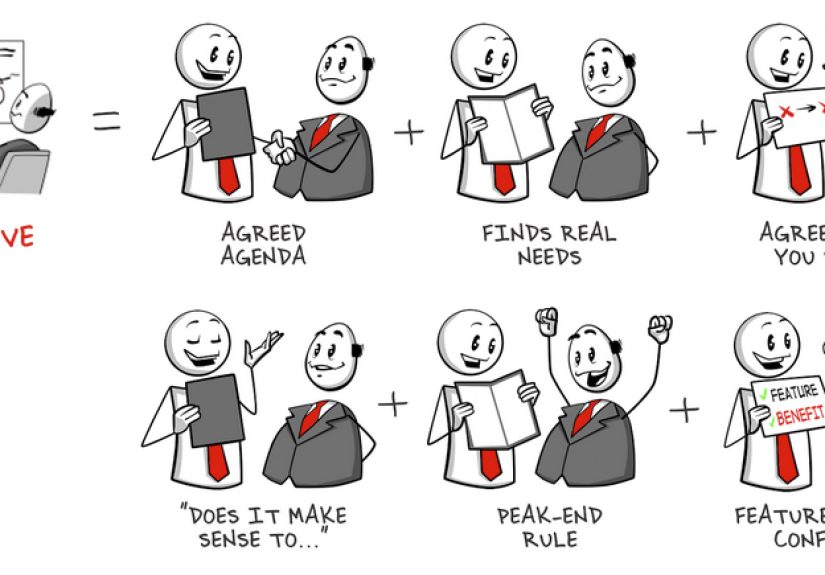
A simple fix is a “frame → proof → recap” structure (often taught as Tell-Show-Tell):
explain what you’re about to show and why, show it, then summarize what it means.
A clean, repeatable agenda (25–30 minutes total)
- 1–2 min: Set the goal and confirm priorities (“Here’s what we’ll prove today.”)
- 2–3 min: The problem story (current state → friction → cost/risk)
- 9–12 min: The “show” (2–3 tightly chosen demo moments)
- 5–10 min: Questions + objections (interactive, not defensive)
- 2–3 min: Recap + next step (clear and specific)
Notice the “show” is not 27 minutes. Data-driven demo coaching and classic demo training both converge on the same idea:
keep the core demo short and concentrated so buyers have space to ask questions.
The Golden Rule: Show Outcomes, Not Just Features
Buyers don’t wake up craving “a new dashboard.” They crave what the dashboard changes:
faster decisions, fewer mistakes, cleaner reporting, safer systems, less chaos.
So you lead with outcomes and use features as evidence.
Outcome-first talk track (steal this)
“You told us the goal is X. In the next 10 minutes, I’ll show you how you get Xstarting with the end result.”
If you feel the urge to say, “And here are all the settings,” pause and ask:
“Does this help them reach the outcome we agreed on?”
If not, save it for Q&A or a follow-up session.
How to Keep a Live Demo Interactive (Without Losing Control)
The best demos are a conversation. A simple tactic: ask questions during the demo, not just at the end.
It keeps buyers engaged and helps you spot confusion earlybefore it turns into silent skepticism.
Three “micro-check” questions
- “How would this fit your process today?”
- “Who on your team would use this most?”
- “What would you need to see to feel confident?”
Handling interruptions like a pro
- Acknowledge: “Good question.”
- Place it: “We’ll hit that in 2 minutes when we get to reporting.”
- Confirm: “Sound good?”
This keeps the flow intact while proving you’re not ignoring them. You’re guiding.
Real Examples: Four Demo Storylines You Can Copy
Below are four demo examples across common SaaS categories. Each includes an opening, a storyline,
and the exact “moments” you’d show. Swap in your product screens and buyer details.
Example 1: Project Management Tool (Reducing Late Work + Status Chaos)
Buyer context: Marketing team misses deadlines, status updates live in Slack, leadership wants predictable launches.
Open (Tell): “You said the biggest pain is last-minute surprises. I’ll show how you can plan a launch, spot risk early,
and give leadership a live status viewwithout begging everyone for updates.”
Show (3 moments):
-
Risk visibility: Demonstrate a launch board with due dates, dependencies, and an “at-risk” view.
Mini-narration: “This is the ‘what might slip’ screen. Instead of waiting for a status meeting, you see risk as it forms.” -
Ownership + handoffs: Show task assignment, approvals, and a comment thread tied to the work (not scattered across apps).
Mini-narration: “Now feedback is attached to the task, so there’s one source of truth.” -
Leadership reporting: Show a dashboard: timeline, progress, blockers, next milestones.
Mini-narration: “This is what you forward to leadershipexcept you don’t have to forward it. They can view it live.”
Close (Tell): “We proved you can plan, detect risk early, and report status without manual chasing.
Next step: let’s map one real upcoming launch and invite your ops lead to validate reporting needs.”
Example 2: CRM for a Sales Team (Fixing Pipeline Hygiene + Forecast Confidence)
Buyer context: Deals stall, stages aren’t consistent, forecasting feels like “educated vibes.”
Open (Tell): “You want a pipeline that reflects reality. I’ll show how reps update deals faster,
how managers spot stalled deals, and how forecasting becomes less… interpretive dance.”
Show (3 moments):
-
Fast updates: Show a deal view with next step, close date, and required fields per stage.
Mini-narration: “The system nudges the update that matters most: next step + timing.” -
Stalled deal detection: Show a “no activity” or “stalled stage” view.
Mini-narration: “Managers don’t need to guess where deals are stuckthis surfaces it.” -
Forecast logic: Show forecast rollups by stage/probability, plus notes tied to deals.
Mini-narration: “Forecast calls shift from ‘What do you feel?’ to ‘What does the data show?’”
Close (Tell): “If this fits, the next step is a 30-minute workflow session with one manager and two reps
to confirm required fields, stages, and the dashboard you want for forecasts.”
Example 3: Security Platform (Proving Control + Audit Readiness)
Buyer context: IT/security needs visibility, controlled access, and audit evidence. Stakeholders include compliance.
Open (Tell): “You need to reduce risk and produce audit proof quickly. I’ll show visibility into access,
how policies are enforced, and what evidence you can export for compliance.”
Show (3 moments):
-
Access overview: Show user access by role, system, and last activity.
Mini-narration: “This answers ‘who has access to what’ without spreadsheet archaeology.” -
Policy enforcement: Demonstrate conditional access / least privilege / approval workflow.
Mini-narration: “Instead of trusting tribal knowledge, the policy is baked into the process.” -
Audit evidence: Show an audit log and export/report view.
Mini-narration: “This is what your auditor wants: the control, the change history, and the proof.”
Close (Tell): “Next step is a security deep dive: we’ll cover integrations, your identity provider,
and the exact evidence your compliance team needs.”
Example 4: Analytics / BI Tool (From Raw Data to Decisions)
Buyer context: Leaders can’t trust numbers; analysts spend hours reconciling reports; decisions are slow.
Open (Tell): “You said ‘one version of the truth’ is the goal. I’ll show a live dashboard,
how definitions stay consistent, and how teams explore without breaking governance.”
Show (3 moments):
-
Single dashboard: Show executive KPI dashboard tied to a defined data model.
Mini-narration: “The metric definition is visibleso ‘revenue’ doesn’t mean five different things.” -
Self-serve exploration: Show a guided drill-down with guardrails (filters, segments, time ranges).
Mini-narration: “Teams can answer questions without requesting a new report every time.” -
Sharing + alignment: Show scheduled delivery or share link with permissions.
Mini-narration: “The outcome: fewer ‘what number is right?’ debates and faster decisions.”
Close (Tell): “If this aligns, let’s connect one real dataset and replicate your current monthly report
so you can compare time-to-insight.”
Common Demo Mistakes (And the Fix in One Sentence)
- Mistake: Feature dumping. Fix: Pick 2–3 “critical few” moments tied to outcomes.
- Mistake: No agenda. Fix: Start with what you’ll prove and how you’ll spend time.
- Mistake: Talking nonstop. Fix: Ask micro-check questions during each section.
- Mistake: Skipping recap/next steps. Fix: End with a summary + a calendar-worthy next action.
- Mistake: Demos built on guesswork. Fix: Do real discovery and demo the capabilities the buyer asked for.
After the Demo: The Follow-Up That Actually Moves Things Forward
Your demo can be fantasticand still die quietlyif the follow-up is fuzzy.
Send a recap quickly and make it easy for the buyer to socialize internally.
A strong recap email format
- What you heard: 2–3 bullets of priorities/pain.
- What you showed: 2–3 bullets mapping proof to priorities.
- Open questions: Security, pricing, integration, stakeholders.
- Next step: A specific meeting or action with owners and dates.
Bonus: attach (or link) a short recording clip or a one-page summary if that fits your processanything that helps the buyer
champion your product when you’re not in the room.
A Practical Demo Prep Checklist
- Goal: What decision or next step should happen because of this demo?
- Audience: Who’s attending and what do they care about (ops, exec, security)?
- Success criteria: What must they see to feel confident?
- Storyline: Current state → friction → outcome → proof.
- Demo moments: 2–3 “critical few” capabilities.
- Environment: Clean data, realistic scenario, no “test123” horrors.
- Objections: Likely pushback and calm answers.
- Next step: Calendar-ready proposal before the call ends.
Experience Notes: What Demo Teams Learn the Hard Way (About )
Below are common “field lessons” shared by sales reps, solutions consultants, founders, and customer-facing teams after running
lots of demos. Not theorypatterns that show up repeatedly when real buyers react in real time.
1) “Less is more” is true, but it’s not easy
Teams often assume that showing more creates more value. In practice, showing more usually creates more confusion.
The hard part is that a concise demo takes more preparation than a long one. You have to decide what not to show,
which can feel emotionally difficult if you love your product (or your product manager is watching).
The teams that improve fastest get comfortable saying: “That’s important, but it’s not today’s goal.”
2) Buyers remember feelings, not interfaces
If someone leaves your demo feeling “clear,” you win. If they leave feeling “overwhelmed,” you loseeven if the product is strong.
High-performing teams design demos around moments that create relief:
“Oh, that would save us time,” “That would reduce mistakes,” “That makes approval easy,” “That gives me audit proof.”
They don’t chase applause for clever features. They chase confidence.
3) The best demos start with the ending
A recurring lesson: buyers love seeing the end result first. Dashboards, outcomes, completed workflowsanything that answers,
“What do I get?” When teams start with setup screens, configurations, or admin menus, attention drops.
When they start with the “ta-da” outcome and then work backward into “how it happens,” buyers stay engaged and ask better questions.
4) Interactivity is the difference between a demo and a lecture
Demo teams consistently report that the turning point in their skills is learning to ask questions during the demo.
Not just polite “Any questions?” but real prompts like:
“How would this work with your approval flow?” or “Who owns this step today?”
Those questions do two things: they keep attention high, and they reveal hidden requirements early
the stuff that otherwise shows up later as a deal-killing surprise.
5) Objections aren’t interruptionsthey’re buying signals (usually)
When a buyer challenges pricing, security, implementation, or edge cases, it can feel like a threat.
Strong demo teams treat it as interest: the buyer is imagining real usage.
The “experience-based” response is calm and structured: acknowledge, answer briefly, and connect back to outcomes.
Then they offer a next step that matches the objection (security review, integration workshop, stakeholder session).
That’s how demos become momentum instead of debate.
6) The close matters more than the cleverness
One of the most common regrets teams share: ending a great demo with a soft landing“Cool, let us know.”
The best teams end with a crisp recap (what you heard, what you proved) and a specific next step with a date.
Buyers are busy. If you don’t give them a clear path, they’ll choose the path of least resistance: doing nothing.
Conclusion: A Demo That Wins Is a Story With Proof
Product demos don’t need to be flashy. They need to be focused.
Do real discovery, choose a few high-impact moments, lead with outcomes, and keep the experience interactive.
Use a simple structure (frame → show → recap), and always land the plane with a specific next step.
If your demo makes buyers feel clarity and confidence, you’ll stand outwithout ever showing “Settings” once.