Table of Contents >> Show >> Hide
- What the Intel PROMPT-80 Actually Is (And Why It’s So Fun)
- Restoration Strategy: Museum Piece vs. Daily Driver
- Step Zero: Documentation, Photos, and a Gentle Reality Check
- Don’t Plug It In Yet: Visual Inspection That Saves Machines
- Power: The Make-or-Break Part of Any 8080-Era System
- Connectors, Cables, and the Secret Life of Oxidation
- The CPU Board: Finding the Right “Brain” for Your PROMPT-80
- ROMs, EPROMs, and the Tiny Windows Into 1970s Firmware
- Keyboard and Display: Making the Human Interface Trustworthy Again
- First Boot: What “Success” Looks Like on a Trainer
- Modern-Friendly Upgrades That Don’t Wreck the Vintage Soul
- Common Restoration Pitfalls (So You Don’t Have to Learn the Hard Way)
- Why Restoring a PROMPT-80 Is Worth It
- Field Notes: The “Experience” of Bringing a PROMPT-80 Back
- SEO Tags
There are two kinds of vintage computers: the ones that look cool on a shelf, and the ones that make you
earn every blinking LED like it’s a merit badge. The Intel PROMPT-80 lives proudly in the second category.
It’s a microcomputer trainer from the era when “user interface” meant “you, a hex keypad, and the courage to press
RUN.” Restoring one is less like fixing a gadget and more like time-traveling into 1970s engineering: linear power
supplies, chunky connectors, EPROMs with opinions, and a front panel that basically dares you to type one wrong nibble.
This guide walks through a realistic, restoration-minded approachwhat to inspect, what typically fails, what to
preserve, and how to get from “mystery box from an auction listing” to “working 8080 trainer that feels alive again.”
It’s written for curious humans, not robots, so you’ll also get the “why” behind the “what,” plus practical examples
that help you avoid the classic vintage-computing mistakes (like letting the magic smoke out because “it probably
still works”).
Safety note: Vintage computers often contain exposed mains-voltage areas inside the case and large
capacitors that can store energy. If you’re not trained to work safely around line-powered equipment,
treat power-supply repair as a “qualified technician” job. You can still do plenty of restoration workdocumentation,
inspection, cleaning, connector checks, and non-powered troubleshootingwithout taking risky steps.
What the Intel PROMPT-80 Actually Is (And Why It’s So Fun)
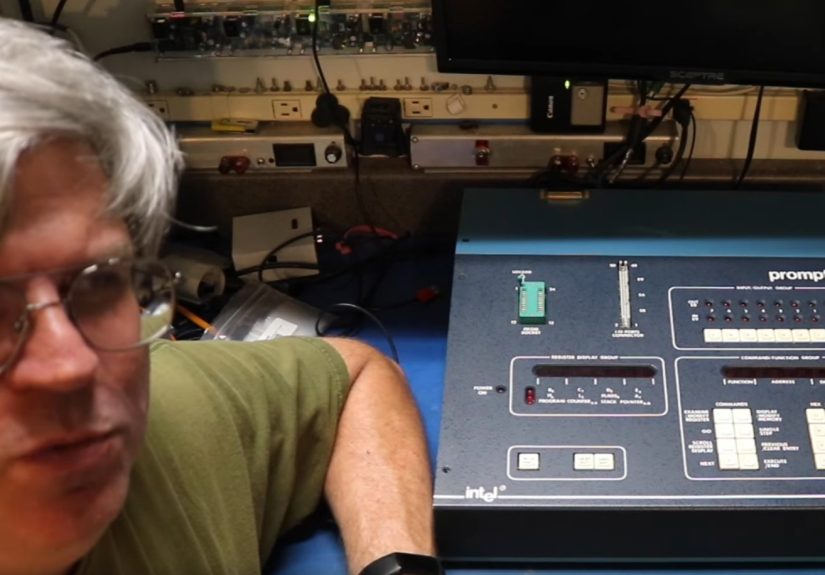
The PROMPT-80 is best described as a microcomputer design aid / trainer. Instead of giving you a
full-screen terminal and a friendly BASIC prompt, it gives you a compact front panel with an LED display, keypad,
and I/O indicatorsthen expects you to speak fluent machine-level thinking. It was built to help people learn
Intel’s 8080-era ecosystem, debug programs, and even support tasks like programming EPROMs.
Trainer vibes: calculator brain, microcomputer soul
The hallmark of this class of machine is “calculator-like” program entry: you enter bytes in hexadecimal, store
them to memory, and run them. That sounds slowbecause it isbut it’s also weirdly satisfying. You don’t just run a
program. You manufacture it one byte at a time like you’re assembling software with tweezers.
Typical PROMPT-80/85 configurations are associated with Intel’s single-board computer ecosystem (notably Intel’s
System 80/10 family). Some units were found with missing CPU boards, and restorations often involve sourcing a
compatible Intel SBC board to bring the trainer back to life.
Restoration Strategy: Museum Piece vs. Daily Driver
Before you touch a screwdriver, decide what “restored” means to you:
- Conservation restore: Keep it as original as possible. Clean gently, repair only what’s needed,
and avoid modern modifications that are hard to reverse. - Functional restore: Make it reliable and usable. Replace known-failure components, improve
power stability, and allow reversible upgrades (like socketed ROMs or non-destructive adapters). - Sympathetic upgrade: Keep the look and feel, but add “quality of life” improvementslike a
modern serial adapter, updated ROM contents, or an add-on modulewithout drilling, cutting, or irreversible mods.
None of these are morally superior. The only wrong choice is the one you’ll regret after you’ve made it impossible
to go back. A good rule: if it’s rare, don’t do anything you can’t undo with basic tools.
Step Zero: Documentation, Photos, and a Gentle Reality Check
Vintage restorations fail most often because people skip the boring part: documenting what they have. Start with:
- High-resolution photos of every cable, connector, board edge, and label.
- Close-ups of the power-supply area, fuse ratings, and voltage selector (if present).
- Inventory of boards: what’s installed, what’s missing, what looks swapped.
- Connector labeling (masking tape tags are your best friend).
Why the fuss? Because trainers like the PROMPT-80 often rely on board-to-panel wiring harnesses and edge connectors.
If you mis-route a connector, you can create faults that look like “mysterious vintage gremlins” but are actually
“I plugged it in wrong, and now I’m sad.”
Don’t Plug It In Yet: Visual Inspection That Saves Machines
The most valuable test you can do is a non-powered inspection. You’re looking for clues that power-up would be
unsafe or likely to cause damage:
What to look for
- Leaking capacitors (wetness, crust, or staining).
- Burn marks around regulators, resistors, or connector pins.
- Corrosion (especially around battery areasif any existor near metal fasteners).
- Loose debris inside the case (metal bits are tiny villains).
- Missing boards or obviously non-original wiring.
- Connector damage (bent pins, cracked housings, pulled wires).
If the PROMPT-80’s CPU board is missing, don’t panicthis is surprisingly common in the vintage world. It just
changes the project from “repair” to “restore + source parts.”
Power: The Make-or-Break Part of Any 8080-Era System
The Intel 8080 family is famously picky about power. Many classic 8080 designs use multiple supply rails
(commonly +5 V, +12 V, and −5 V in typical 8080-era implementations). That means the power supply isn’t just
“a box that makes volts”it’s the foundation of system stability.
Why old power supplies fail first
Linear supplies are rugged, but time is undefeated. Common issues include electrolytic capacitors drifting out of
spec, increasing ESR, and reducing the supply’s ability to deliver stable voltage under load. You might measure
“something close to 5 V” with no load, then watch it collapse when the logic boards actually demand current.
In one documented PROMPT-80 restoration, the 5 V rail was far below nominal until the power supply was serviced,
including replacement of aged electrolytics that tested poorly. That’s a typical storyline: the computer isn’t
“dead,” it’s just starving.
A safe approach to PSU work
If you’re not experienced with mains-powered electronics, the best move is to treat power-supply refurbishment as
a professional task. However, you can still do these safe, practical steps:
- Verify the fuse type and rating match the labeling.
- Check for a voltage selector and confirm it matches your region’s mains.
- Inspect for cracked insulation, brittle wires, or heat damage.
- Clean dust carefully (compressed air is not a magic wand; it can also relocate grime into connectors).
Once the supply is confirmed healthy, the next challenge is delivering clean power to the logic boards through
connectors that haven’t been moved since disco was still in the charts.
Connectors, Cables, and the Secret Life of Oxidation
Many “it powers on but behaves weirdly” problems come down to connectors. Edge connectors and multi-pin harnesses
develop oxidation films that behave like invisible resistors. The fix is often boring but effective:
reseat connectors, verify mechanical alignment, and ensure the harness is not under strain.
Front panel connections matter more than you think
The PROMPT-80’s front panel is not just decoration. It’s the primary human interface, and it typically connects to
the CPU board via one or more harnesses. A single flaky connection can cause symptoms that look like CPU failure:
keys that don’t register, display segments that glitch, LEDs that lie to you (and yes, a lying LED is a thing).
The CPU Board: Finding the Right “Brain” for Your PROMPT-80
Many PROMPT-80 restorations boil down to this question: What board is supposed to be inside?
Historical configurations often used Intel single-board computer modules from the System 80/10 line.
A restorer might start with an older SBC 80/10 board, but it’s also common to use later compatible variants,
depending on what can be sourced and what features you want.
SBC 80/10, 80/10A, 80/10B: what changes?
Without turning this into a collector’s taxonomy lecture, here’s the practical difference from a restoration
perspective:
- Compatibility: Later boards may be easier to find and sometimes cheaper than the “cool ceramic
chip” originals. - Memory headroom: Some later variants support more RAM than earlier ones, which can make the
trainer more usable for larger experiments. - Expansion options: Certain variants add expansion features, like a small module slot that can
host add-ons.
In a well-known PROMPT-80 revival, a missing original board led to installation of a newer compatible board, and
later an upgrade that increased available RAM and added a multimodule slot. That’s a smart restoration pattern:
get it working first, then decide how far you want to go.
ROMs, EPROMs, and the Tiny Windows Into 1970s Firmware
Part of the PROMPT-80 charm is that its “software stack” is often a small monitor program living in ROM/EPROM.
Some configurations also support spare EPROM sockets intended for expansion or custom code. In practical terms,
this means you can keep an original monitor intact while also experimenting with your own firmwareif you do it
carefully and keep everything socketed and reversible.
EPROM reality: not all chips are equally friendly
Classic EPROM types (including early Intel families) can require special programming voltages and hardware
support. The PROMPT-80’s identity is tied to this eraEPROMs were a core part of how you took a program from “typed
in” to “stored and reusable.” If you’re lucky, the original EPROMs still read correctly. If you’re not, you’ll be
verifying ROM images and checking whether the system’s monitor expects a particular memory map.
A practical best practice is to dump ROM contents (or have them dumped) before making changes.
Treat ROM images like rare artifacts: once they’re gone, you can’t re-grow them in a garden.
Keyboard and Display: Making the Human Interface Trustworthy Again
The PROMPT-80 front panel typically includes a hexadecimal keypad and function keys, plus an LED display that gives
you just enough information to keep going. Restoration here is equal parts mechanical and electrical:
Keypads: the “my 7 key only works on Tuesdays” problem
Old key switches can suffer from oxidized contacts, accumulated grime, or worn conductive surfaces. Symptoms
include missed presses, doubled presses, or keys that appear dead. Because the interface is so minimal, a flaky
keypad can make the machine feel unusable even if the CPU board is perfectly healthy.
The restoration approach is generally: clean gently, check connector integrity, and verify that each key is
electrically registering where expected. If the keypad uses discrete switches, they may be serviceable; if it uses
a membrane-like structure, you’ll be leaning more on careful cleaning and mechanical stability.
LED displays: check the simple stuff first
Dim segments and “ghosting” can be caused by power issues, but also by connector problems or failing driver logic.
Before chasing exotic faults, confirm the supply rails are stable and the connectors are sound. In vintage work,
the simplest explanation is often correctand the second simplest explanation is “oxidation.”
First Boot: What “Success” Looks Like on a Trainer
A successful first power-up on a trainer isn’t always dramatic. You may not get a cinematic beep or a friendly
splash screen. Your goals are more basic:
- Stable display behavior (no random flicker storms).
- Predictable keypad response (presses register consistently).
- Monitor readiness (a prompt-like state where you can inspect/enter data).
- Indicators behave sensibly (I/O LEDs aren’t permanently stuck in chaos mode).
A perfect “hello world” for a PROMPT-80: the LED chase
On trainer systems, an LED chase program is the equivalent of “Hello, World!” because it tests multiple pieces at
once: memory entry, CPU execution, and some form of output. One restoration project used a “Cylon”-style LED sweep
as a first demonstration after the system became stablesimple, visual, and deeply satisfying.
Even if you don’t copy a specific routine byte-for-byte, the concept is ideal: a tiny loop that writes patterns to
an output port. If it runs smoothly, you’ve proven the system can fetch instructions, execute branches, and drive
I/O in a controlled way.
Modern-Friendly Upgrades That Don’t Wreck the Vintage Soul
You don’t need to turn a PROMPT-80 into a Frankenputer to enjoy it. The best upgrades are the ones that:
(1) are reversible, and (2) increase usability without changing the character of the machine.
ROM-based languages: giving the trainer a “personality”
A particularly fun approach is to put a compact language environment into ROM, turning the trainer into a
self-contained interactive system. In one documented build, a ROMmable Forth was trimmed to fit alongside monitor
code into an EPROM footprint appropriate for the board in use. The result: the PROMPT-80 becomes a Forth machine
that boots into something you can use, not just poke with hex bytes.
Speech modules: because 1970s future fantasies deserve to talk
If your board supports small expansion modules, you can add something delightfully period-correct, like a classic
speech synthesizer module. A restored PROMPT-80 setup demonstrated this by adding a speech module and running small
programs that spoke short phrases. Is it necessary? Absolutely not. Is it joyful? Completely.
Common Restoration Pitfalls (So You Don’t Have to Learn the Hard Way)
- Assuming “it turns on” means “it’s safe.” Many failing power supplies still light LEDs while
delivering unstable rails that cause logic errors or stress components. - Changing multiple things at once. Make one change, test, then proceed. Otherwise you won’t know
which action fixed (or caused) a problem. - Forgetting that connectors are components. Old connectors and harnesses fail like anything else.
Treat them as part of the circuit. - Not documenting ROM contents. Original firmware is part of the system’s identity. Preserve it.
- Chasing “rare chip failure” too early. Most faults are power, connectors, or bad capacitorsnot
a suddenly cursed CPU.
Why Restoring a PROMPT-80 Is Worth It
Restoring a trainer like the Intel PROMPT-80 is not just about having a working vintage computer. It’s a hands-on
lesson in how early microcomputing worked: memory maps, monitor programs, I/O ports, and the discipline of entering
and debugging code at the byte level. It also forces a mindset shift. Modern devices hide complexity behind layers
of abstraction. The PROMPT-80 hands you the complexity directly and says, “Congrats, you’re the operating system.”
And once it’s running, it’s hard not to grin when the LEDs obey youbecause you didn’t click “Run.”
You convinced silicon from the 1970s to do your bidding using nothing but hex, patience, and a refusal to be
intimidated by an 8-character display.
Field Notes: The “Experience” of Bringing a PROMPT-80 Back
People who restore a PROMPT-80 often describe the process less like fixing a product and more like negotiating a
truce with history. The first emotion is usually optimismbecause the case looks sturdy, the front panel looks
amazing, and you can practically hear the soundtrack of a 1976 engineering lab playing in the background. Then you
open it and reality shows up wearing a dust sweater and carrying a suspiciously loose screw.
The first “experience milestone” is the moment you realize how much of restoration is detective work. You’re not
just looking at partsyou’re reading clues. A slightly browned resistor? A hint that something ran hot. A connector
that looks seated but isn’t quite square? That’s the kind of tiny detail that can steal hours. You start to develop
a sixth sense for what’s “normal vintage grime” versus “something leaked here and time tried to cover it up.”
Another common moment: the board inventory surprise. With a trainer, you expect a CPU board. Sometimes it’s
missing. Sometimes it’s present but not the one you expected. And sometimes you find a board that looks “almost
right,” which is vintage-computer code for “this will be a fascinating weekend.” Restorers talk about that shift
from disappointment to curiosity: “Okay, it’s missingso what’s my path back to a compatible setup?” That’s when
you stop thinking like a consumer and start thinking like a systems person.
When the power situation is resolved and the machine behaves consistently, there’s a specific kind of joy that’s
hard to explain to someone who’s only ever used modern computers. It’s not the joy of speed. It’s the joy of
control. On a PROMPT-80, every byte you enter feels like you placed a brick in a tiny digital building.
You’ll see restorers smile at ridiculously small wins: a stable display, a keypad that registers cleanly, an LED
that flips exactly when it should. Each of those is proof that a chain of old decisionscomponent choices,
wiring, firmware assumptionsstill holds together decades later.
Then comes the first program that feels like “life.” Often it’s an LED pattern: a sweep, a blink, a chase. It’s
the perfect starter because it’s visible, immediate, and shamelessly dramatic. The experience is half technical and
half emotional: you’re watching a machine that was built for engineers and students do something playful. It’s like
discovering your strict math teacher can also juggle.
The deeper experience is what happens after it works. Restorers often report that once the machine is stable, they
become more carefulnot less. The goal shifts from “make it run” to “make it reliable without erasing its story.”
That’s where the best projects live: keeping original parts when possible, using sockets and reversible changes
when experimenting, and documenting everything so the next person (or future-you) can understand what was done and
why. A PROMPT-80 restoration isn’t just a repair; it’s stewardship.
And yes, there’s always at least one moment of comedy: you painstakingly troubleshoot a “logic fault” only to
discover it was a connector not fully seated. You’ll laugh, you’ll sigh, you’ll reseat it properly, and you’ll
immediately pretend you knew that all along. That’s vintage computing: equal parts engineering and humility, with
the occasional victory lap performed by a row of obedient LEDs.