Table of Contents >> Show >> Hide
- What Is a Mesh Wi-Fi System (and Why You Might Need One)
- Key Features to Look For in the Best Mesh Wi-Fi Systems
- Top Mesh Wi-Fi Network Systems in 2025
- 1. Asus ZenWiFi BQ16 Pro – Best Overall Wi-Fi 7 Mesh Powerhouse
- 2. Netgear Orbi 870 – Best for Huge Homes and Power Users
- 3. Netgear Orbi 370 – Best Future-Proof Value in a Wi-Fi 7 Mesh
- 4. Eero Pro 7 – Easiest Wi-Fi 7 Mesh for Busy Households
- 5. TP-Link Deco XE75 – Best Budget-Friendly Wi-Fi 6E Mesh
- 6. TP-Link Deco X20 – Best Affordable Wi-Fi 6 Mesh for Most Homes
- 7. Google Nest Wifi Pro – Best for Google-Centric Smart Homes
- 8. Eero 6+ or Eero 6 – Set-and-Forget Mesh Wi-Fi for Everyday Users
- How to Choose the Right Mesh Wi-Fi System for Your Home
- Setup Tips to Get the Most from Your Mesh Wi-Fi Network
- Real-World Experiences with the Best Mesh Wi-Fi Network Systems
- Final Thoughts
If your Wi-Fi drops the moment you walk into the kitchen, or your streaming
freezes right at the plot twist, your home is screaming for a mesh Wi-Fi
system. Instead of one lonely router in a corner trying its best, mesh
networks use multiple nodes that work together to blanket your entire home
with fast, stable internet.
In 2025, the best mesh Wi-Fi network systems are faster, smarter, and more
future-proof than ever, with Wi-Fi 6E and Wi-Fi 7 models pushing ridiculous
speeds and supporting dozens (or hundreds) of connected devices. The trick
is choosing the right one for your home, your budget, and your tech comfort
level.
This guide walks you through how mesh Wi-Fi works, what features actually
matter, and which systems stand out as the best mesh Wi-Fi network systems
you can buy today. We’ll also share real-world experiences and practical
tips so you don’t just buy a fancy kityou actually fix your Wi-Fi.
What Is a Mesh Wi-Fi System (and Why You Might Need One)
A traditional router sits in one spot and tries to push signal as far as it
can. That works in small apartments, but large homes, thick walls, and
multiple floors turn that signal into a tired whisper. A mesh Wi-Fi system
solves this by using several nodes that all broadcast the same network
name. Your phone or laptop automatically hops to the strongest node as you
move around, giving you seamless coverage.
Mesh Wi-Fi is ideal if:
- Your home is larger than about 1,500–2,000 square feet.
- You have Wi-Fi dead zones (basement, garage, far bedrooms).
- You’ve added lots of smart home devices that overload your old router.
- You want an easy app-based setup with automatic updates and security.
Modern mesh systems also support newer standards like Wi-Fi 6, 6E, and
increasingly Wi-Fi 7, which offer higher speeds, lower latency, and better
handling of many devices on the same network.
Key Features to Look For in the Best Mesh Wi-Fi Systems
Coverage Area and Number of Nodes
Every kit advertises coverage5,000 square feet, 7,200 square feet, and so
on. Treat these numbers like “up to” claims under perfect conditions.
Real-world coverage will be lower once you add walls, floors, and
interference. A typical three-pack mesh Wi-Fi 6 or 6E system covers around
5,000–7,000 square feet, which is enough for most multi-story homes.
For medium homes (up to ~3,000 square feet), a two-pack is usually plenty.
Larger homes, long ranch layouts, or brick walls often benefit from a
three-pack or an extra node.
Wi-Fi Standard: Wi-Fi 5 vs. 6 vs. 6E vs. 7
-
Wi-Fi 5 (802.11ac): Older but still serviceable. Only
worth considering if it’s extremely cheap and you have modest needs. -
Wi-Fi 6 (802.11ax): Sweet spot for price and
performancebetter speed, capacity, and efficiency for busy households. -
Wi-Fi 6E: Adds the 6 GHz band for more spectrum and
less interference. Great if you’re in a congested area or have newer
phones and laptops that support it. -
Wi-Fi 7: The latest standard, pushing multi-gig speeds
and ultra-low latency with features like 320 MHz channels and
Multi-Link Operation. Ideal if you’re planning to keep your mesh system
for many years and have (or will soon have) multi-gig internet.
Backhaul and Ports
Backhaul is how the nodes talk to each other. High-end mesh routers use a
dedicated band or Wi-Fi 7’s Multi-Link Operation to keep speeds high even
when traffic is heavy. Some systems also let you connect nodes with
Ethernet cables for rock-solid “wired backhaul,” which is amazing if your
home has existing Ethernet runs.
If you have a NAS, gaming PC, or TV that needs a wired connection, look
for nodes with multiple 2.5 Gbps or at least gigabit Ethernet ports. High-
end systems like Netgear Orbi 870 and some Asus ZenWiFi kits include
multi-gig ports on the router and satellites, making them ideal for
power users and multi-gig fiber plans.
Security, Updates, and App Features
The best mesh Wi-Fi systems automatically update their firmware, support
WPA3 security, and offer helpful extras like guest networks, parental
controls, content filtering, and basic intrusion protection. Some brands
put advanced security behind a subscription, while others (notably some
Asus and TP-Link models) include strong protection without a monthly fee.
Smart Home and Voice Assistant Integration
If you’re building a smart home, consider mesh systems that can double as
smart hubs. Amazon Eero integrates deeply with Alexa and supports Matter
and Thread on recent models. Google’s Nest Wifi Pro pairs tightly with
Google Home and is a solid choice for multi-story homes that rely heavily
on Assistant-powered devices.
Top Mesh Wi-Fi Network Systems in 2025
Let’s look at standout mesh Wi-Fi network systems across different budgets
and use cases. Exact speeds and coverage will vary with your home and ISP
plan, but these kits consistently rank among the best mesh Wi-Fi systems
in independent tests and long-term reviews.
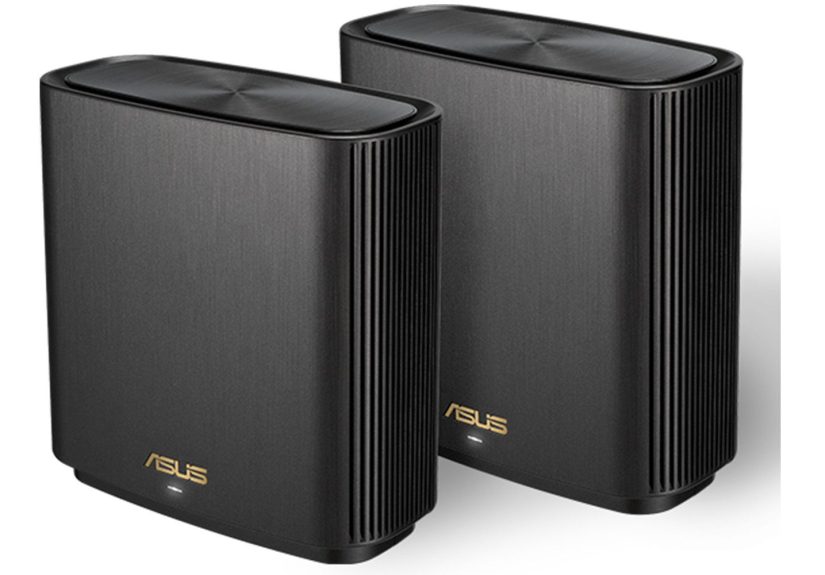
1. Asus ZenWiFi BQ16 Pro – Best Overall Wi-Fi 7 Mesh Powerhouse
If you want a “buy once, cry once” solution, Asus’s ZenWiFi BQ16 Pro is a
beast. As a Wi-Fi 7 mesh system, it supports ultra-wide channels, speedy
multi-gig ports, and serious throughputeasily handling gigabit and
multi-gig internet plans while covering large homes without breaking a
sweat.
This system is great for:
- Homes with many 4K streamers and gamers.
- Users with 2.5 Gbps or 5 Gbps fiber connections.
- People who want advanced tuning, QoS, and built-in security tools.
The trade-off? Price. It’s on the premium end, and the interface offers more
knobs and levers than a simple “set and forget” system. If you like
control and hate bottlenecks, though, this may be the best mesh Wi-Fi
network system for you.
2. Netgear Orbi 870 – Best for Huge Homes and Power Users
Netgear’s Orbi line has long been associated with high-end mesh Wi-Fi
systems, and the Orbi 870 keeps that tradition alive with Wi-Fi 7 support,
strong long-range performance, and excellent coverage for very large homes.
A three-pack can blanket roughly 9,000 square feet under good conditions,
making it ideal if you have a sprawling layout.
Orbi 870 is built for:
- Large, multi-story homes that ordinary routers can’t handle.
- Users who want multi-gig WAN and LAN ports on every node.
- Households running many simultaneous streams, work calls, and smart devices.
It’s expensive and the app pushes optional subscription add-ons for
security and parental controls, but if you want raw performance and
extended coverage, it’s one of the best mesh Wi-Fi network systems you can
buy.
3. Netgear Orbi 370 – Best Future-Proof Value in a Wi-Fi 7 Mesh
The Orbi 370 brings Wi-Fi 7 mesh networking down to a more approachable
price. You still get fast tri-band Wi-Fi, 2.5 Gbps Ethernet ports, and
support for Multi-Link Operation, but in a more compact and budget-friendly
package compared with the flagship Orbi 870 or 970 series.
This is perfect if:
- You want to upgrade to Wi-Fi 7 without paying ultra-premium prices.
- Your home is medium to large, but not mansion-sized.
- You like the Orbi ecosystem and app, but don’t need the absolute top tier.
4. Eero Pro 7 – Easiest Wi-Fi 7 Mesh for Busy Households
Amazon’s Eero Pro 7 aims squarely at people who want fast Wi-Fi 7 mesh
performance without learning what half the acronyms mean. The tri-band
design supports the latest Wi-Fi 7 features and offers very solid speeds and
mid-range throughput, but the real draw is the Eero app and ecosystem.
With Eero Pro 7 you get:
- Simple, guided setup that even non-technical users can handle.
-
Strong integration with Alexa and smart home standards like Matter and
Thread. - Easy expansionjust add another Eero node when you need more coverage.
Each unit covers around 2,000 square feet, so a three-pack can handle most
mid-sized homes. The main limitation is the number of Ethernet ports per
node, which can be tight if you have many wired devices, but for most
families this is a non-issue.
5. TP-Link Deco XE75 – Best Budget-Friendly Wi-Fi 6E Mesh
If you want the benefits of the 6 GHz band without Wi-Fi 7 pricing, the
TP-Link Deco XE75 is consistently one of the best values. A typical
three-pack can cover up to around 7,200 square feet, and tests show that it
performs very well even at longer distances for a Wi-Fi 6E system.
Why it’s a great pick:
- Excellent price-to-performance ratio.
- Simple app-based setup with clear controls.
-
Three Ethernet ports per node for common wired devices (TV, console,
desktop).
For most households on sub-gigabit or gigabit plans, the Deco XE75 delivers
more than enough speed and range to count as one of the best mesh Wi-Fi
network systems in its price class.
6. TP-Link Deco X20 – Best Affordable Wi-Fi 6 Mesh for Most Homes
For many people, Wi-Fi 6 is the sweet spot. TP-Link’s Deco X20 is a
budget-friendly Wi-Fi 6 mesh kit that can cover roughly 5,800 square feet
with a three-pack and handle dozens of devices across your home. It doesn’t
have the newest 6 GHz band, but it’s still a substantial upgrade from older
Wi-Fi 5 routers.
Choose Deco X20 if:
- You want a reliable whole-home Wi-Fi system without paying for bleeding-edge tech.
- Your internet plan is 1 Gbps or less.
- You prefer a clean, simple app and minimal tweaking.
7. Google Nest Wifi Pro – Best for Google-Centric Smart Homes
Google’s Nest Wifi Pro focuses less on raw specs and more on a smooth
experience inside the Google ecosystem. It supports Wi-Fi 6E and performs
especially well in multi-story homes where you need strong coverage on
multiple floors.
The Nest Wifi Pro is a great match if:
- You already live in Google Home (Nest speakers, displays, cameras).
- You want an attractive mesh system that blends into your decor.
- You prefer simple controls in the Google Home app over deep networking tweaks.
8. Eero 6+ or Eero 6 – Set-and-Forget Mesh Wi-Fi for Everyday Users
The Eero 6 series isn’t new, but it’s still one of the easiest mesh Wi-Fi
networks to live with. It supports Wi-Fi 6, offers decent coverage for
multi-level homes, and is built to be “boringly reliable.” You set it up,
connect your devices, and mostly never think about it again.
It’s ideal for:
- Households that prioritize stability over chasing the absolute top speed.
- Users who appreciate automatic updates and strong smart-home integration.
- People who don’t want to deal with router firmware, channels, or obscure settings.
How to Choose the Right Mesh Wi-Fi System for Your Home
To pick the best mesh Wi-Fi network system for your situation, match your
real-world needs to what each kit offers. Here’s a quick cheat sheet:
-
Small apartment or condo: Single high-quality router or
a two-node Wi-Fi 6 mesh (e.g., Deco X20, Eero 6). -
Typical family home (2,000–3,500 sq. ft.): Wi-Fi 6 or 6E
mesh two- or three-pack (Deco XE75, Nest Wifi Pro, Eero Pro 7). -
Large or complex home: Premium Wi-Fi 7 mesh with strong
range and multi-gig ports (Asus ZenWiFi BQ16 Pro, Orbi 870). -
Heavy gamers and creators: Wi-Fi 6E or 7 mesh with wired
backhaul options and multi-gig LAN (high-end Asus, Orbi, or TP-Link Deco
BE-series). -
Smart home enthusiasts: Systems with built-in hubs and
Matter/Thread support (Eero Pro 7, Nest Wifi Pro).
Also pay attention to subscription details. Some brands charge for advanced
parental controls or security suites. Others include them for free. If you
’re buying for a family, those recurring costs can matter as much as the
sticker price.
Setup Tips to Get the Most from Your Mesh Wi-Fi Network
Buying one of the best mesh Wi-Fi network systems is only half the job.
Placement and configuration are where the magic happens. A few practical
tips:
-
Don’t bury nodes in cabinets. Wi-Fi hates cramped,
enclosed spaces. Put nodes in the open, about halfway between your
router and dead zones. -
Avoid stacking nodes on your modem. Spread them out so
each node has a good line of sight and can “see” the next one. -
Use wired backhaul if possible. If your home has
Ethernet runs, plug nodes into them for maximum performance and
reliability. -
Turn off your ISP router’s Wi-Fi (or put it in bridge mode).
Two routers broadcasting overlapping networks can cause interference and
strange connection issues. -
Keep firmware updated. Let automatic updates run or
periodically check the app for new versions to improve stability and
security.
Real-World Experiences with the Best Mesh Wi-Fi Network Systems
On paper, every mesh kit sounds perfect. In real homes, things get more
interesting. Here are some common scenarios and what actually makes a
difference, based on real-world testing and user experiences.
From “My Zoom Keeps Dropping” to “I Forget Wi-Fi Exists”
One of the most common before-and-after stories comes from people working
remotely. With a single old router in the living room, video calls are
fineuntil someone else starts streaming 4K or the kids jump into online
games. Suddenly your calls stutter, your audio lags, and you start
apologizing to your coworkers again.
Drop a modern mesh system like Eero Pro 7 or Deco XE75 into the same home,
distribute nodes thoughtfully, and the experience flips. The extra
capacity, smarter traffic handling, and better coverage mean your laptop
doesn’t have to fight for airtime. When a system is properly set up, the
biggest compliment you can give it is, “I stopped thinking about Wi-Fi.”
Multi-Story Homes and the “Basement Problem”
Many mesh converts live in multi-story houses where the basement is a
dead zone. They want to stream workouts, use a Peloton, or run a home
theater downstairs, but Wi-Fi simply doesn’t reach reliably.
In these cases, a three-node setup shinesone near the modem, one on the
main floor, and a third in the basement. Systems like Nest Wifi Pro and
Deco XE75 consistently handle these layouts well, especially if you can
place the middle node roughly above or below another node instead of
cramming everything on one floor.
Gamers and Latency-Sensitive Uses
Gamers often worry that mesh Wi-Fi will add lag. Older systems sometimes
did, especially when clients connected through a wireless backhaul hop.
But modern Wi-Fi 6E and Wi-Fi 7 mesh systems, combined with Ethernet for
the gaming PC or console, can be nearly indistinguishable from a direct
wired connection in everyday play.
The key is to use the mesh system intelligently: plug your console or PC
into a node’s Ethernet port, use wired backhaul where you can, and enable
built-in QoS or gaming modes if the system offers them. With that setup,
you get the coverage benefits of mesh Wi-Fi without sacrificing snappy
responsiveness.
Smart Homes with Dozens of Devices
Another common pain point is the “too many gadgets” problem. Between
cameras, smart speakers, TVs, thermostats, lights, and random IoT gadgets,
it’s easy to have 40+ devices on your network. Older routers get bogged
down, especially if they’re Wi-Fi 5, and things start dropping off or
lagging.
Mesh Wi-Fi systems built with Wi-Fi 6/6E and Wi-Fi 7 are designed for this
reality. They handle more simultaneous connections gracefully, and some,
like Eero and Nest, integrate tightly with smart-home standards and
assistants. The difference isn’t just speedit’s that everything feels
more responsive and reliable, from turning on lights to checking cameras.
Common Mistakes People Make with Mesh Wi-Fi
Even the best mesh Wi-Fi network system can struggle if it’s mis-installed.
Some common mistakes:
- Putting nodes too close together (they end up stepping on each other’s signal).
- Leaving the old router’s Wi-Fi on, creating overlapping networks.
- Ignoring Ethernet backhaul options when they’re available.
- Stuffing nodes behind TVs, metal racks, or inside entertainment centers.
Fixing these usually doesn’t require buying new hardwarejust better
placement and a quick visit to the app’s settings. That’s why experience
matters: the difference between “meh” Wi-Fi and “wow” Wi-Fi is often where
you put the boxes, not which boxes you bought.
Final Thoughts
The best mesh Wi-Fi network systems in 2025 combine wide coverage, modern
Wi-Fi standards, solid security, and genuinely user-friendly apps. Whether
you choose a premium Wi-Fi 7 powerhouse like Asus ZenWiFi BQ16 Pro or
Orbi 870, or a high-value option like Deco XE75 or Deco X20, the goal is
the same: no more dead zones, no more dropped calls, and no more family
arguments over whose show gets to buffer.
Take a moment to match your home size, internet plan, and tech comfort to
the right system, follow a few smart placement tips, and you’ll end up
with fast, reliable, whole-home Wi-Fi that just worksquietly, in the
background, exactly how it should.