Table of Contents >> Show >> Hide
- What “Bluetooth Spoofing” Means in This Context
- Why AirPods Feel Limited Outside Apple Devices
- How LibrePods Fits Into the Story
- The Technical Idea Without the Spy-Movie Nonsense
- Why This Matters for Android and Linux Users
- Features That Become More Useful When AirPods Are “Liberated”
- The Ethical Side of Reverse Engineering
- Limitations and Real-World Caveats
- What This Says About the Future of Wireless Earbuds
- Practical Experiences With Liberating AirPods With Bluetooth Spoofing
- Conclusion
AirPods are tiny white earbuds with a very Apple personality: charming, polished, and a little too comfortable living inside the walled garden. Pair them with an iPhone, iPad, or Mac, and they behave like royalty. You get instant setup, smart battery reporting, noise control, ear detection, Conversation Awareness, head gestures, accessibility tuning, and a parade of small conveniences that make the product feel more expensive in a good way. Pair the same AirPods with Android or Linux, however, and suddenly they become ordinary Bluetooth earbuds wearing a designer jacket.
That is where the idea behind liberating AirPods with Bluetooth spoofing becomes so interesting. The phrase sounds like something whispered in a basement by someone holding a soldering iron and a suspiciously warm laptop, but the concept is not about stealing audio secrets or launching attacks. It is about interoperability. In simple terms, developers discovered that many advanced AirPods features are not locked away by mysterious hardware magic. They are often hidden behind proprietary software conversations between AirPods and Apple devices. When a non-Apple device can speak enough of that language, AirPods become far more useful outside Apple’s ecosystem.
What “Bluetooth Spoofing” Means in This Context
Bluetooth spoofing can mean different things depending on the situation, and not all of them are friendly. In security discussions, spoofing may refer to pretending to be another device, service, or identity. In the AirPods interoperability world, the idea is more specific and less villainous: software can imitate parts of the device identity or protocol behavior expected by AirPods so the earbuds reveal features normally reserved for Apple hardware.
AirPods already use standard Bluetooth for basic audio. That is why they can play music from an Android phone, Windows laptop, Linux computer, or handheld gaming device. The frustrating part is that the premium features ride on extra layers of communication. Battery levels, noise-control state, ear detection, personalized audio settings, hearing assistance controls, and other smart behaviors involve proprietary messages. Without software that understands those messages, the host device is basically standing outside a fancy restaurant saying, “I have money,” while the bouncer replies, “Not in our font.”
Projects such as LibrePods show how reverse engineering can change that relationship. By studying how AirPods communicate with Apple devices, open-source developers can build software that sends compatible commands, reads useful status data, and gives Android or Linux users access to features they already paid for when they bought the earbuds.
Why AirPods Feel Limited Outside Apple Devices
Apple’s ecosystem is famous for its smoothness. AirPods pop up on an iPhone screen, pair quickly, switch between Apple devices, and show polished controls in Control Center. This is not accidental. Apple controls the hardware, operating systems, chips, software frameworks, and user interface. That control makes setup feel almost magical.
The downside is that the same convenience can become a moat. On Android or Linux, AirPods usually still work for music, calls, and basic microphone input, but several headline features may disappear or become awkward. Users may lose easy access to exact battery percentages for each earbud and the case. They may not be able to switch quickly between Active Noise Cancellation, Transparency mode, and Adaptive modes. Ear detection may be slower or unavailable. Head gestures and Conversation Awareness may not surface at all. Accessibility-related tuning can be especially frustrating because the hardware is physically capable, but the non-Apple device may not expose the controls.
That gap creates a strange user experience. The owner has premium earbuds, but the features depend heavily on which rectangle happens to be in their pocket. It is like buying a sports car and discovering the turbo only works near Cupertino.
How LibrePods Fits Into the Story
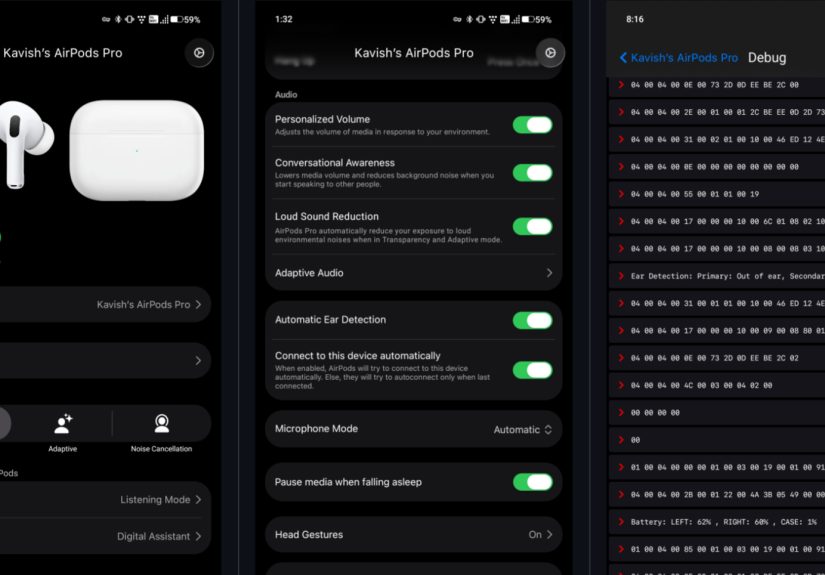
LibrePods is an open-source effort designed to bring Apple-exclusive AirPods features to Android and Linux. Instead of treating AirPods as ordinary Bluetooth headphones, it attempts to understand and implement the proprietary protocol AirPods use for deeper control. The project has drawn attention because it turns a long-standing annoyance into a practical software problem: if the earbuds can do the work, why should the phone brand decide whether users can access it?
Among the features associated with this kind of AirPods controller are accurate battery status, noise control switching, ear detection, head gestures, Conversation Awareness, accessibility settings, and configuration options that are usually handled through Apple’s own menus. On supported models, that can make AirPods feel dramatically less handicapped on Android or Linux.
The trick is not that AirPods suddenly become a different product. The trick is that non-Apple software learns to talk to them more fluently. Imagine moving to another country with a very expensive coffee machine. At first, you only know how to press the giant “coffee” button. Then someone hands you a translated manual, and now you can make espresso, adjust temperature, clean the machine, and finally stop blaming the beans.
The Technical Idea Without the Spy-Movie Nonsense
Modern Bluetooth devices often communicate through a mix of standard profiles and vendor-specific behavior. Standard Bluetooth audio lets headphones receive sound. Bluetooth Low Energy can help devices exchange small pieces of data, advertise status, and expose services or attributes. Proprietary extensions can sit on top of that foundation, creating special commands that only certain software knows how to use.
In the AirPods case, Apple devices know how to request information, interpret responses, and present controls in a clean interface. A reverse-engineered tool tries to reproduce enough of that conversation to unlock practical features. This may include identifying the AirPods model, reading battery values, changing listening modes, reacting to in-ear status, or adjusting settings that would otherwise require an iPhone.
It is important to keep the discussion responsible. This is not a tutorial for impersonating devices in someone else’s environment, bypassing security, or interfering with nearby hardware. The legitimate value is user-controlled interoperability: making your own earbuds work better with your own devices.
Why This Matters for Android and Linux Users
Android users often choose their phones because they value flexibility, hardware variety, customization, or simply because they prefer Google’s ecosystem. Linux users may be developers, privacy enthusiasts, tinkerers, or people who enjoy fixing something for three hours so they can save four minutes every week forever. Both groups are used to solving problems Apple prefers to solve only inside Apple’s house.
AirPods are popular enough that many people own them even if they do not use an iPhone full-time. Someone might use a Mac for work, an Android phone personally, and a Linux laptop for development. Another person might receive AirPods as a gift and later switch platforms. Without interoperability tools, those users are punished for mixing ecosystems. Their earbuds still function, but the experience is noticeably downgraded.
Bluetooth spoofing and protocol reverse engineering challenge that limitation. They suggest that product features should not vanish just because a user changes operating systems. If the earbuds, sensors, microphones, and onboard processors are present, the user should have a reasonable path to control them.
Features That Become More Useful When AirPods Are “Liberated”
Accurate Battery Reporting
Basic Bluetooth battery reporting can be vague, inconsistent, or incomplete. A better AirPods controller can display separate battery levels for the left earbud, right earbud, and charging case. That sounds minor until you are on a train, one earbud is at 8 percent, and your podcast is reaching the part where someone finally explains the murder board.
Noise Control Switching
AirPods Pro and AirPods Max are known for noise control modes such as Active Noise Cancellation and Transparency. On Apple devices, switching modes is easy. On unsupported systems, users may have to rely on stem presses, previous settings, or limited controls. Software support makes these modes more visible and manageable.
Ear Detection
Automatic ear detection pauses audio when an earbud is removed and resumes when it returns. It is one of those features that feels unnecessary until it works perfectly, then feels barbaric when missing. Better protocol support can make this behavior more reliable outside Apple devices.
Conversation Awareness and Adaptive Features
Conversation Awareness lowers media volume and adjusts audio when the wearer starts speaking. Adaptive features can blend noise cancellation and transparency depending on the environment. These features rely on sensors and software cooperation, which is why non-Apple control matters.
Accessibility and Hearing Assistance
Newer AirPods Pro models support hearing-related features that can use audiogram data and personalized settings. This is one of the most meaningful areas for interoperability because accessibility should not feel like a platform loyalty reward. Users still need appropriate hearing guidance and should not treat earbuds as a replacement for professional medical care, but giving people more control over supported hardware is a positive step.
The Ethical Side of Reverse Engineering
Reverse engineering often lives in a gray cultural zone. Companies may view it as a threat to control, branding, or support quality. Users and developers may view it as repair, compatibility, research, or digital self-defense. The AirPods example sits in a particularly interesting place because users are not trying to get paid features for free. They are trying to use features built into hardware they already own.
There is also a broader right-to-repair and right-to-interoperate argument. As consumer electronics become more software-defined, ownership becomes slippery. You may physically own the earbuds, but if essential controls are restricted to one ecosystem, your ownership has invisible footnotes. Reverse-engineered interoperability tools push back against that trend.
At the same time, responsible developers must avoid harming users. Bluetooth software touches radios, privacy, device identity, and sometimes accessibility settings. Tools should be transparent about limitations, security implications, supported models, and whether root access or system-level changes are required. “It works on my machine” is a proud hacker tradition, but it is not a warranty.
Limitations and Real-World Caveats
Liberating AirPods does not mean every feature works perfectly everywhere. Android’s Bluetooth stack, device manufacturer changes, firmware updates, AirPods model differences, and operating system permissions can all affect results. Some features may require root access, special frameworks, newer Android versions, or specific phone brands. Linux support may depend on desktop environment, Bluetooth stack behavior, distribution packages, and user patience measured in cups of coffee.
There is also the update problem. Apple can change firmware behavior. Android can change Bluetooth permissions. Linux packages can move faster or slower than expected. A reverse-engineered app must keep adapting. This is the classic open-source treadmill: exciting, useful, and occasionally powered by one developer who should probably be sleeping.
Users should also be careful with health-related features. Hearing assistance tools can be helpful, but audiograms and hearing settings are not toys. If a feature depends on an audiogram, the best data comes from a qualified hearing professional or a validated test process. Cranking amplification because “more is more” is not a strategy; it is how ears file a complaint.
What This Says About the Future of Wireless Earbuds
The AirPods spoofing story points toward a bigger industry question: should smart accessories expose more open controls? Wireless earbuds are no longer simple speakers. They are wearable computers with microphones, sensors, processors, accessibility features, health-adjacent functions, and environmental awareness. Locking all of that behind one platform may be good for ecosystem retention, but it is not always good for users.
A healthier future would include better standardization for common features such as battery reporting, noise mode switching, ear detection, microphone control, latency settings, and accessibility profiles. Bluetooth standards continue to evolve, and new audio technologies are improving what wireless devices can do. But standards often move slower than product teams. Until the official road catches up, community projects will keep building clever bridges.
For Apple, this is both a compliment and a challenge. AirPods are desirable enough that people want to use them everywhere. The hardware is good. The experience is polished. But the more useful the product becomes, the louder the question gets: why should basic control depend on owning the “right” phone?
Practical Experiences With Liberating AirPods With Bluetooth Spoofing
The most relatable experience begins with a small disappointment. You pair AirPods with an Android phone and they work instantly. Music plays. Calls connect. The microphone behaves well enough. For the first five minutes, everything seems fine. Then you look for the battery case percentage and find nothing useful. You try to switch noise modes from the phone and discover the settings page has the emotional depth of a parking receipt. You remove one earbud expecting audio to pause, but the podcast keeps talking into the void. That is when the “premium earbuds, budget experience” feeling arrives.
Using an interoperability tool changes that mood. The first satisfying moment is usually seeing separate battery levels appear. It sounds absurdly simple, but it turns AirPods from mysterious pebbles into manageable devices. You no longer have to guess whether the left bud is secretly dying. You no longer have to open an Apple device just to check the case. The earbuds become part of the system you are actually using.
The second big moment is noise control. On a busy street, in a coffee shop, or during a commute, being able to switch modes from an Android interface or Linux utility feels like reclaiming a missing button. Instead of remembering which squeeze gesture does what, you can see the mode and change it directly. For people who move between work calls, music, and environmental awareness, that control matters.
Ear detection is another feature that feels tiny until it is restored. Pulling out one earbud to answer a question and having audio pause is not just convenience; it is social survival. Nobody wants to be the person nodding at a coworker while a true-crime narrator continues describing suspicious footprints. When ear detection works properly outside Apple devices, AirPods feel less like borrowed hardware and more like your own.
There is also a psychological experience: the pleasure of refusing artificial limits. Many tech users do not object to Apple making excellent products. They object to excellent products becoming less excellent when used in a mixed ecosystem. Bluetooth spoofing, when used responsibly for your own hardware, feels like peeling off a sticker that says “best enjoyed only under supervision.” It is not rebellion with fireworks. It is rebellion with a settings menu.
That said, the experience is not always smooth. Some users may run into compatibility problems, installation requirements, missing features, or bugs. A feature that works on one AirPods model may be limited on another. A phone update may improve support or break something unexpectedly. Linux users, being Linux users, may solve the problem, write a script, forget where they saved it, and then proudly call the whole thing “stable.”
The best attitude is curious but cautious. Treat AirPods liberation tools as community-driven enhancements, not official replacements for Apple’s software. Read project notes. Understand requirements. Avoid random downloads. Do not experiment with device identity tricks on hardware you do not own. And for hearing-related settings, use reliable hearing data rather than guesswork.
When it works, though, the result is genuinely satisfying. AirPods stop feeling like they are visiting Android or Linux under protest. They become capable Bluetooth earbuds again, with the smart features closer to the surface. The whole experience proves an old truth about technology: sometimes the hardware is ready for freedom long before the business model is.
Conclusion
Liberating AirPods with Bluetooth spoofing is not just a quirky hack; it is a window into the modern struggle between polished ecosystems and user ownership. AirPods are excellent wireless earbuds, but many of their best features depend on proprietary communication with Apple devices. Reverse-engineered projects such as LibrePods show that Android and Linux users can recover much of that missing functionality by speaking the right Bluetooth language.
The story matters because it is bigger than earbuds. As accessories become smarter, users will increasingly ask whether they truly own their devices or merely rent the best features from an ecosystem. Responsible interoperability gives consumers more choice, extends hardware usefulness, and challenges companies to compete on quality rather than artificial inconvenience. Also, it lets your earbuds pause when you remove one, which is a small miracle for anyone who has ever missed the punchline of a conversation because a podcast would not shut up.
Note: This article is based on publicly available technical documentation, open-source project information, Apple feature documentation, Bluetooth development references, and reputable technology reporting. It is written for educational and editorial purposes, not as a guide to misuse Bluetooth spoofing or interfere with devices you do not own.