Table of Contents >> Show >> Hide
- What Makes the New WiFi Module Generation Different?
- Wi-Fi 7 Is the Star of the Announcement
- The Latest WiFi Module Announcements Worth Watching
- Is Wi-Fi 7 Always the Best Choice?
- How to Choose the Best WiFi Module for Your Project
- Why This Announcement Matters for Consumers and Developers
- Market Outlook: WiFi Modules Are Becoming Core Infrastructure
- Hands-On Experience: What It Feels Like to Work With the Latest WiFi Modules
- Conclusion
The WiFi module world just got another jolt of electricity, and no, this time it is not because someone soldered the antenna pad backward. The latest generation of WiFi modules has moved far beyond the “tiny board that gets your gadget online” phase. Today’s best WiFi module is expected to handle high-speed data, low latency, crowded networks, power efficiency, security, automotive-grade temperatures, industrial reliability, and enough simultaneous devices to make your old router quietly consider retirement.
The big headline is Wi-Fi 7. With features like 320 MHz channels, 4K-QAM, Multi-Link Operation, and better spectrum efficiency, Wi-Fi 7 modules are being built for a world where everything wants to stream, sync, sense, report, update, and occasionally blink an LED for emotional support. Recent announcements from automotive, industrial, AI-edge, and IoT companies show that the “best WiFi module” is no longer one single board for every project. Instead, the best choice depends on whether you are building a smart camera, an autonomous robot, an in-car entertainment system, a medical device, a factory gateway, or a humble temperature sensor that simply wants to live its best low-power life.
What Makes the New WiFi Module Generation Different?
A WiFi module is a compact hardware component that gives a device wireless networking capability. It usually combines a WiFi radio, processor or connectivity chipset, RF front-end components, firmware, antenna options, security features, and certification support. In simple terms, it is the part that lets your device say, “Hello, internet,” without requiring the product team to become RF engineering wizards overnight.
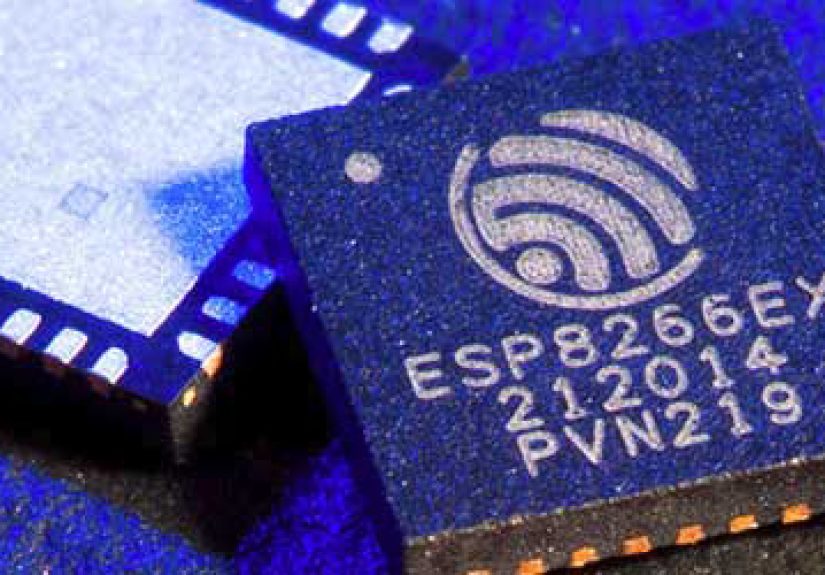
Older modules, such as the famous ESP8266-era boards, won hearts because they were cheap, small, and shockingly useful. They allowed makers and startups to connect microcontrollers to the internet without selling a kidney or hiring an entire wireless team. But the new generation is playing a different game. The latest WiFi modules are not just about basic connectivity. They are about stable performance in difficult wireless environments, faster throughput for heavy data, stronger security, smoother roaming, and better coexistence with Bluetooth, Zigbee, Thread, and cellular systems.
Wi-Fi 7 Is the Star of the Announcement
Wi-Fi 7, also known as IEEE 802.11be, is the technology behind many of the most exciting new WiFi module announcements. It was designed for extremely high throughput, lower latency, and better performance in congested environments. That matters because modern networks are crowded. A typical home may have laptops, phones, smart TVs, cameras, speakers, thermostats, game consoles, and appliances all competing for airspace like tiny invisible bumper cars.
The biggest Wi-Fi 7 upgrades include 320 MHz channel bandwidth, 4K-QAM modulation, Multi-Link Operation, and preamble puncturing. The translation: wider lanes, denser data packing, multiple paths at once, and better handling of interference. It is like upgrading from a two-lane road with potholes to a smart highway that can reroute traffic while still letting someone stream 8K video in the back seat.
320 MHz Channels: Bigger Lanes for Bigger Data
Wi-Fi 7 can use channels up to 320 MHz wide in the 6 GHz band, doubling the maximum channel width used by Wi-Fi 6E. For high-bandwidth applications, this is a major improvement. A wider channel can move more data at once, which helps with video streaming, AR and VR experiences, large file transfers, machine vision, and edge AI devices that must send heavy data quickly.
4K-QAM: More Data in Every Wireless Symbol
4K-QAM, or 4096-QAM, allows Wi-Fi 7 to encode more information into each wireless signal symbol than Wi-Fi 6 or Wi-Fi 6E. In ideal signal conditions, this can improve peak transmission rates. The catch is that 4K-QAM likes clean signal environments, so antenna design, placement, shielding, and router quality still matter. Physics remains undefeated, even when marketing brochures wear sunglasses.
Multi-Link Operation: The Real Secret Sauce
Multi-Link Operation, often shortened to MLO, allows compatible Wi-Fi 7 devices to use multiple bands or channels more intelligently. Instead of relying on one wireless path, a device can use multiple links for better throughput, lower latency, or improved reliability. For devices like AI cameras, industrial robots, medical imaging systems, gaming gear, and in-vehicle entertainment systems, MLO is one of the most practical reasons to care about Wi-Fi 7.
The Latest WiFi Module Announcements Worth Watching
The most important recent announcements show how broad the WiFi module market has become. There are modules for cars, factories, embedded Linux systems, developer boards, smart homes, and long-range IoT networks. Each one claims a different version of “best,” and that is good news for engineers because the best module for a robot is not always the best module for a battery-powered soil sensor.
Automotive Wi-Fi 7 Modules: The Car Becomes a Rolling Network
One of the strongest recent signals came from the automotive market. New automotive Wi-Fi 7 communication modules are being designed for in-vehicle infotainment, audio-video-navigation systems, rear-seat entertainment, telematics units, and domain control units. These modules are not casual gadgets. They must survive heat, cold, vibration, and the unique emotional climate created when four passengers all want to stream different content at the same time.
Automotive Wi-Fi 7 modules can support ultra-wide bandwidth, faster data transmission, and multiple connected devices inside the vehicle. That matters as cars evolve into “second living spaces” with video calls, streaming, gaming, over-the-air updates, and connected services. In this category, durability is just as important as speed. A module that performs well on a desk but panics inside a hot parked car is not ready for automotive duty.
Industrial Wi-Fi 7 Modules: Built for Factories, Robots, and Edge AI
Industrial Wi-Fi 7 modules focus on reliability, long operating life, rugged temperature ranges, roaming, security, and stable operation in interference-heavy environments. Factories are wireless chaos machines. Metal surfaces, motors, sensors, moving vehicles, and thick walls can all turn a simple connection into a dramatic soap opera.
Industrial modules such as Wi-Fi 7 Key E, M.2, and Mini PCIe designs are aimed at robotics, autonomous mobile robots, medical imaging, rugged endpoints, ProAV, and AIoT gateways. These applications need more than a speed test screenshot. They need consistent latency, predictable performance, secure authentication, and strong interoperability testing. For businesses, a deployment-ready module can shorten certification cycles and reduce expensive redesigns.
Enterprise AI Modules: When WiFi Meets Heavy Compute
AI-enabled edge devices are another major driver. Cameras, remote monitoring systems, smart kiosks, industrial vision systems, and AR devices may generate huge amounts of data. A modern WiFi module for these devices must support fast uplink, strong driver support, Linux compatibility, and smooth integration with popular computing platforms.
Some of the newest PCIe Wi-Fi 7 and Bluetooth combo modules are built specifically for AI-enabled enterprise devices. Support for 2.4 GHz, 5 GHz, and 6 GHz bands gives designers flexibility, while Bluetooth integration helps reduce the number of separate radio components. The result is a cleaner design, faster development, and fewer chances for the hardware team to say, “Well, it worked perfectly in the lab.”
IoT Wi-Fi 7 SoCs: Smaller, Smarter, and More Connected
For IoT, the most interesting trend is multi-protocol connectivity. New Wi-Fi 7 SoCs for IoT may combine Wi-Fi 7, Bluetooth, Zigbee, Thread, and Matter-ready features. This is important because the smart home and industrial IoT world is not one neat wireless kingdom. It is more like a crowded apartment building where every protocol has its own mailbox.
A WiFi module or SoC that supports Wi-Fi, Bluetooth, Thread, and Zigbee can simplify product design for smart speakers, cameras, displays, hubs, appliances, security systems, and home automation devices. It also helps manufacturers build products that can talk to multiple ecosystems instead of living in a lonely compatibility cave.
Is Wi-Fi 7 Always the Best Choice?
Not always. This is where the phrase “best WiFi module” needs a reality check. Wi-Fi 7 is excellent for high-bandwidth, low-latency, premium applications. But if your product sends a few bytes of sensor data every hour, Wi-Fi 7 may be like hiring a race car to deliver a postcard.
For low-cost IoT, Wi-Fi 6 modules such as dual-band ESP32-C5-based designs can be more practical. They offer modern connectivity, 2.4 GHz and 5 GHz support, Bluetooth LE, and often Zigbee or Thread capabilities at a price and power profile suitable for embedded products. For long-range, low-power IoT, Wi-Fi HaLow modules based on IEEE 802.11ah can be a better fit because they operate in sub-GHz bands and are designed for range and penetration rather than headline-grabbing gigabit speeds.
How to Choose the Best WiFi Module for Your Project
Choosing the best WiFi module starts with the application, not the spec sheet. A spec sheet can seduce you with peak speeds, but real products live in messy rooms, moving cars, crowded apartments, warehouses, hospitals, and backyards where the router is somehow always behind three walls and a refrigerator.
1. Match the WiFi Standard to the Job
Choose Wi-Fi 7 for high-performance applications such as 8K streaming, XR, gaming devices, industrial vision, AI cameras, and automotive infotainment. Choose Wi-Fi 6 or Wi-Fi 6E for strong mainstream performance and better cost control. Choose Wi-Fi HaLow for long-range IoT, agriculture, metering, industrial monitoring, and outdoor sensors.
2. Check Bands and Channel Support
A module that supports 2.4 GHz, 5 GHz, and 6 GHz gives designers more flexibility. The 2.4 GHz band travels farther and penetrates walls better, but it is crowded. The 5 GHz band offers better performance with less congestion. The 6 GHz band is the performance playground for Wi-Fi 6E and Wi-Fi 7, but availability depends on regional regulations and device certification.
3. Look Beyond Peak Speed
Peak speed is useful, but it is not the whole story. Real-world performance depends on antenna design, router support, firmware quality, driver stability, device placement, enclosure materials, and network congestion. A module with excellent Linux drivers and good antenna documentation may beat a faster-looking module that turns integration into a treasure hunt without a map.
4. Prioritize Security
Modern WiFi modules should support strong security features such as WPA3, secure boot, encrypted firmware updates, and robust authentication options. For medical, industrial, automotive, and enterprise devices, security is not a bonus feature. It is the front door, the lock, and the person asking why someone named “Free_Public_WiFi_TrustMe” is nearby.
5. Consider Certification and Support
Pre-certified modules can save significant time and money. Regulatory testing, antenna tuning, and interoperability validation can delay a product launch if they are not planned early. Strong vendor support, documentation, development kits, reference designs, and long-term availability matter, especially for commercial products that must remain in production for years.
Why This Announcement Matters for Consumers and Developers
For consumers, better WiFi modules mean devices that feel faster, connect more reliably, and handle crowded networks with fewer tantrums. Smart TVs, laptops, cars, cameras, speakers, and home hubs can all benefit from improved wireless hardware. The magic is not just higher speed; it is fewer glitches during the moments when connectivity matters most.
For developers, the new generation offers more choices. A maker can still build affordable projects with compact Wi-Fi 6 boards. A startup can use certified modules to speed up product development. An industrial manufacturer can choose rugged Wi-Fi 7 modules with validated performance. An automotive supplier can build around temperature-resistant modules designed for in-car networking. The WiFi module market has grown up, put on a blazer, and somehow still kept a drawer full of jumper wires.
Market Outlook: WiFi Modules Are Becoming Core Infrastructure
The WiFi module market is growing because connectivity is becoming standard in nearly every device category. Smart homes, factories, cars, healthcare devices, retail systems, agricultural sensors, and city infrastructure all depend on wireless communication. Embedded WiFi modules now account for a major share of the market because manufacturers want compact, reliable, ready-to-integrate solutions instead of building wireless systems from scratch.
Automotive and transportation are especially important growth areas. As vehicles become software-defined, connected, and entertainment-rich, WiFi modules will play a larger role in passenger connectivity, diagnostics, content delivery, and communication between in-car systems. Meanwhile, factories and hospitals will demand stable low-latency modules for automation, imaging, and monitoring.
Hands-On Experience: What It Feels Like to Work With the Latest WiFi Modules
Working with a modern WiFi module is exciting, but it also teaches humility. On paper, everything looks clean: neat dimensions, beautiful block diagrams, impressive throughput numbers, and a cheerful promise of “easy integration.” Then the real world arrives wearing steel-toed boots. The enclosure blocks the antenna. The access point firmware needs an update. The 6 GHz band is not enabled in the region. The test bench works perfectly, but the prototype drops packets when mounted next to a motor. Wireless development has a way of reminding everyone that invisible radio waves are still very real engineering problems.
In practical testing, the first lesson is to define success before chasing speed. If the device is an AI camera, sustained uplink and thermal behavior may matter more than a one-time peak download result. If it is a smart thermostat, power draw and reconnection behavior are more important than gigabit throughput. If it is installed in a vehicle, temperature range and vibration tolerance matter more than whether it wins a living-room speed test. The best WiFi module is the one that keeps doing its job after the demo is over.
A good evaluation process starts with development kits. Test the module with the same operating system, drivers, antennas, power supply, and enclosure materials planned for the final product. Try it near competing networks. Try it far from the access point. Try it with Bluetooth active. Try it when the device wakes from sleep. Try it when someone closes a metal cabinet door. Wireless bugs often hide in these ordinary moments, waiting like tiny gremlins with clipboards.
Antenna placement is another experience that separates prototypes from products. Even the best WiFi module can perform poorly if the antenna is squeezed against metal, buried under a battery, or placed beside a noisy component. Engineers should follow the module vendor’s keep-out zones, ground plane guidance, and matching recommendations. If the product is small, antenna decisions should happen early, not after the industrial design is already approved and everyone is emotionally attached to the shape.
Driver quality also matters. A module with stable Linux support, clear documentation, and active vendor engineering help can save weeks of frustration. For commercial teams, the cheapest module is not always the lowest-cost module. If a slightly more expensive option reduces debugging, certification risk, and support tickets, it may be the better business decision. In wireless design, “cheap” can become very expensive once engineers begin measuring lost afternoons.
Finally, the newest WiFi modules show that wireless design is becoming more application-specific. Wi-Fi 7 is fantastic for performance-heavy products. Wi-Fi 6 remains a smart mainstream choice. Wi-Fi HaLow is excellent when range and low power matter more than speed. The best experience comes from choosing the module that matches the mission, then testing it like it owes you money.
Conclusion
The latest, best WiFi module announcement is bigger than one shiny component. It represents a shift toward smarter, faster, more reliable wireless connectivity across cars, factories, homes, hospitals, and edge AI devices. Wi-Fi 7 modules bring impressive performance through 320 MHz channels, 4K-QAM, and Multi-Link Operation, while Wi-Fi 6 and Wi-Fi HaLow modules continue to serve practical IoT needs where cost, power, and range matter most.
For developers, the takeaway is simple: do not buy the biggest number on the box and hope for the best. Choose the WiFi module that fits the product’s environment, power budget, certification needs, operating system, antenna design, and long-term roadmap. For consumers, the new generation means connected devices should become faster, smoother, and less likely to behave like they are buffering through molasses. The WiFi module may be small, but in modern products, it is one of the parts that makes the whole experience feel intelligent.