Table of Contents >> Show >> Hide
- What Does “A Neural Net For A Graphing Calculator” Actually Mean?
- Why Build AI On A Calculator When Phones Exist?
- The Hardware Problem: Tiny Memory, Tiny Patience
- Calculator Neural Networks: The Main Approaches
- What These Projects Teach About TinyML
- Why Confidence Scores Matter
- Practical Use Cases: Fun, Education, And Maybe A Little Utility
- Challenges Developers Must Solve
- What A Calculator Neural Net Says About The Future Of AI
- Experience Notes: Testing The Idea In A Real Learning Setting
- Conclusion
There are two kinds of people in the world: those who see a graphing calculator as a tool for plotting parabolas, and those who look at the same plastic brick and wonder, “Could this run artificial intelligence?” The second group is wonderfully dangerous in the best possible way. They are the people who ask whether a calculator designed for algebra class can also recognize handwritten digits, autocorrect typos, or squeeze a miniature neural network into memory so tight it makes a shoebox apartment look spacious.
The surprising answer is yes. A neural net for a graphing calculator is not only possible, it has already been demonstrated in several clever projects. These experiments do not turn a TI-84 into a pocket-size ChatGPT, and nobody should expect a calculator to train a massive language model during second-period geometry. But as proof of concept, education tool, and engineering puzzle, the idea is fascinating. It shows how machine learning works when every byte matters, every multiplication costs time, and the hardware politely reminds you that it was born to graph sine waves, not conquer Silicon Valley.
This article explores how neural networks can run on graphing calculators, why projects like calculator-based autocorrect and handwritten digit recognition matter, and what they teach us about TinyML, edge AI, efficient programming, and the joy of making old-school hardware do new-school tricks.
What Does “A Neural Net For A Graphing Calculator” Actually Mean?
A neural network is a software model inspired loosely by the way biological neurons pass signals. In practical terms, it is a collection of mathematical operations: inputs go in, weights and activation functions transform them, and predictions come out. That is the basic recipe whether the model runs on a cloud GPU cluster or a humble graphing calculator with the computing muscle of a caffeinated toaster.
On a graphing calculator, the model must be tiny. A typical modern machine-learning model may contain millions or billions of parameters. A calculator project might use dozens, hundreds, or a few thousand values. Instead of recognizing every object in a photo, it may recognize digits, classify simple patterns, or correct a small vocabulary of four-letter words. That sounds modest, but modest is the whole point. The question is not, “Can this calculator replace a data center?” The question is, “Can the core idea of machine learning survive under brutal constraints?”
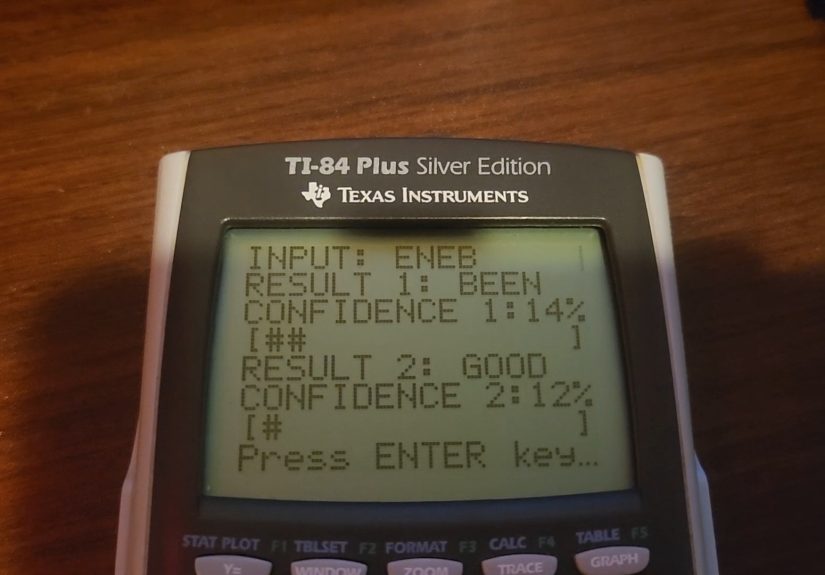
Projects such as Hermes Optimus, a neural-network autocorrect system designed for a TI-84 Plus Silver Edition, demonstrate that the answer is yes. Its architecture uses a compact feedforward neural network to map four-character inputs to target words. Other experiments have ported convolutional neural networks to the TI-84 Plus CE for handwritten digit recognition using MNIST-style images. These are not gimmicks in the lazy sense. They are miniature laboratories for understanding inference, training, memory management, model compression, and hardware-aware software design.
Why Build AI On A Calculator When Phones Exist?
Because phones make everything too easy. That may sound like a strange complaint, but modern devices hide many engineering trade-offs. A phone can run a large app, call a cloud API, cache megabytes of data, and display beautiful graphics without asking the user to think about memory layout. A calculator, on the other hand, is strict. It gives you limited RAM, limited storage, a slower processor, and a user interface that says, “You may have a menu, but only if you earn it.”
That makes the graphing calculator a terrific teaching platform. When a neural network runs on limited hardware, students and hobbyists can see the machinery more clearly. They learn that artificial intelligence is not magic. It is arithmetic, data representation, optimization, and compromise. A neural network is not a mystical brain floating in the cloud; it is a chain of operations that can be written, counted, stored, and debugged.
Running a neural net locally on a calculator also connects to a larger trend: edge AI. Edge AI means performing machine-learning tasks on the device itself instead of sending everything to a remote server. In the wider technology world, this matters for privacy, latency, reliability, and power consumption. In the calculator world, it matters because the device usually has no internet connection at all. The model either runs locally or it does not run. There is no cloud cavalry galloping over the horizon.
The Hardware Problem: Tiny Memory, Tiny Patience
The biggest obstacle is not the math. A calculator can add, multiply, divide, and store values. The obstacle is scale. Neural networks are hungry little creatures. They need weights, biases, input arrays, intermediate activations, and output values. Training requires even more memory because the system must track errors and update weights through backpropagation.
Older TI-84-style calculators are especially tight. Some classic models offer only tens of kilobytes of accessible RAM. The TI-84 Plus CE improved the situation with more memory, a color screen, and faster hardware, but it is still tiny compared with a laptop or smartphone. That is why successful calculator neural-net projects tend to use careful architecture choices. A compact feedforward network may be practical for word correction. A very small convolutional neural network can classify low-resolution handwritten digits. A large transformer model is not invited to this party; it would eat all the chips and crash the calculator before dessert.
Why Floating-Point Math Gets Expensive
Neural networks often rely on floating-point numbers, which represent decimals with flexible precision. On hardware that lacks fast floating-point support, those operations must be emulated in software. That can make training or inference painfully slow. In one TI-84 Plus CE handwritten-digit project, inference could take seconds per prediction, while full training on the calculator would be wildly impractical compared with training on a computer first.
This is why engineers often use fixed-point math, quantization, or simplified activation functions for embedded machine learning. Quantization reduces the precision of model weights and activations, often from 32-bit floating-point values to smaller integer formats. It is like packing for a weekend trip with only a backpack: you cannot bring the espresso machine, but you can still survive if you choose wisely.
Calculator Neural Networks: The Main Approaches
1. Feedforward Networks For Simple Pattern Recognition
A feedforward neural network is the simplest place to start. Inputs move in one direction through layers until the model produces an output. There are no loops, no memory of previous inputs, and no fancy attention mechanism. That simplicity makes feedforward networks useful for calculator experiments.
In a word-correction project, each character can be encoded numerically, passed into hidden neurons, and compared against a small vocabulary. The model does not understand language the way a large AI system might. It does not know grammar, tone, or whether “math test” is an emotionally loaded phrase. It simply learns patterns in the training examples and maps noisy inputs to likely outputs.
2. Convolutional Neural Networks For Digits
A convolutional neural network, or CNN, is commonly used for image recognition. For a graphing calculator, the images must be tiny. The MNIST handwritten digit dataset is a popular benchmark because each digit is represented as a small 28-by-28 grayscale image. That is still a lot for a calculator, but it is manageable with clever packing, preprocessing, and memory planning.
In calculator-based digit recognition projects, the workflow often looks like this: train or prepare the model on a computer, convert the data and weights into calculator-friendly files, transfer them to the device, and run inference locally. Some projects also demonstrate on-device training, but training is much slower and usually more educational than practical.
3. Python-Based Experiments
Modern graphing calculators increasingly support programming languages such as Python or Python-like environments. The TI-84 Plus CE Python Edition and NumWorks calculators help students write scripts directly on the device. These environments are excellent for learning loops, functions, plotting, simulations, and data analysis. For neural networks, they lower the barrier to experimentation, although performance and library limitations still matter.
MicroPython and CircuitPython are designed for constrained devices, which makes them relevant to calculator programming. They do not provide the full desktop Python ecosystem. You should not expect to install every machine-learning package from the internet and casually import your way into artificial intelligence. But the limitations are part of the lesson. When there is no giant library doing the thinking for you, the structure of a neural network becomes much easier to see.
What These Projects Teach About TinyML
TinyML is the practice of running machine-learning models on extremely resource-constrained devices, such as microcontrollers and embedded systems. A graphing calculator is not always the exact same category of device as a sensor board or industrial controller, but the mindset overlaps. You need small models, efficient data formats, predictable memory use, and a clear understanding of what task the model is supposed to perform.
The calculator forces the most important TinyML question: what is the smallest model that does something useful? That question is refreshing in an AI culture that often celebrates bigger models, bigger datasets, and bigger bills from cloud providers. Bigger can be powerful, but small can be elegant. A calculator neural network reminds us that intelligence-like behavior can emerge from surprisingly compact systems when the task is narrow and the design is careful.
For students, this is a gift. Instead of treating AI as a black box, they can inspect a small network layer by layer. They can see how inputs are encoded, how weights change predictions, and how confidence scores may or may not reflect reality. They can also learn that an 85 percent accurate model is not “smart” in every situation. It is useful within a specific boundary, and outside that boundary, it may confidently say something ridiculous. In other words, it behaves like many larger AI systems, just with fewer press releases.
Why Confidence Scores Matter
One charming feature of several small neural-net demos is that they display confidence scores. A calculator autocorrect model might say it believes the intended word is “JUST” with high confidence, or it might show uncertainty between several possible outputs. That is valuable because users should know when a model is guessing.
Modern AI products sometimes hide uncertainty behind smooth language or polished interfaces. A graphing calculator has no room for theatrics. It prints a number, and the user can decide whether the prediction deserves trust. This makes calculator AI a useful reminder: a model’s output is not truth. It is a prediction based on training data, architecture, and input encoding.
Practical Use Cases: Fun, Education, And Maybe A Little Utility
Is a neural network on a graphing calculator practical? Mostly, no. That is not an insult. A potato battery is not a practical power grid either, but it teaches electricity beautifully. Calculator neural networks are best understood as educational tools, demonstrations, and hacker art.
Still, there are plausible small uses. A calculator could classify simple sensor readings from an attached educational device, recognize hand-drawn digits, correct a limited set of input mistakes, or demonstrate statistical learning in a classroom. Teachers could use these projects to bridge algebra, programming, and machine learning. Students could modify weights, test inputs, and observe how errors change. The calculator becomes not just a math tool but a pocket laboratory.
For hobbyists, the appeal is also emotional. There is satisfaction in making limited hardware do something unexpected. It is the same joy people feel when they run Doom on a printer, build a web server on a microcontroller, or use a graphing calculator to play games instead of finishing homework. The device was not designed for this, and that is exactly why it is interesting.
Challenges Developers Must Solve
Memory Layout
Small neural networks still need arrays of values. On a calculator, developers may need to flatten matrices, split data into multiple files, or reuse memory aggressively. A model that looks simple on a laptop can become a puzzle when every allocation matters.
Data Conversion
Training data often starts in formats meant for computers. To use it on a calculator, developers may need to convert images, labels, weights, and checkpoints into calculator-compatible variables or files. This step can be just as important as the neural network itself.
Speed
Inference may be acceptable for a demo even if it takes several seconds. Training, however, can be painfully slow. That is why many projects train on a desktop computer, then transfer the trained weights to the calculator. The calculator performs the final prediction, which is the part users can see and interact with.
User Interface
A calculator screen is small. Input methods are limited. Displaying menus, confidence values, images, or graphs requires thoughtful design. A good project does not merely run; it communicates what it is doing in a way humans can understand.
What A Calculator Neural Net Says About The Future Of AI
The future of AI will not only be giant models in giant data centers. It will also include small models running near the user, near the sensor, and near the problem. Your thermostat, watch, car, camera, and medical devices may all use local models for specific tasks. These systems will not need to write poems or debate philosophy. They will need to detect patterns reliably, efficiently, and privately.
A graphing calculator neural network is a playful preview of that philosophy. It shows that AI can be local, limited, inspectable, and task-specific. It also shows that constraints can improve understanding. When the hardware is tiny, the developer must know what every layer does. There is no hiding behind endless compute.
In that sense, the calculator is not behind the times. It is a tiny stage where the essential ideas of machine learning perform without backup dancers.
Experience Notes: Testing The Idea In A Real Learning Setting
Imagine sitting down with a graphing calculator, a small neural-network program, and a simple goal: make the calculator recognize a pattern. The first experience is usually surprise. The calculator does not feel like an AI device. It feels like something that should be solving quadratic equations and surviving backpack abuse. But once the first input produces a prediction, the mood changes. Suddenly, the little screen feels more alive. Not alive in a science-fiction way, of course, but alive in the sense that it is responding to ambiguity.
The most useful learning moment comes when the model is wrong. A perfect demo is impressive for five seconds. A wrong prediction is educational for an hour. Why did it choose that output? Was the input encoded badly? Are two classes too similar? Are the weights poorly trained? Is the activation function saturating? Did the model see enough examples? These questions turn machine learning from a buzzword into a troubleshooting process. The calculator’s limitations make the questions sharper because there are fewer places for the problem to hide.
Another memorable experience is dealing with speed. On a laptop, a small model may run so quickly that students barely notice the computation. On a calculator, waiting for inference creates suspense. That delay is not always convenient, but it makes the work visible. You can feel the device calculating. It is like watching a tiny factory assemble a prediction one operation at a time. The wait encourages students to ask how many multiplications are happening, whether smaller weights would help, and why optimized math matters.
Memory management is equally humbling. A beginner may write code that seems perfectly reasonable, only to discover that the calculator cannot store the data structure. This is frustrating, but it is also a rite of passage. It teaches that software is not floating in a magical cloud. It occupies space. It has shape. It must fit somewhere. When students flatten a matrix, compress data, or reduce a hidden layer from sixty neurons to thirty, they are learning engineering trade-offs in a very concrete way.
The best classroom use of a calculator neural net is not to pretend it is the future of commercial AI. It is to use it as a transparent model of the bigger world. A small autocorrect system can lead to discussions about language models. A digit recognizer can introduce computer vision. A confidence score can open a conversation about uncertainty, bias, and trust. A slow training loop can explain why GPUs matter. The calculator becomes a bridge between math class and modern computing.
There is also a motivational benefit. Students who may feel intimidated by artificial intelligence often relax when the project runs on familiar hardware. A graphing calculator is not a server rack. It does not look elite or unreachable. It says, “You already know me.” That familiarity lowers the emotional barrier. From there, curiosity can do its job. And curiosity, unlike RAM, is wonderfully expandable.
Conclusion
A neural net for a graphing calculator is a small idea with a surprisingly large lesson. It proves that machine learning does not begin with massive infrastructure; it begins with inputs, weights, patterns, and predictions. When squeezed into a calculator, those ideas become easier to inspect and harder to take for granted.
No, a TI-84 will not replace your laptop for AI development. It will not train a giant model before lunch, and it will not write your term paper while pretending to be “just a calculator.” But it can demonstrate the heart of neural networks in a way that is concrete, memorable, and delightfully nerdy. In a world obsessed with bigger AI, the graphing calculator reminds us that small intelligence can still be smart enough to teach us something.