Table of Contents >> Show >> Hide
- Why Do You Have to Activate a Credit Card?
- Before You Activate Your Credit Card
- How to Activate a Credit Card: Step-by-Step
- Which Credit Card Activation Method Is Best?
- How Long Does Credit Card Activation Take?
- Common Problems When Activating a Credit Card
- Credit Card Activation Safety Tips
- What to Do Right After You Activate Your Card
- How to Know If Your Credit Card Is Active
- FAQ: How to Activate a Credit Card
- Final Thoughts
- Real-World Experiences With Credit Card Activation
Getting a new credit card in the mail can feel a little like receiving a VIP pass to adulting. It is shiny, important, and somehow makes you feel like you should suddenly understand reward categories, billing cycles, and the mysterious emotional power of a 2% cash-back offer. But before you can swipe, tap, or dramatically place it on a restaurant bill, you need to activate it.
The good news? Credit card activation is usually quick, easy, and about as complicated as making toast. The even better news? Once you know the steps, you can avoid common mistakes, dodge sketchy scams, and start using your card with confidence.
In this guide, you will learn exactly how to activate a credit card, which method is best, what information you may need, what to do if something goes wrong, and how to stay safe during the process. Whether your card came from a major bank, a credit union, or a rewards program that promises points for every latte, this tutorial will help you get it up and running.
Why Do You Have to Activate a Credit Card?
Most new credit cards arrive inactive for one simple reason: security. If someone steals the envelope from your mailbox or intercepts the card before you get it, they usually cannot use it right away. Activation adds a layer of protection by requiring the real cardholder to verify identity before the card starts working.
That means activation is not just a bureaucratic speed bump. It is a built-in security feature. Think of it as your card’s way of asking, “Are you really you?” before it begins its financial career.
Before You Activate Your Credit Card
Before you press buttons, open apps, or call the number on the sticker, gather a few basics. This helps the process move faster and reduces the odds of getting halfway through and realizing your wallet, phone, and patience are all in different rooms.
What you usually need
- Your new credit card
- Your phone or computer
- Your account login, if activating online or in an app
- Personal verification details, such as your ZIP code, date of birth, or the last four digits of your Social Security number
- The letter that came with the card, if it includes special instructions
Some issuers make activation incredibly simple if you already use their mobile app or online banking. Others may ask you to confirm the card number, security code, and a few identity details. In some cases, one cardholder can activate the account for multiple cards, while with other issuers each card may need its own step. The exact process depends on the bank, but the overall flow is very similar.
How to Activate a Credit Card: Step-by-Step
There are three main ways to activate a credit card: by mobile app, online, or by phone. Let’s walk through each one.
Method 1: Activate your credit card in the mobile app
If your card issuer has a mobile app, this is often the easiest option. It is fast, secure, and convenient, especially if you already use the app to check balances or make payments.
- Download the official app from your card issuer.
- Sign in to your account, or create one if you are a new user.
- Find your new card in the account dashboard.
- Tap the option that says something like Activate Card, Confirm Card, or Set Up Card.
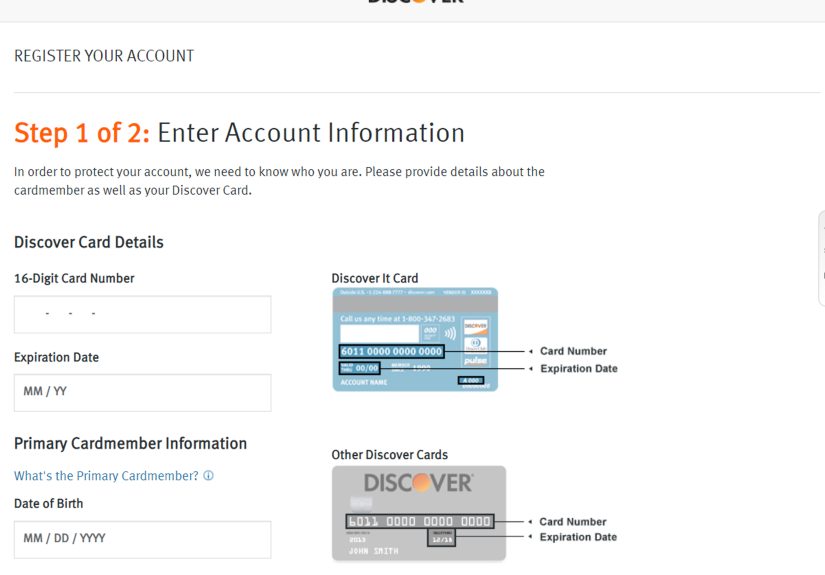
- Enter any requested details, such as the card number, CVV, expiration date, or personal verification information.
- Submit the request and wait for confirmation.
This method is especially handy if you want to add the card to a digital wallet soon after activation. Some banks make it possible to manage alerts, freeze or unfreeze the card, or view digital card features right after setup. It is basically the financial version of assembling furniture and discovering there were no leftover screws.
Method 2: Activate your credit card online
If you prefer a laptop or desktop, the issuer’s official website is another common route.
- Go to the official bank or card issuer website.
- Sign in to online banking, or enroll if you have never created an account.
- Look for a menu option such as Activate Credit Card.
- Enter the required card and identity information.
- Follow the prompts and confirm activation.
Online activation is a solid option if you like seeing all the details on a bigger screen. It is also useful if your card issuer does not make app activation obvious or if you are already logged in to online banking.
One important rule: type the website address yourself or use a trusted bookmark. Do not click random activation links from texts, emails, or QR codes unless you are certain they are legitimate. Fake sites love pretending to be helpful while they quietly steal your information.
Method 3: Activate your credit card by phone
Phone activation is still extremely common. In fact, many new cards arrive with a sticker that lists a toll-free activation number. If you like old-school certainty and clear instructions, this method gets the job done.
- Call the number provided on the sticker attached to the card or the letter that came with it.
- Follow the automated prompts, or ask for a representative if needed.
- Provide the requested information, which may include your card number, security code, ZIP code, or the last four digits of your Social Security number.
- Listen for confirmation that the card has been activated.
This method is simple, but there is one catch: only call trusted numbers that came directly from the issuer. If someone calls you and claims they need to activate your card, slow down and verify independently. Real customer service is helpful. Scammers are also “helpful,” but in a much more expensive way.
Which Credit Card Activation Method Is Best?
There is no single best method for everyone. The right one depends on how you manage your money and what feels most comfortable.
Choose the app if:
- You already use mobile banking
- You want the fastest setup
- You plan to manage alerts, rewards, or digital wallet features right away
Choose online activation if:
- You prefer a bigger screen
- You want to review account settings immediately
- You are already logged in on your computer
Choose phone activation if:
- You want spoken instructions
- You are not enrolled in online banking yet
- You run into problems with the website or app
In most cases, all three methods work just fine. The important thing is using an official channel and completing every verification step.
How Long Does Credit Card Activation Take?
Usually, only a few minutes. The actual activation process is often quick, especially if your information is ready and your account is already set up. In many cases, the card works almost immediately after activation, although some banks may take a short time to sync account systems.
If you activate the card and it still does not work after a reasonable period, contact the issuer. Do not keep retrying at checkout like you are starring in a very awkward grocery store documentary.
Common Problems When Activating a Credit Card
Most activations are smooth, but sometimes the process hits a speed bump. Here are the most common issues and how to fix them.
1. The card is not recognized
Double-check the card number, expiration date, and security code. One wrong digit can derail the whole thing.
2. Your identity cannot be verified
Make sure the address, ZIP code, and other details match what the issuer has on file. If you recently moved or changed your phone number, that mismatch may cause trouble.
3. The website or app is glitching
Try again later, use a different browser, update the app, or switch to phone activation.
4. The card still will not work after activation
Call customer service using the number on the back of the card. There may be an account hold, shipping issue, or security review.
5. You think the card was lost or tampered with
Do not activate it. Contact the issuer immediately and report the problem. If a card arrived unexpectedly and you never applied for it, treat that as a possible identity theft issue and investigate right away.
Credit Card Activation Safety Tips
If there is one area where it pays to be slightly dramatic, it is security. A few careful habits can protect your account and your personal information.
- Use only the official app, official website, or phone number that came with your card.
- Do not activate a card over public Wi-Fi if you can avoid it.
- Ignore suspicious texts, emails, or QR codes claiming your card needs urgent activation.
- Never give card details, one-time passcodes, or screenshots of your card to strangers.
- Review your account after activation to make sure everything looks correct.
- Be cautious if a representative tries to sell optional add-on products during activation. You do not have to say yes.
That last point matters. Some activation calls or service interactions may lead to offers for optional products like credit monitoring or payment protection. Read carefully, ask questions, and do not agree to anything you do not actually want. A new card should come with excitement, not mystery fees.
What to Do Right After You Activate Your Card
Activation is step one. Smart setup is step two.
Best next moves
- Sign the card if you prefer a physical signature.
- Set up your online account if you have not done it already.
- Enable transaction alerts and fraud notifications.
- Review your interest rate, due date, rewards, and fees.
- Add the card to your digital wallet if you plan to use tap-to-pay or mobile checkout.
- Store the issuer’s customer service number somewhere safe.
- Destroy your old card if this is a replacement, unless your issuer told you to keep it temporarily.
This is also a good time to check whether your new card has benefits you might forget about later, like rental car coverage, purchase protection, travel perks, or bonus categories. Many people activate a card and then immediately use it for snacks. Admirable. But maybe spend thirty seconds reading the benefits page first.
How to Know If Your Credit Card Is Active
If the issuer says the card is activated, that is usually enough. Still, if you want extra reassurance, here are a few ways to confirm:
- Check the app or online banking dashboard for an activation confirmation
- Look for a confirmation email or text, if the issuer sends one
- Make a small purchase and see whether it goes through
- Call customer service and ask them to confirm status
A tiny test purchase, like a coffee or a streaming subscription, can be a practical way to confirm everything is working. Just remember to pay the bill later. The card may be activated, but your future self still enjoys being financially respected.
FAQ: How to Activate a Credit Card
Can I use my credit card before activating it?
Usually no. Most new cards must be activated before purchases will go through.
Can I activate a credit card without calling?
Yes, many issuers let you activate by mobile app or online banking.
Do I need to activate a replacement credit card?
Often yes. Many replacement or renewed cards still require activation, even if the account itself is unchanged.
What if I never received the card?
Contact the issuer immediately. Do not wait and hope it appears. Missing mail and financial products are a bad combination.
Can someone else activate my credit card for me?
Usually the primary cardholder or authorized user must follow the issuer’s process. Rules vary, so check your bank’s instructions.
Final Thoughts
If you have been wondering how to activate a credit card, the answer is refreshingly simple: use the issuer’s official app, website, or phone number, verify your identity, and follow the prompts. That is it. No secret handshake. No financial wizard hat. No need to panic because the envelope looked important.
The real trick is doing it safely. Stick to official channels, watch for scams, double-check your information, and use the moment after activation to set up alerts and understand your account. A credit card can be a useful tool when you start strong and stay organized.
In other words, activation is less about pressing a button and more about starting a relationship with your card on the right foot. Preferably a foot that pays on time.
Real-World Experiences With Credit Card Activation
One of the most common real-life experiences with credit card activation is how surprisingly uneventful it is. People often expect a long call, a maze of robotic menus, or some dramatic banking obstacle. Instead, many activate their card in under five minutes and wonder why they were stressing in the first place. That is especially true for people who already use the issuer’s app. They open the app, tap one button, confirm a few details, and suddenly the card is ready for action. It is the kind of process that feels almost suspiciously easy.
Another common experience is the “I forgot I needed to activate it” moment. This usually happens when someone gets a new card, admires it, tucks it into a wallet, and tries to use it days later at a store. The payment declines, confusion follows, and then the lightbulb goes on. It is a classic scene. The fix is easy, but it shows why activation should be done as soon as the card arrives. Waiting creates unnecessary friction, and nobody wants to hold up a checkout line while quietly realizing the problem is not the cashier, the card reader, or the universe. It is just an unactivated card.
Some people also run into small identity verification hiccups. Maybe they recently moved and the ZIP code on file is outdated. Maybe they typed the security code wrong. Maybe they set up online banking years ago and cannot remember the password now. These situations are annoying, but they are usually easy to fix once you slow down and verify the details. In fact, many cardholders say the biggest lesson they learned was not a technical one. It was simply to keep their account information current and store login credentials somewhere secure.
There are also experiences that highlight the importance of caution. Some users receive text messages or emails claiming their card must be activated immediately through a link. That can feel convincing, especially when the message arrives around the same time the physical card shows up. But savvy consumers know to stop, ignore the link, and go directly to the official app or website instead. That one habit can prevent a serious headache. In the real world, the safest shortcut is often no shortcut at all.
People with replacement cards often have another interesting experience: assuming the old routine still applies automatically. They think, “It is the same account, so this new card should just work.” Sometimes it does not. Many replacement cards still need activation, and that catches people off guard. On the bright side, once they go through the process, they usually take a minute to update digital wallets, recurring subscriptions, and alerts too. That turns an annoying task into a useful financial reset.
There is also a confidence boost that comes with doing everything correctly. For first-time cardholders, activation can feel like a milestone. It is a small step, but it signals a bigger one: learning how to manage credit responsibly. Activating the card, setting alerts, reviewing terms, and making a small first purchase can make the whole system feel less intimidating. Many people start the process feeling unsure and finish feeling much more in control. That is a great outcome for something that begins with a plain envelope and a sticker.
The bottom line from real-world experiences is simple: credit card activation is usually easy, occasionally inconvenient, and always worth doing carefully. Most problems come from rushing, using the wrong channel, or forgetting a detail. Most successes come from sticking to official instructions and taking a few extra minutes to set the account up properly. It is not glamorous, but it is one of those tiny money moves that makes everything else smoother.