Table of Contents >> Show >> Hide
- Why Adding Your Business to Google Maps Matters
- Step 1: Create or Claim Your Google Business Profile
- Step 2: Verify Your Business
- Step 3: Optimize Your Google Maps Listing
- Common Mistakes to Avoid When Adding Your Business to Google Maps
- How Google Maps Helps Different Types of Businesses
- Experience-Based Tips for Adding Your Business to Google Maps
- Conclusion
If your business is not on Google Maps, you are basically hiding behind a very tasteful curtain while customers wander around the internet asking, “Where is the nearest bakery, plumber, dentist, boutique, dog groomer, or taco place that will understand my emergency?” The good news is that learning how to add your business to Google Maps is not complicated. You do not need a marketing degree, a secret handshake, or a spreadsheet with 47 color-coded tabs. You need a Google account, accurate business details, and a few minutes of focused attention.
Google Maps is one of the first places customers check when they want directions, hours, phone numbers, reviews, photos, or proof that your business is real and not operating from the mysterious back corner of the internet. A complete Google Business Profile can help your company appear in Google Search and Maps, attract nearby customers, collect reviews, share updates, and turn online curiosity into phone calls, visits, bookings, and sales.
This guide breaks the process into three easy steps: create or claim your profile, verify your business, and optimize your listing so it looks trustworthy, useful, and ready for customers. Whether you run a storefront, a service-area business, a restaurant, a salon, a repair company, or a local professional service, these steps will help you get your business listed the right way.
Why Adding Your Business to Google Maps Matters
Before we jump into the steps, let’s talk about why this matters. When people search for local businesses, they often have high intent. Someone typing “coffee shop near me” is not writing a research paper on beans. They probably want caffeine soon. Someone searching “emergency plumber near me” is not casually browsing pipe aesthetics. They need help now.
A Google Business Profile gives your business a public identity on Google Maps and Google Search. It can display your business name, address, service area, phone number, website, hours, photos, reviews, products, services, updates, and directions. For local SEO, this profile is one of the most important online assets a business can have.
Even if you already have a website, your Google Maps listing still matters because many customers never make it past the search results page. They compare ratings, hours, distance, photos, and recent activity before deciding who gets the call. A complete and accurate profile makes that decision easier.
Step 1: Create or Claim Your Google Business Profile
The first step to add your business to Google Maps is creating or claiming your Google Business Profile. Google Business Profile is the free tool that lets business owners manage how their company appears on Google Search and Google Maps.
Start with the Right Google Account
Use a Google account that you plan to keep connected to the business long term. Ideally, this should be a business email account rather than someone’s personal account from 2009 with an embarrassing username. If you have partners, managers, or marketing staff, you can add them later as owners or managers instead of sharing one login.
Go to the Google Business Profile setup page and search for your business name. Google may already have a listing for your company, especially if customers, data providers, or past owners added information before. If your business appears, claim it. If it does not appear, create a new profile.
Enter Your Real Business Name
Your business name should match the name customers see in the real world. Do not stuff it with keywords like “Best Cheap 24/7 Emergency Plumbing Near Me LLC” unless that is genuinely your legal and public-facing business name. Besides looking like a search engine sneezed, keyword stuffing can violate Google’s guidelines and create trust problems.
Use the same business name that appears on your storefront, website, business cards, invoices, and official documents. Consistency helps customers recognize you and helps Google understand that your business information is reliable.
Choose the Best Business Category
Your primary category tells Google what your business does. Choose the category that most accurately describes your core business. A bakery should not choose “restaurant” just because cake is technically food and food is technically eaten. Be specific when possible.
For example, a dental clinic might choose “Dentist,” while an orthodontic practice may choose “Orthodontist.” A hair salon should not pick “Beauty Supply Store” unless it mainly sells beauty products. Your category influences which local searches your business may appear in, so accuracy matters.
Add Your Location or Service Area
If customers visit your physical location, add your street address. This is common for restaurants, shops, salons, clinics, offices, gyms, and other storefront businesses. Make sure the address is exact, including suite numbers, floor numbers, or unit numbers when needed.
If you travel to customers instead of serving them at a storefront, you may set a service area instead of displaying a public address. This works for businesses such as plumbers, electricians, cleaners, landscapers, mobile mechanics, photographers, and home repair services. Be honest about where you actually serve customers. A small business in Denver should not claim it serves the entire continental United States unless it has a cape and a private jet.
Add Contact Details
Include a phone number and website if you have one. Use a phone number that customers can actually reach. If your phone line sounds like it is guarded by an ancient voicemail dragon, fix that before sending more traffic to it.
Your website should match the business information in your profile. If your site lists different hours, a different address, or an old phone number, update it. Consistency across your Google Business Profile, website, social media pages, directories, and local listings supports trust and helps reduce customer confusion.
Step 2: Verify Your Business
Creating a profile is only the beginning. To manage your business fully and improve trust, you need to verify it. Verification helps Google confirm that you are the real owner or authorized representative of the business.
Why Verification Is Important
Verification protects business owners and customers. Without it, anyone could claim a business, change a phone number, redirect customers, or make a perfectly good pizza shop look like it only sells decorative staplers. Verification helps prevent fraud, impersonation, and incorrect information.
Once your profile is verified, you can manage key details, respond to reviews, upload photos, post updates, and keep your information fresh. In many cases, customers also feel more confident when they see a complete and active business listing.
Common Google Business Verification Methods
Google determines available verification methods based on the business type, location, public information, and other factors. You may see one or more options such as phone, text, email, postcard, live video call, or video recording. You usually cannot choose a method that Google does not offer for your profile.
For a storefront, Google may ask for proof that your business exists at the listed address. For a service-area business, Google may ask for proof that you operate the business and serve customers in the stated area. Video verification may require you to show your location, equipment, signage, branded vehicle, workspace, business documents, or tools related to your business.
Tips for Passing Verification Smoothly
Prepare before starting verification. Make sure your business name, address, phone number, category, and website are accurate. If you use a video recording, show clear evidence that connects you to the business. This might include exterior signage, interior workspace, business equipment, branded materials, locked areas that only staff can access, or official documents.
Avoid editing major business details while verification is in progress unless necessary. Big changes can sometimes delay review or trigger additional checks. If Google asks for more information, provide it carefully and honestly.
What If Someone Else Already Claimed Your Business?
Sometimes a business profile already exists and is managed by a former employee, previous agency, old owner, or someone you do not recognize. In that case, you can request ownership through Google. The current profile owner usually receives a request and has a limited time to respond.
If the owner approves the request, you can gain access. If they deny it or do not respond, Google may provide next steps. Be prepared to prove your connection to the business. This is one more reason to use a stable business email and keep business documents organized.
Step 3: Optimize Your Google Maps Listing
After your business is added and verified, the real work begins. A blank or half-finished Google Business Profile is like opening a store with the lights off and a handwritten sign that says, “Maybe we’re open?” Optimization helps your listing stand out and gives customers the information they need to choose you.
Complete Every Important Section
Fill out your business hours, holiday hours, phone number, website, appointment links, services, products, accessibility details, attributes, description, and service area. A complete profile is more useful to customers and may perform better in local search because Google can understand what you offer and when you are available.
Your business description should be clear, natural, and customer-focused. Explain what you do, who you serve, where you serve them, and what makes your business useful. Avoid sales hype, all-caps shouting, and keyword stuffing. “Family-owned HVAC company serving Austin with AC repair, installation, and maintenance” is helpful. “BEST HVAC AC REPAIR AUSTIN CHEAP FAST #1 COOL AIR NOW” is not helpful; it sounds like a billboard had too much espresso.
Add High-Quality Photos and Videos
Photos can make a major difference. Customers want to see your storefront, interior, products, team, menu items, completed projects, parking area, entrance, and anything that helps them feel comfortable choosing you.
For a restaurant, upload photos of the dining area, popular dishes, menu boards, exterior sign, and happy-but-not-too-staged atmosphere. For a home service business, show branded vehicles, tools, uniforms, before-and-after project photos, and team members at work. For a clinic or professional office, show the reception area, treatment rooms, exterior entrance, and staff photos.
Use bright, clear, honest images. Do not upload heavily filtered photos that make your sandwich look like it has achieved spiritual enlightenment. Customers appreciate accuracy.
Add Services, Products, and Booking Links
If your profile allows service listings, add specific services with short descriptions. A landscaping business might list lawn mowing, seasonal cleanup, mulch installation, hedge trimming, and irrigation repair. A salon might list haircuts, color treatments, blowouts, bridal styling, and beard trims.
If you sell products, add product names, categories, descriptions, and photos when appropriate. If your business accepts appointments, reservations, or online orders, connect the correct booking or ordering link. The easier you make the next step, the more likely customers are to take it.
Ask for Reviews the Right Way
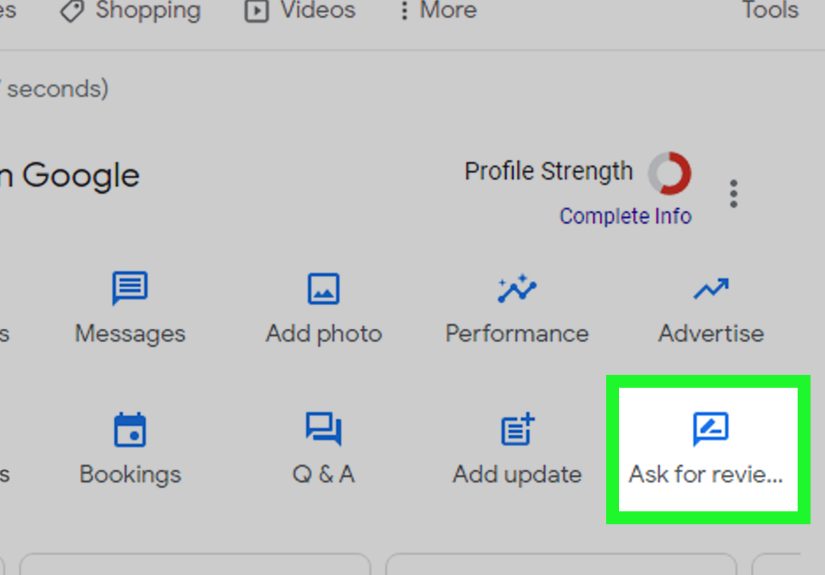
Reviews are a key part of local trust. After a real customer has a real experience with your business, you can politely ask them to leave an honest review. You can share your Google review link in follow-up emails, receipts, text messages, or printed cards.
What you should not do is buy fake reviews, offer discounts for reviews, pressure customers, review your own business, or ask employees to pretend they are customers. Fake and incentivized reviews can damage trust, violate platform policies, and create legal risk under U.S. consumer review rules. In other words, do not turn your review strategy into a courtroom-themed escape room.
Respond to reviews professionally. Thank happy customers. For negative reviews, stay calm, acknowledge the concern, and invite the customer to contact you directly when appropriate. A thoughtful response can show future customers that you care.
Post Updates Regularly
Google Business Profile lets many businesses publish updates, offers, events, and announcements. Use these posts to share seasonal specials, new services, holiday hours, limited-time offers, community events, menu changes, or helpful reminders.
For example, a tax preparation office might post about appointment availability before filing deadlines. A bakery might promote holiday pies. A gym might announce a beginner class. A plumber might share winter pipe protection tips. These updates show that your business is active and give customers fresh reasons to engage.
Keep Your Information Accurate
Accuracy is not a one-time task. Update your profile whenever your hours, phone number, website, address, services, or business model changes. Add special hours for holidays. If you close early for a staff event or move across town, update your listing before customers discover the change by standing in front of a locked door.
Local SEO depends heavily on trust, relevance, and usefulness. A profile with accurate information, strong photos, real reviews, and regular updates gives customers confidence and helps search engines understand your business.
Common Mistakes to Avoid When Adding Your Business to Google Maps
Using Keyword-Stuffed Business Names
Your business name should be your real-world name. Adding extra keywords may seem clever, but it can create policy problems and make your brand look spammy. Use keywords naturally in your description, services, products, posts, and website content instead.
Choosing the Wrong Category
Your primary category should describe your main business. If you choose a category just because it has high search volume, you may attract the wrong customers and confuse Google. Add secondary categories only when they genuinely apply.
Ignoring Service-Area Settings
Service-area businesses should be clear about where they operate. Do not list a home address if customers cannot visit you there. Do not claim service areas you cannot reasonably serve. A clean service-area setup helps customers know whether you are available in their location.
Forgetting Holiday Hours
Holiday hours matter more than many businesses realize. Customers often check Google Maps before driving over. If your listing says you are open and you are not, that customer may not come back. Update special hours before major holidays, vacations, renovations, and temporary closures.
Letting Reviews Sit Unanswered
Reviews are public conversations. You do not need to write a novel in response to every review, but a simple thank-you or thoughtful reply can make your business look attentive. When negative reviews appear, respond with professionalism instead of emotion. The future customer reading your response is often more important than the reviewer who wrote the complaint.
How Google Maps Helps Different Types of Businesses
Restaurants and Cafes
Restaurants benefit from photos, menus, hours, busy times, reviews, directions, and ordering links. Customers often choose where to eat based on what they see in Maps. Strong food photos and current hours can directly affect foot traffic.
Home Service Businesses
Plumbers, electricians, HVAC companies, cleaners, roofers, and landscapers rely heavily on local search. Customers want fast answers, service areas, phone numbers, reviews, and proof of professionalism. A complete profile can help these businesses get calls from nearby customers who need immediate help.
Medical and Professional Offices
Dentists, clinics, attorneys, accountants, therapists, and consultants need trust. A complete Google Business Profile with accurate hours, appointment links, office photos, and thoughtful review responses can help reduce hesitation and make the first contact easier.
Retail Stores
Retail businesses can use Google Maps to show store hours, product highlights, photos, accessibility details, and promotions. For shoppers comparing options nearby, a polished profile can be the difference between “Let’s go there” and “Keep scrolling.”
Experience-Based Tips for Adding Your Business to Google Maps
From working with local business content and SEO strategy, one lesson stands out: the businesses that win on Google Maps are usually not the ones trying to be clever. They are the ones being clear. Clarity beats tricks. Accuracy beats hype. A real photo of your storefront often does more for trust than a perfectly polished stock image of smiling people pointing at a laptop.
One practical experience is that business owners often underestimate how customers search. Owners think in brand terms, while customers think in need-based terms. A bakery owner may focus on the business name, but customers search for “birthday cake near me,” “custom cupcakes,” or “gluten-free bakery.” That does not mean you should stuff those phrases into your business name. It means you should add accurate services, products, descriptions, posts, and website content that naturally explain what you offer.
Another common experience is that verification becomes easier when the business has consistent information across the web. If your website says one address, your Facebook page says another, and your invoice template has a phone number from three years ago, Google and customers may both raise an eyebrow. Before creating or claiming your profile, check your website, social media pages, online directories, and signage. Make the details match as much as possible.
Photos are also more powerful than many owners expect. A small restaurant with clear menu photos, exterior shots, and real food images can look more trustworthy than a competitor with only one blurry logo. A contractor with project photos, branded trucks, and team images can reduce customer doubt before the first phone call. People want to know what to expect. Photos answer questions that text cannot.
Reviews require patience. New businesses sometimes panic because they have only two reviews while a competitor has 200. The best approach is steady and ethical. Ask real customers after real transactions. Make it easy with a direct review link. Do not bribe, pressure, or script them. A natural review profile built over time is healthier than a suspicious burst of five-star praise that reads like it was written by a robot wearing a fake mustache.
Another experience-based tip: update your profile before busy seasons. If you run a tax office, optimize before tax season. If you sell flowers, update before Valentine’s Day and Mother’s Day. If you repair air conditioners, refresh your services and photos before summer. Local search demand often rises before business owners remember to update their listings. Prepare early and your profile can be ready when customers start searching.
Finally, treat your Google Business Profile like a living storefront, not a one-time setup task. Add photos when you complete projects. Post updates when you launch offers. Check hours before holidays. Respond to reviews every week. Review your services every few months. The businesses that get the most value from Google Maps usually make profile maintenance part of their normal routine, just like cleaning the front window or answering the phone.
Conclusion
Adding your business to Google Maps is one of the simplest and most valuable steps you can take to improve local visibility. The process comes down to three easy steps: create or claim your Google Business Profile, verify your business, and optimize your listing with accurate information, strong photos, real reviews, and useful updates.
A complete Google Maps listing helps customers find you, trust you, contact you, visit you, and choose you over competitors. It also supports your broader local SEO strategy by giving Google clear information about who you are, what you offer, and where you serve customers.
Do not rush through the setup and disappear. Keep your profile accurate, active, and honest. The internet rewards businesses that make life easier for customers. And customers, as it turns out, are big fans of not driving to the wrong address.