Table of Contents >> Show >> Hide
Note: Kaleidoscopico runs on the RP2350-powered Raspbetle follows the commonly used name for Raspberry Pi’s microcontroller family.
Modern computers are so powerful that developers can occasionally treat memory like an all-you-can-eat buffet. Kaleidoscopico takes the opposite approach. Created by demoscene programmer Linus Åkesson, also known as lft, this audiovisual production turns a tiny Raspberry Pi Pico 2 into something resembling a complete retro multimedia computer.
There is no graphics processor waiting backstage, no dedicated sound chip humming politely in the corner, and no mountain of RAM available to hide inefficient code. Instead, Kaleidoscopico generates animated graphics, layered video, transitions, synthesized music, scrolling text, and a three-dimensional landscape through careful use of the RP2350 microcontroller’s two processor cores, programmable I/O hardware, DMA controller, PWM units, and memory banks.
The result placed second in the Wild competition at Revision 2025, one of the demoscene’s major events. More importantly, it demonstrates what can happen when a developer stops asking, “How powerful is this board?” and starts asking, “How much can I persuade every transistor to do before it files a complaint?” t Is Kaleidoscopico?
Kaleidoscopico is a real-time microcontroller demo written for the Raspberry Pi Pico 2. A demoscene production is not a conventional game, application, or prerecorded animation. It is executable software that generates synchronized graphics and music while it runs, often under strict hardware, storage, or competition limitations.
Åkesson’s project contains approximately 17,000 lines of RISC-V assembly language. That detail alone makes Kaleidoscopico unusual. The RP2350 chip inside the Pico 2 can run either a pair of Arm Cortex-M33 processors or a pair of open-hardware Hazard3 RISC-V processors. Although the Arm cores offer hardware floating-point support, Kaleidoscopico deliberately uses the RISC-V cores.
Choosing the less convenient option is practically a demoscene tradition. If a platform makes the job slightly harder but considerably more interesting, someone will eventually write a visual masterpiece for it.
The finished firmware is accompanied by downloadable binaries, schematics, a stripboard layout, soundtrack files, and a detailed technical explanation. That openness turns the production into more than a performance. It is also a deep lesson in Raspberry Pi Pico 2 graphics programming, RISC-V optimization, real-time audio, and low-level system architecture. the Raspberry Pi Pico 2 Matters
The Raspberry Pi Pico 2 is built around Raspberry Pi’s RP2350 microcontroller. It includes 520 KB of on-chip SRAM, 4 MB of onboard flash storage, dual-architecture processing options, DMA hardware, PWM channels, interpolators, and programmable I/O blocks. It is a microcontroller board rather than a Linux computer, so it boots directly into a dedicated program without a desktop operating system consuming resources.
This makes the Pico 2 an appealing platform for deterministic real-time work. Code can interact directly with hardware registers, memory regions, timers, and peripheral blocks. There are fewer protective layers, but there are also fewer surprises. When an instruction consumes a cycle, that cycle matters.
The board’s programmable I/O system is especially important. PIO state machines can shift bits and control GPIO pins with extremely precise timing while the main processors handle higher-level calculations. Many Pico projects use PIO to communicate with unusual displays, LED strips, sensors, vintage buses, and custom protocols. Kaleidoscopico pushes the same concept into full-screen VGA generation.
Official documentation also supports several development paths, including C, C++, assembly language, MicroPython, and third-party Arduino or CircuitPython environments. Beginners can blink an LED without meeting a linker script, while experts can bypass the usual software layers and negotiate directly with the silicon. Amiga-Inspired Two-Core Architecture
Kaleidoscopico divides the Pico 2’s work between its two active RISC-V cores. One core behaves like the main CPU, calculating effects and coordinating the progression of the demo. The other acts more like a collection of custom multimedia chips.
This design is inspired by the Commodore Amiga. Classic Amiga computers paired a general-purpose CPU with specialized hardware for graphics, audio, and memory movement. Developers could program those supporting components to perform tasks in parallel, producing results that seemed far beyond the computer’s modest clock speed.
In Kaleidoscopico, the second core runs a tightly controlled loop for every scanline. It configures video layers, starts DMA transfers, processes control lists, and generates the next stereo audio sample. Shared variables act like virtual hardware registers through which the main core controls this software-defined chipset.
This is a clever use of multicore processing because the responsibilities are sharply separated. One core protects the timing-sensitive video and audio pipeline, while the other concentrates on animation, asset preparation, transitions, and rendering. Rather than having two processors repeatedly bump elbows at the same buffet table, each receives a clearly labeled tray. erating VGA Without a Graphics Chip
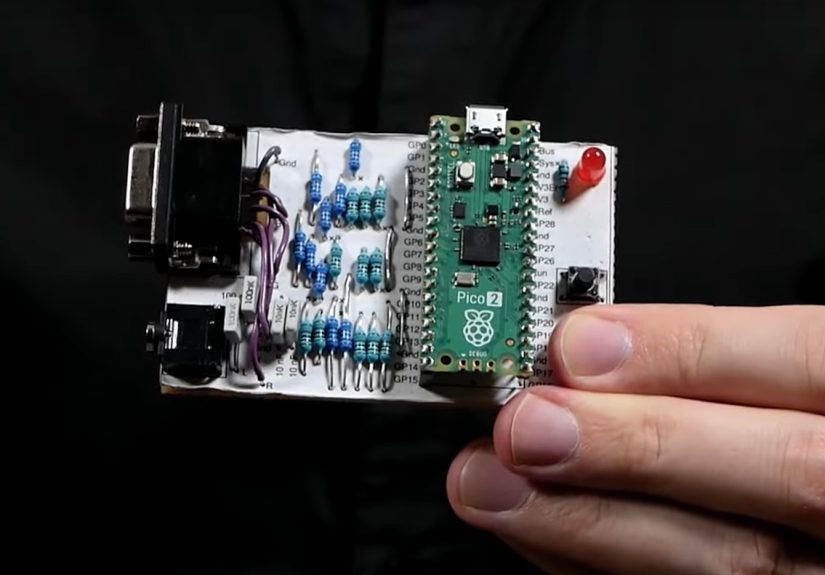
A Minimal Hardware Adapter
The external hardware is delightfully simple. The Pico 2 sits on a carrier board containing resistor ladders for analog RGB output, a VGA connector, an audio jack, and passive filtering components. Four output bits are assigned to each red, green, and blue channel, producing a palette of 4,096 possible colors.
The chip is downclocked from its rated 150 MHz to approximately 130 MHz so its timing aligns conveniently with a standard 1024-by-768 VGA signal running at 60 frames per second. Kaleidoscopico does not render at the full nominal resolution. Color values change at half the horizontal rate, and each logical row is transmitted twice, giving an effective resolution of 512 by 384 pixels.
That may sound modest beside modern 4K displays, but context matters. The board is producing the video signal itself while simultaneously drawing effects and synthesizing multichannel audio. Your expensive graphics card has fans, heat pipes, and several gigabytes of memory. Kaleidoscopico has resistor ladders and confidence. State Machines Create Video Layers
A PIO block supplies four programmable state machines. Kaleidoscopico assigns three of them to separate pixel layers. The fourth coordinates scanline timing, waits for horizontal synchronization, starts the other state machines, and produces the black border outside the visible image.
The PIO hardware includes an output-priority feature. A higher-numbered state machine can override lower-numbered outputs, allowing transparent pixels in one layer to reveal imagery underneath. In practical terms, this creates a tiny hardware-assisted compositing system without a conventional GPU.
The layers can hold backgrounds, logos, text, sprites, or rendered scenery. Their positions, palettes, memory addresses, and modes can change while the display beam moves down the screen. The approach resembles raster effects on classic computers, where programmers modified graphics settings at precisely chosen scanlines.
DMA Keeps the Pixels Flowing
Direct memory access transfers pixel data to the PIO state machines without forcing a CPU core to copy every value manually. That leaves precious processor cycles available for rendering and sound synthesis.
Kaleidoscopico also uses DMA ring buffers creatively. A short buffer can repeat across a line to produce horizontal tiling, while a wider circular buffer allows images or text to scroll smoothly across wraparound boundaries. A 256-pixel kaleidoscope background, for example, can appear twice across the 512-pixel logical display without storing a second copy.
This is an excellent illustration of constraint-driven design. Instead of treating a ring buffer as merely a streaming tool, the demo turns address wrapping into a graphics feature. The hardware does not know it is drawing tiled art. It is simply following orders with admirable enthusiasm. ing Memory by Racing the Beam
A conventional true-color framebuffer would consume a large portion of the Pico 2’s SRAM. Kaleidoscopico avoids that cost by generating and composing much of the display as it is transmitted. This technique is often called “racing the beam,” because software prepares visual data in step with the monitor’s scanning process.
Pixels are generally stored as four-bit palette indexes rather than full RGB values. Each layer receives its own small palette, and the PIO program translates incoming pixel codes into output colors. Åkesson even uses computed jumps inside the PIO instruction memory as a type of palette lookup, avoiding a more bus-intensive arrangement involving repeated DMA table transfers.
The lesson is broader than retro graphics. Memory bandwidth can be just as important as processor speed. A theoretically elegant design may perform poorly if it floods the internal bus with unnecessary reads and writes. Kaleidoscopico succeeds because its graphics system is built around the actual movement of data through the RP2350.
Real-Time Synthesized Audio
The demo’s soundtrack is not simply played from a large audio file. Kaleidoscopico implements a 12-channel phase-modulation synthesizer. Each channel contains four operators and a resonant filter, and the outputs are panned into stereo. A global delay effect adds echoes and depth.
Audio is produced through synchronized PWM channels. The VGA line frequency is roughly 48.36 kHz, conveniently close to a standard digital audio sampling rate. After launching pixel transfers for a scanline, the chipset core calculates one new left and right audio sample before the next line begins.
The audio pipeline therefore shares the same heartbeat as the display. Video timing determines when samples are produced, and the music playback routine updates synthesizer parameters during vertical blanking. A custom tracker stores the composition as compact musical instructions rather than raw recorded sound.
This integration is one of Kaleidoscopico’s most impressive achievements. Graphics, audio, music sequencing, and synchronization all operate inside a tightly budgeted real-time loop. Missing a deadline could cause visible glitches, audible distortion, or boththe embedded equivalent of dropping a tray while the restaurant is full. ory Management Becomes Part of the Art
The RP2350’s SRAM is divided into banks with different access characteristics. Kaleidoscopico places the time-critical chipset code in a dedicated 4 KB memory bank so instruction fetches are less likely to stall. Another small bank stores performance-sensitive routines and shared system variables.
The remaining memory is divided into large working areas assigned to visual effects. Adjacent scenes must avoid overwriting data that is still being displayed, while transitional scenes may inherit prepared assets from earlier sections. An echo buffer occupies another substantial region, and its size is tied to the duration of a musical beat.
Yes, the music tempo indirectly influences the initial stack location. This is what happens when every byte has a job description.
Each scene provides callback routines for preparation, continuous processing, vertical-blank updates, and fade-out behavior. Lightweight transition scenes give the next major effect time to prepare its data without destroying the current image. The result is a structured demo framework rather than a collection of unrelated visual tricks. ndout Visual Effects
Rotozoomers, Copper Lists, and Scrolling Text
One scene combines rotating and zooming background imagery with a logo and multiple rows of scrolling greetings. Hardware interpolators accelerate fixed-point movement through a texture, while copper-style command lists modify layer registers at selected rasterlines.
Compressed assets are expanded into RAM during scene preparation. One 24 KB logo reportedly occupies only about 1.2 KB in flash after custom compression, demonstrating how preprocessing can save valuable storage without burdening the real-time display loop.
The Balloon and Raycast Landscape
Near the end of the production, a hot-air balloon travels over a three-dimensional landscape. The scene uses all three graphics layers, both software copper systems, and the three main memory areas.
The terrain begins as a seamlessly tiled 256-by-256 height map. For each screen column, a ray advances through the map using fixed-point coordinates. Heights are projected upward to form mountains stretching toward the horizon. Because a second full framebuffer would not fit comfortably in memory, the image is updated without double buffering.
Random dithering maps calculated brightness values onto a seven-color gradient. By choosing between neighboring shades, the scene creates the impression of smoother color transitions and greater horizontal detail than the underlying pixel format directly provides.
Nothing about the landscape is accidental. Its resolution, palette, update order, memory layout, and visual speed are all selected to conceal hardware compromises. The restrictions do not merely reduce the image; they shape its style. t Kaleidoscopico Teaches Embedded Developers
Kaleidoscopico is an extreme project, but its engineering lessons apply to ordinary Raspberry Pi Pico development.
Understand the Data Path
Optimization begins with knowing where information travels. CPU instructions, flash reads, SRAM banks, DMA transfers, and peripheral FIFOs can compete for access. Improving one routine is not useful if it creates congestion elsewhere.
Give Time-Critical Work a Dedicated Home
Separating rendering logic from scanline output prevents unpredictable workloads from disturbing strict video timing. Similar designs are useful in motor control, digital audio, industrial protocols, robotics, and high-speed sensor acquisition.
Use Peripherals as Small Coprocessors
PIO, DMA, PWM, timers, and interpolators are not decorative entries on a specification sheet. Properly combined, they can perform jobs normally assigned to custom hardware. A microcontroller becomes much more capable when the CPU does not insist on personally escorting every bit to its destination.
Design Around Limits Instead of Fighting Them
Kaleidoscopico does not attempt to imitate a desktop graphics engine badly. It builds a rendering system suited to the Pico 2’s strengths. Paletted layers, scanline updates, ring-buffer tiling, fixed-point math, compressed assets, and synchronized audio all emerge from that decision.
Practical Experience From a Kaleidoscopico-Inspired Build
A maker does not need to begin with 17,000 lines of assembly. In fact, beginning that way may cause your soldering iron to request a transfer. A more practical route is to recreate the project’s ideas in stages.
The first stage is basic VGA timing. Connect a resistor-based output circuit, generate horizontal and vertical synchronization, and display a solid color. At this point, the most valuable tool is not a faster compiler but a reliable monitor or logic analyzer. A timing error of only a few instructions can move the picture, bend it, or make the display reject the signal entirely.
Next, transfer a small line buffer through PIO and DMA. Start with a monochrome pattern, then introduce packed palette indexes. This is where many developers gain a new appreciation for alignment, FIFO depth, and DMA pacing. Documentation that once looked like a telephone directory suddenly becomes an exciting detective novel, although admittedly one with fewer car chases.
Adding a second layer reveals another important lesson: visual complexity does not always require dramatically more computation. A background, transparent foreground, and independently scrolling text can look sophisticated when their movement is coordinated well. Hardware-assisted composition often produces a larger improvement than adding another expensive per-pixel effect.
Audio introduces a different class of difficulty. PWM sound is straightforward when it runs alone, but combining it with VGA output exposes grounding noise, power-supply quality, interrupt timing, and shared-resource problems. Passive filters can remove much of the carrier frequency, yet poor wiring may still inject digital noise into the analog output. Keeping signal paths short and using a clean supply can matter as much as the synthesizer code.
The most instructive experience comes from budgeting time per scanline. Instead of asking whether a routine is “fast,” you calculate whether it always completes before its deadline. Average performance is not enough. One unusually slow frame can produce a glitch, so predictable fixed-point math may be preferable to a more elegant but variable algorithm.
Scene transitions also deserve early planning. It is easy to build several attractive effects that cannot coexist because each consumes the same memory. A transition framework forces you to record which buffers belong to each scene, which assets can be inherited, and when preparation can safely occur. This discipline resembles resource scheduling in larger software systems, only with fewer megabytes available for pretending the problem does not exist.
Finally, a Kaleidoscopico-inspired project changes how you evaluate microcontrollers. Clock speed remains important, but it becomes only one part of the picture. Bus architecture, DMA flexibility, peripheral timing, memory banking, and programmable I/O can determine whether an idea is awkward, practical, or unexpectedly spectacular.
The experience is rewarding because progress is visible and audible. A correctly timed scanline becomes a stable picture. A working DMA chain becomes smooth animation. A compact synthesizer becomes music. Each improvement feels less like installing another library and more like teaching a small machine a new physical skill.
Conclusion
Kaleidoscopico shows that the Raspberry Pi Pico 2 is more than an inexpensive board for beginner electronics. In skilled hands, its RP2350 microcontroller can behave like a custom retro computer, complete with layered VGA graphics, scanline effects, synthesized stereo music, animated transitions, texture mapping, and a raycast landscape.
The production’s real achievement is not simply that it looks and sounds impressive. It demonstrates a complete philosophy of efficient computing: understand the hardware, divide responsibilities carefully, move data intelligently, and turn limitations into design tools.
Most Pico 2 projects will never require this level of optimization, but Kaleidoscopico expands the range of what makers can imagine. It reminds developers that small hardware is not necessarily weak hardware. Sometimes it is merely hardware waiting for someone sufficiently stubborn to read every chapter of the datasheet. n id=”seo-metadata”>