Table of Contents >> Show >> Hide
- What Does “The PC In Your Pico” Actually Mean?
- Why the Raspberry Pi Pico Is a Surprisingly Good Playground
- Pico-286: A Tiny Board With Big Retro Ambitions
- From Pico-XT to Pico-286: The Retro Roadmap
- What Can You Actually Do With a PC on a Pico?
- The Hardware Puzzle: Why a Bare Pico Is Not Enough
- Why This Is Not Just Nostalgia
- Pico 2 and RP2350: More Room for the Tiny PC Dream
- Real-World Limitations: The Fun Part Has Friction
- Why Makers Love Projects Like This
- Specific Example: A Pocketable DOS Workstation Concept
- Hands-On Experiences: What Working With “The PC In Your Pico” Feels Like
- Conclusion
- SEO Tags
There is something delightfully absurd about asking a microcontroller the size of a stick of chewing gum to behave like a personal computer. A Raspberry Pi Pico was never marketed as a desktop replacement. It does not have a fancy GPU, gigabytes of RAM, a polished operating system, or a fan that sounds like a tiny leaf blower. It is a modest, low-cost board built around Raspberry Pi’s RP2040 microcontroller, and yet clever developers keep finding ways to squeeze more “computer” out of it than seems reasonable.
That is the charm behind the idea of the PC in your Pico. Projects such as Pico-286 and earlier Pico-XT experiments show how far retro computing can be pushed on tiny embedded hardware. Instead of using the Pico merely to blink LEDs or read sensors, these projects emulate classic IBM-compatible machines: CPUs, video modes, storage behavior, keyboard input, sound hardware, and the wonderfully stubborn personality of old DOS systems.
For anyone who grew up around beige boxes, floppy disks, command prompts, and software that could fit inside a file smaller than today’s app icons, it feels like a magic trick. For everyone else, it is a practical lesson in computer architecture, optimization, and the beautiful weirdness of making a modern microcontroller pretend to be a decades-old PC.
What Does “The PC In Your Pico” Actually Mean?
The phrase refers to running a PC-style emulator on a Raspberry Pi Pico or Pico-compatible board. In plain English, the Pico pretends to be an old personal computer. It does not become a modern Windows laptop, and it will not run a giant video editor unless your definition of “video editor” is a blinking cursor and heroic optimism. Instead, it targets the world of early IBM PC, XT, AT, and 286-era computing.
A classic PC emulator recreates the behavior of old hardware in software. The emulated machine may include an 8086, 8088, or 80286-style CPU, memory mapping, BIOS-like behavior, disk images, text and graphics modes, sound devices, and input through a keyboard or mouse. When this works well, you can boot DOS-compatible software, run old utilities, play simpler games, or explore how personal computing worked before operating systems started asking for several gigabytes just to feel awake.
The Pico makes this interesting because it is not a full single-board computer like a Raspberry Pi 5. It is a microcontroller board. That means the programmer has fewer resources and far more responsibility. There is no big operating system underneath doing housekeeping. The emulator must be lean, careful, and very aware of timing, memory, and input/output constraints.
Why the Raspberry Pi Pico Is a Surprisingly Good Playground
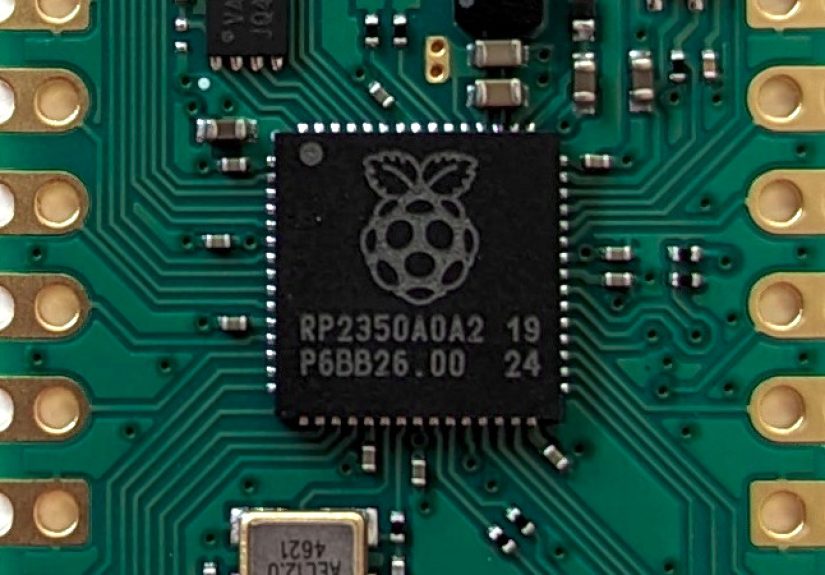
The original Raspberry Pi Pico is built around the RP2040, a dual-core Arm Cortex-M0+ microcontroller running at 133 MHz with 264 KB of SRAM and external flash on the board. Those numbers look tiny beside even an old smartphone. But compared with many 1980s computers, the Pico has enough speed to do fascinating things, especially when the code is tuned and the target machine is chosen wisely.
One reason the Pico has become so popular among makers is its mix of simplicity and flexibility. It supports C/C++ and MicroPython development, exposes plenty of GPIO pins, and includes programmable I/O, commonly called PIO. PIO is one of the RP2040’s secret weapons. It lets developers create custom timing-sensitive interfaces without forcing the main CPU cores to handle every signal by hand. That matters for projects involving VGA output, keyboard interfaces, storage tricks, and other retro-computing gymnastics.
The newer Raspberry Pi Pico 2 and Pico 2 W raise the ceiling further. The Pico 2 line is based on RP2350, which brings faster cores, more SRAM, improved interfacing, security features, and optional wireless support on the W model. For PC emulation, more memory and performance are not just nice luxuries; they are the difference between “look, it boots” and “look, I can actually use this thing without making coffee between keystrokes.”
Pico-286: A Tiny Board With Big Retro Ambitions
Pico-286 is one of the most interesting examples of this tiny-PC idea. It aims to emulate a classic 286-era PC on Raspberry Pi Pico-class microcontrollers, including RP2040 and RP2350-based boards. That is a bold goal because a 286 PC was not just a toy. In its day, it was a serious productivity machine. People wrote documents, ran spreadsheets, managed business software, played games, and did actual work on systems that now look hilariously underpowered.
What makes Pico-286 especially appealing is that it is not merely a CPU demo. A useful PC emulator needs the rest of the machine. Video output matters. Input matters. Storage matters. Sound matters, especially if the goal includes DOS games and multimedia experiments. That is why boards such as the Murmulator development platform become important. They can add the practical pieces that a bare Pico lacks, such as VGA or HDMI display output, PS/2 keyboard and mouse support, SD-card storage, audio output, and external PSRAM.
External PSRAM is a major part of the story. The original Pico’s built-in SRAM is impressive for a microcontroller, but it is not generous enough for a comfortable PC-style environment. Add several megabytes of PSRAM, and suddenly the emulator has room to breathe. It still has to be efficient, but it no longer feels like trying to build a cathedral inside a lunchbox.
From Pico-XT to Pico-286: The Retro Roadmap
Pico-XT projects focused on 8086 and 8088-style PC emulation. That makes sense as a first step because the original IBM PC and compatible XT-class machines were simpler than later AT and 286 systems. They had less memory, less complicated expectations, and a vast library of software that does not demand much by modern standards.
Pico-286 pushes the concept into a more capable era. A 286-class machine opens the door to more ambitious DOS productivity tools and games, while still staying far enough back in history that the hardware can be plausibly emulated on a microcontroller. It is a sweet spot: old enough to be manageable, useful enough to be fun, and strange enough to make fellow makers stop scrolling and say, “Wait, that runs on a Pico?”
What Can You Actually Do With a PC on a Pico?
The practical answer depends on the build, the board, the emulator version, available memory, display output, and software image. But the general idea is that a Pico-based PC emulator can run DOS-compatible environments and programs suited to early PC hardware.
Run Classic DOS Software
FreeDOS is especially relevant because it provides an open-source DOS-compatible operating system. Instead of needing an old MS-DOS license, users can experiment with a living DOS environment that supports classic games, utilities, and applications. FreeDOS is useful not only for nostalgia but also for education. It gives modern learners a clean way to understand command-line computing, file systems, batch files, and the era when “installing software” often meant copying a directory and hoping CONFIG.SYS was in a good mood.
Explore Retro Games
Early DOS games are natural candidates for Pico PC emulation. Simple text adventures, CGA-era titles, small shareware games, and lightweight VGA experiments all fit the spirit of the project. Do not expect every classic title to run perfectly. Timing, graphics modes, sound hardware, and memory requirements can make compatibility tricky. Retro gaming on a microcontroller is less like ordering from a menu and more like tuning a tiny orchestra where one musician is a square wave.
Learn How PCs Worked
This may be the best reason to care. A Pico PC emulator makes old computer architecture visible again. Modern computers hide layers under layers: firmware, operating systems, drivers, graphics APIs, sandboxing, virtualization, and more. A DOS-era PC is much easier to understand. Memory maps, interrupts, ports, text modes, and disk images are close enough to the surface that learners can see how the machine breathes.
The Hardware Puzzle: Why a Bare Pico Is Not Enough
A single Raspberry Pi Pico is powerful for its price, but a PC emulator needs more than raw processing. It needs a way to show output, accept input, store files, and sometimes produce sound. This is where supporting hardware turns a clever demo into something you can actually sit down and use.
Display output is one of the biggest challenges. VGA output requires precise timing, and HDMI is even more demanding. Some Pico projects use carefully timed software and PIO techniques. Others rely on development boards designed specifically for retro-computing experiments. The Murmulator ecosystem is one example, combining Pico-class microcontrollers with the peripherals needed to behave more like a complete computer.
Keyboard input is another important detail. PS/2 keyboards are popular in retro projects because the protocol is relatively approachable and period-appropriate. USB keyboards are more common today, but USB host support can complicate a microcontroller design. SD-card storage is also essential because disk images give the emulator a place to keep operating systems, applications, and files.
Then comes sound. Basic speaker output is one thing; emulating sound devices such as AdLib-like FM audio, Tandy-style voices, Covox-like output, or other period hardware is another. Every added device makes the illusion richer, but it also consumes CPU time and memory. The developer must choose what matters most: speed, compatibility, sound, graphics, or bragging rights.
Why This Is Not Just Nostalgia
Yes, the nostalgia is strong. A command prompt can trigger memories faster than the smell of dusty plastic and warm power supplies. But the Pico PC idea is not only about reliving the past. It is also a compact, affordable way to study computing fundamentals.
Students and hobbyists can learn what a CPU emulator does instruction by instruction. They can see how video modes are mapped, how disk images behave like drives, how keyboard scancodes become characters, and how old software expected direct access to hardware. These are the kinds of details that modern development often hides behind friendly frameworks. Friendly frameworks are wonderful, but sometimes you need to peek behind the curtain and see the goblins operating the machinery.
There is also a design lesson here: constraints produce creativity. A microcontroller does not forgive waste. You cannot casually allocate huge buffers or assume endless background services. You write tighter code. You make better trade-offs. You understand why old software developers counted bytes the way hikers count water in the desert.
Pico 2 and RP2350: More Room for the Tiny PC Dream
The Raspberry Pi Pico 2 changes the conversation. With RP2350, the board offers more memory, faster cores, and upgraded capabilities while preserving compatibility with earlier Pico projects. That means developers can take ideas proven on RP2040 and push them further.
For emulation, the extra SRAM is especially valuable. More memory helps with buffers, video handling, disk caches, and smoother device emulation. Faster processing allows more accurate CPU behavior or additional hardware features. The Pico 2 W also adds wireless networking, which may inspire future retro-networking experiments, remote file transfer tools, or oddball connected DOS gadgets that absolutely nobody needs and many of us would immediately want.
RP2350 also includes a more modern architecture and stronger documentation around its security and interface features. For commercial embedded products, that matters. For retro-computing fans, it mainly means the playground got bigger, the toys got sharper, and the excuses got thinner.
Real-World Limitations: The Fun Part Has Friction
A Pico-based PC emulator is impressive, but it is not magic. Compatibility will vary. Some DOS programs depend on exact timing, obscure graphics modes, unusual memory managers, or hardware behaviors that are difficult to reproduce. Games that push VGA tricks or expect specific sound cards may misbehave. Productivity software may fare better, especially if it uses standard text modes and modest memory.
Performance is another limitation. A microcontroller pretending to be a PC has to translate or interpret instructions, manage virtual hardware, and handle real-world output at the same time. Even if the original PC was slow by modern standards, emulation adds overhead. That is why careful optimization and hardware support matter so much.
There is also the build factor. Beginners can buy a Pico and start blinking LEDs in minutes. Building a useful Pico PC setup may require a specific development board, PSRAM, SD-card setup, keyboard compatibility, display configuration, firmware flashing, and disk image preparation. It is not impossible, but it is a project, not a toaster. The toaster usually does not ask you to format a boot image.
Why Makers Love Projects Like This
Makers love projects that feel slightly unreasonable. A PC inside a Pico sits in that perfect zone between “technically possible” and “why would anyone do this?” The answer, of course, is because it teaches something, because it is fun, and because small computers doing oversized jobs are inherently charming.
It also reflects a bigger trend in retrocomputing. People are no longer satisfied with simply collecting old hardware. They are rebuilding, emulating, miniaturizing, and remixing it. Some projects recreate vintage computers on FPGAs. Others use full Raspberry Pi boards to run emulators. Pico PC emulation is different because it embraces the microcontroller constraint. It is not the most powerful way to run DOS, but it may be one of the most educational and entertaining.
Specific Example: A Pocketable DOS Workstation Concept
Imagine a small handheld device built around a Pico 2, PSRAM, a microSD slot, a compact keyboard, and a small LCD or HDMI output. It boots into FreeDOS, opens a text editor, stores files on disk images, and runs lightweight DOS utilities. It is not a practical competitor to a laptop, but it could be a fantastic writing machine, retro terminal, field note device, or badge project for a hardware conference.
The appeal is not raw convenience. The appeal is focus. A tiny DOS machine has no social media notifications, no background video ads, and no operating system insisting that now would be a wonderful time to update. It gives you a blinking cursor and asks, politely but firmly, what you plan to do next.
Hands-On Experiences: What Working With “The PC In Your Pico” Feels Like
The first experience is usually disbelief. You flash firmware, prepare a disk image, connect the display, and expect something to fail because, frankly, this whole idea sounds like a dare. Then a DOS-style screen appears, and the room suddenly becomes 1989 with better desk lighting. The cursor blinks. The keyboard responds. The tiny board that yesterday looked like a sensor controller is now pretending to be a personal computer, and doing it with a straight face.
The second experience is humility. Retro PC emulation on Pico-class hardware reminds you that computers are not abstract clouds of convenience. They are timing, memory, signals, electrical interfaces, and decisions made under pressure. When the display flickers, you start thinking about video timing. When a program refuses to run, you wonder about memory layout. When sound stutters, you become painfully aware that every emulated device is competing for the same small pool of cycles.
Setting up storage is a good example. A modern user expects files to “just be there.” In a Pico PC project, you may deal with disk images, folders, file naming, SD-card formats, and boot behavior. It is a little fussy, but also satisfying. When the emulator finally sees the image as a drive, it feels less like configuration and more like convincing a tiny time machine to accept your passport.
Typing on a PS/2 keyboard attached to a microcontroller has its own charm. There is a physical directness to it. You press a key, the emulator receives a scancode, DOS sees input, and a character appears. Nothing about that path is mysterious once you study it, yet it feels more honest than typing into a giant modern software stack. It is computing with fewer curtains.
The best part is testing old software. A small text editor, a file manager, a BASIC interpreter, or a simple game can become surprisingly exciting when it runs on hardware never intended for the job. You stop judging software by screenshots and start judging it by efficiency. Programs that were once considered plain suddenly look elegant. They load quickly, fit in tiny spaces, and do exactly what they promise. There is a lesson there for modern software, which sometimes arrives carrying three toolbars, six background services, and the appetite of a raccoon in a bakery.
There are frustrations too. Not every program works. Some games expect hardware behavior that is hard to mimic. Some display modes may be unsupported or imperfect. Audio can be experimental. Performance may vary depending on board, memory, clock speed, and emulator version. But those problems are part of the experience. This is not a sealed consumer product; it is a maker project. You are not just using a tiny PC. You are helping reveal where the illusion holds and where it needs another clever trick.
After spending time with the concept, the strongest impression is respect: respect for the developers squeezing a PC into a microcontroller, respect for the old machines that did so much with so little, and respect for the Pico itself. It may be small, cheap, and quiet, but give it enough clever code and a few supporting parts, and it becomes a reminder that personal computing was never only about power. It was always about possibility.
Conclusion
The PC In Your Pico is more than a clever headline. It captures a wonderful moment in maker culture where microcontrollers are fast enough, documentation is open enough, and retrocomputing is beloved enough for someone to build a tiny DOS-capable machine from parts that fit in your palm.
Projects like Pico-286 show that the Raspberry Pi Pico and Pico 2 are not limited to beginner experiments. With the right supporting hardware, external memory, display output, input devices, and a sharp emulator, they can recreate the feel of classic PCs in miniature. The result is not a replacement for modern computers, and it does not need to be. Its purpose is education, experimentation, nostalgia, and the pure joy of making a small board do something outrageous.
In a world where computers keep getting more powerful and less understandable, a Pico pretending to be a PC feels refreshing. It is small enough to study, cheap enough to risk, and weird enough to love. Sometimes the best computer is not the fastest one. Sometimes it is the one that makes you grin when the command prompt appears.
Note: This article is written for web publication and synthesizes real information from official Raspberry Pi documentation, open-source Pico PC emulator projects, FreeDOS resources, maker community coverage, and related retrocomputing references. Source links are intentionally omitted from the article body for clean publishing.