Table of Contents >> Show >> Hide
- What Are Android Secret Codes?
- Before You Use Any Secret Code
- The Most Useful Android Secret Codes
- What These Common Codes Actually Mean
- Brand-Specific Secret Codes
- Best Ways to Use Android Secret Codes in Real Life
- Why Secret Codes Sometimes Do Not Work
- Safety Tips for Using Secret Codes
- A Smarter Way to Think About Android Hidden Codes
- Experiences Using Android Secret Codes in the Real World
- Conclusion
Android has always had a mischievous side. Behind the polished home screens, sleek widgets, and endless notification drama lives a strange little world of dialer commands, diagnostic menus, and hidden tools. These “secret codes” are the backstage passes of the Android universe. Some reveal your IMEI number. Some open testing menus. Some show software or hardware information. And some do absolutely nothing on your phone except make you question your life choices.
That last part matters, because Android secret codes are not universal magic spells. They depend on the phone brand, model, Android version, carrier, and even the phone app you use to enter them. A code that works beautifully on a Samsung Galaxy may shrug and vanish on a Pixel. Another may have worked three Android versions ago and now behaves like a retired rock star: famous, but unavailable.
In this guide, we’ll walk through the most useful Android secret codes, explain what they actually do, and separate the genuinely helpful ones from the internet folklore. You’ll also get practical examples, brand-specific notes, and a reality check on what to try first if a code refuses to cooperate.
What Are Android Secret Codes?
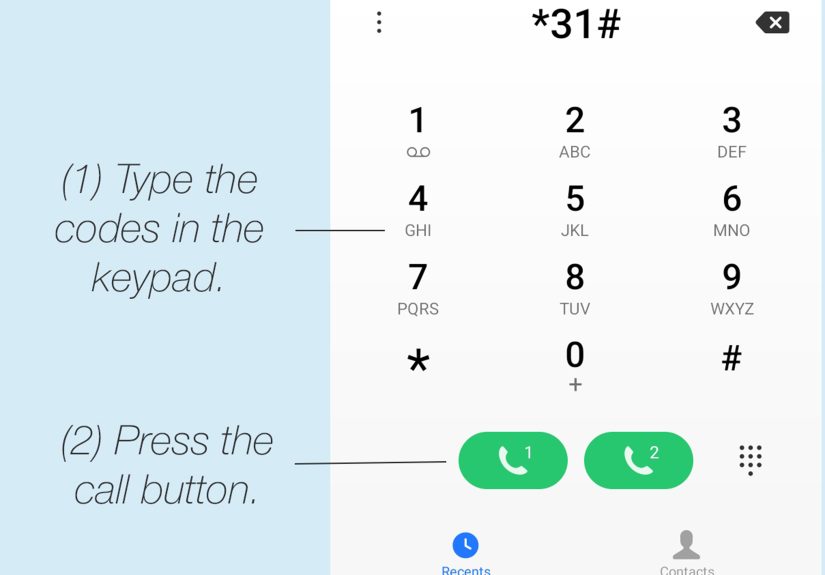
Android secret codes are character sequences typed into the phone dialer, usually a mix of asterisks, pound signs, and numbers. They can trigger hidden menus, run diagnostics, or display device information. Many people casually call them “Android dialer codes,” “USSD codes,” or “MMI codes,” although those categories are not always identical in the technical sense.
In everyday use, though, the idea is simple: type the code into the dial pad, and if your device supports it, something happens. Ideally something helpful. Occasionally something confusing. Rarely, something you should not have touched before coffee.
Before You Use Any Secret Code
1. Understand that compatibility is inconsistent
Not every Android phone supports the same hidden codes. Samsung, Google Pixel, Motorola, OnePlus, and Xiaomi devices all have different layers of software and different diagnostic tools.
2. Use the stock phone app if possible
Third-party dialers sometimes block or ignore these commands. If a code does not work, try your phone’s built-in Phone app first.
3. Avoid destructive codes
Some lists online include factory reset or data-erasing commands. This article focuses on safe, information-based, and diagnostic codes only. In other words, we are here for useful nerdiness, not accidental heartbreak.
4. Back up important data anyway
Even safe codes can open service menus meant for testing. Resist the temptation to press every button like you are trying to win a game show.
The Most Useful Android Secret Codes
Below is a practical list of secret codes that are commonly cited, relatively useful, and worth knowing. Availability varies, so think of this as a toolkit rather than a guarantee.
Universal or Broadly Supported Codes
| Code | What It Does | Notes |
|---|---|---|
| *#06# | Displays your IMEI or device ID information | One of the most widely supported Android codes |
| *#*#4636#*#* | Opens the Testing menu on many Android phones | May include phone info, battery info, usage stats, and Wi-Fi details |
| *#*#232338#*#* | Shows Wi-Fi MAC address on some devices | Support varies widely |
| *#*#232337#*#* | Shows Bluetooth device address on some phones | Less consistent on newer models |
| *#*#2664#*#* | Touchscreen test on certain Android devices | Often unavailable on newer builds |
| *#*#0842#*#* | Vibration and backlight test on some devices | Older code, still appears on some phones |
| *#*#0*#*#* | LCD or display test on some Android models | Do not confuse this with Samsung’s *#0*# code |
What These Common Codes Actually Mean
*#06# The IMEI Lifesaver
If you know only one Android secret code, make it *#06#. This one displays the IMEI number, the unique identifier for your phone. It is useful when buying a used phone, checking carrier compatibility, filing insurance claims, or reporting a lost device. It is not flashy, but neither is a fire extinguisher, and both become very interesting when needed.
Example: You are buying a used Android phone from a marketplace seller. Enter *#06#, compare the IMEI with the listing or box, and confirm the device identity before handing over your money and your optimism.
*#*#4636#*#* The Famous Testing Menu
This is arguably the most talked-about Android hidden code. On many devices, it opens a testing screen with sections like:
- Phone information
- Battery information
- Usage statistics
- Wi-Fi information
Depending on the phone, you may see signal details, preferred network options, battery data, app usage information, or connection diagnostics. Power users sometimes use it to inspect network behavior. Regular users use it to feel like they have entered the Matrix.
Important note: On modern devices, some options inside this menu may be restricted, renamed, or hidden. Also, changing network settings without understanding them is a fantastic way to create a problem you did not have five minutes earlier.
Brand-Specific Secret Codes
Samsung Secret Codes
Samsung has long been one of the most secret-code-friendly Android brands. A few well-known Samsung dialer codes include:
| Samsung Code | Function |
|---|---|
| *#0*# | Hardware test menu on many Galaxy phones |
| *#1234# | Software or firmware version information |
| *#0228# | Battery status information on some Samsung phones |
| *#12580*369# | Software and hardware information on certain models |
The most useful one here is often *#0*#, which can open a diagnostic menu with screen tests, vibration checks, sensors, cameras, and more. If your display, speaker, or touch layer seems odd, this can help narrow down whether the issue is hardware-related.
Google Pixel Secret Codes
Pixel phones are a little more selective about hidden codes, but they do have an official diagnostic route worth knowing.
| Pixel Code | Function |
|---|---|
| *#*#7287#*#* | Launches Pixel diagnostics on supported devices |
This is especially useful for users troubleshooting hardware concerns or preparing a device for service. Pixel owners should also remember that Google has moved some health and battery checks into the settings menu itself, so a code is not always the only route anymore.
Motorola and Other Android Brands
Motorola, OnePlus, Xiaomi, and others may support their own diagnostic or engineering menus, but the code lists vary a lot by region and model. That is why broad online lists can be misleading. A code may be “real” and still be irrelevant to your specific phone.
As a rule, manufacturer-specific secret codes are most reliable when verified against your exact device line, not just your favorite search result from 2017.
Best Ways to Use Android Secret Codes in Real Life
Checking a used phone before buying
Use *#06# to verify the IMEI. If supported, use a diagnostic code like Samsung’s *#0*# or a Pixel diagnostic menu to check the screen, sensors, speaker, and touch response.
Troubleshooting network confusion
If your phone constantly bounces between network types or behaves strangely with mobile data, the *#*#4636#*#* testing menu may reveal useful connection details. Look, do not poke randomly.
Verifying software details
Firmware and software version codes can help identify what you are actually running, especially when troubleshooting with support, comparing devices, or checking whether a used phone matches its advertised condition.
Why Secret Codes Sometimes Do Not Work
If an Android code fails, it does not necessarily mean you typed it wrong. Here are the usual suspects:
- Your phone brand does not support that code
- Your carrier disabled or altered it
- Your current Android version removed access
- You are using a third-party dialer
- The code is old, obscure, or copied from a wildly generic list
This is why “comprehensive list” articles can be both helpful and hilarious. The Android ecosystem is so fragmented that two people can try the same code and have completely different experiences. One enters a neat service menu. The other stares at the dial pad like it owes them money.
Safety Tips for Using Secret Codes
- Stick to informational and diagnostic codes
- Do not change advanced radio or service settings unless you know exactly what they do
- Take screenshots of important readings instead of trying to memorize them
- Use official support options when available, especially on Pixel and Samsung devices
- Never assume a code from one Android brand will behave the same way on another
A Smarter Way to Think About Android Hidden Codes
The biggest myth about Android secret codes is that they unlock a hidden treasure chest of magical features. In reality, they are mostly shortcuts to diagnostics, device information, and service menus. That does not make them boring. It makes them useful.
If you are a casual user, the code you are most likely to actually use is *#06#. If you are a power user, you might lean on *#*#4636#*#* or a manufacturer-specific diagnostic menu. If you are a tech enthusiast buying and selling devices, these codes can save you time, help you verify hardware, and keep you from purchasing a “perfectly fine” phone with a suspiciously moody touchscreen.
Experiences Using Android Secret Codes in the Real World
Here is the funny truth about Android secret codes: they sound far more dramatic than they usually are. The first time many people hear the phrase “secret codes for Android devices,” they expect spy-level functionality, hidden launch sequences, or at least a glowing red button labeled Do Not Press. What they get is often a battery readout, an IMEI screen, or a service menu with enough abbreviations to make a networking engineer grin.
Still, real-world experience proves these codes can be surprisingly useful. One of the most practical moments happens when checking a secondhand phone. Instead of trusting a seller’s cheerful promise that “everything works great,” dialing *#06# lets you verify the IMEI instantly. On some devices, a hardware test menu can also help you check whether the screen has dead zones, whether the speaker sounds normal, or whether vibration is functioning. That is not glamorous, but it is the kind of boring information that protects your wallet.
Another common experience is curiosity-driven experimenting. People read about *#*#4636#*#*, enter it, and suddenly land in a testing menu that feels like they wandered backstage at an Android concert. The first reaction is usually delight. The second is confusion. The third is the wise decision to stop touching random settings. Used carefully, though, this menu can be genuinely helpful for checking signal behavior, usage stats, or connection data when your phone seems determined to make every ordinary task weird.
Samsung users often have the most entertaining stories because Galaxy phones have a reputation for supporting useful diagnostic menus. Running a display test, checking sensors, or confirming hardware behavior can feel reassuring when a device seems “off” but not obviously broken. Instead of guessing whether the problem is software lag, a failing sensor, or a touch issue, the code-based test menu can offer a clearer answer.
Pixel users have a slightly different experience. Google tends to push more troubleshooting tools into official workflows and settings, so the hidden-code experience feels a bit less like discovering a dungeon and a bit more like finding a side door that leads to the same support hallway. That is not a bad thing. It means you can often combine a dialer code with official diagnostics for a more reliable picture of what is happening.
The biggest lesson from real use is simple: secret codes are best treated like specialty tools, not toys. When you need them, they can be incredibly handy. When you do not need them, poking through random menus just because the internet said “try this cool hack” is how you end up learning the phrase “Why is my network acting strange now?” the hard way.
So yes, Android secret codes are real. Yes, some are genuinely useful. And yes, they are a little less cinematic than the name suggests. But in a world full of bloated apps and endless settings menus, there is something charming about typing a weird string of symbols and getting straight to the point. Android has always rewarded curiosity. Secret codes are just one more reminder that under the shiny surface, your phone is still a wonderfully nerdy machine.
Conclusion
A comprehensive list of secret codes for Android devices is only useful when it is honest about one thing: compatibility is messy. The best Android secret codes are not the most mysterious ones. They are the ones that help you identify your phone, test hardware, inspect diagnostics, and troubleshoot smarter. Start with *#06# for IMEI checks, try *#*#4636#*#* if your device supports it, and use brand-specific options like Samsung or Pixel diagnostics when appropriate.
Think of Android hidden codes as practical shortcuts for curious users, not magic cheat codes for your smartphone. Used wisely, they can save time, reduce guesswork, and make you look suspiciously competent the next time someone asks, “How did you find that?”