Table of Contents >> Show >> Hide
- What Is a DC UPS?
- Why Internet Equipment Is So Vulnerable During Power Outages
- DC UPS vs. Traditional AC UPS: What Is the Difference?
- How a DC UPS Keeps the Internet Up
- Common Devices That Benefit From a DC UPS
- Runtime: How Long Can a DC UPS Keep Internet Running?
- Battery Types Used in DC UPS Systems
- Key Features to Look for in a DC UPS
- Where DC UPS Makes the Biggest Difference
- DC UPS Setup Example for a Home Network
- DC UPS Safety Tips
- Maintenance: The Part Everyone Forgets
- When a Traditional AC UPS Still Makes Sense
- Common Mistakes to Avoid
- How to Estimate the Right DC UPS Size
- The Future of Always-On Home Internet
- Real-World Experiences With DC UPS Keeps The Internet Up
- Conclusion
When the lights go out, the modern home does not panic because the refrigerator is quiet. It panics because the Wi-Fi disappears. Suddenly, the laptop still has battery, the phone still has battery, the tablet is bravely glowing, and yet the internet is gone like it saw a ghost. The usual culprit is not always the internet provider. Often, the modem, router, fiber ONT, switch, or Wi-Fi access point simply lost power. That is where a DC UPS earns its tiny superhero cape.
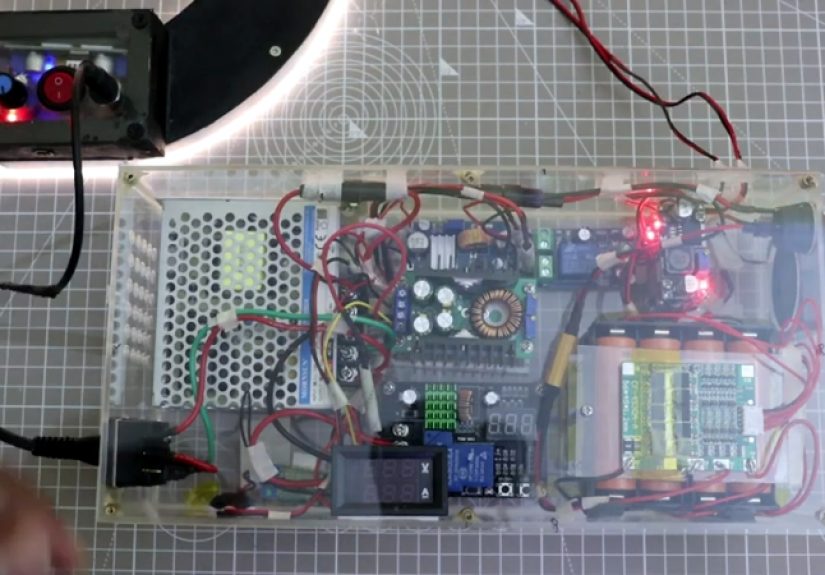
A DC UPS, short for direct current uninterruptible power supply, is a backup power device designed to keep low-voltage networking equipment running during outages, brownouts, voltage dips, and those rude little power flickers that last two seconds but somehow make your router reboot for three minutes. Unlike a traditional AC UPS that converts battery power into household AC electricity, a DC UPS can feed compatible devices directly with the low-voltage DC power they already use. For internet equipment, that can mean less wasted energy, quieter operation, smaller size, and longer runtime.
The result is simple but powerful: a DC UPS keeps the internet up when the grid gets dramatic. For remote workers, students, smart-home users, small offices, security camera owners, and anyone who has ever yelled “Can you still hear me?” during a video call, this is not just a gadget. It is digital oxygen in a box.
What Is a DC UPS?
A DC UPS is a battery backup system that provides direct current power to connected electronics when the main power supply fails. Most home networking devices do not actually run on the AC power coming from the wall. The wall adapter converts AC power into DC power, often at common voltages such as 5V, 9V, 12V, 15V, 19V, or 24V. Your router may look like it is plugged into the wall, but internally, it is sipping DC power like a very picky houseplant.
A mini DC UPS usually sits between the wall adapter and the networking device. When utility power is available, it charges its internal battery and passes power to the router or modem. When power fails, the battery takes over almost instantly. The connected device may not even notice. No reboot. No blinking lights of doom. No waiting for the modem to negotiate with the universe again.
DC UPS units are commonly used for routers, modems, optical network terminals, VoIP adapters, network switches, IP cameras, access control panels, small NAS devices, and other low-power electronics. Larger DC power systems are also used in telecom, data networks, and edge infrastructure, where uptime is not a luxury but a business requirement.
Why Internet Equipment Is So Vulnerable During Power Outages
The internet feels wireless because Wi-Fi is wireless. Unfortunately, power is not. A typical home internet setup may include several devices that all need electricity: a modem or fiber ONT, a Wi-Fi router, a mesh node, a network switch, and sometimes a VoIP phone adapter. If any one of those critical pieces goes dark, the connection can fail.
Even short power interruptions can be annoying. A one-second power flicker may shut down the modem and router, and then the whole system has to restart. Some modems reconnect quickly. Others take several minutes to re-establish service. Fiber ONTs may need time to sync. Cable modems may scan channels. Routers may boot, check firmware, rebuild Wi-Fi, and behave like they are preparing for a royal entrance.
This is why battery backup for internet matters. A DC UPS does not need to power your whole house. It only needs to keep the small networking chain alive. That makes it one of the most efficient ways to protect connectivity during everyday power problems.
DC UPS vs. Traditional AC UPS: What Is the Difference?
A traditional AC UPS is the classic battery backup box used for desktop computers, servers, monitors, and office equipment. It receives AC power, charges a battery, and provides AC output when the power fails. This works well for many devices, especially equipment that requires standard wall power.
A DC UPS is more specialized. Since routers and modems already use DC power, the DC UPS can avoid one or more conversion steps. In a typical AC UPS setup, battery DC power is converted to AC power, then the router’s wall adapter converts it back to DC. That double conversion can waste energy. It is like translating English into French and then back into English just to say, “Please keep the Wi-Fi on.”
With a DC UPS, power can be delivered in a more direct path. The benefits may include better efficiency, compact design, lower heat, and longer backup time for small networking loads. However, DC UPS units require careful voltage and connector matching. A 12V router needs a 12V output. A 19V mesh router needs a compatible 19V output. Guessing is not a power strategy; it is a fast way to make electronics unhappy.
How a DC UPS Keeps the Internet Up
The magic is not actually magic, although it feels like it when everyone else is offline and your video meeting continues. A DC UPS works through three basic functions: power pass-through, battery charging, and automatic switchover.
1. Normal Power Pass-Through
When utility power is available, the DC UPS passes regulated power to the connected router, modem, or ONT. At the same time, it charges or maintains the battery. Better units include battery management circuits that help prevent overcharging, deep discharge, and unsafe charging behavior.
2. Instant Battery Backup
When AC power disappears, the internal battery takes over. Because the device is already receiving DC power, the transfer can be fast enough that the router stays online without rebooting. This is especially useful for brief outages, generator transfer delays, storms, and unstable grid conditions.
3. Stable Output Voltage
Networking equipment can be sensitive to voltage drops. A good DC UPS provides regulated output so the router receives the correct voltage as the battery discharges. Stable voltage helps prevent random restarts, connection drops, and the classic “everything has lights but nothing works” networking mystery.
Common Devices That Benefit From a DC UPS
A DC UPS is most useful when it protects the full internet path inside your home or office. Backing up only the Wi-Fi router may not help if the modem or fiber ONT loses power. The best setup identifies every device required for connectivity and keeps each one powered.
Modem
Cable and DSL modems need constant power to maintain the provider connection. If the modem reboots, internet service may disappear even if the router is still running.
Fiber ONT
A fiber optical network terminal converts the fiber signal into usable internet service for the home. Many fiber users discover during an outage that the router has backup power but the ONT does not. That is like putting premium tires on a car with no engine.
Wi-Fi Router
The router manages local networking, Wi-Fi, firewall functions, and device connections. Keeping it alive prevents phones, laptops, smart TVs, and smart-home devices from falling off the network.
Network Switch
If your home office, camera system, or mesh network depends on a small Ethernet switch, that switch also needs backup power. Otherwise, wired devices may disconnect even while the router remains awake and smug.
VoIP Adapter
Internet-based phone service may require backup power for the modem, router, and phone adapter. A battery backup can be especially important for households that rely on VoIP for essential calls.
Runtime: How Long Can a DC UPS Keep Internet Running?
Runtime depends on battery capacity and the total power draw of connected devices. A simple router may use around 6 to 15 watts. A modem may use another 8 to 20 watts. A fiber ONT, small switch, or mesh node adds more. The total load matters more than the number of devices.
Here is a practical example. Suppose your modem uses 10 watts and your router uses 12 watts. Together, they draw 22 watts. If your DC UPS has a usable battery capacity of about 88 watt-hours, a rough runtime estimate would be:
88 watt-hours ÷ 22 watts = about 4 hours
Real-world runtime may be lower because of conversion losses, battery age, temperature, and how the UPS manages discharge. Still, this simple math helps you avoid buying a tiny backup unit and expecting it to power your network through a legendary thunderstorm, three movies, and a neighborhood barbecue.
Battery Types Used in DC UPS Systems
DC UPS systems may use sealed lead-acid batteries, lithium-ion batteries, or lithium iron phosphate batteries. Each type has advantages.
Sealed Lead-Acid Batteries
Sealed lead-acid batteries are common in traditional UPS systems. They are affordable and proven, but they are heavier and usually have shorter cycle life than many lithium-based options. They also do not love deep discharges. Treating a lead-acid battery like an all-you-can-eat energy buffet will shorten its life.
Lithium-Ion Batteries
Lithium-ion batteries are lightweight, energy dense, and common in modern portable electronics. Many compact DC UPS units use lithium-ion cells because they allow smaller designs and longer runtime for low-power devices. Quality battery management is important for safe charging and discharging.
LiFePO4 Batteries
Lithium iron phosphate, often written as LiFePO4, is valued for thermal stability, long cycle life, and durability. It can cost more upfront, but for frequent outages or demanding use, it may be worth considering.
Key Features to Look for in a DC UPS
Choosing a DC UPS is not complicated, but it does require checking the details. The right model should match your equipment, your runtime goal, and your tolerance for blinking LEDs at 2 a.m.
Correct Voltage Output
Check the label on each device’s power adapter. If the router requires 12V, choose a DC UPS with a stable 12V output. If the device needs 9V or 19V, make sure the UPS supports that voltage. Multi-voltage models can be helpful, but only when configured correctly.
Enough Current Capacity
Voltage must match, and current capacity must be sufficient. If a router requires 12V at 2A, the UPS output should support at least that much current. More available current is usually fine; too little current can cause instability.
Connector Compatibility
Many routers use barrel connectors, but barrel sizes vary. A connector that “almost fits” is not good enough. Loose power plugs can cause random outages that will make you blame the internet provider, the weather, and possibly your neighbor’s cat.
Battery Capacity
Look for watt-hour capacity, not just milliamp-hour ratings. Milliamp-hours can be misleading unless you know the battery voltage. Watt-hours give a clearer picture of usable energy.
Automatic Restart
A good UPS should recover gracefully when utility power returns. For remote locations, cameras, vacation homes, and small offices, automatic restart behavior is important. Nobody wants to drive across town just to press a power button on a box that had one job.
Battery Protection
Quality DC UPS units include protections against overcharge, over-discharge, short circuit, overload, and overheating. These features are not glamorous, but they are exactly the kind of boring that keeps electronics safe.
Where DC UPS Makes the Biggest Difference
Remote Work
For remote workers, a DC UPS can keep a video call, cloud document, VPN session, or customer support dashboard alive during short outages. Your laptop may already have a battery, but your internet equipment usually does not. A DC UPS closes that gap.
Online Learning
Students taking online classes need stable connectivity. A short power flicker can mean missing attendance, losing a quiz connection, or turning a group presentation into a silent movie. Backup power for the router and modem helps keep learning on track.
Smart Homes
Smart locks, cameras, hubs, thermostats, and sensors often depend on Wi-Fi or wired internet. During outages, local device batteries may still work, but cloud access can fail if the network goes down. A DC UPS keeps the network core alive longer.
Small Businesses
Small businesses depend on payment systems, booking platforms, cloud software, security cameras, and VoIP phones. A compact DC UPS can help avoid lost transactions and awkward moments where the card reader gives up before the customer does.
Emergency Communication
In a power outage, communication matters. Keeping internet equipment powered may support messaging apps, Wi-Fi calling, VoIP devices, security alerts, and access to weather updates. It should not be the only emergency plan, but it is a practical layer.
DC UPS Setup Example for a Home Network
Imagine a home network with a fiber ONT in the utility closet, a Wi-Fi router in the living room, and a small Ethernet switch in the office. The homeowner buys one DC UPS for the router but ignores the ONT. The next outage arrives, the router stays powered, and the internet still disappears. The router is now perfectly awake with no upstream connection, like a receptionist in an empty building.
A better setup would identify the full path: ONT, router, and switch. If they are located together, one properly sized multi-output DC UPS may work. If they are in different rooms, separate backup units may be needed. The goal is not to power every gadget. The goal is to protect the chain that brings internet from the provider to your devices.
DC UPS Safety Tips
Use the manufacturer’s recommended power ratings, cables, and connectors. Do not improvise with random adapters unless you fully understand voltage, polarity, current, and connector size. Low-voltage power is safer than household AC in many ways, but it can still damage equipment or create heat if mismatched.
Place the DC UPS in a ventilated area. Avoid covering it with papers, cloth, or the mysterious pile of cables everyone owns but nobody admits to owning. Keep batteries away from excessive heat, moisture, and direct sunlight. Replace aging batteries when runtime drops noticeably. Test the system before storm season, not during the outage when everyone in the house is staring at you like you personally offended the power grid.
Maintenance: The Part Everyone Forgets
A DC UPS is not a “buy once and ignore forever” device. Batteries age. Capacity declines. Connectors loosen. Firmware may need updates on advanced units. Every few months, unplug the main power briefly and confirm that the internet equipment stays online. Check whether the UPS charges properly after the test. Make sure the unit does not become unusually hot, swollen, noisy, or unreliable.
Also review your network equipment after upgrades. A new router may require a different voltage or more current than the old one. A mesh system may add nodes. A faster fiber plan may come with a different ONT. The backup power system should grow with the network, not remain frozen in the era when your Wi-Fi password was probably “password123.”
When a Traditional AC UPS Still Makes Sense
A DC UPS is excellent for low-voltage networking gear, but it is not always the best choice. If you need to power a desktop computer, monitor, external drives, printer, or larger server, a traditional AC UPS may be more appropriate. AC UPS units also work well when devices have different power requirements or proprietary adapters that are difficult to match with DC output.
In some cases, the best solution is a hybrid approach. Use a DC UPS for the modem, ONT, router, and switch, and use an AC UPS for the workstation or server. That way, small devices get efficient long runtime, while larger equipment gets the AC backup it requires.
Common Mistakes to Avoid
Backing Up Only One Device
Powering the router but not the modem or ONT is the most common mistake. The internet path is a team sport. If one player leaves, the game gets weird.
Ignoring Voltage
Never assume all routers are 12V. Many are, but plenty are not. Always read the adapter label.
Buying by Size Alone
A small DC UPS may look perfect, but capacity and output matter more than appearance. Cute does not equal capable.
Forgetting About Heat
Batteries dislike heat. A hot closet can reduce battery life and reliability. Give the UPS breathing room.
Skipping Real-World Testing
Do not wait for a storm to learn that your backup unit does not support your router’s connector. Test before you need it.
How to Estimate the Right DC UPS Size
Start by listing every device required to keep your internet working. Write down each device’s voltage and current from the power adapter label. To estimate watts, multiply voltage by amps:
Volts × Amps = Watts
For example, a 12V router rated at 1.5A may use up to 18 watts. A 12V modem rated at 1A may use up to 12 watts. Together, the maximum rated load is 30 watts. Actual use may be lower, but sizing with the adapter rating gives a safer estimate.
Next, decide how long you want the internet to stay online. For short outages and flickers, one hour may be enough. For remote work, two to four hours may feel more comfortable. For areas with frequent storms, longer runtime may be worth the investment.
Finally, compare the total load with the UPS’s watt-hour capacity and output rating. Leave a safety margin. Batteries age, and real life enjoys proving spreadsheets wrong.
The Future of Always-On Home Internet
As homes become more connected, backup power for networking gear will become less optional. Remote work, telehealth, online education, smart security, cloud storage, and Wi-Fi calling all depend on a stable connection. The internet is no longer just where people watch videos of raccoons stealing snacks, although that remains an important cultural achievement.
DC UPS technology fits this future because it is focused, efficient, and practical. Instead of powering an entire home, it protects the small but essential devices that keep digital life connected. As battery technology improves and more networking equipment uses standardized power inputs such as USB-C Power Delivery, compact backup power may become easier to install and manage.
Real-World Experiences With DC UPS Keeps The Internet Up
The first time someone installs a DC UPS, the benefit may feel almost too simple. Nothing dramatic happens. That is the whole point. The power flickers, the lights blink, the microwave forgets the time again, and the internet keeps working. It is a rare technology victory where success looks like absolutely nothing changed.
One common experience happens during remote meetings. A person is working from home, the neighborhood power dips, and everyone else in the house groans because the lights went out. But the laptop stays on battery, the router stays powered by the DC UPS, and the meeting continues. The only awkward part is when the person on camera is suddenly sitting in a darker room pretending everything is normal. The internet remains stable, the VPN stays connected, and the file upload survives. That small backup device just saved a deadline, a client call, or a presentation that took far too many slides to create.
Another practical example is the smart home. Security cameras, smart hubs, and Wi-Fi alerts are only helpful if the network remains available. During a short outage, a DC UPS can keep the router and modem running long enough for notifications to continue. This is especially useful when nobody is home. A traditional outage may knock smart-home systems offline right when you want information most. With a DC UPS, the network has a fighting chance to report what is happening before batteries in individual devices run down or the provider network itself becomes unavailable.
Small businesses also notice the difference quickly. A boutique, repair shop, café, or small office may not need a massive backup power system, but it does need internet for point-of-sale terminals, online orders, appointment systems, and customer communication. A short outage without backup power can interrupt payments and create a line of customers doing the universal retail face: polite but slowly losing hope. A properly sized DC UPS can keep the modem, router, and payment network alive through brief interruptions. That does not solve every outage, but it can turn a business-stopping problem into a manageable inconvenience.
People who live in areas with frequent brownouts often appreciate DC UPS systems even more than people who experience long blackouts. Long outages get attention. Short flickers are sneakier. They may happen several times a week, forcing routers to reboot repeatedly. Over time, that becomes irritating and may even disrupt firmware updates, smart devices, or cloud backups. A DC UPS smooths over those small interruptions. It acts like a shock absorber for the home network.
There is also a psychological benefit. When the power fails, people immediately check their phones. If Wi-Fi is still available, the household feels more in control. You can check outage maps, message family, use Wi-Fi calling if supported, monitor weather alerts, and decide what to do next. Nobody becomes thrilled about the blackout, of course. But staying connected reduces the chaos. The DC UPS becomes one of those boring devices that earns loyalty precisely because it prevents drama.
The best experience comes from planning the setup properly. Users who back up the entire chainONT or modem, router, and any required switchget better results than those who power only one device. Labeling cables helps. Testing the system helps. Knowing expected runtime helps. Once configured, the DC UPS quietly sits in the background, waiting for the grid to trip over its own shoelaces.
In daily life, that reliability is the real selling point. A DC UPS does not make internet faster. It does not improve your Wi-Fi password. It will not stop your teenager from claiming the lag ruined the game. But it can keep the connection alive when ordinary power problems would otherwise take it down. For many homes and small businesses, that is more than enough reason to give this little battery box a permanent spot near the network gear.
Conclusion
A DC UPS keeps the internet up by solving a very specific and very common problem: networking equipment needs steady power, even when the wall outlet stops cooperating. For routers, modems, fiber ONTs, switches, VoIP adapters, and smart-home hubs, a compact DC UPS can provide efficient battery backup, reduce reboot delays, and protect connectivity during brief outages or unstable power conditions.
The key is choosing the right unit. Match voltage, confirm current capacity, check connectors, estimate runtime, and test the setup before you rely on it. A DC UPS is not a whole-house generator, and it cannot fix an outage in the provider’s network. But for many everyday power interruptions, it can keep your digital world online while everyone else is still waiting for the router lights to stop blinking like a tiny electronic Christmas tree.
Note: This article is based on current, real-world information about DC UPS systems, battery backup for networking equipment, telecom power practices, UPS design principles, battery safety, and outage preparedness guidance from reputable U.S. industry and public-information sources.