Table of Contents >> Show >> Hide
- Can You Really Join a WhatsApp Group Without an Invitation?
- How WhatsApp Group Invites Work
- Legitimate Ways to Join a WhatsApp Group Without a Personal Invitation
- What You Cannot Do: No Sneaking Into Private Groups
- How to Join a WhatsApp Group Using a Link
- How to Stay Safe Before Joining Public WhatsApp Groups
- How to Control Who Adds You to WhatsApp Groups
- Best Types of WhatsApp Groups to Join Publicly
- WhatsApp Group Etiquette After You Join
- Why Some WhatsApp Group Links Stop Working
- Experience-Based Tips for Joining WhatsApp Groups Without an Invitation
- Final Thoughts
So, you want to know how to join a WhatsApp group without an invitation. Maybe your classmates have a study group, your neighborhood has a “who left the trash bin open?” chat, or your favorite hobby community is hiding somewhere behind a mysterious green icon. The good news: there are legitimate ways to find and join WhatsApp groups without being personally invited by an admin. The important catch: you cannotand should notforce your way into a private WhatsApp group.
WhatsApp groups are built around privacy. Unlike public Facebook Groups or Reddit communities, WhatsApp does not offer a giant searchable directory where you can type “best pizza lovers group” and instantly join 47 chats full of cheese arguments. To enter most groups, you need one of three things: an admin adding you, a valid invite link, or access through a community or public post where the link has been shared.
This guide explains the safe, legal, and realistic ways to join a WhatsApp group without a direct invitation, plus what to avoid, how to protect your privacy, and how to spot sketchy groups before your phone becomes a notification-powered popcorn machine.
Can You Really Join a WhatsApp Group Without an Invitation?
Yesbut only in a limited sense. When people say “without an invitation,” they usually mean “without a personal invite from the group admin.” In that case, you may still be able to join through a public WhatsApp group link, QR code, social media post, forum listing, community page, or shared directory.
However, you cannot join a private WhatsApp group without permission if no invite link is available. WhatsApp does not provide a built-in search engine for private groups, and there is no legitimate trick to sneak into one. Any website, app, or “tool” claiming it can unlock private WhatsApp groups is waving a red flag so large it could be seen from space.
How WhatsApp Group Invites Work
WhatsApp group admins can invite people in two main ways. First, they can manually add contacts or phone numbers. Second, they can create an invite link or QR code that lets people join by tapping or scanning. If an invite link is active and shared publicly, anyone with the link may be able to join, depending on the group’s settings.
Admins also have control over whether group invite links are enabled. They can reset or revoke a link at any time. When that happens, the old link stops working. This is why some WhatsApp group links you find online lead nowhere. They may be expired, reset, full, restricted, or removed by the admin after the internet did what the internet does best: overuse something.
Legitimate Ways to Join a WhatsApp Group Without a Personal Invitation
1. Search for Public WhatsApp Group Links Online
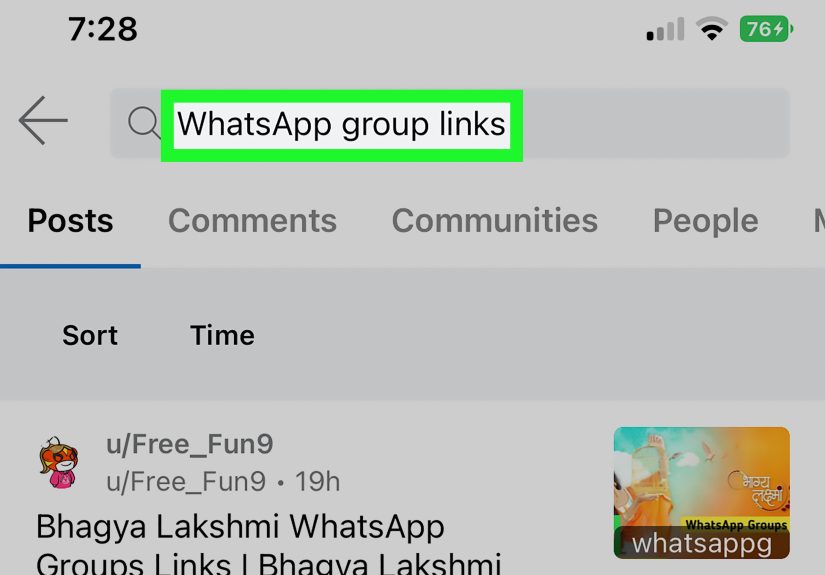
The most common way to join a WhatsApp group without a direct invite is to find a public group link. These links often appear on blogs, forums, niche websites, school pages, event pages, local community boards, or hobby directories.
A typical WhatsApp group invite link starts with chat.whatsapp.com. When you tap it, WhatsApp usually opens a preview screen showing the group name and join option. If the link is valid, you can choose to join. If the link has been reset or revoked, WhatsApp may tell you that the invite link is no longer available.
For example, if you are looking for a photography group, you might search for terms like:
- public WhatsApp photography group link
- New York WhatsApp community group
- WhatsApp study group link for biology
- WhatsApp group link for small business owners
Be specific. Searching “WhatsApp group” is like walking into a library and yelling “book!” Technically correct, but not very helpful.
2. Check Social Media Platforms
Many WhatsApp groups are promoted on social media. Group admins often share links on Facebook pages, Instagram bios, X posts, LinkedIn groups, YouTube video descriptions, TikTok comments, and community pages. This is especially common for events, online classes, local buy-and-sell communities, fan clubs, language learning groups, and professional networking circles.
If you are trying to join a local group, search social platforms using your city, neighborhood, or interest. For example, “Austin runners WhatsApp group” or “Miami real estate WhatsApp group” will usually produce better results than a broad search.
3. Use Forums and Community Websites
Forums remain surprisingly useful for finding public WhatsApp groups. Reddit communities, niche message boards, gaming forums, university forums, and local online communities may include posts where members share group links. These are often more reliable than random link-directory websites because real users may comment, ask questions, and report broken links.
Still, use caution. A public link does not automatically mean a group is safe, active, or worth your time. Some groups are abandoned, spam-filled, or used to promote scams. Before joining, look for context: Who shared the link? What is the group for? Are there rules? Does the post look legitimate?
4. Join Through a WhatsApp Community
WhatsApp Communities are designed to organize related groups under one umbrella. A school, nonprofit, workplace, club, or neighborhood association may have a community with multiple groups inside it. In some cases, the community or announcement group may include access to related chats.
This can be a clean way to join relevant WhatsApp groups without receiving a personal invitation to each one. For example, a community for a local sports club might include separate groups for soccer, basketball, volunteers, announcements, and weekend events.
5. Scan a Public WhatsApp Group QR Code
Some businesses, events, clubs, and classes display QR codes that lead to WhatsApp groups. You might see these on posters, flyers, conference signs, classroom boards, restaurant counters, product packaging, or event booths. When scanned, the QR code opens the group invite link.
This method is especially common for temporary event groups, customer support communities, workshop updates, or local clubs. If the QR code is posted in a public space by the organization, scanning it is generally the same as using a public invite link.
6. Ask a Member to Share the Public Link
If you know someone in the group, ask whether the group has a shareable invite link. This is not technically a direct admin invitation, but it still respects the group’s rules. Some groups allow all members to share the invite link, while others limit this ability to admins.
A polite message works best: “Hey, I heard there’s a WhatsApp group for the workshop. Is there a public join link, or should I contact the admin?” Simple, respectful, and unlikely to make you look like a digital raccoon rummaging through private chats.
7. Contact the Admin Through Public Information
Sometimes the group itself is private, but the admin has shared contact information publicly. This often happens with classes, clubs, business communities, or volunteer groups. You may find an email address, website form, Facebook page, or phone number where you can request access.
This is often the best approach for professional or sensitive groups. Instead of hunting for a random link, explain who you are and why you want to join. Many admins appreciate this because it helps keep spam, bots, and off-topic members out.
What You Cannot Do: No Sneaking Into Private Groups
There is no legitimate way to bypass WhatsApp group privacy and enter a private group without approval. If a group does not have a public invite link, QR code, community access, or admin approval, then it is not open for public joining.
Avoid any website or app that promises to “hack,” “unlock,” or “join hidden WhatsApp groups.” These tools may steal your data, install malware, collect your phone number, trick you into surveys, or push you into scam groups. In other words, the only group you may accidentally join is the “people who regret clicking that” group.
How to Join a WhatsApp Group Using a Link
Once you find a valid public invite link, joining is usually simple:
- Tap the WhatsApp group invite link.
- Wait for WhatsApp to open the group preview.
- Review the group name, image, and available details.
- Tap Join Group if it looks legitimate.
- Read the group rules before posting.
If the group does not open, the link may be invalid, expired, revoked, or reset. The group may also be full or restricted. In that case, look for a newer link or contact the group admin.
How to Stay Safe Before Joining Public WhatsApp Groups
Check the Group Purpose
Before joining, ask yourself: What is this group actually for? A good public group usually has a clear purpose, such as language learning, neighborhood updates, job alerts, hobby discussion, event coordination, or class announcements. If the group description is vague, spammy, or packed with suspicious promises, back away slowly.
Avoid Groups Promising Easy Money
Be extra careful with WhatsApp groups that promise guaranteed profits, crypto returns, investment secrets, remote jobs with huge pay, gift cards, lottery winnings, or “double your money” schemes. Scammers love group chats because they can create fake excitement and pressure people into acting quickly.
Protect Your Phone Number
When you join a WhatsApp group, other members may be able to see your phone number depending on the group and privacy context. If privacy matters to you, think twice before joining large public groups. You can adjust WhatsApp privacy settings for profile photo, about section, last seen, online status, and group permissions to reduce unwanted exposure.
Watch for Safety Prompts
WhatsApp has been adding safety features to help users understand risks when they are added to unfamiliar groups. If WhatsApp shows a safety overview or warning, read it carefully. That little prompt is not decoration; it is your phone politely saying, “Maybe do not trust strangers with your bank account today.”
Leave and Report Suspicious Groups
If a group becomes suspicious, abusive, or spam-heavy, leave it. You can also report the group to WhatsApp. Reporting helps WhatsApp review problematic activity, while leaving protects your attention, privacy, and sanity.
How to Control Who Adds You to WhatsApp Groups
Even if you are searching for groups to join, you should still protect yourself from unwanted group additions. WhatsApp lets users control who can add them to groups. Depending on your app version and region, you can usually find this under:
Settings > Privacy > Groups
From there, you may see options such as:
- Everyone: Anyone can add you to groups.
- My Contacts: Only people saved in your contacts can add you.
- My Contacts Except: You can exclude specific contacts from adding you.
For most users, “My Contacts” is a smart default. It keeps random strangers from tossing you into mystery groups at 2:00 a.m., which is rarely the beginning of a beautiful friendship.
Best Types of WhatsApp Groups to Join Publicly
Not all public WhatsApp groups are chaos in a chat bubble. Many are genuinely useful. Some of the best public groups include:
- Study groups: Great for exam prep, language learning, and class updates.
- Local community groups: Useful for neighborhood alerts, events, and recommendations.
- Professional groups: Helpful for networking, job leads, and industry discussion.
- Hobby groups: Perfect for photography, gardening, gaming, fitness, books, or travel.
- Event groups: Useful for conferences, workshops, meetups, and volunteer activities.
The best groups have active moderation, clear rules, respectful members, and a focused topic. The worst groups have spam links, shouting, suspicious investment pitches, and 837 “good morning” images before breakfast.
WhatsApp Group Etiquette After You Join
Joining is only step one. Staying welcome is step two. Once you enter a WhatsApp group, take a minute to read the description and pinned messages. Many groups have rules about promotions, introductions, posting times, language, links, or off-topic discussions.
Introduce yourself briefly if appropriate. Avoid dumping links immediately. Do not message random members privately unless there is a clear reason. Keep messages relevant, respectful, and readable. Nobody joined a gardening group to receive your cousin’s miracle stock tip.
Why Some WhatsApp Group Links Stop Working
If a WhatsApp group invite link does not work, do not panic. Several things may have happened. The admin may have reset the link, disabled link sharing, removed public access, changed group permissions, or closed the group. The group may also have reached a member limit or become inactive.
Public links often disappear because admins are trying to stop spam. Once a link is posted online, it can spread quickly. If too many irrelevant or suspicious users join, an admin may revoke the link and create a new one for trusted members only.
Experience-Based Tips for Joining WhatsApp Groups Without an Invitation
In real-world use, the best way to join a WhatsApp group without a personal invitation is not to chase every link you find. It is to follow the trail of credibility. Start with the source. A group link posted on an official event page, school website, club announcement, trusted Facebook page, or verified business profile is usually safer than a random link buried in a comment section from three years ago.
One practical habit is to preview before joining. When WhatsApp opens the group preview, look at the group name and image. Does it match what you expected? If you clicked a link for a “local hiking club” and the group image shows luxury watches, crypto charts, or a suspiciously enthusiastic millionaire in sunglasses, do not join. Your hiking boots deserve better.
Another useful experience: join quietly at first. Spend a few minutes observing the conversation before posting. Check whether people are discussing the topic you came for. In a good group, messages should feel relevant and human. In a bad group, you may see repeated promotions, suspicious links, copied messages, or strangers asking people to move money quickly. Leave immediately if the vibe feels wrong.
For professional groups, a short introduction works wonders. Try something like, “Hi everyone, I’m Alex. I work in digital marketing and joined to learn more about local networking events.” This tells members you are a real person, not a bot wearing a fake mustache. Keep it brief. A WhatsApp group introduction should not read like a wedding toast.
If you join a study group, ask before sharing files, recordings, or links. Many academic groups have rules about copyright, answer sharing, or exam materials. If you join a neighborhood group, avoid heated arguments and verify information before forwarding alerts. Local groups can be useful, but they can also turn into live theater if someone posts about parking, pets, or fireworks.
For hobby groups, the best approach is to contribute value before asking for favors. In a photography group, comment thoughtfully on someone’s shot before asking which camera to buy. In a gardening group, share your plant problem clearly with a photo and location context. In a travel group, search the chat before asking a question that was answered yesterday. Small manners make a big difference.
Also, do not join too many groups at once. WhatsApp notifications can pile up fast. A group that looks exciting at noon can become a buzzing digital beehive by dinner. Mute groups that are useful but noisy. Leave groups that no longer serve a purpose. Your attention is not an unlimited buffet.
Finally, remember that public WhatsApp groups are semi-public spaces. Even when conversations feel casual, your number and messages may be visible to people you do not know. Avoid sharing sensitive details such as your address, financial information, verification codes, private documents, or personal schedules. A good rule: if you would not say it on a crowded bus with 200 strangers, do not post it in a public WhatsApp group.
Final Thoughts
Joining a WhatsApp group without a personal invitation is possible when the group has a public invite link, QR code, community access, or a link shared by a member. The key is to stay realistic and ethical. You can discover public groups, but you cannot legitimately bypass private group permissions.
The safest approach is simple: find links from trusted sources, preview the group before joining, protect your privacy settings, avoid suspicious money-related groups, and leave anything that feels spammy or unsafe. WhatsApp groups can be incredibly useful for learning, networking, events, hobbies, and local communitiesprovided you do not treat every random link like a golden ticket.
In short, join smart. Respect privacy. Read the room. And if the group sends 200 messages before your coffee cools, remember: the mute button is one of modern life’s greatest inventions.