Table of Contents >> Show >> Hide
- Why printing matters more than beginners think
- How to print in C with printf
- How to print in C++ with cout
- cout vs printf: what is the real difference?
- Common printing mistakes in C and C++
- Practical examples beginners actually need
- Which one should you use?
- Experiences and lessons from real learning situations
- Final thoughts
If programming had a starter pack, printing text to the screen would be item number one, right next to coffee and mysterious error messages. Before you build games, apps, tools, or the next world-changing algorithm, you need a simple way to see what your program is doing. That is where printf in C and std::cout in C++ come in.
These two classics solve the same basic problem: they let you print text, numbers, and program results to standard output. But they do it in very different styles. printf is a formatting-heavy C function that relies on format specifiers such as %d and %.2f. std::cout is a C++ stream object that uses the insertion operator << to send data to the output stream. One feels like filling in a template. The other feels like building a sentence piece by piece.
If you are learning how to print in C and C++, the good news is that neither tool is especially hard. The better news is that understanding both makes you a stronger programmer. You will read old code more easily, debug faster, and stop treating output statements like magical spells that somehow work until they do not.
Note: In correct technical terms, std::cout is an object and printf is a function. The title keeps the common search phrasing many learners use.
Why printing matters more than beginners think
Printing is not just for “Hello, World!” It is also the fastest way to inspect variables, verify logic, and catch bugs before they become full-time roommates. When your loop behaves strangely, when your condition never triggers, or when your math looks suspiciously cursed, output statements help you see the truth.
That is why beginner-friendly output still matters, even in an age of IDEs, debuggers, and fancy tooling. A well-placed print statement can save ten minutes of guessing and one small existential crisis.
How to print in C with printf
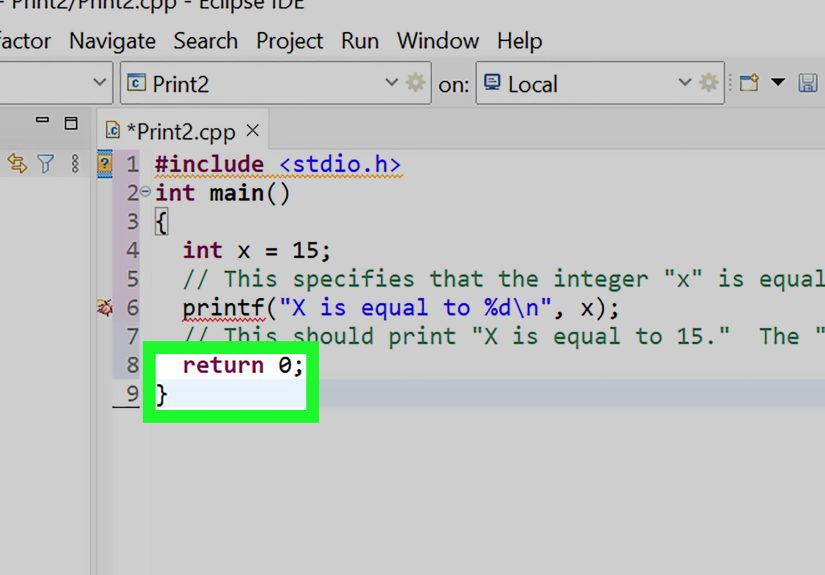
In C, the traditional way to print output is with printf, which lives in the standard I/O library. You include the proper header and pass a format string, plus any values you want printed.
The simplest C printing example
This prints a line of text followed by a newline character. That n matters more than people realize. Without it, your output may still print, but depending on buffering and environment, it may not appear exactly when you expect.
Printing variables with format specifiers
The real power of printf comes from format specifiers. These placeholders tell C what kind of value to expect and how to display it.
Here are a few of the most common printf format specifiers:
%dfor integers%ffor floating-point numbers%cfor a single character%sfor a string%xfor hexadecimal output
You can also control width and precision. For example, %.2f prints a floating-point value with two digits after the decimal point. That is great for prices, averages, and looking like you planned ahead.
Why printf is powerful
printf is compact, familiar, and excellent for formatted output. It shines when you want tight control over layout, especially in C programs, low-level code, or output that must follow a precise pattern.
It can also be unforgiving. If you use the wrong format specifier for a value, the result can be incorrect, unstable, or undefined. C is many things, but “forgiving babysitter” is not one of them.
How to print in C++ with cout
In C++, the classic output tool is std::cout, found in the <iostream> header. Instead of format strings, C++ streams use the insertion operator << to send values into the output stream.
The simplest C++ cout example
This already feels different. You are not describing a template like in printf; you are streaming output from left to right. It reads naturally, which is one reason many beginners find it easier.
Printing variables with cout
Notice what is missing: no %d, no %f, no format string gymnastics. cout already knows how to print many built-in C++ types. That makes it feel cleaner and often safer for everyday use.
Formatting output with C++ manipulators
Where printf uses format specifiers, C++ uses manipulators and stream settings. If you want more polished numeric output, add <iomanip>.
This lets you control precision, width, base, alignment, and more. It is a different mental model from printf, but once you get used to it, it is extremely readable.
cout vs printf: what is the real difference?
If you compare cout vs printf, the first big difference is style. printf uses one formatted string with placeholders. cout builds output with stream insertion. Neither is universally better. Each has a personality.
| Feature | printf | std::cout |
|---|---|---|
| Language origin | C | C++ |
| Main style | Format string | Stream insertion |
| Formatting | Uses specifiers like %d and %.2f | Uses manipulators like fixed and setprecision |
| Readability | Compact but easy to misuse | Verbose but often easier to follow |
| Type safety | More error-prone with wrong specifiers | Generally safer with built-in streaming rules |
Another difference is how they behave in mixed codebases. C projects naturally lean toward printf. Modern C++ code often favors cout. But plenty of real-world C++ programs still use printf, especially when developers want familiar formatting or are working in performance-sensitive or legacy-heavy environments.
As for speed, do not fall for simplistic claims like “printf is always faster” or “cout is always slower.” Performance depends on stream synchronization, buffering, flushing behavior, compiler settings, formatting needs, and how the program is written. A careless std::endl in a hot loop can be slower than necessary. A badly used printf can also be a mess. Benchmarks love context, and context loves being ignored on the internet.
Common printing mistakes in C and C++
1. Using the wrong printf specifier
This is the classic trap. If the placeholder does not match the data type, your output may be wrong or worse. For example, printing a floating-point number with %d is not a creative shortcut. It is a bug wearing sunglasses.
2. Forgetting the header
C needs <stdio.h> for printf. C++ needs <iostream> for std::cout. Missing headers can lead to compiler errors, warnings, or confusing behavior. The compiler is not being dramatic. It is just asking for the tools you forgot to bring.
3. Overusing std::endl
Many beginners use std::endl everywhere because it looks official. It does print a newline, but it also flushes the stream. That flushing can be useful when you need output immediately, but unnecessary flushing can slow things down. In many cases, 'n' is the simpler and better choice.
4. Mixing printf and cout carelessly
You can use both in a C++ program, but be careful. C and C++ standard streams are synchronized by default, and some developers disable synchronization for speed. Once you start tweaking that behavior, mixed output can appear in unexpected order if you are not careful.
This may look harmless, and often it is. But once synchronization settings change, assuming perfect ordering becomes risky. The safest beginner strategy is simple: pick one output style per small program unless you have a clear reason to mix them.
Practical examples beginners actually need
Printing math results in C
Printing math results in C++
Printing a nicely formatted price
Both are valid. Both are useful. The best choice depends on your language, project style, and what feels easier to maintain.
Which one should you use?
If you are writing pure C, use printf. That is the standard, practical answer. If you are writing modern C++, start with std::cout because it integrates naturally with the language and is usually easier for beginners to read.
That said, do not treat this as a programming religion. Many strong developers know both and switch based on context. Sometimes you want stream-based readability. Sometimes you want compact formatting. Sometimes you inherit code written by twelve previous developers and one very ambitious intern. Life happens.
The smartest move is to learn the strengths and weaknesses of both tools. Once you understand how they work, you stop memorizing random syntax and start choosing output methods on purpose.
Experiences and lessons from real learning situations
One of the most common learning experiences with printing in C and C++ is realizing that output is not just decoration. It becomes your first debugging partner. New programmers usually begin with cheerful lines like “Hello, world!” and then move quickly into printing variable values inside loops, conditions, and functions. That is when output stops being cute and starts being useful.
A typical beginner in C often loves printf at first because it feels powerful. You can print text and numbers in one line, line things up, control decimal places, and make the terminal look surprisingly organized. Then the first mismatch between a format specifier and a variable type happens, and suddenly the results look like your program was possessed. That moment is frustrating, but it teaches an important lesson: in C, details matter. Tiny syntax choices can change everything.
In C++, many learners have the opposite experience. std::cout feels friendlier on day one. You can chain values together naturally and avoid memorizing a pile of percent-based specifiers right away. But then formatting enters the chat. The first time someone needs two decimal places, hexadecimal output, column widths, or aligned data, they discover manipulators and stream states. That is the moment when cout changes from “easy” to “powerful but slightly opinionated.”
Another common experience is discovering the difference between 'n' and std::endl. Beginners often assume they are twins. They are not. One gives you a newline, and the other gives you a newline plus a flush. That difference seems tiny until someone prints thousands of lines in a loop and wonders why the program feels slower than expected. This is one of those lessons that sticks because it comes with just enough pain to become memorable.
Mixing printf and cout in one C++ file is another classic adventure. It often begins innocently: one line with printf, one line with cout, no problem. Then someone tweaks synchronization for speed or copies code from two different tutorials, and the output order becomes strange. That is usually when learners stop thinking of printing as a trivial feature and start seeing it as part of the language runtime model.
Perhaps the biggest long-term lesson is that printing teaches style. Some developers prefer the precise, compact structure of printf. Others prefer the readable flow of cout. Over time, most programmers develop a sense for when each tool feels natural. That is a good milestone. It means they are no longer just asking, “How do I make text appear?” They are asking, “What is the clearest and safest way to express output in this program?” That is the kind of question experienced programmers ask, and it usually starts with a simple print statement.
Final thoughts
If you want to master how to print in C and C++, start small and practice often. Write a few printf statements. Write a few cout chains. Print integers, strings, floating-point values, and formatted output. Then intentionally make a few mistakes and see what happens. That is not bad learning. That is real learning.
In C, printf gives you classic formatted power. In C++, std::cout gives you stream-based readability and flexible formatting tools. Learn both, respect both, and use the one that fits your program best. Your future self, staring down a confusing bug at 1:14 a.m., will appreciate it.
Note: This article is written for web publication and intentionally avoids source links in the visible copy, while remaining grounded in standard documentation and real compiler behavior.