Table of Contents >> Show >> Hide
- Introduction: When a 286 Meets the Modern Web
- What Is the Hackaday Retro Edition?
- Why a 286 Online Is Such a Big Deal
- The Hardware: A 286 With Just Enough Muscle
- The Software Stack: DOS, mTCP, Arachne, and Drivers
- Why Modern Websites Crush Vintage Computers
- Packet Drivers: The Unsung Heroes
- The 286 as a Web Performance Reality Check
- Specific Example: Loading a Lightweight Tech Page
- What a 286 Online Can Still Do
- Security and Practical Limits
- Why Retro Computing Communities Love Projects Like This
- Lessons for Modern Web Creators
- Extended Experience: What It Feels Like to Bring a 286 Online
- Conclusion: The 286 Still Has Something to Say
Note: This article is based on real retro-computing history, DOS networking documentation, mTCP references, packet-driver information, IBM PC/AT background, and the original Hackaday Retro Edition story.
Introduction: When a 286 Meets the Modern Web
Putting a 286 computer on the internet sounds like asking a rotary phone to join a video conference: technically possible in spirit, deeply unreasonable in practice, and absolutely irresistible to the kind of person who owns more ISA cards than socks. Yet that is exactly why the story behind Hackaday Retro Edition: A 286 On The Internet still has charm. It is not merely about old hardware loading a web page. It is about patience, clever software, low-level networking, and the delightful stubbornness of people who refuse to let perfectly good beige boxes fade into landfill history.
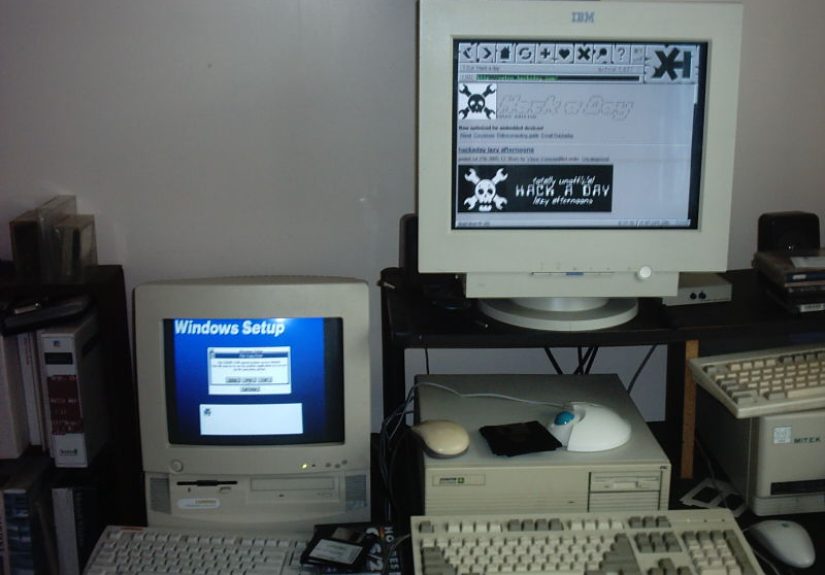
The original Hackaday story centered on a Zenith Data Systems 286 machine brought back into useful digital life. With MS-DOS, mTCP, Arachne, and the right network interface drivers, the system managed to browse Hackaday’s lightweight Retro Edition. In today’s web world, where a single homepage can arrive carrying enough JavaScript to make a 1990s hard drive file for retirement, that achievement feels almost heroic. No autoplay videos. No pop-ups demanding cookie consent in 47 languages. Just HTML, networking, and a little old-school magic.
This topic matters because retro computing is more than nostalgia. A 286 on the internet teaches us how the web works when the layers are stripped down. It shows the difference between “connected” and “bloated.” It reminds us that computing once rewarded direct understanding: IRQs, packet drivers, memory limits, config files, and all the tiny details modern systems hide behind shiny progress bars.
What Is the Hackaday Retro Edition?
The Hackaday Retro Edition is a lightweight version of Hackaday designed with old computers in mind. Instead of leaning on heavy scripts, complex layouts, rich media, and modern browser assumptions, it keeps things simple enough for vintage machines to handle. That simplicity is not a step backward; it is the entire point. A retro-friendly site becomes a practical testing ground for whether a classic computer can truly reach the web.
For many vintage computing fans, loading a retro page is the equivalent of planting a flag. The machine is not just powered on. It is not merely booting from a floppy or displaying a BIOS screen. It is communicating with the outside world using TCP/IP, resolving addresses, sending packets, and receiving real data. In other words, the old box has joined the conversation.
Why a 286 Online Is Such a Big Deal
The Intel 80286, commonly called the 286, was introduced in the early 1980s and became famous through machines such as the IBM PC/AT and countless compatible clones. It was a 16-bit processor with protected-mode capabilities and support for more memory than earlier PC designs. At the time, that was serious business-computing muscle. By modern standards, of course, it is the digital equivalent of a bicycle with a fax machine strapped to it.
That comparison is unfair, but only slightly. The 286 was not designed for today’s web. It was born in an era of DOS applications, spreadsheets, text interfaces, local storage, serial ports, and networks that required hands-on configuration. It had no native understanding of Wi-Fi, HTTPS, modern CSS, JavaScript frameworks, streaming media, or the cheerful chaos of contemporary websites. Asking it to browse the internet means assembling a tiny software ecosystem by hand.
The Core Challenge
A typical DOS-based 286 does not include a built-in TCP/IP stack the way modern operating systems do. DOS is wonderfully direct, but it does not wake up and say, “Good morning, shall I negotiate DHCP and check the weather?” To get online, the user needs several pieces working together: a network card, a DOS-compatible packet driver, a TCP/IP suite such as mTCP, and a browser or web-fetching tool light enough to run on the machine.
If any piece fails, the whole project becomes a scavenger hunt through error messages, old documentation, and forum posts written by people who casually say things like “just check the interrupt vector” before lunch.
The Hardware: A 286 With Just Enough Muscle
The Hackaday example involved a Zenith Data Systems 286 machine. The system originally had 4 MB of RAM, which was generous for its period. The old hard drive was not cooperating, so it was replaced with another IDE drive after some BIOS tinkering. Later, the RAM was upgraded to 8 MB, giving the machine a little more breathing room for DOS networking and graphical browsing.
That upgrade matters. Although DOS itself can run in very limited memory, internet software adds overhead. A browser like Arachne needs memory for the program, network buffers, page content, graphics, and temporary files. The more memory available, the less the machine feels like it is trying to browse the web through a drinking straw.
Network Interface Cards and the Joy of Old Connectors
The network card in the Hackaday story included both RJ45 and BNC connectors. That detail alone is enough to make retro-computing fans lean forward. RJ45 Ethernet still looks familiar today, while BNC reminds us of coaxial networking days when one loose terminator could make an entire network behave like a haunted toaster.
For a 286, the network card must have DOS driver support. This is where packet drivers enter the story. A packet driver is a small program, often loaded as a TSR, that provides a standard interface between DOS networking software and the physical network card. Instead of every TCP/IP application needing custom code for every Ethernet adapter, the application talks to the packet driver, and the packet driver handles the hardware.
The Software Stack: DOS, mTCP, Arachne, and Drivers
The magic formula in the Hackaday example was straightforward but not exactly “click Next to continue.” The system ran MS-DOS 5a, mTCP, Arachne, and the relevant NIC drivers. Each component had a job, and none of them could be replaced with wishful thinking.
MS-DOS: The Foundation
MS-DOS provided the operating environment. It handled files, memory loading, command execution, and startup configuration. On a 286, DOS is fast, small, and predictable. It does not secretly update itself, reorganize your settings, or ask you to sign into a cloud account before you can open a text file. That is refreshing, although it also means you must configure nearly everything yourself.
mTCP: The Networking Brain
mTCP, written by Michael B. Brutman, is one of the most important tools in modern DOS networking. It provides TCP/IP applications for DOS machines, including utilities such as DHCP, FTP, Telnet, Ping, Netcat, and lightweight web-related tools. Its design is especially valuable because it targets old PCs and compatibles, not just late-era Pentium systems with comfortable amounts of memory.
In practical terms, mTCP gives a DOS machine the ability to speak the language of the internet. It can obtain an IP address, resolve names, transfer files, ping hosts, and interact with network services. That may sound basic, but on a machine that predates the mainstream web, it is a superpower.
Arachne: The Browser That Could
Arachne is a graphical DOS web browser and internet suite that became popular among users who wanted web access without Windows. It supported HTML browsing, graphics, email functions, and dial-up networking features in a package designed for modest hardware. For retro projects, Arachne is appealing because it can run where mainstream browsers would immediately collapse into a pile of expired DLLs.
However, Arachne is not a time machine that makes the modern web simple. Many contemporary sites expect HTTPS, advanced CSS, JavaScript, large images, responsive frameworks, and browser APIs that did not exist when DOS browsing was relevant. This is why a lightweight destination such as Hackaday Retro Edition is perfect. It gives the browser something realistic to handle.
Why Modern Websites Crush Vintage Computers
The modern web is powerful, flexible, and often absurdly heavy. Many websites load scripts for analytics, advertising, personalization, consent management, embedded media, live chat widgets, tracking pixels, styling frameworks, fonts, and interactive components. A modern laptop shrugs. A 286 quietly wonders whether it has been drafted into a space program.
A 286-era machine struggles with several issues at once. Its processor is slow by modern standards. Its memory is tiny. Its storage is limited. Its browser lacks support for modern standards. It may not handle TLS encryption required by HTTPS. It cannot run contemporary JavaScript engines. Even if a page technically loads, rendering it may be slow, incomplete, or impossible.
Plain HTML Still Wins
The lesson is simple: plain HTML is incredibly durable. A clean page with basic markup, small images, and minimal styling can travel across decades of hardware. It can be read by a modern phone, a text browser, a screen reader, or a 286 running DOS software. That is not just retro charm; it is good web design.
Accessibility, performance, and longevity often point in the same direction. When a site works well without unnecessary complexity, more people and more devices can use it. The 286 becomes an extreme test case. If a page can survive there, it is probably lean enough for slow connections, low-power devices, and readers who simply want the content without a parade of digital confetti.
Packet Drivers: The Unsung Heroes
Packet drivers deserve more applause than they usually get. In the DOS networking world, they form the bridge between application software and network hardware. They standardized how software could send and receive network packets through many different cards.
This mattered because the PC hardware market was full of variety. Ethernet adapters came from many vendors, used different chipsets, and required different low-level handling. Without a common interface, every network application would need to understand every card. Packet drivers prevented that mess from becoming even messier, which is impressive because DOS networking already had enough alphabet soup to qualify as a pantry item: TCP/IP, ODI, NDIS, IRQ, DMA, TSR, and so on.
Why This Still Matters Today
Packet drivers show the value of abstraction. Good abstraction does not hide reality completely; it creates a clean boundary where software can cooperate. Modern computing still depends on the same idea. Drivers, APIs, libraries, and protocols work because they allow one layer to do its job without forcing every other layer to become an expert in its internal details.
The 286 as a Web Performance Reality Check
Using a 286 online is funny, but it is also revealing. It makes visible what modern computing often conceals. On a new computer, waste is easy to ignore. A bloated page may load in two seconds instead of half a second. On a 286, waste becomes drama. Every extra image, script, redirect, or layout trick feels like someone added bricks to a backpack.
This makes retro browsing a useful thought experiment for web developers. What is the minimum needed to deliver value? Does the page still communicate without scripts? Are images optimized? Is the HTML meaningful? Can the content be read in a simple browser? These questions are not just for vintage hobbyists. They are central to building faster, more inclusive websites.
Specific Example: Loading a Lightweight Tech Page
Imagine the 286 requesting a retro-friendly Hackaday page. First, the packet driver allows the NIC to communicate with the network. mTCP handles TCP/IP operations. DNS may resolve the hostname. The browser sends an HTTP request. The server responds with a lean page. Arachne interprets the HTML and displays it in a graphical DOS environment. The page appears, and somewhere a retrocomputing enthusiast smiles like they have just convinced a toaster to read Shakespeare.
That process sounds ordinary today because modern systems automate almost all of it. On DOS, each step is visible and fragile. That fragility is part of the appeal. Success feels earned.
What a 286 Online Can Still Do
A 286 is not going to replace your daily computer unless your daily routine involves editing CONFIG.SYS and feeling superior to smart refrigerators. But it can still perform meaningful network tasks under the right conditions.
Possible Uses
- Browsing lightweight HTTP pages
- Using FTP for file transfers
- Pinging hosts for basic network testing
- Connecting through Telnet to compatible systems
- Serving simple static content with lightweight DOS web-server software
- Demonstrating how TCP/IP works at a practical level
These tasks may seem small, but they are educational. They show the internet as a set of protocols rather than a glossy app icon. That understanding is valuable, especially in a world where many users never see what happens beneath the browser tab.
Security and Practical Limits
Connecting vintage systems to modern networks requires caution. Old DOS machines were not designed for the threat landscape of today. They lack modern security updates, memory protections, encrypted-by-default communications, and hardened networking stacks. Many tools operate best on plain HTTP or older protocols, which should be kept away from sensitive accounts, private credentials, or personal data.
The safest approach is to treat a vintage internet setup as a lab project. Use a separate network segment when possible. Avoid logging into important services. Do not expose unnecessary ports directly to the public internet. Keep expectations modest. The goal is exploration, not turning a 286 into a banking workstation. That would be less “retro cool” and more “please call an adult network administrator.”
Why Retro Computing Communities Love Projects Like This
Projects like A 286 On The Internet thrive because they combine hardware repair, software archaeology, networking, and storytelling. A vintage computer is not just a machine. It is a physical record of design decisions, industry transitions, and user expectations from another era.
When someone restores a 286, replaces a dead hard drive, configures a NIC, loads DOS, finds the right drivers, and reaches a live website, they are preserving computing knowledge through action. Museums preserve artifacts behind glass. Hobbyists preserve behavior. They make the machine do what it once didor, even better, what it was never expected to do.
Lessons for Modern Web Creators
The Hackaday Retro Edition experiment offers several lessons for anyone building websites today. First, performance matters. Second, basic HTML remains powerful. Third, compatibility is not an antique concern. Fourth, content should not depend entirely on fragile layers of scripting. Fifth, the fastest page is often the one that does not try to impress you before it informs you.
Modern sites do not need to look like they were delivered on a floppy disk. But they can learn from retro-friendly design. A good website should load quickly, communicate clearly, and degrade gracefully. It should not require a brand-new device just to read a paragraph about soldering, software, or sandwich recipes. The 286 may be old, but as a critic of web bloat, it remains brutally honest.
Extended Experience: What It Feels Like to Bring a 286 Online
Working with a 286 internet project is less like setting up a computer and more like restoring an old radio that occasionally argues in hexadecimal. The first experience is usually physical. You hear the power supply fan, feel the heavy case, check the keyboard connector, inspect the motherboard, and look suspiciously at any battery that might have leaked its tiny chemical revenge across the board. Retro computing begins with optimism and a screwdriver.
Then comes storage. Old hard drives may spin up with the confidence of a lawn mower full of gravel, or they may not spin at all. Replacing them with a compatible IDE drive, compact flash adapter, or other period-friendly solution can feel like a major victory. Suddenly the machine boots, and the familiar DOS prompt appears. That blinking cursor has more personality than some modern login screens.
Networking is where the adventure becomes truly educational. You install the network card, identify the correct packet driver, choose an interrupt, test the configuration, and hope nothing conflicts with sound cards, serial ports, or mysterious settings selected by jumpers that look like they were designed by a tiny committee of electricians with trust issues. When the packet driver loads correctly, it feels like the machine has cleared its throat and announced, “Fine, I will speak Ethernet.”
Configuring mTCP is surprisingly satisfying. A small text configuration file can define the packet interrupt, IP address, gateway, netmask, and DNS server. Compared with modern network settings buried under layers of menus, this feels refreshingly honest. You know exactly what you told the machine to do. If it fails, it is probably your fault, the driver’s fault, the card’s fault, the router’s fault, or the universe’s fault. Retro troubleshooting is generous with suspects.
The first successful ping is unforgettable. It is such a tiny thing: a few packets leave the computer, a few packets return, and the screen reports success. But on a 286, it feels like hearing a message from another planet. The machine is alive in a new way. It is no longer an isolated artifact. It is participating in a network built long after its original designers imagined its normal working life.
Launching Arachne adds another layer of wonder. The graphics may be simple, the rendering imperfect, and the waiting time noticeable, but watching a DOS browser draw a web page on vintage hardware is deeply satisfying. When Hackaday Retro Edition appears, the moment lands with a quiet punch. The content is there. The links work. The old computer has reached the modern internet, not by pretending to be new, but by using lightweight standards that still remember how to include older machines.
That experience changes how you see both old and new technology. Modern computers are astonishingly powerful, but they often hide too much. A 286 reveals the machinery. It makes networking tangible. It makes memory feel finite. It makes efficient design feel noble. Most of all, it reminds you that “obsolete” is not the same as “useless.” Sometimes obsolete just means the machine is waiting for someone patient enough to listen.
Conclusion: The 286 Still Has Something to Say
Hackaday Retro Edition: A 286 On The Internet is more than a quirky retro stunt. It is a celebration of durable standards, careful engineering, and the joy of making old hardware do surprising things. A 286 will never browse the modern web comfortably, and that is perfectly fine. Its value is not in competing with current machines. Its value is in teaching us what computers are doing underneath the polish.
When a 286 loads a lightweight web page through DOS, packet drivers, mTCP, and Arachne, it tells a story about compatibility, restraint, and creativity. It also gently roasts the modern web for needing a small mountain of resources to show three paragraphs and a logo. The old machine may be slow, but it is honest. And sometimes, honest is exactly what technology needs.